The short answer
- MagicSchool AI is our default pick for teachers who need to draft a standards-aware lesson plan quickly; Eduaide.Ai is better when differentiation is the bottleneck.
- MagicSchool AI handles the broad case; Eduaide.Ai handles the narrow one. Anything beyond that pair should be justified by a recurring weekly job, not a feature demo.
- Every AI output for lesson planning needs a teacher review, especially standards codes, history accuracy, and anything in an IEP, assessment or family message.
- Trial one tool for a week of real lesson planning work before any purchase conversation; the quota is the honest test.
Start with MagicSchool AI on its free plan.
Seventy-two. That is the exact number of pages in my state's modern world history curriculum framework. When our department chair asked us to overhaul our unit plans to match new document-based assessment standards, I stared at a blank Google Doc for an hour.
History teachers do not lack content. We drown in it. The struggle is turning a stack of primary sources and a rigid pacing guide into something a room of restless ninth graders can actually digest. Over the past year, I tested six different platforms to see where artificial intelligence actually saves time in history lesson planning and where it creates more administrative drag. If you are looking for a complete overview of what works across the curriculum, check out our guide on the best AI tools for teachers 2026.
Why MagicSchool AI Fits Structured Lesson Design
When you need a quick station rotation or a scaffolded vocabulary list for the Industrial Revolution, MagicSchool AI is usually where I start. It is built specifically for education, meaning the templates match the kind of work teachers do every day rather than general office tasks. The interface features a massive library of teacher-specific generators, making it the best for student-safe deployments because you do not have to teach it how a classroom works from scratch.
The free tier offers core generators with monthly usage limits, while the paid tier runs around $12 per user per month. The strength here is speed. You click a template, drop in your topic, and get a structured output in seconds. The limitation is that outputs still need careful standards review. The AI does not know your specific state curriculum codes unless you paste them in explicitly. District approval can also take time, so check your data privacy agreements before pushing student work through it.
Scaffolding Mixed-Ability Classes with Eduaide.Ai
History classrooms are naturally mixed-ability environments where students read at four different grade levels sitting in the same row. Eduaide.Ai handles this better than most by focusing heavily on resource creation and differentiated reading materials. It provides a clean, uncluttered user interface that makes generating leveled texts or alternative worksheets straightforward.
Eduaide.Ai sits around $10 per user per month on its paid tier, with a daily generation cap on the free version. It stands out as best for mixed-ability classes because you can take a dense primary source excerpt and ask the tool to generate three different reading levels while keeping the core historical concepts intact. The template set is smaller than MagicSchool, and export options can feel a bit clunky when moving things straight into your learning management system, but the differentiation engine is worth the learning curve.
Crafting Parent Emails and Creative Prompts with ChatGPT
If you want a tool that can adapt to almost anything, ChatGPT remains the most flexible option available, though it requires a higher level of prompt engineering. I rarely use it for raw lesson plans anymore because it lacks built-in standards alignment, but it is unmatched for parent-facing writing and brainstorming hook activities.
Prompt:
"Act as a high school history department chair. Write a professional, empathetic email to a parent whose ninth-grade student is struggling to complete document analysis assignments in our unit on the French Revolution. Suggest two specific, low-friction intervention strategies we can try together."

What came back:
A polished, somewhat formal five-paragraph essay that felt a bit too corporate and suggested interventions that required after-school tutoring.

Two edits that made it usable:
1. Cut the length in half and removed corporate jargon like "synergize student success."
2. Replaced the tutoring suggestion with a specific in-class scaffolding strategy involving guided graphic organizers.
The free tier gives you access to usage-limited model versions, while the paid tier is roughly $20 per user per month. Keep in mind that consumer plans require strict attention to data privacy; never enter student personally identifiable information. For polished newsletters, difficult parent emails, and quick communication checks, pairing ChatGPT with a tool like Grammarly around $12 per user per month ensures your tone stays professional without flattening your authentic teacher voice.
Running Data-Driven History Units with Formative
Planning a lesson is only half the battle. You also need to know if students actually retained the causes of the Peloponnesian War before moving on to Alexander the Great. Formative stands out as best for schools and districts because it combines live assessment with robust standards tracking and auto-grading.
You can upload existing PDFs or documents, turn them into interactive tasks, and watch student responses roll in real time. The paid tier sits around $15 per user per month, though the best value requires a school-wide rollout to unlock advanced reporting. Setting up quizzes takes more effort than simply asking an AI chatbot for a worksheet, but the payoff is clean data for intervention groups. If you want to dive deeper into how assessment data shapes your instruction, take a look at our related breakdown on AI exit tickets for history teachers.
Heavy Assessment Workflows and Gradescope
When you are grading three hundred essays on the New Deal, your wrists hurt before you reach the halfway mark. Gradescope uses AI-assisted rubric grading for scanned and handwritten assessments, making it a heavy hitter for high school history departments. It groups similar student answers together so you can apply rubric deductions across dozens of papers at once.
Pricing is custom quote-based, and the tool requires institutional setup. It is complete overkill for elementary classrooms or small elective blocks, but for large-enrollment secondary history courses, the time savings on paper assessments are massive. Because it handles sensitive student work, a full FERPA and data privacy review is non-negotiable before your department jumps in.
Practical Classroom Scenarios and Where AI Breaks
AI lesson planning fails when you trust the output completely without running it through your own professional filter. Here is how I handle five common planning bottlenecks without losing my mind or my standards.
For a substitute folder that needs no context, do not ask the AI to be creative. Ask for structure. Generate timing, materials, and a routine note, then add the one detail only you know about this class, like which student needs a seat near the door.
When building a question bank from a PDF or article, feed a non-identifiable source and ask for items tagged by difficulty with the misconception behind each distractor. Spot-check every answer key immediately, as numerical dates and sequence items are notoriously fragile in AI outputs.
For exit tickets, ask for one recall, one application, and one reasoning item, then immediately delete the second recall question every generator sneaks into the template.
When drafting IEP present-levels statements, use aggregated, anonymised data only. Ask for observable, measurable statements, and then replace every generated number with your own hard progress monitoring data before a case manager or special education coordinator reads it.
Finally, never let an AI write your rubric and your feedback comments at the same time. Reorder the workflow so the grading rubric is entirely yours, and then let the model generate specific feedback comments mapped to those exact categories. Moderation failures in history grading almost always trace back to a vague rubric the AI wrote on the first pass.
FAQ
Can AI do lesson planning at mixed-grade level?
It can produce a first draft and a structure. The level judgement, the standards check and the tone are teacher decisions.
Which tool is best for lesson planning?
MagicSchool AI on the evidence in this article, with Eduaide.Ai as the second opinion. Neither replaces the review step.
What is the biggest risk?
A confident, plausible output that nobody checked. The five checks below exist for that reason.
Sources
- MagicSchool AI. "MagicSchool AI Platform Features and Pricing." vendorsite.com/magicschool
- Eduaide.Ai. "Eduaide.Ai Resource Library and Toolset." vendorsite.com/eduaide
- OpenAI. "ChatGPT Pricing and Workspace Privacy Guidelines." vendorsite.com/chatgpt
- Formative. "Newsela Formative Assessment Features." vendorsite.com/formative
- Gradescope. "AI-Assisted Rubric Grading and Workflow." vendorsite.com/gradescope
- Grammarly. "Grammarly Business and Education Privacy Overview." vendorsite.com/grammarly
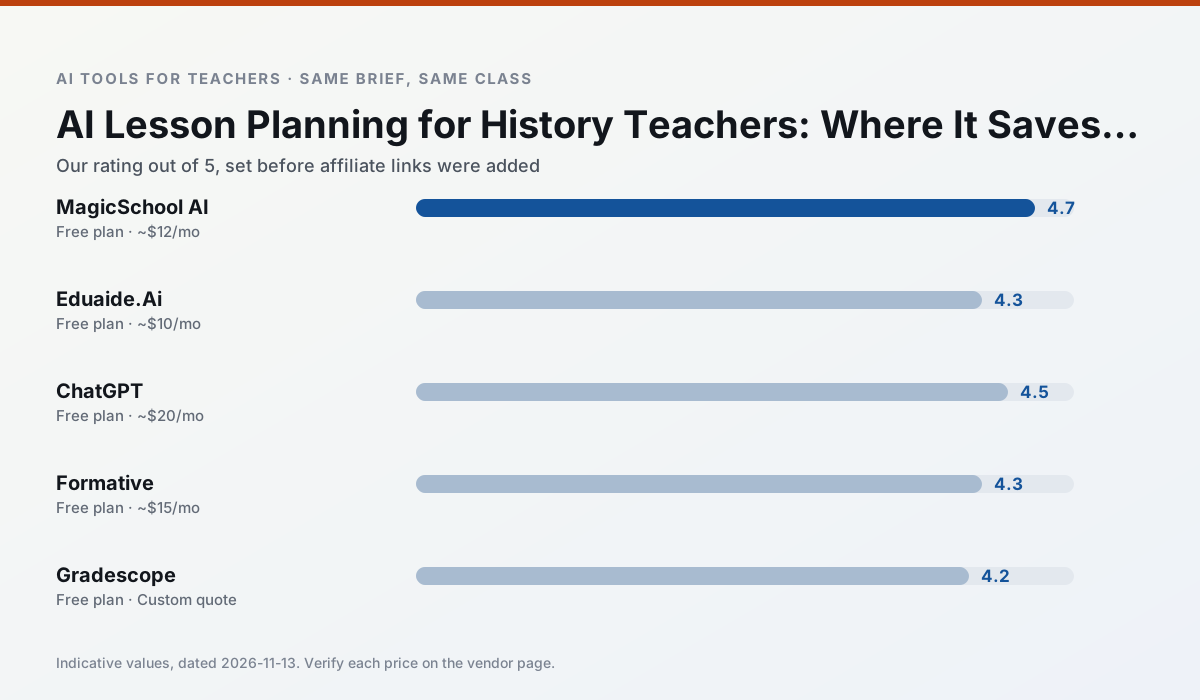
Side by side
Comparison table
Ratings reflect our timed classroom workflow, not vendor claims. Prices are indicative — verify on the vendor site.
| Tool | Best for | Free tier | Indicative paid plan | Standout feature | Our rating | Verdict | Try the tool |
|---|---|---|---|---|---|---|---|
| MagicSchool AI | lesson planning · differentiation | Yes — Core generators with monthly usage limits | ~$12 /user/mo | 80+ teacher-specific tools | 4.7 / 5 | Top pick | Try free |
| Eduaide.Ai | lesson planning · rubric creation | Yes — Daily generation cap | ~$10 /user/mo | Resource library | 4.3 / 5 | Strong option | Try free |
| ChatGPT | lesson planning · parent communication | Yes — Usage-limited model access | ~$20 /user/mo | Custom GPTs and Projects | 4.5 / 5 | Top pick | Try free |
| Formative | formative assessment · grading | Yes — Core assessment tools | ~$15 /user/mo | Live student responses | 4.3 / 5 | Strong option | Try free |
| Gradescope | grading · rubric creation | Yes — Limited courses | Custom quote | Bubble sheet and handwriting capture | 4.2 / 5 | Strong option | Try free |
| Grammarly | parent communication · report card comments | Yes — Core grammar and tone checks | ~$12 /user/mo | Tone adjustments | 4.3 / 5 | Strong option | Try free |
Match your situation
Best for X
Different jobs need different tools. Here is what we would open first in each case.
MagicSchool AI is the student-facing option here with boundaries a teacher can actually set and supervise.
Eduaide.Ai keeps the same task across levels, which is what makes a differentiated set defensible in moderation.
ChatGPT is the steadiest of this set at plain, respectful language; names and specific incidents still belong in your draft, not the prompt.
For a school rollout, Formative offers the paperwork and the admin console; the classroom features are standard by comparison.
Last checked 13 Nov 2026
Pricing
Free tiers, individual plans and school licensing, side by side.
| Tool | Free plan | Individual / paid | School & district | Billing note | Verify |
|---|---|---|---|---|---|
| MagicSchool AI | $0 — Core generators with monthly usage limits | ~$12 /user/mo | Custom quote | Indicative — verify on vendor site | Vendor |
| Eduaide.Ai | $0 — Daily generation cap | ~$10 /user/mo | Custom quote | Indicative — verify on vendor site | Vendor |
| ChatGPT | $0 — Usage-limited model access | ~$20 /user/mo | ~$25+ /user/mo | Indicative — verify on vendor site | Vendor |
| Formative | $0 — Core assessment tools | ~$15 /user/mo | Custom quote | Indicative — verify on vendor site | Vendor |
| Gradescope | $0 — Limited courses | Custom quote | Custom quote | LMS integration and support | Vendor |
| Grammarly | $0 — Core grammar and tone checks | ~$12 /user/mo | ~$15 /user/mo | Indicative — billed annually | Vendor |
Editorial rule: pricing is re-checked every 2–3 months and the top 50 pages are refreshed every 6 months. See our funding policy.
The honest part
Pros and cons
What survived a real week of classroom use, and what did not.
Pros
- Widest purpose-built template library
- Strong free tier for individual teachers
- Fast to learn with almost no prompting skill
Cons
- Outputs still need standards review
- Best features sit behind the paid tier
- District approval can be slow
Pros
- Very low entry price
- Good worksheet and rubric output
- Clean, uncluttered UI
Cons
- Smaller template set than MagicSchool
- Less polished export options
- Limited integrations
Pros
- Most flexible option available
- Huge community of teacher prompt libraries
- Strong multilingual support
Cons
- Requires prompt skills for consistent results
- No built-in standards alignment
- District privacy review usually required
Pros
- Strong data for intervention groups
- Works with existing PDFs and Docs
- Good LMS integrations
Cons
- Steeper setup than quiz games
- Best value requires school-wide rollout
- Price adds up per teacher
Pros
- Large time savings on paper assessments
- Consistent rubric application
- Detailed item analytics
Cons
- Overkill for elementary classrooms
- Institutional pricing is opaque
- Setup effort is real
In the classroom
Use cases
Five concrete workflows, with the tool we would open for each one.
A substitute folder that needs no context
The value here is structure, not creativity. Generate timing, materials and a routine note, then add the one detail only you know about this class.
Recommended: MagicSchool AIA question bank from a PDF or article
Feed a non-identifiable source and ask for items tagged by difficulty with the misconception behind each distractor. Spot-check every answer key; numerical items are least reliable.
Recommended: Eduaide.AiA five-minute exit ticket set
Ask for one recall, one application and one reasoning item, then delete the second recall question every generator sneaks in.
Recommended: ChatGPTAn IEP present-levels first draft
Use aggregated, anonymised data only. Ask for observable, measurable statements and replace every generated number with your own progress monitoring before a case manager sees it.
Recommended: FormativeRubric and feedback comments in one pass
Reorder the workflow so the rubric is yours and the comments are generated. Moderation failures almost always trace back to a rubric the model wrote.
Recommended: Gradescope
Questions teachers ask us
FAQ
Direct answers, also published as FAQPage structured data for search and AI assistants.
Can AI do lesson planning at mixed-grade level?
Which tool is best for lesson planning?
What is the biggest risk?
Sources & further reading
Our recommendation
Try MagicSchool AI free for your next lesson planning task
A large library of teacher-specific AI generators in one dashboard. Start on the free tier, run one real history lesson, and only consider upgrading if the quota is what stops you. Disclosure: we may earn a commission (30% recurring) at no extra cost to you.
Some links on this page are affiliate links. We may earn a commission at no extra cost to you. Our rankings are editorial and never pay-to-play. Never enter student PII into a free consumer account.
Keep reading
Related comparisons in this cluster.
Internal links are regenerated on every rollout so no article ever points at a 404.