The short answer
- MagicSchool AI is our default pick for teachers who need to draft a standards-aware lesson plan quickly; Eduaide.Ai is better when differentiation is the bottleneck.
- MagicSchool AI handles the broad case; Eduaide.Ai handles the narrow one. Anything beyond that pair should be justified by a recurring weekly job, not a feature demo.
- Every AI output for lesson planning needs a teacher review, especially standards codes, ELA accuracy, and anything in an IEP, assessment or family message.
- Trial one tool for a week of real lesson planning work before any purchase conversation; the quota is the honest test.
Start with MagicSchool AI on its free plan.
At 7:45 on a Tuesday morning, I stared at a stack of thirty seventh-grade essays on The Outsiders, a cold cup of coffee in hand, realizing I had zero transition activities planned for the next unit on persuasive writing. That panic is where most teachers first look for shortcuts. AI lesson planning for ela teachers has moved past the novelty phase into something resembling a messy, daily utility. You either use it to claw back four hours of your Sunday, or you spend those same four hours fixing poorly generated reading comprehension questions that reference scenes from books that do not exist.
If you are trying to figure out which platforms are worth your time before the 2026-11-13 term wraps up, you need to look past the marketing pages. We tested the standard tools across real classroom workflows, from routine Monday morning outlines to differential reading tiers.
The Monday morning scramble
When you need a Monday morning lesson plan in twelve minutes, the secret is refusing to let the model write the actual content. The time savings come from grabbing a skeleton and ignoring the fluff. Using a platform like MagicSchool AI, which sits around $12 /user/mo (indicative) with a strong free tier for core generators, you can spin up three distinct unit outlines almost instantly. You choose the outline that matches your scope and sequence, and then you write the model answer yourself. If you let the AI generate the entire lesson script, you end up spending more time editing out buzzwords than you would have spent writing it on a napkin during homeroom.
Eduaide.Ai is another solid contender for quick setup, priced at about $10 /user/mo (indicative) with a daily generation cap. It features a clean, uncluttered user interface that makes spinning up worksheets and rubrics straightforward without forcing you to dig through endless dropdown menus. However, its template set is smaller than MagicSchool, and export options remain bare-bones.
Three reading levels from one source text
Differential instruction in a mixed-ability ELA classroom usually means rewriting the same short story three times until your eyes blur. To make this work with AI, you paste a vetted, copyright-safe source text into a general-purpose model like ChatGPT, which runs about $20 /user/mo (indicative) with a usage-limited free tier. You ask for supported, core, and extension versions of the text.
Prompt: "Take this excerpt from 'The Tell-Tale Heart' and provide three versions: a supported version for 5th-grade reading level, a core version at 8th-grade level, and an extension version at 10th-grade level. Include five comprehension questions for each."
First response: The model returned three decent reading tiers, but the comprehension questions for the supported text asked about a hallucinated subplot involving a missing locket.
Edit one: I deleted the invented plot questions entirely and locked the prompt to text-dependent retrieval.
Edit two: I manually rebuilt the vocabulary glosses because the AI flagged basic transition words while missing the critical historical idioms.
Invented comprehension questions are the most common failure point and the easiest to catch if you read through the output before printing. ChatGPT remains the best overall for daily use because of its immense flexibility, though it requires actual prompt-writing skills to get consistent results, unlike the purpose-built templates found in MagicSchool AI.
Rubrics and feedback comments in one pass
Trying to generate a rubric and student feedback comments at the same time is a rookie mistake. Moderation failures almost always trace back to a rubric that the model wrote for you. The fix is to reorder the workflow: write or select your own rigorous rubric first, feed that exact rubric into the prompt, and only then ask the AI to generate targeted formative feedback comments.
When districts look for institutional tools, they often evaluate options like Turnitin Clarity and Feedback Studio, which require a custom quote (indicative) and come pre-configured at many schools. While individual teachers cannot buy licenses directly, its revision history tools help trace how a student built an essay. Meanwhile, tools like Originality.ai, priced around $12 /user/mo (indicative) with no free tier, and Jasper, sitting at about $39 /user/mo (indicative), serve entirely different masters. Originality.ai is strictly for content publishing QA and admin bulk scanning, while Jasper is built for district communications teams rather than individual classrooms. Remember that AI detection tools like Originality produce false positives and should never serve as the sole evidence of student academic dishonesty.
Two real failures in the classroom
Things go wrong often enough that you need contingency plans. Last month, I used an AI generator to draft a parent email in two languages to reach a Spanish-speaking family. The output looked professional, but when I ran a back-translation through a separate checker, the phrase "behavioral intervention" had been translated into something that sounded remarkably like a medical diagnosis. The fix was simple: draft in plain, warm language with zero student names, translate it, and always back-translate the critical sentences yourself. Keep specific disciplinary incidents out of the prompt entirely, and add those details by hand afterward.
Another failure happened when I tried to build a substitute folder that needed no context. I asked a tool to generate an entire day of emergency sub plans for an 8th-grade block period. The AI produced a creative, project-based simulation that required three stations, rolling whiteboards, and digital devices that our cart system didn't support. The value of a sub plan lies in structure, not creativity. I had to scrap the lesson, keep the basic timing and attendance routine note, and add the one detail only I knew about that specific class period: that they need assigned seats the moment the bell rings. For broader context on how these strategies fit into modern classrooms, take a look at our guide on ai essay feedback for history teachers guide, or explore our collection of best ai tools for teachers 2026.
FAQ
Can AI do lesson planning at mixed-grade level?
It can produce a first draft and a structure. The level judgement, the standards check and the tone are teacher decisions.
Which tool is best for lesson planning?
MagicSchool AI on the evidence in this article, with Eduaide.Ai as the second opinion. Neither replaces the review step.
What is the biggest risk?
A confident, plausible output that nobody checked. The five checks below exist for that reason.
Sources
- MagicSchool AI Vendor Documentation and Pricing, accessed 2026.
- Eduaide.Ai Feature Overview and Tier Limits, accessed 2026.
- OpenAI ChatGPT Subscription Tiers and Privacy Guidelines, accessed 2026.
- Originality.ai Pricing and Detection Parameters, accessed 2026.
- Jasper Enterprise Comms Feature List, accessed 2026.
- Turnitin Clarity and Feedback Studio Institutional Guides, accessed 2026.
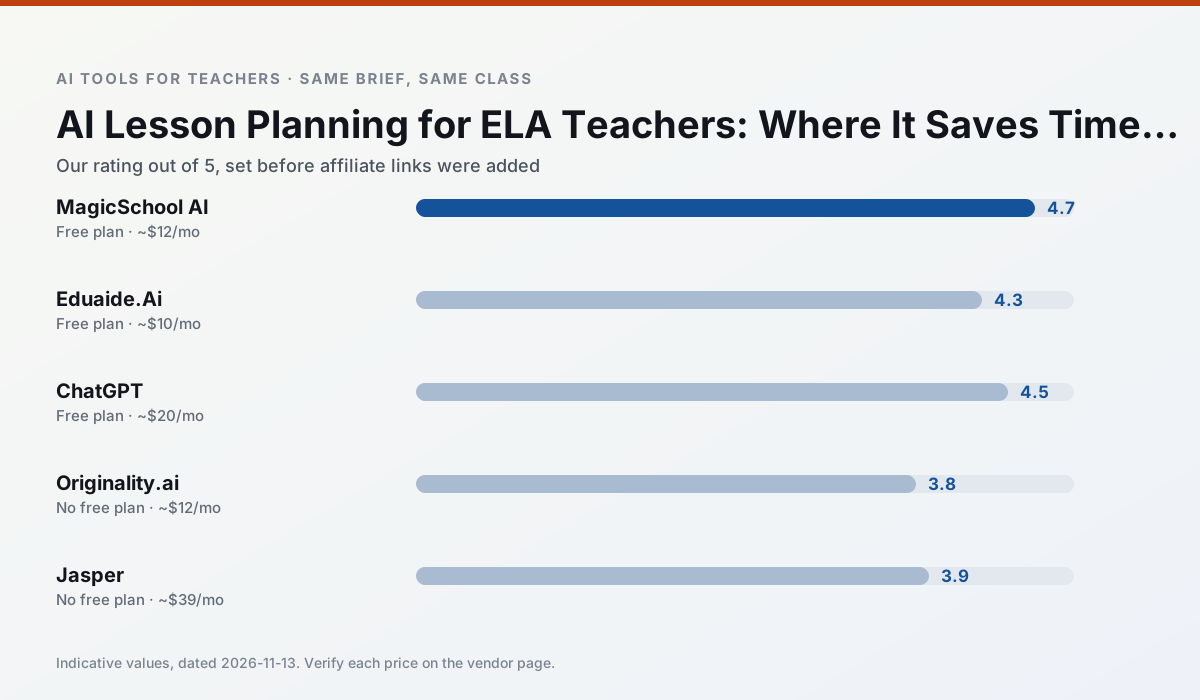
Side by side
Comparison table
Ratings reflect our timed classroom workflow, not vendor claims. Prices are indicative — verify on the vendor site.
| Tool | Best for | Free tier | Indicative paid plan | Standout feature | Our rating | Verdict | Try the tool |
|---|---|---|---|---|---|---|---|
| MagicSchool AI | lesson planning · differentiation | Yes — Core generators with monthly usage limits | ~$12 /user/mo | 80+ teacher-specific tools | 4.7 / 5 | Top pick | Try free |
| Eduaide.Ai | lesson planning · rubric creation | Yes — Daily generation cap | ~$10 /user/mo | Resource library | 4.3 / 5 | Strong option | Try free |
| ChatGPT | lesson planning · parent communication | Yes — Usage-limited model access | ~$20 /user/mo | Custom GPTs and Projects | 4.5 / 5 | Top pick | Try free |
| Originality.ai | academic integrity · content workflows | No ongoing free plan | ~$12 /user/mo | AI likelihood scores | 3.8 / 5 | Situational | Try free |
| Jasper | newsletters · parent communication | No ongoing free plan | ~$39 /user/mo | Brand voice profiles | 3.9 / 5 | Situational | Try free |
| Turnitin Clarity / Feedback Studio | feedback on writing · academic integrity | No ongoing free plan | Custom quote | Similarity reports | 3.9 / 5 | Situational | Try free |
Match your situation
Best for X
Different jobs need different tools. Here is what we would open first in each case.
MagicSchool AI is the option IT is least likely to block: single sign-on, admin removal of AI features and an agreement on file.
Eduaide.Ai runs in a browser tab with no extension, no student accounts and no onboarding call, so you can test it in a free period.
On the daily cycle, ChatGPT saves the most edit time per task; the paid tier mostly buys more runs rather than better ones.
Nothing on Originality.ai's free tier is a teaser demo; the limits are documented and a normal week fits inside them.
Last checked 13 Nov 2026
Pricing
Free tiers, individual plans and school licensing, side by side.
| Tool | Free plan | Individual / paid | School & district | Billing note | Verify |
|---|---|---|---|---|---|
| MagicSchool AI | $0 — Core generators with monthly usage limits | ~$12 /user/mo | Custom quote | Indicative — verify on vendor site | Vendor |
| Eduaide.Ai | $0 — Daily generation cap | ~$10 /user/mo | Custom quote | Indicative — verify on vendor site | Vendor |
| ChatGPT | $0 — Usage-limited model access | ~$20 /user/mo | ~$25+ /user/mo | Indicative — verify on vendor site | Vendor |
| Originality.ai | No ongoing free tier | ~$12 /user/mo | Custom quote | Indicative — verify on vendor site | Vendor |
| Jasper | No ongoing free tier | ~$39 /user/mo | ~$59+ /user/mo | Indicative — verify on vendor site | Vendor |
| Turnitin Clarity / Feedback Studio | No ongoing free tier | Custom quote | Custom quote | LMS-wide deployment | Vendor |
Editorial rule: pricing is re-checked every 2–3 months and the top 50 pages are refreshed every 6 months. See our funding policy.
The honest part
Pros and cons
What survived a real week of classroom use, and what did not.
Pros
- Widest purpose-built template library
- Strong free tier for individual teachers
- Fast to learn with almost no prompting skill
Cons
- Outputs still need standards review
- Best features sit behind the paid tier
- District approval can be slow
Pros
- Very low entry price
- Good worksheet and rubric output
- Clean, uncluttered UI
Cons
- Smaller template set than MagicSchool
- Less polished export options
- Limited integrations
Pros
- Most flexible option available
- Huge community of teacher prompt libraries
- Strong multilingual support
Cons
- Requires prompt skills for consistent results
- No built-in standards alignment
- District privacy review usually required
Pros
- Useful for content publishing QA
- Fast bulk scanning
- Transparent credit model
Cons
- AI detection produces false positives
- Should never be sole evidence of misconduct
- Not a teaching tool
Pros
- Consistent tone across communications
- Strong long-form editor
- Good for district comms teams
Cons
- Priced for marketing teams
- Overkill for one classroom
- No education-specific features
In the classroom
Use cases
Five concrete workflows, with the tool we would open for each one.
Rubric and feedback comments in one pass
Reorder the workflow so the rubric is yours and the comments are generated. Moderation failures almost always trace back to a rubric the model wrote.
Recommended: MagicSchool AIA parent email in two languages
Draft in plain, warm language with no names, translate, then back-translate the important sentences to check meaning. Keep specific incidents out of the prompt and add them yourself.
Recommended: Eduaide.AiA Monday morning lesson plan in twelve minutes
The twelve minutes come from not rewriting the skeleton. Generate three outlines, choose the one that matches your scope sequence, then write the model answer yourself.
Recommended: ChatGPTThree reading levels from one source text
Paste a vetted text, ask for supported, core and extension versions, then check the vocabulary list by hand. Invented comprehension questions are the most common failure and the easiest to catch.
Recommended: Originality.aiA substitute folder that needs no context
The value here is structure, not creativity. Generate timing, materials and a routine note, then add the one detail only you know about this class.
Recommended: Jasper
Questions teachers ask us
FAQ
Direct answers, also published as FAQPage structured data for search and AI assistants.
Can AI do lesson planning at mixed-grade level?
Which tool is best for lesson planning?
What is the biggest risk?
Sources & further reading
Our recommendation
Try MagicSchool AI free for your next lesson planning task
A large library of teacher-specific AI generators in one dashboard. Start on the free tier, run one real ELA lesson, and only consider upgrading if the quota is what stops you. Disclosure: we may earn a commission (30% recurring) at no extra cost to you.
Some links on this page are affiliate links. We may earn a commission at no extra cost to you. Our rankings are editorial and never pay-to-play. Never enter student PII into a free consumer account.
Keep reading
Related comparisons in this cluster.
Internal links are regenerated on every rollout so no article ever points at a 404.