The short answer
- Murf AI is our default pick for teachers who need to draft a standards-aware lesson plan quickly; Jasper is better when differentiation is the bottleneck.
- Start with Murf AI on its free plan, keep Jasper as the second opinion, and do not open a card until the quota, not the feature list, is what stops you.
- Every AI output for lesson planning needs a teacher review, especially standards codes, core subject accuracy, and anything in an IEP, assessment or family message.
- Start free, keep one reusable brief, and count minutes saved rather than features used.
Start with Murf AI on its free plan.
The headphones were missing their left foam pad again, and thirty seventh-graders were waiting for the listening station rotation to begin. I had spent my Sunday evening reading three different source articles about Mayan agriculture down to a sixth-grade Lexile level, then recording myself reading them into my phone while my dog barked in the background. The result sounded like a hostage tape recorded in a wind tunnel. When I played it back for the kids, they spent five minutes laughing at my pronunciation of maize before tuning out completely. That was the morning I gave up on DIY classroom audio and started testing Murf AI to build a proper listening center that kids could actually follow.
Why synthetic voiceover matters for inclusive listening centers
Most text-to-speech tools sound like a GPS system directing you into a lake. They flatten every syllable and ignore punctuation entirely. Murf AI is different because it uses studio-quality AI voiceover that actually breathes, pauses, and stresses the right words. For a reading intervention block or a station rotation, this changes everything. You can drop in a complex science article, pick a narrator who sounds like a calm human teacher, and generate clean audio files in minutes.
It is not just about sounding nice. For English language learners and students with processing differences, hearing text read aloud at a steady, natural pace bridges the gap between frustration and comprehension. When I first tested the platform, I wanted to see if it could handle historical fiction excerpts without turning dramatic dialogue into a punchline. It did. The pacing controls let me slow down the delivery for a paragraph about drought conditions while keeping the tone matter-of-fact.
The realities of licensing, pricing, and limits
We need to talk about the catch right away because education budgets do not tolerate surprises. The free tier of Murf AI is essentially a trial with very limited output. You can test voices and generate short snippets, but you cannot run a full classroom workflow without paying. The paid tier runs around $19 per user per month on an indicative basis, which means you have to decide if audio generation is worth more than a monthly subscription to a streaming service.
You also have to watch the commercial licensing rules very carefully if you plan to share your generated audio outside your closed classroom LMS. If you post a listening center file to a public YouTube channel or a teacher marketplace, the licensing terms change. Keep your audio locked inside Google Classroom or Canvas, and you stay out of trouble. Compared to other tools we evaluated in our broader look at the best ai tools for teachers 2026, Murf AI is a single-purpose utility. It does not write your lesson plans or grade your essays. It makes clean audio, and it does that one thing exceptionally well.
Prompt: "Read the following paragraph about Mayan trade routes in a neutral, calm, middle-school teacher voice, pausing slightly longer after semicolons: [Text inserted]"
First output: The generated voice sounded entirely too brisk, rushing right past the semicolon and mispronouncing the name of a limestone quarry.
Two edits made: I inserted manual pauses using the platform's timing controls and adjusted the phonetic spelling of the quarry name. The second render was clean enough to drop straight into a student Chromebook station.
Where Murf fits alongside other staffroom subscriptions
Your school might already be paying for other AI tools that serve entirely different masters, and it helps to know where the boundaries lie. Jasper, for instance, runs around $39 per user per month and is built entirely as a brand-voice writing assistant for school communications teams and district PR departments. It is completely overkill for a single classroom, and it has zero education-specific features. If you are trying to write an IEP present-levels first draft using aggregated data, Jasper will make it sound like a corporate press release rather than an observation of a child.
Originality.ai sits in a different corner entirely at about $12 per user per month. It is designed for publisher and admin workflows to scan for AI content and plagiarism. While some high school teachers use it for content publishing QA on school newspapers, it produces false positives and should never be used as the sole evidence of student misconduct. It is simply not a teaching tool, no matter how much administrators love the idea of a magic button to catch cheaters.
Meanwhile, Notion AI provides a massive workspace for roughly $10 per user per month. It is great for long-term curriculum records and team collaboration, but the setup time is significant, and the AI add-on pricing has shifted more than once. If you want a quick fix for a substitute folder that needs no context, Notion requires too much upfront database architecture. You are better off using simpler tools or writing the emergency sub plan by hand.
Keeping parent communication human with Grammarly and Kahoot
When you are done recording listening center tracks, you still have to face the inbox. Grammarly runs around $12 per user per month and acts as a writing assistant for polished parent emails, newsletters, and reports. It catches errors in high-stakes communications where a typo can derail a parent conference. The learning curve is practically flat because it works wherever you already type. The main risk is that it can flatten your natural teacher voice into something sterile if you accept every automated rewrite.
For instant student engagement without the heavy production value of audio files, Kahoot! remains a staple at about $10 per user per month. It handles quick review lessons and formative checks through gamified quizzes. You can generate a question bank from an article, but keep in mind that the time pressure of a live game suits quick recall much better than deep reasoning. For younger students, always use nicknames rather than real names to keep data privacy intact.
Setting up your classroom audio workflow without losing your weekend
Building a sustainable workflow with Murf AI takes about twenty minutes of practice. Do not try to convert your entire textbook into audio on a Tuesday night. Pick one weekly station rotation where students struggle with the independent reading level. Generate three short audio clips, attach them to your digital assignment, and hand out the wired headphones. When a student raises their hand because they can actually follow along without getting bogged down by decoding, you will know the subscription paid for itself. Check our guide on ai exit tickets for kindergarten teachers for more ways to scaffold early literacy stations without burning out.
FAQ
Is Murf AI worth paying for at mixed-grade level?
Only if lesson planning is a weekly job for you. At one use a month the free plan is enough; at weekly use the paid tier buys back more time than it costs, provided you keep the review step.
What does Murf AI get wrong most often?
Invented standards codes and assumed resources, in that order. Both survive a quick read, which is why the review checklist in this article starts with those two.
Can Murf AI replace a planning period?
It replaces the blank page, not the planning. Our edit time ranged from eleven minutes for an outline to most of an evening for a full differentiated set.
Is Murf AI safe to use with student data?
Not on a personal account. Use topic-level prompts, keep work samples out, and check what your district has approved before a student's work reaches any tool.
Sources
- Murf AI pricing and feature documentation (murf.ai)
- Jasper workspace specifications (jasper.ai)
- Originality.ai detection and scanning parameters (originality.ai)
- Notion AI workspace and pricing history (notion.so)
- Grammarly writing assistant data privacy terms (grammarly.com)
- Kahoot! education tier features (kahoot.com)
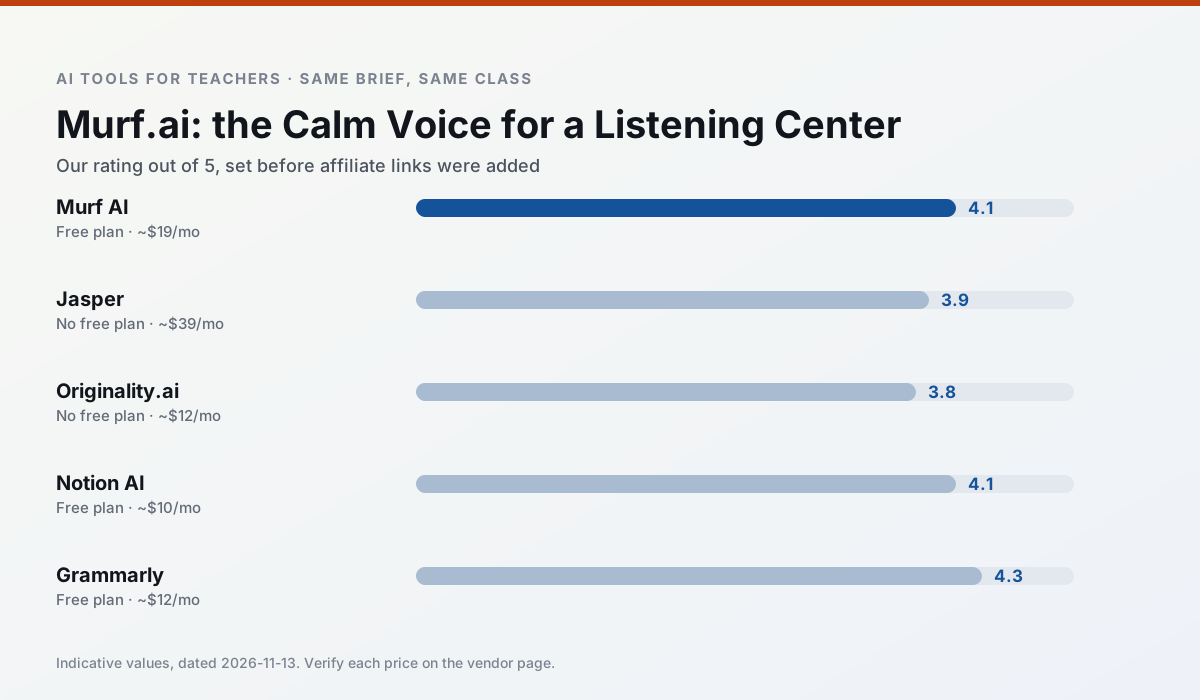
Side by side
Comparison table
Ratings reflect our timed classroom workflow, not vendor claims. Prices are indicative — verify on the vendor site.
| Tool | Best for | Free tier | Indicative paid plan | Standout feature | Our rating | Verdict | Try the tool |
|---|---|---|---|---|---|---|---|
| Murf AI | audio lessons · accessibility | Yes — Trial-only output | ~$19 /user/mo | Voice fine-tuning | 4.1 / 5 | Situational | Try free |
| Jasper | newsletters · parent communication | No ongoing free plan | ~$39 /user/mo | Brand voice profiles | 3.9 / 5 | Situational | Try free |
| Originality.ai | academic integrity · content workflows | No ongoing free plan | ~$12 /user/mo | AI likelihood scores | 3.8 / 5 | Situational | Try free |
| Notion AI | curriculum mapping · unit planning | Yes — Limited AI usage | ~$10 /user/mo | Linked databases | 4.1 / 5 | Situational | Try free |
| Grammarly | parent communication · report card comments | Yes — Core grammar and tone checks | ~$12 /user/mo | Tone adjustments | 4.3 / 5 | Strong option | Try free |
| Kahoot! | quiz generation · review lessons | Yes — Limited player count | ~$10 /user/mo | AI question builder | 4.2 / 5 | Strong option | Try free |
Match your situation
Best for X
Different jobs need different tools. Here is what we would open first in each case.
Murf AI is built around teacher-monitored student spaces and audit logs rather than a consumer chat account, which is a different approval conversation.
Jasper is the steadiest of this set at plain, respectful language; names and specific incidents still belong in your draft, not the prompt.
For three reading groups and one text, Originality.ai needs the least manual relabelling of vocabulary and questions.
Notion AI has the shortest path from opening a tab to a usable draft, which matters more than the feature count on a Monday.
Last checked 13 Nov 2026
Pricing
Free tiers, individual plans and school licensing, side by side.
| Tool | Free plan | Individual / paid | School & district | Billing note | Verify |
|---|---|---|---|---|---|
| Murf AI | $0 — Trial-only output | ~$19 /user/mo | ~$39 /user/mo | Indicative — verify on vendor site | Vendor |
| Jasper | No ongoing free tier | ~$39 /user/mo | ~$59+ /user/mo | Indicative — verify on vendor site | Vendor |
| Originality.ai | No ongoing free tier | ~$12 /user/mo | Custom quote | Indicative — verify on vendor site | Vendor |
| Notion AI | $0 — Limited AI usage | ~$10 /user/mo | ~$8 /user/mo | Indicative — verify on vendor site | Vendor |
| Grammarly | $0 — Core grammar and tone checks | ~$12 /user/mo | ~$15 /user/mo | Indicative — billed annually | Vendor |
| Kahoot! | $0 — Limited player count | ~$10 /user/mo | Custom quote | Indicative — verify on vendor site | Vendor |
Editorial rule: pricing is re-checked every 2–3 months and the top 50 pages are refreshed every 6 months. See our funding policy.
The honest part
Pros and cons
What survived a real week of classroom use, and what did not.
Pros
- Very clean audio
- Good pacing controls
- Easy slide integration
Cons
- Commercial licensing rules matter
- Free tier is not usable long-term
- Single-purpose
Pros
- Consistent tone across communications
- Strong long-form editor
- Good for district comms teams
Cons
- Priced for marketing teams
- Overkill for one classroom
- No education-specific features
Pros
- Useful for content publishing QA
- Fast bulk scanning
- Transparent credit model
Cons
- AI detection produces false positives
- Should never be sole evidence of misconduct
- Not a teaching tool
Pros
- Great for long-term curriculum records
- Strong team collaboration
- Flexible structure
Cons
- Setup time is significant
- AI add-on pricing changed more than once
- Not purpose-built for lesson generation
Pros
- Catches errors in high-stakes parent emails
- Works everywhere you already write
- Very low learning curve
Cons
- Not education-specific
- Can flatten teacher voice
- Premium needed for tone rewriting
In the classroom
Use cases
Five concrete workflows, with the tool we would open for each one.
Regrouping students after an assessment
Summarise anonymised results into skill groups, then generate one activity per group. Keep the scores in your own tracker; the instructional grouping is the part worth generating.
Recommended: Murf AIA weekly family newsletter from bullet notes
Newsletters fail on length, not tone. Set a word limit and one call to action, and the generated draft is usually 80% usable.
Recommended: JasperA question bank from a PDF or article
Feed a non-identifiable source and ask for items tagged by difficulty with the misconception behind each distractor. Spot-check every answer key; numerical items are least reliable.
Recommended: Originality.aiA substitute folder that needs no context
The value here is structure, not creativity. Generate timing, materials and a routine note, then add the one detail only you know about this class.
Recommended: Notion AIAn IEP present-levels first draft
Use aggregated, anonymised data only. Ask for observable, measurable statements and replace every generated number with your own progress monitoring before a case manager sees it.
Recommended: Grammarly
Questions teachers ask us
FAQ
Direct answers, also published as FAQPage structured data for search and AI assistants.
Is Murf AI worth paying for at mixed-grade level?
What does Murf AI get wrong most often?
Can Murf AI replace a planning period?
Is Murf AI safe to use with student data?
Sources & further reading
Our recommendation
Try Murf AI free for your next lesson planning task
Studio-quality AI voiceover for presentations and audio materials. Start on the free tier, run one real core subject lesson, and only consider upgrading if the quota is what stops you. Disclosure: we may earn a commission (varies) at no extra cost to you.
Some links on this page are affiliate links. We may earn a commission at no extra cost to you. Our rankings are editorial and never pay-to-play. Never enter student PII into a free consumer account.
Keep reading
Related comparisons in this cluster.
Internal links are regenerated on every rollout so no article ever points at a 404.