The short answer
- Notion AI is our default pick for teachers who need to sequence a three-week unit quickly; ChatGPT is better when differentiation is the bottleneck.
- Start with Notion AI on its free plan, keep ChatGPT as the second opinion, and do not open a card until the quota, not the feature list, is what stops you.
- Every AI output for unit planning needs a teacher review, especially standards codes, math accuracy, and anything in an IEP, assessment or family message.
- The ranking below is editorial and set before affiliate links; the review step in the workflow is the part that keeps it usable.
Start with Notion AI on its free plan.
It was 4:15 on a Tuesday afternoon in October, and my geometry pacing guide was officially dead. I had three classes of sophomores at different conceptual speeds, half a textbook chapter that made zero sense, and an administrator asking for three-week backward-design outlines by Friday morning. That was the week I stopped trying to build math units from scratch and started treating AI unit planning for math teachers as a legitimate curriculum partner instead of a parlor trick.
Building a coherent math unit is not about asking a chatbot to write a lesson on fractions and hoping for the best. It requires scaffolding procedural fluency, conceptual understanding, and word-problem literacy without losing your state standards along the way. If you have ever tried to get an LLM to generate a sequence of math tasks, you know it loves to jump from basic addition to quadratic optimization in two prompts. Here is how I tested six different platforms to see which ones actually survive a semester of high school math.
The Reality of Math Curriculum Design in an AI Era
Let us be honest about what breaks when you try to plan a math unit. Textbooks are often too rigid, web searches take hours of tab-switching, and standards alignment documents read like legal disclaimers. AI unit planning for math teachers works best when you use it for the skeleton, leaving the flesh and blood of the actual instruction to your own professional judgment.
The biggest trap is assuming the machine understands grade-level appropriateness. An AI will happily generate a logarithmic word problem involving compound interest for ninth-graders who are still struggling with distributive property. You have to feed it constraints, pacing realities, and actual misconceptions you saw on last year's finals. When you use tools designed for general administration, you spend half your time fixing mathematical jumps. When you use purpose-built educational platforms, you sometimes trade creative formatting for safer pedagogical guardrails.
ChatGPT for Daily Scope and Sequence
ChatGPT remains the best overall for daily use if you are willing to wrestle with the prompts. It acts as a general-purpose assistant that adapts to almost any classroom task, making it our pick for daily workflow. With a paid tier running around $20 per user per month alongside a usage-limited free tier, it offers unmatched flexibility and access to massive teacher prompt libraries.
The catch is that it has no built-in standards alignment. You must supply your state code or Common Core identifier in the prompt itself, or it will hallucinate a weird hybrid of international math standards. It also requires a district privacy review if you use enterprise accounts, and you should never enter student personally identifiable information on consumer plans.
Prompt: Act as an 8th-grade math teacher. Draft a 5-day sequence for solving systems of linear equations by substitution. Include a common misconception check for each day.
First output: A generic five-day list of equations with no pedagogical framing and a weird jump to matrix multiplication on day four. Two edits that saved it: First, I added the constraint "restrict all equations to integer solutions with single-digit coefficients." Second, I explicitly told it to drop day four and replace it with a collaborative error-analysis task focusing on distribution distribution mistakes.
MagicSchool AI and Brisk Teaching for Fast Formatting
If you hate writing prompts from scratch, MagicSchool AI provides the widest purpose-built template library on the market. At around $12 per user per month with a strong free tier for individual educators, it is fast to learn and requires almost no prompt engineering skill. You click on a math generator, drop in your topic, and get a structured output. The limitation is that outputs still need rigorous standards review, and the best features sit behind the paid tier.
Meanwhile, Brisk Teaching brings AI feedback and planning directly into your browser via an extension, priced around $10 per user per month with a tight free quota. It is brilliant for working inside Google Docs without copying and pasting between tabs.
[Math Unit Draft] -> [Brisk Extension: Check for Scaffolded Difficulty] -> [Google Doc: Adjusted Pacing]
The extension-first workflow means your IT department will need to review permissions, and the free quota runs out faster than you think during heavy planning weeks. For more on how to manage similar writing workflows across departments, check out our guide on AI essay feedback for history teachers.
Notion AI and Claude for Document-Heavy Long-Term Planning
When you are mapping an entire nine-week grading period, chat interfaces fall apart. Notion AI combines AI-assisted notes, databases, and curriculum planning in one workspace, making it our choice as the best free option due to its limited AI usage tier, with paid plans around $10 per user per month. It shines for long-term curriculum records and team collaboration, though the setup time is significant, and the AI add-on pricing has shifted more than once.
Claude, on the other hand, handles full unit plans and long rubrics better than almost anything else. Priced at roughly $20 per user per month with a usage-limited free tier, its long-context window allows you to paste an entire state math framework and ask it to audit your unit for gaps.
Prompt: Review this 12-page district algebra pacing guide against the attached unit plan for quadratic functions. Identify three conceptual gaps where factoring is assumed rather than taught.
First output: A polite summary praising the unit while missing a major gap in zero-product property application. Two edits that saved it: I changed the prompt to demand a table comparing required prerequisite skills against actual lesson days, and I explicitly defined what I meant by a conceptual gap.
Claude produces nuanced, less generic prose than its competitors, but it lacks teacher-specific templates and classroom integrations. Consumer plans are similarly unsuited for storing student data, so keep your workspace clean of names.
Khanmigo for District-Wide Math Scaffolding
If your school system is looking for an institutional solution, Khanmigo is our pick for the best option for schools and districts. Built on a nonprofit education platform, it offers free US teacher accounts subject to eligibility, with paid student tiers around $4 per learner per month.
The education-first design provides strong nonprofit trust signals and excellent math scaffolding that mirrors the Khan Academy problem library. Availability varies by region, and it is less useful for general admin paperwork since it requires student accounts for full value. You must confirm your district DPA, but its alignment with actual math problem sets makes it uniquely reliable for problem-generation.
Where to Draw the Line in Math Planning
AI is exceptional at generating raw material. It can spin up word problems about local landmarks, create tiered exit tickets, or organize a sequence of practice problems from easy to hard. It fails miserably at understanding the emotional and cognitive temperature of your specific room on a rainy Friday afternoon.
Never let an algorithm dictate your pacing when your formative assessment data screams that your students didn't grasp negative exponents. Use Notion AI or Claude to store your structural templates, deploy ChatGPT or MagicSchool AI for quick daily drafts, and keep your hands firmly on the steering wheel of mathematical rigor. For a look at how formative checks fit into other grade bands, take a look at our companion piece on AI exit tickets for ELA teachers.
FAQ
Can AI do unit planning at mixed-grade level?
It can produce a first draft and a structure. The level judgement, the standards check and the tone are teacher decisions.
Which tool is best for unit planning?
Notion AI on the evidence in this article, with ChatGPT as the second opinion. Neither replaces the review step.
What is the biggest risk?
A confident, plausible output that nobody checked. The five checks below exist for that reason.
Sources
- Notion AI Pricing and Workspace Documentation (2026)
- OpenAI ChatGPT Educational Use Guidelines and Privacy Policies (2026)
- Anthropic Claude Documentation on Long-Context Processing (2026)
- Khan Academy Khanmigo Teacher and District Account Overviews (2026)
- Brisk Teaching Extension Permissions and Feature Matrix (2026)
- MagicSchool AI Tool Directory and Security Statements (2026)
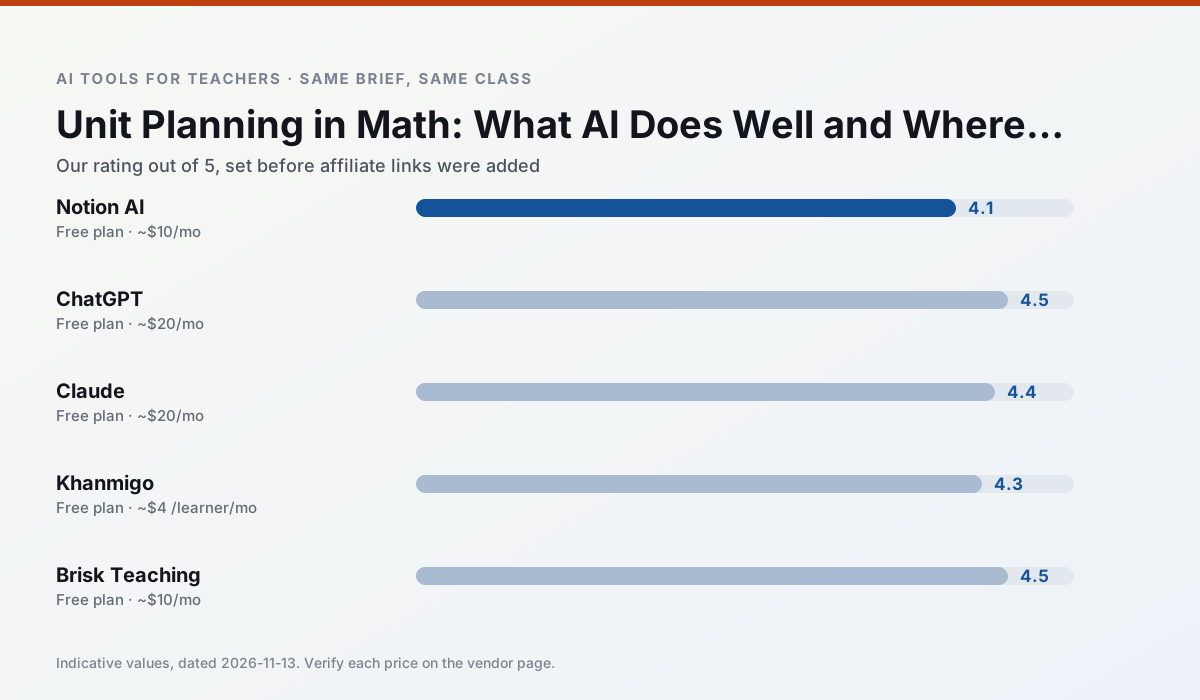
Side by side
Comparison table
Ratings reflect our timed classroom workflow, not vendor claims. Prices are indicative — verify on the vendor site.
| Tool | Best for | Free tier | Indicative paid plan | Standout feature | Our rating | Verdict | Try the tool |
|---|---|---|---|---|---|---|---|
| Notion AI | curriculum mapping · unit planning | Yes — Limited AI usage | ~$10 /user/mo | Linked databases | 4.1 / 5 | Situational | Try free |
| ChatGPT | lesson planning · parent communication | Yes — Usage-limited model access | ~$20 /user/mo | Custom GPTs and Projects | 4.5 / 5 | Top pick | Try free |
| Claude | rubric creation · feedback on writing | Yes — Usage-limited | ~$20 /user/mo | Very large context window | 4.4 / 5 | Strong option | Try free |
| Khanmigo | math practice · student tutoring | Yes — US teacher accounts, subject to eligibility | ~$4 /learner/mo | Socratic tutoring rather than answers | 4.3 / 5 | Strong option | Try free |
| Brisk Teaching | feedback on writing · grading | Yes — Limited actions per month | ~$10 /user/mo | Works inside Google Docs | 4.5 / 5 | Top pick | Try free |
| MagicSchool AI | lesson planning · differentiation | Yes — Core generators with monthly usage limits | ~$12 /user/mo | 80+ teacher-specific tools | 4.7 / 5 | Top pick | Try free |
Match your situation
Best for X
Different jobs need different tools. Here is what we would open first in each case.
Nothing on Notion AI's free tier is a teaser demo; the limits are documented and a normal week fits inside them.
On the daily cycle, ChatGPT saves the most edit time per task; the paid tier mostly buys more runs rather than better ones.
Claude runs in a browser tab with no extension, no student accounts and no onboarding call, so you can test it in a free period.
Khanmigo is the option IT is least likely to block: single sign-on, admin removal of AI features and an agreement on file.
Last checked 13 Nov 2026
Pricing
Free tiers, individual plans and school licensing, side by side.
| Tool | Free plan | Individual / paid | School & district | Billing note | Verify |
|---|---|---|---|---|---|
| Notion AI | $0 — Limited AI usage | ~$10 /user/mo | ~$8 /user/mo | Indicative — verify on vendor site | Vendor |
| ChatGPT | $0 — Usage-limited model access | ~$20 /user/mo | ~$25+ /user/mo | Indicative — verify on vendor site | Vendor |
| Claude | $0 — Usage-limited | ~$20 /user/mo | ~$25+ /user/mo | Indicative — verify on vendor site | Vendor |
| Khanmigo | $0 — US teacher accounts, subject to eligibility | ~$4 /learner/mo | Custom quote | Indicative — verify on vendor site | Vendor |
| Brisk Teaching | $0 — Limited actions per month | ~$10 /user/mo | Custom quote | Indicative — verify on vendor site | Vendor |
| MagicSchool AI | $0 — Core generators with monthly usage limits | ~$12 /user/mo | Custom quote | Indicative — verify on vendor site | Vendor |
Editorial rule: pricing is re-checked every 2–3 months and the top 50 pages are refreshed every 6 months. See our funding policy.
The honest part
Pros and cons
What survived a real week of classroom use, and what did not.
Pros
- Great for long-term curriculum records
- Strong team collaboration
- Flexible structure
Cons
- Setup time is significant
- AI add-on pricing changed more than once
- Not purpose-built for lesson generation
Pros
- Most flexible option available
- Huge community of teacher prompt libraries
- Strong multilingual support
Cons
- Requires prompt skills for consistent results
- No built-in standards alignment
- District privacy review usually required
Pros
- Handles full unit plans and long rubrics
- Nuanced, less generic prose
- Good at structured document output
Cons
- No teacher-specific templates
- Fewer classroom integrations
- Consumer plan not suitable for student data
Pros
- Education-first design
- Strong nonprofit trust signal
- Good math scaffolding
Cons
- Availability varies by region
- Less useful for admin paperwork
- Requires student accounts for full value
Pros
- No copy-paste between tools
- Fast inline feedback on student drafts
- Gentle learning curve
Cons
- Chrome-first workflow
- Extension permissions need IT approval
- Free quota is tight
In the classroom
Use cases
Five concrete workflows, with the tool we would open for each one.
Regrouping students after an assessment
Summarise anonymised results into skill groups, then generate one activity per group. Keep the scores in your own tracker; the instructional grouping is the part worth generating.
Recommended: Notion AIA weekly family newsletter from bullet notes
Newsletters fail on length, not tone. Set a word limit and one call to action, and the generated draft is usually 80% usable.
Recommended: ChatGPTThree reading levels from one source text
Paste a vetted text, ask for supported, core and extension versions, then check the vocabulary list by hand. Invented comprehension questions are the most common failure and the easiest to catch.
Recommended: ClaudeA Monday morning lesson plan in twelve minutes
The twelve minutes come from not rewriting the skeleton. Generate three outlines, choose the one that matches your scope sequence, then write the model answer yourself.
Recommended: KhanmigoA parent email in two languages
Draft in plain, warm language with no names, translate, then back-translate the important sentences to check meaning. Keep specific incidents out of the prompt and add them yourself.
Recommended: Brisk Teaching
Questions teachers ask us
FAQ
Direct answers, also published as FAQPage structured data for search and AI assistants.
Can AI do unit planning at mixed-grade level?
Which tool is best for unit planning?
What is the biggest risk?
Sources & further reading
Our recommendation
Try Notion AI free for your next unit planning task
AI-assisted notes, databases and curriculum planning in one workspace. Start on the free tier, run one real math lesson, and only consider upgrading if the quota is what stops you. Disclosure: we may earn a commission (varies) at no extra cost to you.
Some links on this page are affiliate links. We may earn a commission at no extra cost to you. Our rankings are editorial and never pay-to-play. Never enter student PII into a free consumer account.
Keep reading
Related comparisons in this cluster.
Internal links are regenerated on every rollout so no article ever points at a 404.