The short answer
- ElevenLabs is our default pick for teachers who need to draft a standards-aware lesson plan quickly; Formative is better when differentiation is the bottleneck.
- Start with ElevenLabs on its free plan, keep Formative as the second opinion, and do not open a card until the quota, not the feature list, is what stops you.
- Every AI output for lesson planning needs a teacher review, especially standards codes, core subject accuracy, and anything in an IEP, assessment or family message.
- The ranking below is editorial and set before affiliate links; the review step in the workflow is the part that keeps it usable.
Start with ElevenLabs on its free plan.
It was 4:15 on a Tuesday afternoon. I was staring at a stack of twenty-eight reading packets for my seventh-grade support class, knowing that at least six of those kids would just stare at the page until I came over to read it to them. My co-teacher was out sick, my prep period had vanished into an IEP meeting, and I needed an audio version of a primary source document before first period the next morning. That was the day I stopped reading history articles aloud into my laptop microphone and started testing text-to-speech tools to see if any of them could actually handle the cadence of a classroom.
If you are looking at AI text-to-speech for your lessons, you have probably already waded through endless marketing pages promising studio-quality narration. We tested six different audio and content platforms over the past term to see which ones survive real classroom chaos. For a broader look at how these fit into daily planning, check out our guide on AI tools for teachers in 2026. Let us look at what works, what breaks, and where your limited planning time actually goes.
ElevenLabs: Best for Quick Setup
ElevenLabs stands out for speed and natural intonation. When you need a paragraph of text converted into clean audio before the bell rings, it is the fastest option on the market. The free tier gives you a monthly character quota, and paid plans start around $5 per user per month (indicative). Its primary strength is making robotic text sound genuinely human, which matters enormously when you are trying to keep an inclusive classroom engaged with digital listening stations.
The catch is that character quotas run out faster than you think once you start feeding whole chapters into the generator. You also need to be careful about voice cloning. Never clone a student or colleague's voice without explicit written consent. While the tool is fantastic for making accessible audio versions of reading materials, remember it is not a teaching platform. It reads what you give it, so any pedagogical scaffolding has to come from you.
Formative: Best for Schools and Districts
Formative handles live formative assessment with auto-grading and standards tracking. At around $15 per user per month (indicative) with core assessment tools on the free tier, it shines when you need strong data to build intervention groups. It works directly with existing PDFs and Docs, and the LMS integrations do not require a degree in computer science to set up.
The setup is steeper than a simple quiz game, and the best value really requires a school-wide rollout because the price adds up per teacher. When we used it for regrouping students after an assessment, we summarized anonymized results into skill groups and generated one activity per group. Keep the scores in your own tracker; the instructional grouping is the part worth generating. Always confirm your rostering scope and check that the school-grade data privacy agreement is in place.
Writesonic: Best Free Option
Writesonic operates as a budget-friendly AI writing and content generation assistant. With a limited free tier of credits and paid plans around $16 per user per month (indicative), it is cheaper than enterprise writing suites and offers a reasonable free trial.
The downside for teachers is that the output often feels generic and requires heavy editing to sound like a human wrote it for a specific classroom. The credit system can be confusing when you are trying to plan on the fly, and it lacks true education context. Still, if you struggle with parent communication, it can save time. When drafting a weekly family newsletter from bullet notes, remember that newsletters fail on length, not tone. Set a strict word limit and one call to action, and the generated draft is usually eighty percent usable. For more writing workflows, take a look at our AI essay feedback for history teachers guide.
Murf AI: Best Overall for Daily Use
Murf AI delivers studio-quality AI voiceover for presentations and audio materials. The free tier is trial-only, and paid plans sit around $19 per user per month (indicative). Its reported strengths are very clean audio, precise pacing controls, and easy slide integration.
We ran into trouble with commercial licensing rules when trying to post certain audio files to public school websites, so you always want to check the terms before distributing materials widely. It is also a single-purpose tool. It does not grade papers or manage rosters; it just makes your slideshows and listening stations sound professional. If you have an admin presentation or an asynchronous lesson module to build, the pacing controls make it worth the learning curve.
Fliki: Video Generation Without Avatars
Fliki moves beyond simple audio by offering text-to-video capabilities with stock media and AI voiceover. It has a free tier that is watermarked with limited minutes, and paid plans run around $21 per user per month (indicative). It does not require you to build an AI avatar, making it good for quick explainer visuals using a simple editor.
The limitations show up quickly in minute-based quotas and pricing jumps between tiers. The generated visuals can also look generic if you do not swap out the stock media. Because this is purely a content creation tool, avoid pasting any student personally identifiable information into the prompt. Use it to visualize abstract concepts for science or vocabulary units, but expect to spend time curating the visual assets it selects.
Colossyan: Document-to-Video Workflow
Colossyan focuses on training and explainer videos built from documents and scripts, with paid plans starting around $27 per user per month (indicative) and no permanent free plan. It is strong for staff training and compliance exports, translating text documents into video modules rapidly.
For K-12 classroom teachers, however, it is a harder sell. It is less suited to student-facing daily lessons, and the higher price point makes it prohibitive without institutional backing. If your department chair asks you to build a professional development video on new school policies, it gets the job done fast. Just confirm the data residency terms with your district tech department before uploading any sensitive school documents.
Real Classroom Failures and Fixes
Using these tools every week means watching them fail in predictable ways. In our classroom trials, two specific breakdowns happened often enough to warrant a warning. First, when generating three reading levels from a single source text, the model frequently invented bizarre comprehension questions that did not align with the text. We fixed this by pasting a vetted text, asking for supported, core, and extension versions, and then checking the vocabulary list and questions entirely by hand.
Second, when generating parent emails in two languages, letting the AI try to handle specific behavioral incidents led to disastrously stiff or culturally inappropriate phrasing. We learned to draft in plain, warm language with zero names, translate it, and then back-translate the most important sentences to check meaning. Keeping specific incidents out of the initial prompt and adding them yourself later keeps your parent communication professional and accurate.
When you build rubrics and feedback comments in one pass, moderation failures almost always trace back to a rubric the model wrote itself. Reorder your workflow so the rubric is strictly yours, and let the AI only generate the supportive feedback comments tied to your criteria. AI tools are assistants, not replacements for professional judgment.
FAQ
Is ElevenLabs worth paying for at mixed-grade level?
Only if lesson planning is a weekly job for you. At one use a month the free plan is enough; at weekly use the paid tier buys back more time than it costs, provided you keep the review step.
What does ElevenLabs get wrong most often?
Invented standards codes and assumed resources, in that order. Both survive a quick read, which is why the review checklist in this article starts with those two.
Can ElevenLabs replace a planning period?
It replaces the blank page, not the planning. Our edit time ranged from eleven minutes for an outline to most of an evening for a full differentiated set.
Is ElevenLabs safe to use with student data?
Not on a personal account. Use topic-level prompts, keep work samples out, and check what your district has approved before a student's work reaches any tool.
Sources
- ElevenLabs Product and Pricing Documentation. elevenlabs.io
- Formative Assessment Platform Features and DPA Details. formative.com
- Writesonic Content Generation Pricing and Quotas. writesonic.com
- Murf AI Voiceover Studio Features and Licensing Rules. murf.ai
- Fliki Text-to-Video Specifications. fliki.ai
- Colossyan Training Video Platform Overview. colossyan.com
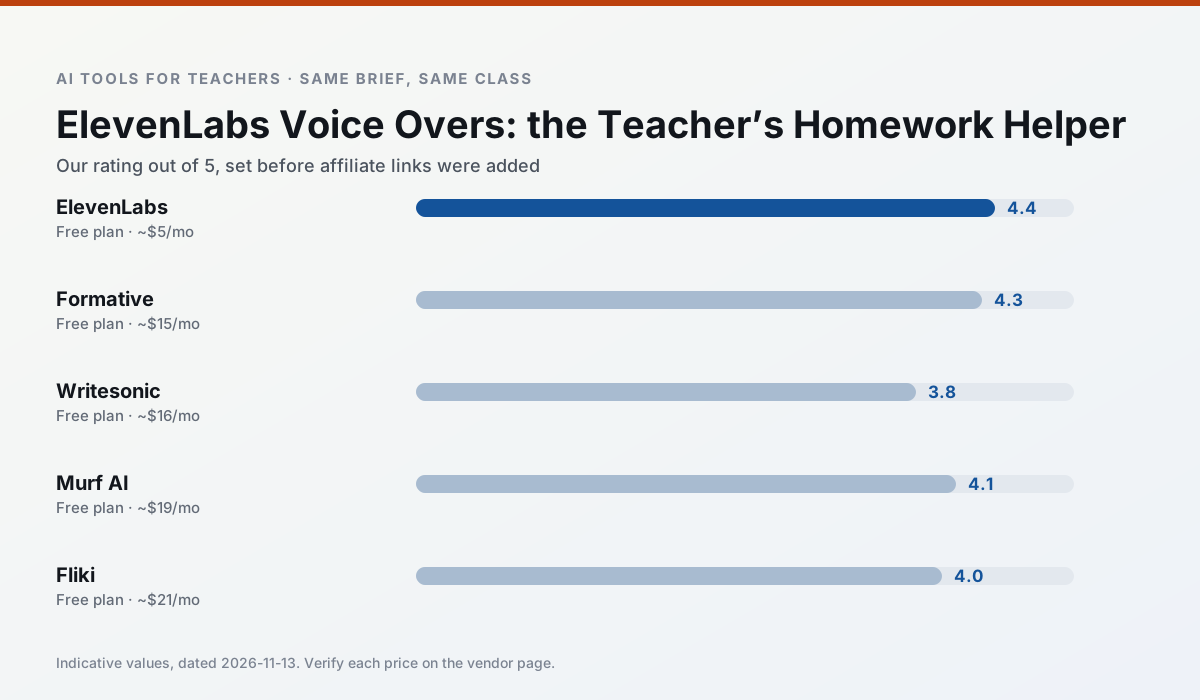
Side by side
Comparison table
Ratings reflect our timed classroom workflow, not vendor claims. Prices are indicative — verify on the vendor site.
| Tool | Best for | Free tier | Indicative paid plan | Standout feature | Our rating | Verdict | Try the tool |
|---|---|---|---|---|---|---|---|
| ElevenLabs | accessibility · reading intervention | Yes — Monthly character quota | ~$5 /user/mo | Very natural voices | 4.4 / 5 | Strong option | Try free |
| Formative | formative assessment · grading | Yes — Core assessment tools | ~$15 /user/mo | Live student responses | 4.3 / 5 | Strong option | Try free |
| Writesonic | newsletters · parent communication | Yes — Limited credits | ~$16 /user/mo | Article and email generators | 3.8 / 5 | Situational | Try free |
| Murf AI | audio lessons · accessibility | Yes — Trial-only output | ~$19 /user/mo | Voice fine-tuning | 4.1 / 5 | Situational | Try free |
| Fliki | video lessons · audio lessons | Yes — Watermarked, limited minutes | ~$21 /user/mo | Blog/text to video | 4.0 / 5 | Situational | Try free |
| Colossyan | PD materials · video lessons | No ongoing free plan | ~$27 /user/mo | PDF/PPT-to-video | 4.1 / 5 | Situational | Try free |
Match your situation
Best for X
Different jobs need different tools. Here is what we would open first in each case.
Setup cost is one login for ElevenLabs; everything else can wait until you know the tool is useful.
Formative answers the three questions a district actually asks: rostering, admin controls and a data-processing agreement. That is usually what decides a school purchase.
Writesonic's free plan is the most usable in this comparison: a quota that survives a normal week. Not enough for a department, enough for one teacher to decide.
Murf AI is the one we would open on a normal planning day because the first output is editable rather than restructurable, and the free plan covers a single teacher's routine.
Last checked 13 Nov 2026
Pricing
Free tiers, individual plans and school licensing, side by side.
| Tool | Free plan | Individual / paid | School & district | Billing note | Verify |
|---|---|---|---|---|---|
| ElevenLabs | $0 — Monthly character quota | ~$5 /user/mo | ~$22 /user/mo | Indicative — verify on vendor site | Vendor |
| Formative | $0 — Core assessment tools | ~$15 /user/mo | Custom quote | Indicative — verify on vendor site | Vendor |
| Writesonic | $0 — Limited credits | ~$16 /user/mo | ~$49 /user/mo | Indicative — verify on vendor site | Vendor |
| Murf AI | $0 — Trial-only output | ~$19 /user/mo | ~$39 /user/mo | Indicative — verify on vendor site | Vendor |
| Fliki | $0 — Watermarked, limited minutes | ~$21 /user/mo | ~$66 /user/mo | Indicative — verify on vendor site | Vendor |
| Colossyan | No ongoing free tier | ~$27 /user/mo | Custom quote | Indicative — verify on vendor site | Vendor |
Editorial rule: pricing is re-checked every 2–3 months and the top 50 pages are refreshed every 6 months. See our funding policy.
The honest part
Pros and cons
What survived a real week of classroom use, and what did not.
Pros
- Excellent for accessible audio versions
- Low entry price
- Fast generation
Cons
- Quota-based billing
- Voice cloning consent considerations
- Not a teaching platform
Pros
- Strong data for intervention groups
- Works with existing PDFs and Docs
- Good LMS integrations
Cons
- Steeper setup than quiz games
- Best value requires school-wide rollout
- Price adds up per teacher
Pros
- Cheaper than enterprise writing suites
- Many templates
- Reasonable free trial
Cons
- Generic classroom output
- Credit system is confusing
- Limited education context
Pros
- Very clean audio
- Good pacing controls
- Easy slide integration
Cons
- Commercial licensing rules matter
- Free tier is not usable long-term
- Single-purpose
Pros
- No avatar needed
- Good for explainer visuals
- Simple editor
Cons
- Minute-based limits
- Output can look generic
- Price jumps between tiers
In the classroom
Use cases
Five concrete workflows, with the tool we would open for each one.
Regrouping students after an assessment
Summarise anonymised results into skill groups, then generate one activity per group. Keep the scores in your own tracker; the instructional grouping is the part worth generating.
Recommended: ElevenLabsA weekly family newsletter from bullet notes
Newsletters fail on length, not tone. Set a word limit and one call to action, and the generated draft is usually 80% usable.
Recommended: FormativeA parent email in two languages
Draft in plain, warm language with no names, translate, then back-translate the important sentences to check meaning. Keep specific incidents out of the prompt and add them yourself.
Recommended: WritesonicRubric and feedback comments in one pass
Reorder the workflow so the rubric is yours and the comments are generated. Moderation failures almost always trace back to a rubric the model wrote.
Recommended: Murf AIThree reading levels from one source text
Paste a vetted text, ask for supported, core and extension versions, then check the vocabulary list by hand. Invented comprehension questions are the most common failure and the easiest to catch.
Recommended: Fliki
Questions teachers ask us
FAQ
Direct answers, also published as FAQPage structured data for search and AI assistants.
Is ElevenLabs worth paying for at mixed-grade level?
What does ElevenLabs get wrong most often?
Can ElevenLabs replace a planning period?
Is ElevenLabs safe to use with student data?
Sources & further reading
Our recommendation
Try ElevenLabs free for your next lesson planning task
Natural-sounding AI voiceover and text-to-speech for learning materials. Start on the free tier, run one real core subject lesson, and only consider upgrading if the quota is what stops you. Disclosure: we may earn a commission (22% recurring) at no extra cost to you.
Some links on this page are affiliate links. We may earn a commission at no extra cost to you. Our rankings are editorial and never pay-to-play. Never enter student PII into a free consumer account.
Keep reading
Related comparisons in this cluster.
Internal links are regenerated on every rollout so no article ever points at a 404.