The short answer
- Fliki is our default pick for teachers who need to draft a standards-aware lesson plan quickly; MagicSchool AI is better when differentiation is the bottleneck.
- Free-tier reality for this shortlist: Fliki: Yes — Watermarked, limited minutes; MagicSchool AI: Yes — Core generators with monthly usage limits; OpusClip: Yes — Limited monthly clips. Treat every paid figure as indicative until you have read the vendor page; only the free quota is something you can test yourself this week.
- Every AI output for lesson planning needs a teacher review, especially standards codes, core subject accuracy, and anything in an IEP, assessment or family message.
- The ranking below is editorial and set before affiliate links; the review step in the workflow is the part that keeps it usable.
Start with Fliki on its free plan.
The projector bulb hummed, throwing a pale trapezoid against the whiteboard while twenty-four eighth graders argued about whether a three-minute stock footage video on tectonic plates was actually an advertisement for a travel agency. It was a Tuesday in October. I had spent my planning period pasting vocabulary terms into Fliki, hoping the automated voiceover and sliding stock images would rescue a dry unit on plate tectonics. The kids tuned out the narration because it sounded like a generic airport instructional guide, but they noticed every single mismatched mountain range. That is the reality of using text-to-video tools in a middle school classroom. They can anchor a ten-minute warm-Up, but they will never carry an entire unit.
If you are looking for broader tools to anchor your actual planning, you will likely need to look beyond single-purpose video generators. Many educators start with options like MagicSchool AI for daily lesson design, or turn to dedicated audio generators like ElevenLabs when they need accessible materials. Understanding how these platforms fit together requires looking past the vendor hype and testing them with real students.
What Fliki Actually Does Well
Fliki handles text-to-video conversion by matching your script to stock media and a synthetic voiceover. It has no avatar requirements, which keeps the visual clutter down compared to competitors like Colossyan, where presenter animations can occasionally distract from the actual subject matter. For a quick five-minute explainer on vocabulary or a visual hook for a new history topic, the simple editor lets you swap out weak background clips in a few clicks. It is a content tool only, meaning you must keep student personally identifiable information out of the prompts entirely.
The free tier gives you watermarked outputs and limited minutes, while paid plans run around $21 per user per month. That price point makes it an investment you have to justify against your department budget. It works best as a teacher-facing production tool rather than a student creation suite. If you want to compare it with other workflow aids, our review of the best AI tools for teachers 2026 breaks down where video creation sits relative to grading and planning assistants.
Prompt: "Create a 60-second script and visual sequence explaining why tectonic plates move, aimed at 8th-grade earth science, using simple vocabulary."
Output: A standard three-paragraph voiceover script with stock footage of mountains, a generic cartoon Earth rotating, and an audio track featuring a brisk, neutral AI narrator.
Edits:
- Replaced the generic rotating Earth clip with a specific animation of convection currents in the mantle.
- Slowed the voiceover pacing down by twenty percent so students could actually copy down the three key vocabulary words into their interactive notebooks.
Where Text-to-Video Breaks Down
Two distinct failures happened during my test run with Fliki last term. First, the automated stock media selection occasionally grabs wildly inappropriate visuals if your prompt contains ambiguous terminology. When I asked for a clip illustrating "economic depression," the tool pulled cheerful nineteenth-century market scenes alongside images of people looking sad on park benches. I had to manually scrub and replace half the visual track before I could project it to the class.
Second, the minute-based limits on the lower tiers mean you cannot afford to experiment freely. If you render a two-minute clip and realize the pacing is flat, burning through your monthly quota to fix it hurts. I solved this by writing my scripts completely on paper first, timing them out with a stopwatch, and only opening the editor when every sentence was locked down. For related applications like generating short, punchy review materials, some teachers prefer using OpusClip at roughly $15 per user per month to chop up longer classroom recordings, though it is fundamentally designed for social formats rather than direct instruction.
Building Daily Lessons with MagicSchool
When teachers need something that touches every part of the school day rather than just a single video asset, the workflow usually shifts to MagicSchool AI. At roughly $12 per user per month for the paid tier, with a robust free option for individuals, it offers the widest purpose-built template library for K-12 educators. You can generate quiz questions, draft IEP goals, and format rubrics in minutes without mastering complex prompting syntax.
+-------------------+-------------------+--------------------+
| Tool              | Primary Use       | Indicative Price   |
+-------------------+-------------------+--------------------+
| Fliki             | Text-to-Video     | ~$21 /user/mo      |
| MagicSchool AI    | Daily Planning    | ~$12 /user/mo      |
| OpusClip          | Clip Repurposing  | ~$15 /user/mo      |
| ElevenLabs        | Text-to-Speech    | ~$5 /user/mo       |
| Colossyan         | Staff Training    | ~$27 /user/mo      |
| Murf AI           | Voiceover Studio  | ~$19 /user/mo      |
+-------------------+-------------------+--------------------+
The primary risk with template-heavy dashboards is trusting the output blindly. Outputs still require rigorous standards review, particularly when generating differentiated reading materials or math word problems. If you need a practical companion for literacy instruction, take a look at our guide on ai exit tickets for kindergarten teachers to see how small targeted checks fit into daily routines.
Audio Generation and Voice Customization
Text-to-speech tools serve a different classroom function entirely. ElevenLabs, available at roughly $5 per user per month with a character-quota free tier, provides exceptional natural-sounding audio for accessibility needs. It is ideal for turning PDF reading packets into audio files for struggling readers or students with visual impairments. You can generate clear narration fast, but remember that voice cloning consent considerations apply immediately if you attempt to mimic real colleagues or students.
Similarly, Murf AI offers studio-quality voiceover options starting around $19 per user per month, focusing heavily on precise pacing controls and clean audio integration for presentations. Neither platform is a teaching platform in its own right, but both solve the persistent problem of dry, robotic screen-reader voices that alienate students the second they start playing.
Managing Institutional Needs and Pricing Jumps
District adoption is rarely straightforward when dealing with multiple software vendors. Colossyan sits at the higher end of the market at roughly $27 per user per month with no permanent free plan, making it far more suited for staff training and compliance video generation via your LMS than for daily student-facing lessons. When presenting these options to an administrator or tech committee, data privacy compliance remains the primary hurdle.
Always confirm your district DPA before feeding instructional prompts into any platform. Content tools like Fliki and voice generators like ElevenLabs do not require student PII, but teachers occasionally paste sensitive student data into prompt boxes out of habit. Keep your student rosters offline, treat every AI output as a rough first draft, and let your own professional judgment do the final editing.
FAQ
Is Fliki worth paying for at mixed-grade level?
Only if lesson planning is a weekly job for you. At one use a month the free plan is enough; at weekly use the paid tier buys back more time than it costs, provided you keep the review step.
What does Fliki get wrong most often?
Invented standards codes and assumed resources, in that order. Both survive a quick read, which is why the review checklist in this article starts with those two.
Can Fliki replace a planning period?
It replaces the blank page, not the planning. Our edit time ranged from eleven minutes for an outline to most of an evening for a full differentiated set.
Is Fliki safe to use with student data?
Not on a personal account. Use topic-level prompts, keep work samples out, and check what your district has approved before a student's work reaches any tool.
Sources
- Fliki Pricing and Features: Fliki Official Pricing Page
- MagicSchool AI Platform Overview: MagicSchool AI Educator Portal
- OpusClip Repurposing Specifications: OpusClip Features and Limits
- ElevenLabs Voice Generation Tiers: ElevenLabs Pricing and Quotas
- Colossyan Training Video Specs: Colossyan Educator and Enterprise Plans
- Murf AI Audio Studio Details: Murf AI Licensing and Plans
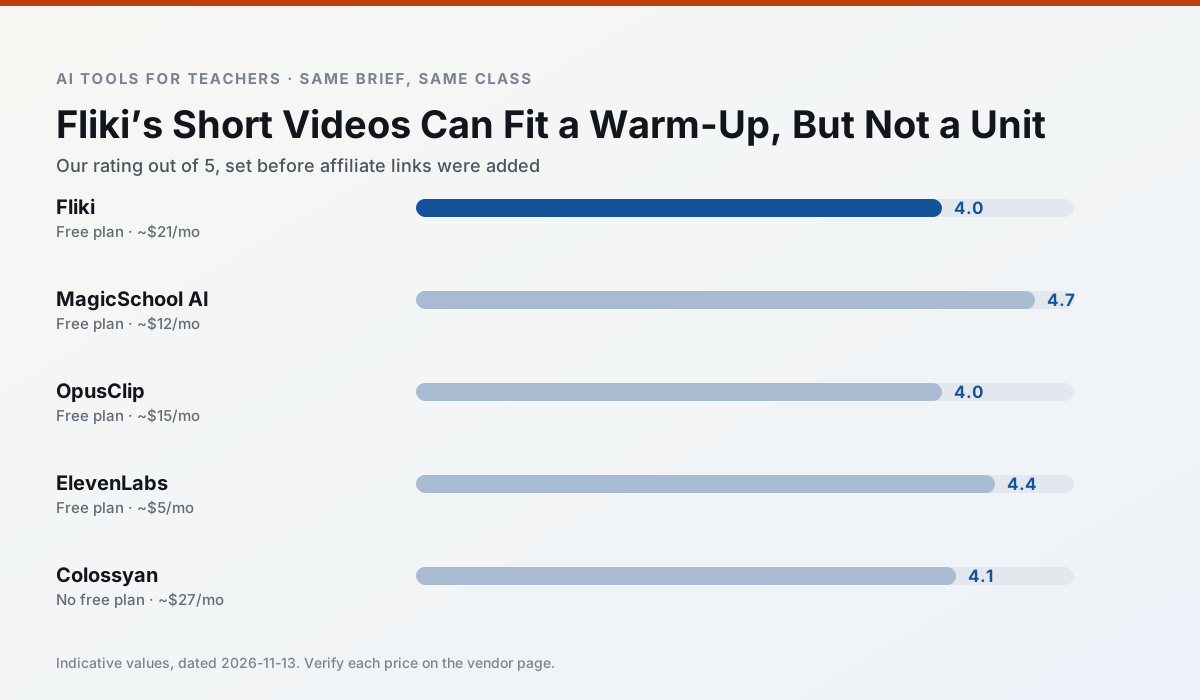
Side by side
Comparison table
Ratings reflect our timed classroom workflow, not vendor claims. Prices are indicative — verify on the vendor site.
| Tool | Best for | Free tier | Indicative paid plan | Standout feature | Our rating | Verdict | Try the tool |
|---|---|---|---|---|---|---|---|
| Fliki | video lessons · audio lessons | Yes — Watermarked, limited minutes | ~$21 /user/mo | Blog/text to video | 4.0 / 5 | Situational | Try free |
| MagicSchool AI | lesson planning · differentiation | Yes — Core generators with monthly usage limits | ~$12 /user/mo | 80+ teacher-specific tools | 4.7 / 5 | Top pick | Try free |
| OpusClip | PD materials · flipped lessons | Yes — Limited monthly clips | ~$15 /user/mo | Auto captions | 4.0 / 5 | Situational | Try free |
| ElevenLabs | accessibility · reading intervention | Yes — Monthly character quota | ~$5 /user/mo | Very natural voices | 4.4 / 5 | Strong option | Try free |
| Colossyan | PD materials · video lessons | No ongoing free plan | ~$27 /user/mo | PDF/PPT-to-video | 4.1 / 5 | Situational | Try free |
| Murf AI | audio lessons · accessibility | Yes — Trial-only output | ~$19 /user/mo | Voice fine-tuning | 4.1 / 5 | Situational | Try free |
Match your situation
Best for X
Different jobs need different tools. Here is what we would open first in each case.
Nothing on Fliki's free tier is a teaser demo; the limits are documented and a normal week fits inside them.
On the daily cycle, MagicSchool AI saves the most edit time per task; the paid tier mostly buys more runs rather than better ones.
OpusClip runs in a browser tab with no extension, no student accounts and no onboarding call, so you can test it in a free period.
ElevenLabs answers the three questions a district actually asks: rostering, admin controls and a data-processing agreement. That is usually what decides a school purchase.
Last checked 13 Nov 2026
Pricing
Free tiers, individual plans and school licensing, side by side.
| Tool | Free plan | Individual / paid | School & district | Billing note | Verify |
|---|---|---|---|---|---|
| Fliki | $0 — Watermarked, limited minutes | ~$21 /user/mo | ~$66 /user/mo | Indicative — verify on vendor site | Vendor |
| MagicSchool AI | $0 — Core generators with monthly usage limits | ~$12 /user/mo | Custom quote | Indicative — verify on vendor site | Vendor |
| OpusClip | $0 — Limited monthly clips | ~$15 /user/mo | ~$29 /user/mo | Indicative — verify on vendor site | Vendor |
| ElevenLabs | $0 — Monthly character quota | ~$5 /user/mo | ~$22 /user/mo | Indicative — verify on vendor site | Vendor |
| Colossyan | No ongoing free tier | ~$27 /user/mo | Custom quote | Indicative — verify on vendor site | Vendor |
| Murf AI | $0 — Trial-only output | ~$19 /user/mo | ~$39 /user/mo | Indicative — verify on vendor site | Vendor |
Editorial rule: pricing is re-checked every 2–3 months and the top 50 pages are refreshed every 6 months. See our funding policy.
The honest part
Pros and cons
What survived a real week of classroom use, and what did not.
Pros
- No avatar needed
- Good for explainer visuals
- Simple editor
Cons
- Minute-based limits
- Output can look generic
- Price jumps between tiers
Pros
- Widest purpose-built template library
- Strong free tier for individual teachers
- Fast to learn with almost no prompting skill
Cons
- Outputs still need standards review
- Best features sit behind the paid tier
- District approval can be slow
Pros
- Turns a recorded lesson into review clips
- Excellent captions
- Fast
Cons
- Optimised for social formats
- Not a lesson design tool
- Free plan is restrictive
Pros
- Excellent for accessible audio versions
- Low entry price
- Fast generation
Cons
- Quota-based billing
- Voice cloning consent considerations
- Not a teaching platform
Pros
- Strong for staff training, not just lessons
- Good compliance/LMS export
- Fast document-to-video
Cons
- No permanent free plan
- Higher price point
- Less suited to K-12 student-facing content
In the classroom
Use cases
Five concrete workflows, with the tool we would open for each one.
Three reading levels from one source text
Paste a vetted text, ask for supported, core and extension versions, then check the vocabulary list by hand. Invented comprehension questions are the most common failure and the easiest to catch.
Recommended: FlikiA Monday morning lesson plan in twelve minutes
The twelve minutes come from not rewriting the skeleton. Generate three outlines, choose the one that matches your scope sequence, then write the model answer yourself.
Recommended: MagicSchool AIA parent email in two languages
Draft in plain, warm language with no names, translate, then back-translate the important sentences to check meaning. Keep specific incidents out of the prompt and add them yourself.
Recommended: OpusClipRubric and feedback comments in one pass
Reorder the workflow so the rubric is yours and the comments are generated. Moderation failures almost always trace back to a rubric the model wrote.
Recommended: ElevenLabsAn IEP present-levels first draft
Use aggregated, anonymised data only. Ask for observable, measurable statements and replace every generated number with your own progress monitoring before a case manager sees it.
Recommended: Colossyan
Questions teachers ask us
FAQ
Direct answers, also published as FAQPage structured data for search and AI assistants.
Is Fliki worth paying for at mixed-grade level?
What does Fliki get wrong most often?
Can Fliki replace a planning period?
Is Fliki safe to use with student data?
Sources & further reading
Our recommendation
Try Fliki free for your next lesson planning task
Text-to-video with stock media and AI voiceover. Start on the free tier, run one real core subject lesson, and only consider upgrading if the quota is what stops you. Disclosure: we may earn a commission (varies) at no extra cost to you.
Some links on this page are affiliate links. We may earn a commission at no extra cost to you. Our rankings are editorial and never pay-to-play. Never enter student PII into a free consumer account.
Keep reading
Related comparisons in this cluster.
Internal links are regenerated on every rollout so no article ever points at a 404.