The short answer
- Claude is our default pick for teachers who need to give actionable draft feedback quickly; Brisk Teaching is better when differentiation is the bottleneck.
- All 3 shortlisted tools are priced for one teacher first and a school second. Claude and Brisk Teaching are the two worth trialling on a real task before any purchase conversation.
- Every AI output for feedback on student writing needs a teacher review, especially standards codes, ELA accuracy, and anything in an IEP, assessment or family message.
- Trial one tool for a week of real feedback on student writing work before any purchase conversation; the quota is the honest test.
Start with Writesonic on its free plan.
Staring at a stack of seventy-two argumentative essays at 9:00 PM on a Tuesday is a fast track to burnout. You know the routine. By essay number forty, your marginal comments have devolved from thoughtful guidance into repetitive shorthand like "needs evidence" or "check citation."
Using AI feedback on student writing for ela teachers changes the math, but it does not eliminate the work. Over the past term, I have tested how different platforms handle the weight of student prose. Some tools save hours of drafting, while others add administrative friction that makes grading take longer than it did before.
The Reality of Writing Feedback at Scale
Every English teacher wants to provide marginal notes that actually guide revision, not just justify a grade at the top of the page. The problem is volume. When you try to give meaningful commentary to five classes of twenty-eight kids, something has to give.
AI models can process text quickly, but they stumble on context. They do not know that Marcus has been struggling to find his voice all semester, or that Sarah finally grasped thesis placement after three weeks of conferencing. If you feed raw student writing into a generic prompt, you get generic praise and superficial corrections.
The goal is not to let software grade your students. The goal is to use targeted tools to handle the mechanical first pass so you can focus on the higher-order thinking. To see how these platforms fit into a broader instructional stack, you can read our breakdown of the best AI tools for teachers in 2026.
Claude: Best for Schools and Districts
Claude, developed by Anthropic, handles long-context inputs better than almost any other consumer-facing assistant. It shines when you need to feed an entire class set of rubrics, anchor texts, and assignment sheets into one prompt.
Priced around $20 per user per month with a usage-limited free tier, it works best as a heavy-duty planning and feedback partner. Its prose is notably less robotic than competing models, meaning the feedback it generates sounds more like an actual human reader.
The catch is privacy and integration. You cannot paste unredacted student data into a consumer plan. For school use, you need an approved workspace tier that respects FERPA guidelines. It also lacks native classroom integrations, meaning you are doing plenty of copying and pasting unless your district has built custom workflows.
Brisk Teaching: Best for Quick Setup
If your classroom lives inside Google Docs, Brisk Teaching removes a massive friction point. It is a browser extension that brings AI feedback directly into Docs, Slides, and web articles.
At roughly $10 per user per month with a tight free tier limited to a handful of actions per month, Brisk eliminates the need to jump between tabs. You highlight a student paragraph, click the extension, and generate inline comments right where the student is working.
Prompt: Act as an 8th-grade ELA teacher. Review this student paragraph for claim strength and evidence integration using the attached rubric. Do not rewrite the sentence for the student; instead, ask one guiding question that prompts them to connect their evidence back to their thesis.
First output: The model provided a generic compliment ("Good job using a quote!") followed by a slightly academic question about rhetorical strategy that would fly right over an average middle schooler's head.
Two edits for usability: I added a constraint specifying the Lexile-appropriate reading level of the class and explicitly commanded the model to reference a specific phrase from the student's quote. That brought the comment down to an actionable level.
The limitations are technical. Because it is a Chrome extension, your district IT department has to approve it. The free tier will also run out faster than you expect during a heavy grading week.
Turnitin Clarity and Feedback Studio: Best Overall for Daily Use
For high schools and institutional settings, Turnitin Clarity and Feedback Studio remain the heavyweights. They are already licensed at many schools, providing a consistent institutional workflow that students and staff already understand.
Individual teachers cannot buy this software independently; it requires school-wide procurement. Pricing runs on a custom quote model. Its primary strength lies in detailed revision histories and integrated originality checking.
AI detection remains a persistent point of contention among educators, and Turnitin is no exception. False positives cause unnecessary disciplinary headaches, and the administrative setup is heavy. Yet, for managing drafts, peer review, and final submissions in a secure ecosystem, nothing else matches its reach.
Class Companion: Best Free Option
Class Companion attacks the grading bottleneck from a different angle by supporting handwritten and scanned student work. If your students still write essays by hand in blue books, this platform allows you to upload scans and get fast, specific comments.
The free tier supports a limited number of assignments, while paid plans sit around $12 per user per month. It provides surprisingly specific commentary on structure and mechanics, and it includes robust math support if you teach interdisciplinary units.
The limitations are physical. Scan quality dictates accuracy. If a student writes in faint pencil or messy cursive, the optical character recognition stumbles. Furthermore, the feedback still requires careful teacher review before it goes back to the student. Because student work is uploaded to the cloud, you must verify that your district has a proper DPA in place.
Writesonic and Quizizz: Content Generation and Assessment
Writesonic operates as a budget-friendly writing and content generation suite, priced around $16 per user per month with limited free credits. While it has plenty of templates for marketing copy and general writing, its classroom output tends to be generic. The credit system is confusing, and it lacks the deep educational context needed for nuanced ELA feedback. It is not intended for student data, making it a poor choice for grading essays.
Quizizz, on the other hand, excels at formative assessment rather than essay grading. At roughly $15 per user per month with core quiz creation free, students already know the interface well. It works reliably on low-end devices and offers strong reporting features. For checking reading comprehension before moving into a writing workshop, it is dependable. However, writing high-quality AI questions still demands careful human review to avoid superficial multiple-choice traps. For related formative strategies, see our guide on AI exit tickets for ELA teachers.
Final Verdict for the Classroom
Do not try to automate your entire grading load at once. Start by using Brisk Teaching for quick formative checks during drafting sessions, or use Claude to help brainstorm leveled feedback prompts for your next major essay rubric. Keep your human judgment at the center of the process, and let the software handle the heavy lifting of initial text processing.
FAQ
Can AI do feedback on student writing at mixed-grade level?
It can produce a first draft and a structure. The level judgement, the standards check and the tone are teacher decisions.
Which tool is best for feedback on student writing?
Claude on the evidence in this article, with Brisk Teaching as the second opinion. Neither replaces the review step.
What is the biggest risk?
A confident, plausible output that nobody checked. The five checks below exist for that reason.
Sources
- Anthropic. "Claude Pricing and Enterprise Privacy." Retrieved from claude.ai/pricing.
- Brisk Teaching. "Chrome Extension Features and Data Scope." Retrieved from briskteaching.com.
- Turnitin. "Feedback Studio and Institutional Compliance." Retrieved from turnitin.com.
- Class Companion. "AI Feedback for Handwritten Assignments." Retrieved from classcompanion.com.
- Writesonic. "Content Generation Plans." Retrieved from writesonic.com.
- Quizizz. "Interactive Learning and Assessment Platform." Retrieved from quizizz.com.
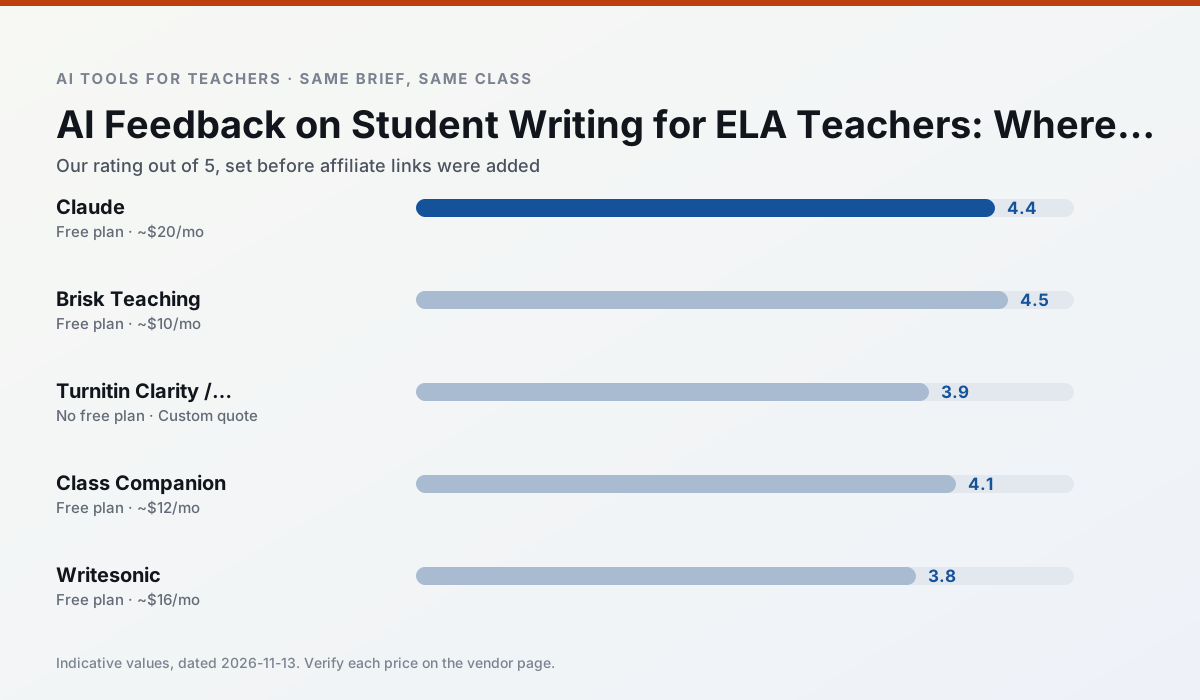
Side by side
Comparison table
Ratings reflect our timed classroom workflow, not vendor claims. Prices are indicative — verify on the vendor site.
| Tool | Best for | Free tier | Indicative paid plan | Standout feature | Our rating | Verdict | Try the tool |
|---|---|---|---|---|---|---|---|
| Claude | rubric creation · feedback on writing | Yes — Usage-limited | ~$20 /user/mo | Very large context window | 4.4 / 5 | Strong option | Try free |
| Brisk Teaching | feedback on writing · grading | Yes — Limited actions per month | ~$10 /user/mo | Works inside Google Docs | 4.5 / 5 | Top pick | Try free |
| Turnitin Clarity / Feedback Studio | feedback on writing · academic integrity | No ongoing free plan | Custom quote | Similarity reports | 3.9 / 5 | Situational | Try free |
| Class Companion | grading · feedback on writing | Yes — Limited assignments | ~$12 /user/mo | Handwriting recognition | 4.1 / 5 | Situational | Try free |
| Writesonic | newsletters · parent communication | Yes — Limited credits | ~$16 /user/mo | Article and email generators | 3.8 / 5 | Situational | Try free |
| Quizizz | quiz generation · formative assessment | Yes — Core quiz creation | ~$15 /user/mo | AI question generator | 4.4 / 5 | Strong option | Try free |
Match your situation
Best for X
Different jobs need different tools. Here is what we would open first in each case.
For a school rollout, Claude offers the paperwork and the admin console; the classroom features are standard by comparison.
Brisk Teaching has the shortest path from opening a tab to a usable draft, which matters more than the feature count on a Monday.
On the daily cycle, Turnitin Clarity / Feedback Studio saves the most edit time per task; the paid tier mostly buys more runs rather than better ones.
If there is no budget, start with Class Companion: free plan with clearest quota is the least punishing free tier here.
Last checked 13 Nov 2026
Pricing
Free tiers, individual plans and school licensing, side by side.
| Tool | Free plan | Individual / paid | School & district | Billing note | Verify |
|---|---|---|---|---|---|
| Claude | $0 — Usage-limited | ~$20 /user/mo | ~$25+ /user/mo | Indicative — verify on vendor site | Vendor |
| Brisk Teaching | $0 — Limited actions per month | ~$10 /user/mo | Custom quote | Indicative — verify on vendor site | Vendor |
| Turnitin Clarity / Feedback Studio | No ongoing free tier | Custom quote | Custom quote | LMS-wide deployment | Vendor |
| Class Companion | $0 — Limited assignments | ~$12 /user/mo | Custom quote | Indicative — verify on vendor site | Vendor |
| Writesonic | $0 — Limited credits | ~$16 /user/mo | ~$49 /user/mo | Indicative — verify on vendor site | Vendor |
| Quizizz | $0 — Core quiz creation | ~$15 /user/mo | Custom quote | Indicative — verify on vendor site | Vendor |
Editorial rule: pricing is re-checked every 2–3 months and the top 50 pages are refreshed every 6 months. See our funding policy.
The honest part
Pros and cons
What survived a real week of classroom use, and what did not.
Pros
- Handles full unit plans and long rubrics
- Nuanced, less generic prose
- Good at structured document output
Cons
- No teacher-specific templates
- Fewer classroom integrations
- Consumer plan not suitable for student data
Pros
- No copy-paste between tools
- Fast inline feedback on student drafts
- Gentle learning curve
Cons
- Chrome-first workflow
- Extension permissions need IT approval
- Free quota is tight
Pros
- Already licensed at many schools
- Consistent institutional workflow
- Detailed revision history
Cons
- Individual teachers cannot buy it
- AI detection remains contested
- Heavy administrative setup
Pros
- Useful where work is done on paper
- Fast, specific comments
- Good math support
Cons
- Scan quality affects accuracy
- Narrow use case
- Feedback still needs teacher review
Pros
- Cheaper than enterprise writing suites
- Many templates
- Reasonable free trial
Cons
- Generic classroom output
- Credit system is confusing
- Limited education context
In the classroom
Use cases
Five concrete workflows, with the tool we would open for each one.
A weekly family newsletter from bullet notes
Newsletters fail on length, not tone. Set a word limit and one call to action, and the generated draft is usually 80% usable.
Recommended: ClaudeRegrouping students after an assessment
Summarise anonymised results into skill groups, then generate one activity per group. Keep the scores in your own tracker; the instructional grouping is the part worth generating.
Recommended: Brisk TeachingRubric and feedback comments in one pass
Reorder the workflow so the rubric is yours and the comments are generated. Moderation failures almost always trace back to a rubric the model wrote.
Recommended: Turnitin Clarity / Feedback StudioA parent email in two languages
Draft in plain, warm language with no names, translate, then back-translate the important sentences to check meaning. Keep specific incidents out of the prompt and add them yourself.
Recommended: Class CompanionA Monday morning lesson plan in twelve minutes
The twelve minutes come from not rewriting the skeleton. Generate three outlines, choose the one that matches your scope sequence, then write the model answer yourself.
Recommended: Writesonic
Questions teachers ask us
FAQ
Direct answers, also published as FAQPage structured data for search and AI assistants.
Can AI do feedback on student writing at mixed-grade level?
Which tool is best for feedback on student writing?
What is the biggest risk?
Sources & further reading
Our recommendation
Try Writesonic free for your next feedback on student writing task
Budget-friendly AI writing and content generation. Start on the free tier, run one real ELA lesson, and only consider upgrading if the quota is what stops you. Disclosure: we may earn a commission (varies) at no extra cost to you.
Some links on this page are affiliate links. We may earn a commission at no extra cost to you. Our rankings are editorial and never pay-to-play. Never enter student PII into a free consumer account.
Keep reading
Related comparisons in this cluster.
Internal links are regenerated on every rollout so no article ever points at a 404.