The short answer
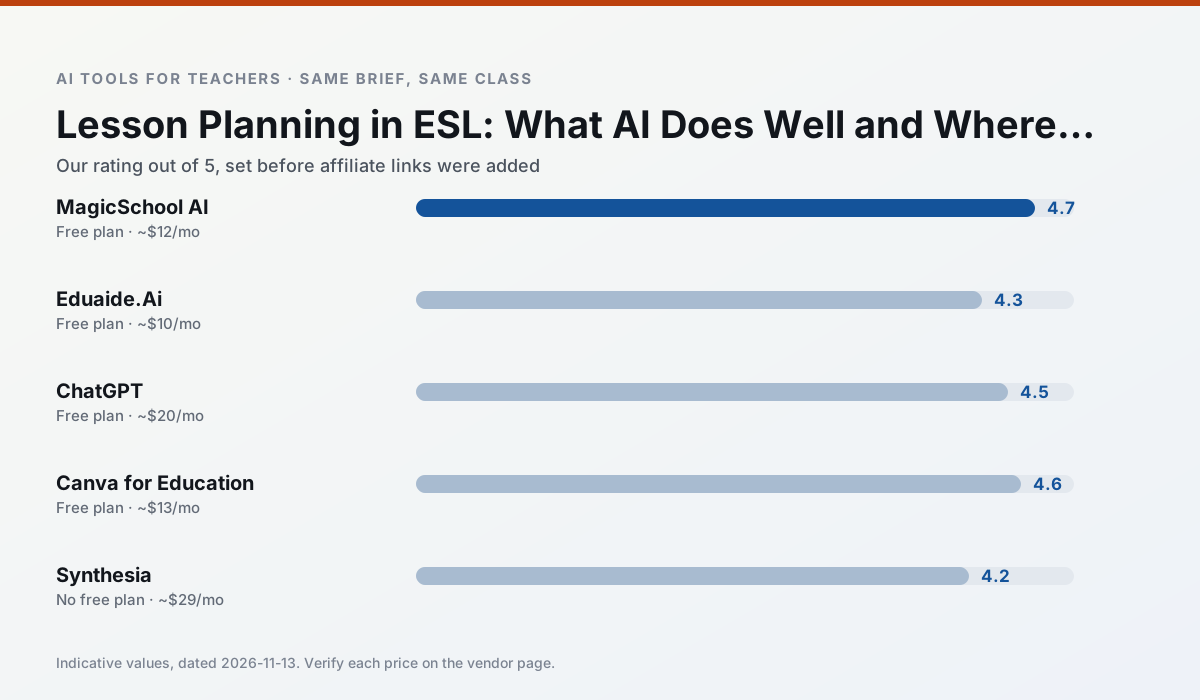
- MagicSchool AI is our default pick for teachers who need to draft a standards-aware lesson plan quickly; Eduaide.Ai is better when differentiation is the bottleneck.
- Free-tier reality for this shortlist: MagicSchool AI: Yes — Core generators with monthly usage limits; Eduaide.Ai: Yes — Daily generation cap; ChatGPT: Yes — Usage-limited model access. Treat every paid figure as indicative until you have read the vendor page; only the free quota is something you can test yourself this week.
- Every AI output for lesson planning needs a teacher review, especially standards codes, Esl accuracy, and anything in an IEP, assessment or family message.
- Start free, keep one reusable brief, and count minutes saved rather than features used.
Start with MagicSchool AI on its free plan.
Seventeen kids were staring at me while I tried to explain the difference between past simple and present perfect using three markers and a dry whiteboard. My newcomer students had glassy eyes, my intermediate kids were bored, and I had forty minutes left. That was the Tuesday I stopped pretending I could write three-tier differentiated ESL lesson plans by hand every single night. If you teach English language learners, you already know the grind. You need a text that an interrupted-formal-education teenager can read, comprehension questions that do not rely on cultural idioms they have never heard, and vocabulary work that actually sticks.
We started testing AI lesson planning for esl teachers this term to see what survives contact with a real classroom. The tools we looked at include MagicSchool AI, Eduaide.Ai, ChatGPT, Canva for Education, Synthesia, and Gamma. Some of them save hours. Others create more cleanup work than they remove. If you want a wider look at how these systems fit into different classrooms, check our guide on best AI tools for teachers 2026. Here is what actually works when you are planning for a room where five languages are spoken at once.
Where AI Saves Time in Language Planning
The best use of these tools is cutting down the mechanical prep of leveling texts and building scaffolds. When you need a news article rewritten so that a CEFR A2 learner can parse it without an expensive textbook, generative tools are genuinely fast. You paste in a paragraph about local weather and ask for simplified syntax and a glossary of five high-frequency verbs. That keeps you from spending your Sunday night digging through six different curricula for something appropriate.
MagicSchool AI is particularly strong here because its dashboard has purpose-built template libraries that require almost no prompting skill. You click into a generator, fill out a form for reading level and topic, and get a structured output. It is our top pick for parent-facing writing, such as translating complex school policy letters into accessible home languages. Its free tier covers core generators with monthly usage limits, while paid access runs around $12 per user per month. The main catch is that you still need to review everything for cultural nuance and local standards alignment.
Eduaide.Ai handles differentiation well, making it our choice for mixed-ability classes. It focuses on lesson, rubric, and worksheet generation with a clean, uncluttered interface. The free tier uses a daily generation cap, and the paid plan is around $10 per user per month. It does not have as many templates as MagicSchool, but its worksheet outputs require fewer edits before you send them to the copy machine.
The Prompt That Survived a Tuesday Lesson
Prompt: Act as an experienced ESL curriculum writer. Take this intermediate science paragraph about photosynthesis and generate three distinct group tasks for a mixed-ability class. Group A needs heavy sentence frames and vocabulary matching. Group B needs a structured graphic organizer with cause-and-effect headings. Group C needs a roleplay prompt where they argue from the perspective of different plant cells. Keep instructions under 50 words per task.
First draft output: The AI gave Group A a clean matching list, gave Group B a workable chart, and gave Group C a creative cell dialogue. However, it included a fifth vocabulary word in Group A that was far too advanced, and it forgot to include an extension task for early finishers in Group C.
Two edits that made it usable:
- Swapped out the advanced vocabulary term in Group A for a high-frequency cognate from the glossary.
- Added a one-sentence extension question to Group C asking students to write down their character's main defense mechanism.
Building Visuals and Decks Without Designer Fatigue
Text is only half the battle in an ESL classroom. If your students cannot see the vocabulary, they cannot anchor it. Canva for Education is effectively free for verified teachers, though account verification can sometimes take a few days. It gives you access to a massive template library with AI writing and image generation features. You can spin up vocabulary flashcards with clear illustrations in minutes, which is miles better than searching Google Images for royalty-free pictures of abstract concepts like frustration or ambiguity.
When you need to turn a rough outline into a slide deck for direct instruction, Gamma is the fastest route. It generates presentation decks and documents from a single prompt, offering modern-day layouts by default. The free tier relies on credit limits, and the paid option sits around $10 per user per month. Design control is limited compared to building from scratch, but it stops you from spending an hour aligning text boxes on a Monday morning. For a related workflow on handling student output, see our guide on AI essay feedback for history teachers.
Where Generative Tools Fall Down
Not everything works. If you ask an AI to generate a quiz from an authentic PDF article, check every single answer key twice. Numerical items and inference questions are the least reliable parts of the output. Generators love to sneak in ambiguous distractors that even native speakers trip over, which is the last thing you want when testing an ELL student's command of a grammatical structure.
Synthesia attempts to solve the speaking practice problem by turning scripts into presenter-led video with AI avatars. At around $29 per user per month with no free ongoing tier, the cost is hard to justify for a single classroom teacher. While its multilingual voice output is impressive, avatar video often feels impersonal for language learners who desperately need human interaction, eye contact, and authentic conversational pauses. Do not use student likenesses or real student data in video tools under any circumstances.
ChatGPT remains the most flexible general-purpose assistant, and it is our recommendation for student-safe deployments when configured through approved district workspace tiers. It adapts to almost any classroom task, from generating dialogue scripts to breaking down idioms. On consumer plans, however, you must never enter student personally identifiable information. You also need decent prompt skills to get consistent results across different classes, since it lacks built-in templates specifically designed for second-language acquisition frameworks.
Drawing the Line on Automated Planning
The temptation with these platforms is to let them run your entire curriculum. Resist that. AI cannot tell you that Javi spent the entire morning crying because his family is moving, or that Maria has finally figured out how to use past tense verbs when she talks about her grandmother. Those observations belong to you. Use these tools to generate the raw material, the leveled reading passages, and the first pass at a rubric. Then apply your professional judgment to make sure the lesson actually fits the human beings sitting in your room.
FAQ
Can AI do lesson planning at mixed-grade level?
It can produce a first draft and a structure. The level judgement, the standards check and the tone are teacher decisions.
Which tool is best for lesson planning?
MagicSchool AI on the evidence in this article, with Eduaide.Ai as the second opinion. Neither replaces the review step.
What is the biggest risk?
A confident, plausible output that nobody checked. The five checks below exist for that reason.
Sources
- MagicSchool AI. (2026). Feature overview and pricing tiers. Retrieved from https://www.magicschool.ai/
- Eduaide.Ai. (2026). Resource generator capabilities and plans. Retrieved from https://www.eduaide.ai/
- OpenAI. (2026). ChatGPT education safety and workspace guidelines. Retrieved from https://openai.com/
- Canva for Education. (2026). Teacher verification and classroom feature summary. Retrieved from https://www.canva.com/education/
- Synthesia. (2026). AI video generation and avatar pricing. Retrieved from https://www.synthesia.io/
- Gamma. (2026). Presentation and document generation credits. Retrieved from https://gamma.app/
Side by side
Comparison table
Ratings reflect our timed classroom workflow, not vendor claims. Prices are indicative — verify on the vendor site.
| Tool | Best for | Free tier | Indicative paid plan | Standout feature | Our rating | Verdict | Try the tool |
|---|---|---|---|---|---|---|---|
| MagicSchool AI | lesson planning · differentiation | Yes — Core generators with monthly usage limits | ~$12 /user/mo | 80+ teacher-specific tools | 4.7 / 5 | Top pick | Try free |
| Eduaide.Ai | lesson planning · rubric creation | Yes — Daily generation cap | ~$10 /user/mo | Resource library | 4.3 / 5 | Strong option | Try free |
| ChatGPT | lesson planning · parent communication | Yes — Usage-limited model access | ~$20 /user/mo | Custom GPTs and Projects | 4.5 / 5 | Top pick | Try free |
| Canva for Education | slide decks · worksheets | Yes — Verification required | ~$13 /user/mo | Thousands of education templates | 4.6 / 5 | Top pick | Try free |
| Synthesia | flipped lessons · video lessons | No ongoing free plan | ~$29 /user/mo | 140+ languages | 4.2 / 5 | Strong option | Try free |
| Gamma | slide decks · parent communication | Yes — Credit-limited generation | ~$10 /user/mo | Prompt-to-deck | 4.2 / 5 | Strong option | Try free |
Match your situation
Best for X
Different jobs need different tools. Here is what we would open first in each case.
MagicSchool AI is the steadiest of this set at plain, respectful language; names and specific incidents still belong in your draft, not the prompt.
For three reading groups and one text, Eduaide.Ai needs the least manual relabelling of vocabulary and questions.
ChatGPT is the student-facing option here with boundaries a teacher can actually set and supervise.
If there is no budget, start with Canva for Education: free plan with clearest quota is the least punishing free tier here.
Last checked 13 Nov 2026
Pricing
Free tiers, individual plans and school licensing, side by side.
| Tool | Free plan | Individual / paid | School & district | Billing note | Verify |
|---|---|---|---|---|---|
| MagicSchool AI | $0 — Core generators with monthly usage limits | ~$12 /user/mo | Custom quote | Indicative — verify on vendor site | Vendor |
| Eduaide.Ai | $0 — Daily generation cap | ~$10 /user/mo | Custom quote | Indicative — verify on vendor site | Vendor |
| ChatGPT | $0 — Usage-limited model access | ~$20 /user/mo | ~$25+ /user/mo | Indicative — verify on vendor site | Vendor |
| Canva for Education | $0 — Verification required | ~$13 /user/mo | Custom quote | Indicative — verify on vendor site | Vendor |
| Synthesia | No ongoing free tier | ~$29 /user/mo | Custom quote | Indicative — verify on vendor site | Vendor |
| Gamma | $0 — Credit-limited generation | ~$10 /user/mo | ~$20 /user/mo | Indicative — verify on vendor site | Vendor |
Editorial rule: pricing is re-checked every 2–3 months and the top 50 pages are refreshed every 6 months. See our funding policy.
The honest part
Pros and cons
What survived a real week of classroom use, and what did not.
Pros
- Widest purpose-built template library
- Strong free tier for individual teachers
- Fast to learn with almost no prompting skill
Cons
- Outputs still need standards review
- Best features sit behind the paid tier
- District approval can be slow
Pros
- Very low entry price
- Good worksheet and rubric output
- Clean, uncluttered UI
Cons
- Smaller template set than MagicSchool
- Less polished export options
- Limited integrations
Pros
- Most flexible option available
- Huge community of teacher prompt libraries
- Strong multilingual support
Cons
- Requires prompt skills for consistent results
- No built-in standards alignment
- District privacy review usually required
Pros
- Effectively free for verified teachers
- Huge template library
- No design skills needed
Cons
- AI features are capped
- Easy to produce cluttered slides
- Account verification can be slow
Pros
- No camera or editing skills required
- Excellent multilingual voice output
- Easy updates to existing videos
Cons
- Cost is hard to justify for a single teacher
- Avatar video can feel impersonal
- No free ongoing tier
In the classroom
Use cases
Five concrete workflows, with the tool we would open for each one.
Regrouping students after an assessment
Summarise anonymised results into skill groups, then generate one activity per group. Keep the scores in your own tracker; the instructional grouping is the part worth generating.
Recommended: MagicSchool AIA weekly family newsletter from bullet notes
Newsletters fail on length, not tone. Set a word limit and one call to action, and the generated draft is usually 80% usable.
Recommended: Eduaide.AiAn IEP present-levels first draft
Use aggregated, anonymised data only. Ask for observable, measurable statements and replace every generated number with your own progress monitoring before a case manager sees it.
Recommended: ChatGPTA five-minute exit ticket set
Ask for one recall, one application and one reasoning item, then delete the second recall question every generator sneaks in.
Recommended: Canva for EducationA question bank from a PDF or article
Feed a non-identifiable source and ask for items tagged by difficulty with the misconception behind each distractor. Spot-check every answer key; numerical items are least reliable.
Recommended: Synthesia
Questions teachers ask us
FAQ
Direct answers, also published as FAQPage structured data for search and AI assistants.
Can AI do lesson planning at mixed-grade level?
Which tool is best for lesson planning?
What is the biggest risk?
Sources & further reading
Our recommendation
Try MagicSchool AI free for your next lesson planning task
A large library of teacher-specific AI generators in one dashboard. Start on the free tier, run one real Esl lesson, and only consider upgrading if the quota is what stops you. Disclosure: we may earn a commission (30% recurring) at no extra cost to you.
Some links on this page are affiliate links. We may earn a commission at no extra cost to you. Our rankings are editorial and never pay-to-play. Never enter student PII into a free consumer account.
Keep reading
Related comparisons in this cluster.
Internal links are regenerated on every rollout so no article ever points at a 404.