The short answer
- Eduaide.Ai is our default pick for teachers who need to write criterion-referenced rubrics quickly; Claude is better when differentiation is the bottleneck.
- Pricing is where these pages date fastest. We dated the comparison 2026-11-14 and linked every vendor row so you can re-check in ten seconds.
- Every AI output for rubric creation needs a teacher review, especially standards codes, art accuracy, and anything in an IEP, assessment or family message.
- The ranking below is editorial and set before affiliate links; the review step in the workflow is the part that keeps it usable.
Start with Colossyan on its free plan.
It is forty minutes past contract time, and I am staring at thirty ceramic coil vessels that all look vaguely like prehistoric turnips. My task tonight is to write a grading rubric for studio art that satisfies district standards, remains fair to the kid who tried a complex glaze technique and failed, and doesn’t demoralize the student who followed every instruction to the letter while producing something utterly lifeless. Art teachers live in the grey area between technical execution and creative risk. That makes standard grading a nightmare. If you want to use AI rubric creation for art teachers without losing your mind or your standards, you have to know which tools actually understand artistic intent and which ones just spit out recycled rubric-builder boilerplate.
The problem with generic art rubrics
If you ask a general-purpose language model to write an art rubric, you usually get four columns labelled Exemplary, Proficient, Developing, and Novice, crossed with rows like Creativity, Effort, and Neatness. Neatness is a curse word in a ceramics studio. If a student is throwing clay on the wheel, neatness is usually the exact opposite of what we are teaching. We want exploration, structural integrity, and risk-taking. Generic AI tools love to penalize students for messy hands or unconventional choices because their training data is dominated by traditional academic subjects where there is one right answer.
When you look across the current landscape, four specific platforms stand out for handling this workload, each filling a different niche. Eduaide.Ai works well for student-safe deployments with its clean, uncluttered UI, though its template set is smaller than some competitors and it costs about $10 a month if you outgrow the daily generation cap. For heavy writing tasks and parent-facing explanations, Claude handles long-context planning exceptionally well at roughly $20 a month, though it lacks teacher-specific templates and shouldn't touch student data on consumer plans. If you need to handle paper assessments and mixed-ability classes, Gradescope saves hours on rubric application, though its institutional pricing is opaque and setup requires real effort. Meanwhile, Canva for Education offers a massive template library with zero design skills needed for about $13 a month after the free verified tier, though the AI features have strict caps. We also see video and multimedia tools like Colossyan and HeyGen on the market for staff training and multilingual families, but they are generally overkill for studio layout work.
How Eduaide handles studio criteria
When I want a fast first draft of a sculpture rubric that actually mentions craftsmanship, surface treatment, and spatial awareness, Eduaide.Ai is my first stop. It gives you a solid grid without all the extra noise. You can specify whether the project is additive, subtractive, or mixed media, and the generator adjusts the rows accordingly.
Prompt: Create a four-level rubric for a high school ceramics coil vessel project. Focus categories on structural integrity, craftsmanship, creative risk-taking, and intentional use of surface finish. Avoid subjective terms like neatness.
First pass: The tool generated four solid rows, but swapped "creative risk-taking" for "followed all directions exactly," which undermines the studio environment. It also used a generic 1-to-4 point scale instead of standards-based descriptors.
First edit: I manually swapped the compliance row back to creative risk-taking and rewrote the top cell to reward structural ambition even if the vessel slumped slightly in the kiln.
Second edit: I adjusted the point values to weight craftsmanship and structural integrity higher than surface finish, reflecting our current unit focus.
Eduaide is best for student-safe deployments because it keeps things straightforward and doesn't try to upsell you on complex design suites. Just remember to confirm your data retention settings if you happen to paste any student reflections into the platform.
Using Claude for nuanced project guidelines
Sometimes an art project requires a massive project overview sheet with multi-step timelines, safety protocols for kilns or chemicals, and clear explanations for parents who think art class is just a glorified free period. Claude excels at this kind of long-form writing. It does not use teacher-specific templates, but its prose sounds less generic and robotic than other models.
When writing parent-facing explanations about why abstract expressionism matters, Claude produces warm, thoughtful paragraphs that explain the value of non-representational work without sounding defensive. You still have to strip out the occasional overly academic flourish, but it saves hours of staring at a blank Google Doc. Just make sure you use an approved workspace tier if your school district requires strict data privacy compliance for all curriculum documents. For broader context on how AI handles subjective assessment tasks across different disciplines, take a look at our guide on AI essay feedback for history teachers.
Where Canva fits into the visual workflow
Once you have your rubric sorted out, students need to see it clearly displayed on the wall or embedded in the digital sketchbook. Canva for Education is the gold standard here for quick setup. It is effectively free for verified educators, and the template library is staggering. You can take your raw text rubric from Eduaide, drop it into a clean, modern infographic template, and have it ready for the projector in five minutes.
Two things went wrong the first time I used Canva for a major critique rubric. First, I got sucked into the infinite scroll of design elements and spent twenty minutes picking matching fonts for a document kids will look at for ten seconds. Second, the AI writing features inside Canva are heavily capped on the education tier, so I had to paste my text in rather than generating it natively. Now, I use Canva strictly as a layout engine, never as a thinking tool. If you want a deeper dive into managing quick formative checks alongside your major studio rubrics, see our tips on AI exit tickets for ELA teachers.
Where to draw the line
AI cannot tell you if a student is genuinely expressing vulnerability through charcoal or just having a bad day and rushing through the exercise. It cannot measure the quiet growth of a kid who hated touching wet clay in September and is now centering a two-pound lump independently.
Keep the machine focused on the structural scaffolding of your grading criteria: definitions of technique, clear tiers of craftsmanship, and vocabulary application. Leave the final evaluation of soul, style, and personal voice to the human being standing in the room holding the kiln tongs.
FAQ
Can AI do rubric creation at mixed-grade level?
It can produce a first draft and a structure. The level judgement, the standards check and the tone are teacher decisions.
Which tool is best for rubric creation?
Eduaide.Ai on the evidence in this article, with Claude as the second opinion. Neither replaces the review step.
What is the biggest risk?
A confident, plausible output that nobody checked. The five checks below exist for that reason.
Sources
- Eduaide.Ai Feature Overview and Pricing. eduaide.ai
- Anthropic Claude Documentation and Plans. anthropic.com
- Gradescope Workflow and Pricing Documentation. gradescope.com
- Canva for Education Verification and Terms. canva.com/education
- Colossyan Product Specifications. colossyan.com
- HeyGen Feature and Pricing Overview. heygen.com
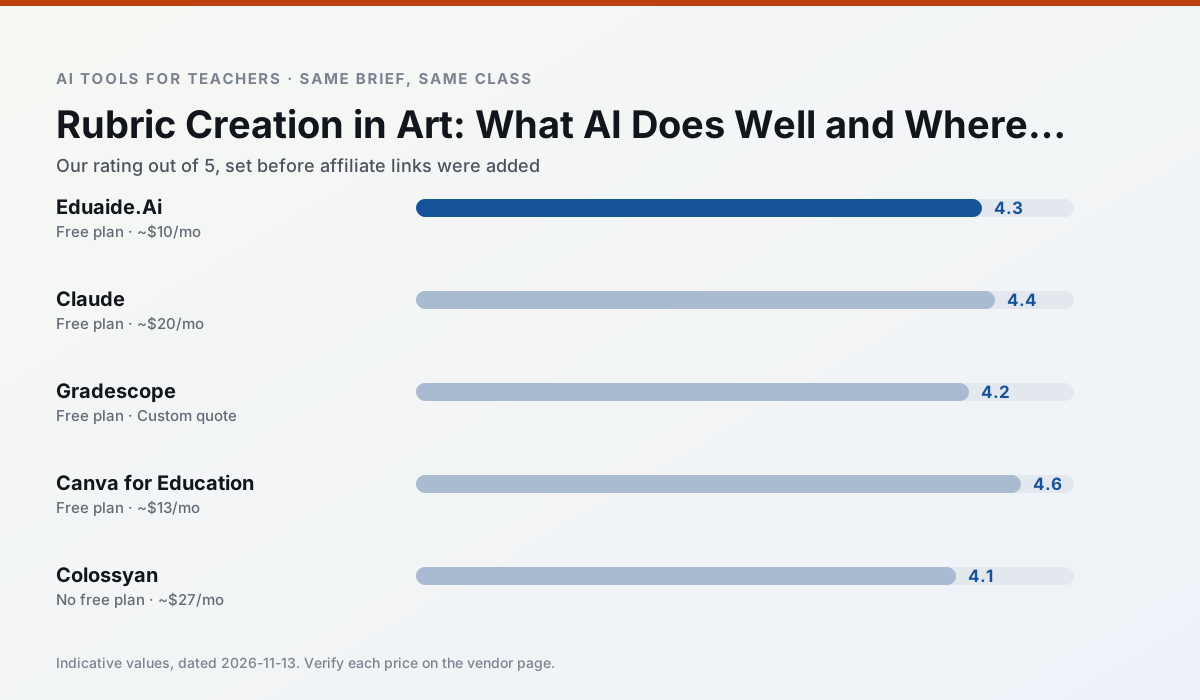
Side by side
Comparison table
Ratings reflect our timed classroom workflow, not vendor claims. Prices are indicative — verify on the vendor site.
| Tool | Best for | Free tier | Indicative paid plan | Standout feature | Our rating | Verdict | Try the tool |
|---|---|---|---|---|---|---|---|
| Eduaide.Ai | lesson planning · rubric creation | Yes — Daily generation cap | ~$10 /user/mo | Resource library | 4.3 / 5 | Strong option | Try free |
| Claude | rubric creation · feedback on writing | Yes — Usage-limited | ~$20 /user/mo | Very large context window | 4.4 / 5 | Strong option | Try free |
| Gradescope | grading · rubric creation | Yes — Limited courses | Custom quote | Bubble sheet and handwriting capture | 4.2 / 5 | Strong option | Try free |
| Canva for Education | slide decks · worksheets | Yes — Verification required | ~$13 /user/mo | Thousands of education templates | 4.6 / 5 | Top pick | Try free |
| Colossyan | PD materials · video lessons | No ongoing free plan | ~$27 /user/mo | PDF/PPT-to-video | 4.1 / 5 | Situational | Try free |
| HeyGen | video lessons · translation | Yes — Limited credit plan | ~$29 /user/mo | Video translation | 4.3 / 5 | Strong option | Try free |
Match your situation
Best for X
Different jobs need different tools. Here is what we would open first in each case.
For anything students touch directly, Eduaide.Ai offers the supervision controls and logging that IT will ask about first.
Family-facing drafts from Claude need the fewest rewrites for warmth without overpromising, which is the usual failure mode.
Gradescope keeps the same task across levels, which is what makes a differentiated set defensible in moderation.
Canva for Education has the shortest path from opening a tab to a usable draft, which matters more than the feature count on a Monday.
Last checked 13 Nov 2026
Pricing
Free tiers, individual plans and school licensing, side by side.
| Tool | Free plan | Individual / paid | School & district | Billing note | Verify |
|---|---|---|---|---|---|
| Eduaide.Ai | $0 — Daily generation cap | ~$10 /user/mo | Custom quote | Indicative — verify on vendor site | Vendor |
| Claude | $0 — Usage-limited | ~$20 /user/mo | ~$25+ /user/mo | Indicative — verify on vendor site | Vendor |
| Gradescope | $0 — Limited courses | Custom quote | Custom quote | LMS integration and support | Vendor |
| Canva for Education | $0 — Verification required | ~$13 /user/mo | Custom quote | Indicative — verify on vendor site | Vendor |
| Colossyan | No ongoing free tier | ~$27 /user/mo | Custom quote | Indicative — verify on vendor site | Vendor |
| HeyGen | $0 — Limited credit plan | ~$29 /user/mo | Custom quote | Indicative — verify on vendor site | Vendor |
Editorial rule: pricing is re-checked every 2–3 months and the top 50 pages are refreshed every 6 months. See our funding policy.
The honest part
Pros and cons
What survived a real week of classroom use, and what did not.
Pros
- Very low entry price
- Good worksheet and rubric output
- Clean, uncluttered UI
Cons
- Smaller template set than MagicSchool
- Less polished export options
- Limited integrations
Pros
- Handles full unit plans and long rubrics
- Nuanced, less generic prose
- Good at structured document output
Cons
- No teacher-specific templates
- Fewer classroom integrations
- Consumer plan not suitable for student data
Pros
- Large time savings on paper assessments
- Consistent rubric application
- Detailed item analytics
Cons
- Overkill for elementary classrooms
- Institutional pricing is opaque
- Setup effort is real
Pros
- Effectively free for verified teachers
- Huge template library
- No design skills needed
Cons
- AI features are capped
- Easy to produce cluttered slides
- Account verification can be slow
Pros
- Strong for staff training, not just lessons
- Good compliance/LMS export
- Fast document-to-video
Cons
- No permanent free plan
- Higher price point
- Less suited to K-12 student-facing content
In the classroom
Use cases
Five concrete workflows, with the tool we would open for each one.
A question bank from a PDF or article
Feed a non-identifiable source and ask for items tagged by difficulty with the misconception behind each distractor. Spot-check every answer key; numerical items are least reliable.
Recommended: Eduaide.AiA substitute folder that needs no context
The value here is structure, not creativity. Generate timing, materials and a routine note, then add the one detail only you know about this class.
Recommended: ClaudeAn IEP present-levels first draft
Use aggregated, anonymised data only. Ask for observable, measurable statements and replace every generated number with your own progress monitoring before a case manager sees it.
Recommended: GradescopeA five-minute exit ticket set
Ask for one recall, one application and one reasoning item, then delete the second recall question every generator sneaks in.
Recommended: Canva for EducationA parent email in two languages
Draft in plain, warm language with no names, translate, then back-translate the important sentences to check meaning. Keep specific incidents out of the prompt and add them yourself.
Recommended: Colossyan
Questions teachers ask us
FAQ
Direct answers, also published as FAQPage structured data for search and AI assistants.
Can AI do rubric creation at mixed-grade level?
Which tool is best for rubric creation?
What is the biggest risk?
Sources & further reading
Our recommendation
Try Colossyan free for your next rubric creation task
Training and explainer videos built from documents and scripts. Start on the free tier, run one real art lesson, and only consider upgrading if the quota is what stops you. Disclosure: we may earn a commission (25–50% recurring) at no extra cost to you.
Some links on this page are affiliate links. We may earn a commission at no extra cost to you. Our rankings are editorial and never pay-to-play. Never enter student PII into a free consumer account.
Keep reading
Related comparisons in this cluster.
Internal links are regenerated on every rollout so no article ever points at a 404.