The short answer
- Diffit is our default pick for teachers who need to level one resource for three reading groups quickly; Brisk Teaching is better when differentiation is the bottleneck.
- Pricing is where these pages date fastest. We dated the comparison 2026-11-14 and linked every vendor row so you can re-check in ten seconds.
- Every AI output for differentiated instruction needs a teacher review, especially standards codes, math accuracy, and anything in an IEP, assessment or family message.
- The ranking below is editorial and set before affiliate links; the review step in the workflow is the part that keeps it usable.
Start with Colossyan on its free plan.
At 8:15 on a Tuesday morning, I had twenty-six ninth-graders staring at me while trying to factor quadratic equations. Four of them were lost before I finished the warm-up, six were already done and bored, and the rest were floating somewhere in the muddy middle. You cannot teach algebra to three distinct rooms at once without burning out by October. That is the reality behind AI differentiated instruction for math teachers in 2026. We are not looking for magic; we are looking for triage tools that survive a real classroom.
The Reality of Mixed-Ability Math Classrooms
Differentiation in math usually fails because the prep time required is impossible. Writing three versions of a problem set, each targeting a different misconception about negative signs or coefficient manipulation, takes hours you do not have. If you want a deeper look at how other subjects handle this load, read our guide on AI essay feedback for history teachers. In math, the stakes are specific: if the numbers are wrong or the scaffolding skips a vital conceptual step, the student learns nothing.
Over the last term, I tested several platforms specifically for math differentiation. Some tools made the prep manageable, while others generated equations that fell apart under basic algebraic scrutiny. You have to know where these systems save minutes and where they create grading nightmares.
Quick Setup When You Need Three Versions Fast
When you need to take a standard word problem worksheet and split it into three entry points for a Friday check-in, Diffit stands out as best for quick setup. You paste a vetted text or concept outline, and it generates multiple reading and practice levels. The free tier gives you a limited number of generations per month, while the paid tier runs around $15 per user per month.
The strength of Diffit is its minimal setup for mixed-ability classes. It produces both printable and digital versions instantly. The limit is that leveling is approximate, not a formal diagnostic assessment. When I used it to generate three versions of a rates-and-ratios word problem set, the support tier added helpful visual cues, but the extension tier missed a crucial constraint about unit conversion. You must check the math yourself. Heavy use also burns through your free quota fast, so you save it for major units.
Prompt: Act as a high school math teacher. Take this standard problem about calculating compound interest and rewrite it into three distinct versions: supported with scaffolding, core grade-level, and extension with multi-step logic. Do not invent formulas, keep the context about saving for a car, and provide an answer key for each.
First output: The tool generated a great car-buying context. The core version was solid, but the supported version removed all exponents and replaced them with linear addition, which broke the math concept entirely. The extension version asked students to calculate depreciation instead of interest.
Two edits for usability:
- Manually fixed the supported version to keep the exponential formula while providing a step-by-step coefficient guide.
- Rewrote the extension prompt restriction to force the model to keep compound interest as the core mechanic while adding a variable time-period twist.
Browser-Based Workflows for Inline Feedback
If you spend your planning periods jumping between tabs, Brisk Teaching acts as a browser extension bringing AI feedback directly into Google Docs and Slides. It is rated as our best for schools and districts, with a paid tier around $10 per user per month and a tight free quota.
The main advantage is eliminating the copy-paste loop between student documents and a separate AI window. You can highlight a student's working out on a digital graphing task and generate inline feedback fast. The friction is that it requires Chrome-first workflows and IT approval for extension permissions. Because the extension reads document content directly, you must review your district data privacy agreement carefully before deploying it with classes.
District-Approved Safeguards and Student Spaces
SchoolAI offers a school-safe AI workspace with teacher-controlled student spaces, standing out as the best free option with limited seats and a paid tier around $15 per user per month. It is built from the ground up for district approval, giving teachers real visibility into student sessions with strong safeguarding defaults.
The trade-off is flexibility. It is less open-ended than a general-purpose language model, and pricing is mostly quote-based for full deployments. If you want students to practice algebraic reasoning inside a controlled chat environment where the AI will not give away the final answer, SchoolAI holds the line. You can watch them work in real time from your dashboard, catching who is stuck on factoring before they shut down entirely.
Explainer Videos and Multilingual Parent Communication
Sometimes differentiation means reaching families who do not speak English at home, or building remediation videos for students who miss class. Colossyan, priced around $27 per user per month with no permanent free plan, turns documents and scripts into training and explainer videos. It is efficient for staff training and LMS exports, though it lacks a free ongoing tier and its price point is steep for a single classroom teacher.
For translation work, HeyGen runs around $29 per user per month with a limited credit plan, offering best-in-class lip-sync translation. When you need to send a video explanation of a new grading rubric to multilingual families, HeyGen handles the translation seamlessly. Similarly, Synthesia turns scripts into presenter-led videos using AI avatars for about $29 per user per month. Both tools require strict adherence to data privacy guidelines regarding voice and likeness cloning. Never use student or staff likenesses without documented written consent.
When drafting parent emails about math interventions in two languages, keep specific incidents out of the prompt.
Prompt: Write a warm, professional email to a parent explaining that their child is struggling with fraction operations and inviting them to a Tuesday tutoring session. Keep names out of the template, translate into Spanish, and provide a back-translation check for clarity.
First output: The tone was slightly too corporate, and the Spanish translation used regional phrasing that sounded unnatural for our local community.
Two edits for usability:
- Added a prompt constraint to use plain, friendly language suitable for an elementary or middle school family.
- Manually adjusted the translated terminology for fractions to match the exact mathematical vocabulary we use in class.
Where AI Still Breaks Down in Math Class
The most common failure mode in math AI tools is the hallucination of procedural steps. Language models predict the next likely word, not the next logical mathematical operation. If you ask an LLM to generate an answer key for a complex system of equations, it will often get the final sign wrong while writing confident explanatory text around it.
Regrouping students after a mid-unit assessment works well if you feed the tool anonymized skill scores—never names—and ask it to output three distinct instructional groups based on specific error types, such as sign errors versus setup errors. Keep the actual student data in your own secure gradebook. Let the AI handle the mechanical translation of those skill groups into differentiated practice prompts, then review every single math problem yourself before it touches a student's desk.
FAQ
Can AI do differentiated instruction at mixed-grade level?
It can produce a first draft and a structure. The level judgement, the standards check and the tone are teacher decisions.
Which tool is best for differentiated instruction?
Diffit on the evidence in this article, with Brisk Teaching as the second opinion. Neither replaces the review step.
What is the biggest risk?
A confident, plausible output that nobody checked. The five checks below exist for that reason.
Sources
- Diffit Product Overview and Pricing: diffit.me
- Brisk Teaching Features and Privacy Documentation: briskteaching.com
- SchoolAI Safety and District Compliance Standards: schoolai.com
- Colossyan Enterprise Video Solutions: colossyan.com
- HeyGen Avatar and Translation Specifications: heygen.com
- Synthesia Video Generation Platform: synthesia.io
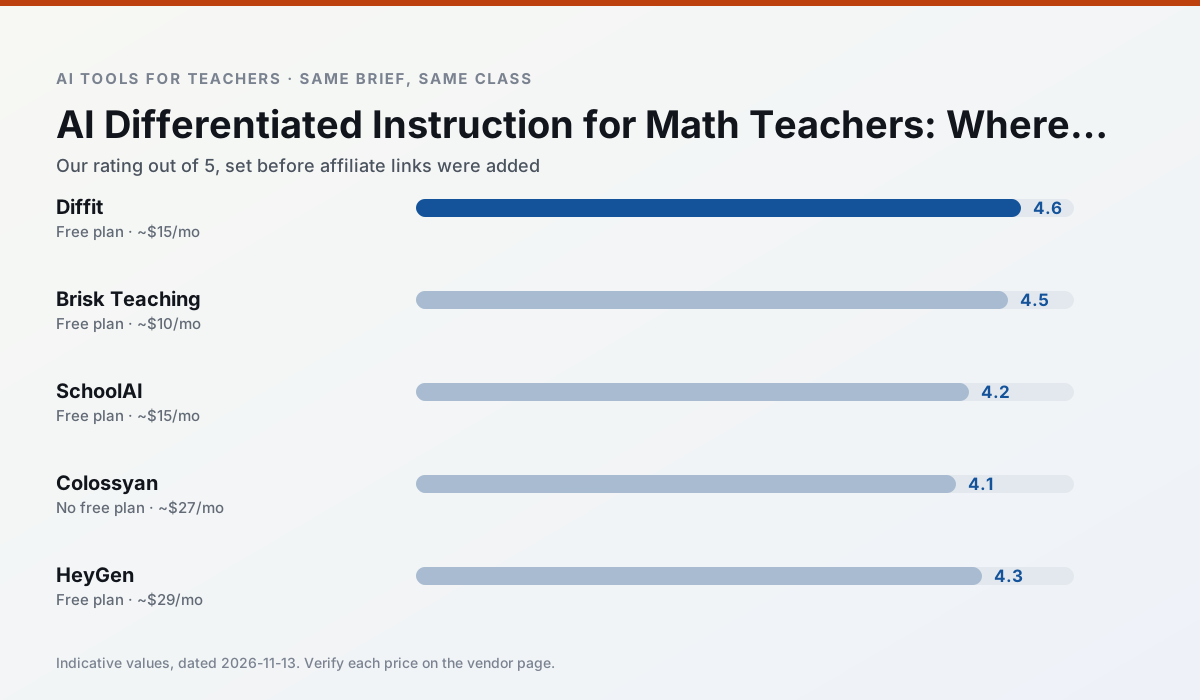
Side by side
Comparison table
Ratings reflect our timed classroom workflow, not vendor claims. Prices are indicative — verify on the vendor site.
| Tool | Best for | Free tier | Indicative paid plan | Standout feature | Our rating | Verdict | Try the tool |
|---|---|---|---|---|---|---|---|
| Diffit | differentiated instruction · reading intervention | Yes — Limited generations per month | ~$15 /user/mo | Lexile-style leveling | 4.6 / 5 | Top pick | Try free |
| Brisk Teaching | feedback on writing · grading | Yes — Limited actions per month | ~$10 /user/mo | Works inside Google Docs | 4.5 / 5 | Top pick | Try free |
| SchoolAI | student-safe AI · differentiated instruction | Yes — Limited seats | ~$15 /user/mo | Teacher-monitored student chats | 4.2 / 5 | Strong option | Try free |
| Colossyan | PD materials · video lessons | No ongoing free plan | ~$27 /user/mo | PDF/PPT-to-video | 4.1 / 5 | Situational | Try free |
| HeyGen | video lessons · translation | Yes — Limited credit plan | ~$29 /user/mo | Video translation | 4.3 / 5 | Strong option | Try free |
| Synthesia | flipped lessons · video lessons | No ongoing free plan | ~$29 /user/mo | 140+ languages | 4.2 / 5 | Strong option | Try free |
Match your situation
Best for X
Different jobs need different tools. Here is what we would open first in each case.
Setup cost is one login for Diffit; everything else can wait until you know the tool is useful.
Brisk Teaching is the option IT is least likely to block: single sign-on, admin removal of AI features and an agreement on file.
SchoolAI's free plan is the most usable in this comparison: a quota that survives a normal week. Not enough for a department, enough for one teacher to decide.
Colossyan is the one we would open on a normal planning day because the first output is editable rather than restructurable, and the free plan covers a single teacher's routine.
Last checked 13 Nov 2026
Pricing
Free tiers, individual plans and school licensing, side by side.
| Tool | Free plan | Individual / paid | School & district | Billing note | Verify |
|---|---|---|---|---|---|
| Diffit | $0 — Limited generations per month | ~$15 /user/mo | Custom quote | Indicative — verify on vendor site | Vendor |
| Brisk Teaching | $0 — Limited actions per month | ~$10 /user/mo | Custom quote | Indicative — verify on vendor site | Vendor |
| SchoolAI | $0 — Limited seats | ~$15 /user/mo | Custom quote | Indicative — verify on vendor site | Vendor |
| Colossyan | No ongoing free tier | ~$27 /user/mo | Custom quote | Indicative — verify on vendor site | Vendor |
| HeyGen | $0 — Limited credit plan | ~$29 /user/mo | Custom quote | Indicative — verify on vendor site | Vendor |
| Synthesia | No ongoing free tier | ~$29 /user/mo | Custom quote | Indicative — verify on vendor site | Vendor |
Editorial rule: pricing is re-checked every 2–3 months and the top 50 pages are refreshed every 6 months. See our funding policy.
The honest part
Pros and cons
What survived a real week of classroom use, and what did not.
Pros
- Excellent for mixed-ability classes
- Produces printable and digital versions
- Minimal setup
Cons
- Narrower scope than all-in-one suites
- Leveling is approximate, not a formal assessment
- Heavy use burns through the free quota
Pros
- No copy-paste between tools
- Fast inline feedback on student drafts
- Gentle learning curve
Cons
- Chrome-first workflow
- Extension permissions need IT approval
- Free quota is tight
Pros
- Designed for district approval
- Teacher visibility into student use
- Good safeguarding defaults
Cons
- Requires school-wide buy-in
- Less flexible than general LLMs
- Pricing is mostly quote-based
Pros
- Strong for staff training, not just lessons
- Good compliance/LMS export
- Fast document-to-video
Cons
- No permanent free plan
- Higher price point
- Less suited to K-12 student-facing content
Pros
- Best-in-class lip-sync translation
- Useful for multilingual families
- Generous trial credits
Cons
- Credit-based pricing is confusing
- Voice cloning raises consent questions
- Overkill for everyday lessons
In the classroom
Use cases
Five concrete workflows, with the tool we would open for each one.
Regrouping students after an assessment
Summarise anonymised results into skill groups, then generate one activity per group. Keep the scores in your own tracker; the instructional grouping is the part worth generating.
Recommended: DiffitA weekly family newsletter from bullet notes
Newsletters fail on length, not tone. Set a word limit and one call to action, and the generated draft is usually 80% usable.
Recommended: Brisk TeachingA parent email in two languages
Draft in plain, warm language with no names, translate, then back-translate the important sentences to check meaning. Keep specific incidents out of the prompt and add them yourself.
Recommended: SchoolAIRubric and feedback comments in one pass
Reorder the workflow so the rubric is yours and the comments are generated. Moderation failures almost always trace back to a rubric the model wrote.
Recommended: ColossyanThree reading levels from one source text
Paste a vetted text, ask for supported, core and extension versions, then check the vocabulary list by hand. Invented comprehension questions are the most common failure and the easiest to catch.
Recommended: HeyGen
Questions teachers ask us
FAQ
Direct answers, also published as FAQPage structured data for search and AI assistants.
Can AI do differentiated instruction at mixed-grade level?
Which tool is best for differentiated instruction?
What is the biggest risk?
Sources & further reading
Our recommendation
Try Colossyan free for your next differentiated instruction task
Training and explainer videos built from documents and scripts. Start on the free tier, run one real math lesson, and only consider upgrading if the quota is what stops you. Disclosure: we may earn a commission (25–50% recurring) at no extra cost to you.
Some links on this page are affiliate links. We may earn a commission at no extra cost to you. Our rankings are editorial and never pay-to-play. Never enter student PII into a free consumer account.
Keep reading
Related comparisons in this cluster.
Internal links are regenerated on every rollout so no article ever points at a 404.