The short answer
- Diffit is our default pick for teachers who need to build levelled passages and word work quickly; ElevenLabs is better when differentiation is the bottleneck.
- All 3 shortlisted tools are priced for one teacher first and a school second. Diffit and ElevenLabs are the two worth trialling on a real task before any purchase conversation.
- Every AI output for reading intervention needs a teacher review, especially standards codes, Foreign language accuracy, and anything in an IEP, assessment or family message.
- Trial one tool for a week of real reading intervention work before any purchase conversation; the quota is the honest test.
Start with ElevenLabs on its free plan.
It is Thursday afternoon, and I am staring at twenty-four copies of a Spanish text about the Fiesta de San Fermín. Six of my Spanish Two students are reading at a fourth-grade level, ten are right where they need to be, and eight are fluent heritage speakers who look ready to chew through drywall out of pure boredom. If I give them all the same article, I fail two-thirds of the room. This is the exact trap that makes AI reading intervention for world language teachers so tempting and so easy to mess up. You cannot simply ask a generic chatbot to make a text easier and hope for a clean pedagogical result.
Leveling Texts Without Losing the Language
Diffit is the tool I reach for when mixed-ability classes threaten to break my lesson plan. It lets you take any authentic article, video, or URL and level it to a specific reading grade while keeping the target language intact. The free tier gives you a limited number of generations per month, while the paid version runs around fifteen dollars a user per month. It stands out as our best choice for schools and districts needing quick differentiation.
When you run an authentic Spanish newspaper article through the engine, it strips out the archaic idioms and rebuilds the vocabulary list on the side. The catch is that leveling is approximate rather than a formal Lexile diagnostic. If you rely on it blindly, you might hand a novice learner a text that is grammatically clean but culturally gutted.
Prompt: Level this 800-word article about Argentine gauchos for CEFR A2 Spanish learners. Keep the past tense simple, define regional terms in Spanish in a glossary at the bottom, and generate three multiple-choice comprehension questions.
Result: The tool returned an A2-appropriate text with a glossary and three straightforward questions in Spanish. Edit 1: I removed one question because it relied on an English translation clue. Edit 2: I swapped out a poorly translated regional term for the actual vocabulary we practiced in our previous unit.
Adding Natural Audio to Bridge the Gap
Reading intervention in a foreign language requires the ear just as much as the eye. ElevenLabs is our pick for quick setup, offering natural-sounding text-to-speech starting on a low-cost tier around five dollars a user per month, alongside a monthly character quota. I use it to generate audio tracks for the leveled readings I pull from Diffit.
The voiceover quality avoids that robotic cadence of older screen readers. Students can listen along while following the text, which helps bridge the gap for kids with decoding difficulties. The limitation is that it remains a voice generator rather than an instructional platform. You must also be careful with voice cloning consent, never cloning a student or colleague's voice without written permission.
Streamlining Feedback and Written Output
When students finish their reading intervention tasks and write short responses, managing the grading pile stops being feasible. Turnitin Clarity and Feedback Studio handles institutional writing feedback and similarity checking. While individual teachers cannot purchase it directly and pricing requires a custom quote, it serves as our best overall tool for daily institutional use due to its consistent workflow and detailed revision history.
For paper-based work, Class Companion steps in as a free option with limited assignments, costing around twelve dollars a user per month for broader access. It provides AI feedback on handwritten and scanned student work. If your students annotate printed articles by hand, this tool reads the scan and offers specific comments. The scan quality dictates accuracy, and you still need to review the feedback before handing papers back.
Creating Safe Practice Spaces
If you want students interacting with AI directly for targeted reading comprehension practice, open-ended chatbots are a liability. SchoolAI creates a school-safe workspace with teacher-controlled student spaces, costing roughly fifteen dollars a user per month. It is designed for district approval with strong safeguarding defaults and teacher visibility.
It prevents students from wandering off into unrestricted web terrain while they practice conversational reading prompts. The trade-off is that it requires school-wide buy-in and lacks the wild flexibility of general-purpose models. If your district has not provisioned a secure environment, keep your AI use strictly teacher-facing. For broader context on how these systems operate across the building, take a look at our guide on AI tools for teachers.
Where Things Go Wrong in Practice
Things go wrong when you trust the AI with structural design. Last term, I let a model generate an entire reading intervention sequence based on a prompt I rushed through during my planning period. The vocabulary progression was completely out of order, introducing subjunctive verbs to students who had barely mastered present tense endings. I had to scrap the materials and spend my lunch break rewriting the activities by hand.
Another time, I tried using Surfer SEO, an expensive content optimization platform running around seventy-nine dollars a month, to clean up some reading resources I was publishing on an external marketplace. While it excels at on-page guidance for teacher-creators, it has nothing to do with student intervention and quickly drains your patience if you are looking for classroom solutions rather than web traffic metrics.
When you build interventions, use the AI for what it handles best: generating variants, grading scanned text drafts, and voicing audio files. Keep the scope and sequence firmly in your own hands. You can also explore specific classroom strategies like those found in the AI essay feedback for history teachers guide to see how other departments handle writing moderation.
FAQ
Can AI do reading intervention at mixed-grade level?
It can produce a first draft and a structure. The level judgement, the standards check and the tone are teacher decisions.
Which tool is best for reading intervention?
Diffit on the evidence in this article, with ElevenLabs as the second opinion. Neither replaces the review step.
What is the biggest risk?
A confident, plausible output that nobody checked. The five checks below exist for that reason.
Sources
- Diffit: diffit.me
- ElevenLabs: elevenlabs.io
- Turnitin Clarity / Feedback Studio: turnitin.com
- Class Companion: classcompanion.com
- SchoolAI: schoolai.com
- Surfer SEO: surferseo.com
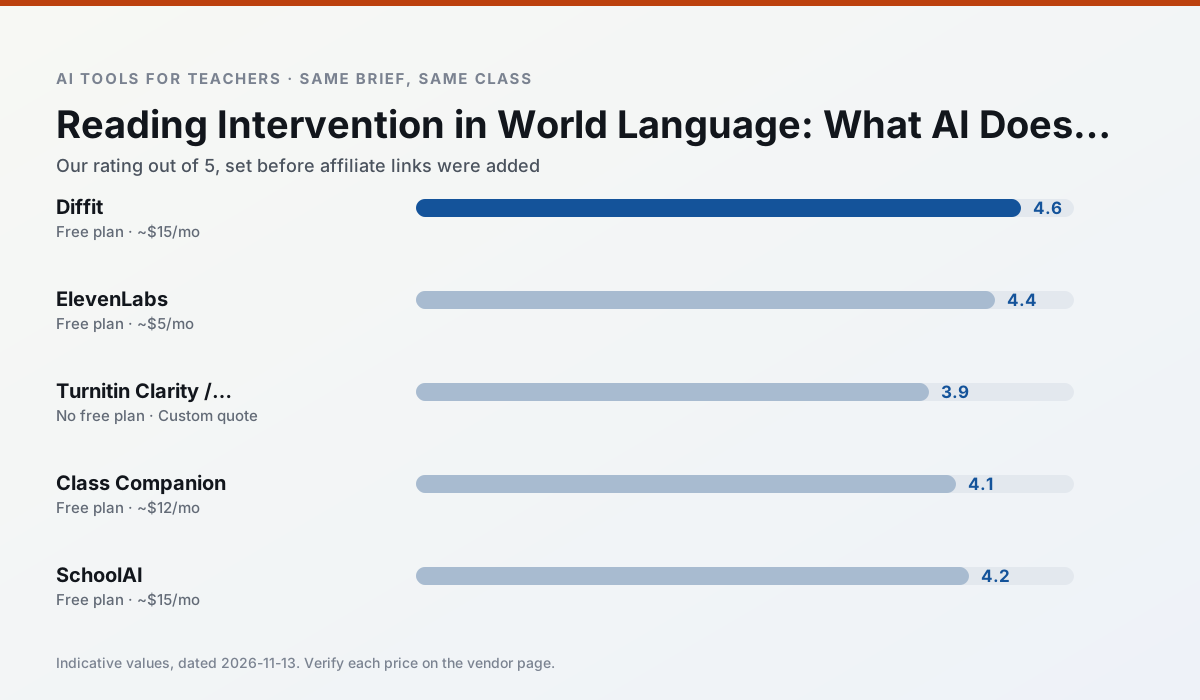
Side by side
Comparison table
Ratings reflect our timed classroom workflow, not vendor claims. Prices are indicative — verify on the vendor site.
| Tool | Best for | Free tier | Indicative paid plan | Standout feature | Our rating | Verdict | Try the tool |
|---|---|---|---|---|---|---|---|
| Diffit | differentiated instruction · reading intervention | Yes — Limited generations per month | ~$15 /user/mo | Lexile-style leveling | 4.6 / 5 | Top pick | Try free |
| ElevenLabs | accessibility · reading intervention | Yes — Monthly character quota | ~$5 /user/mo | Very natural voices | 4.4 / 5 | Strong option | Try free |
| Turnitin Clarity / Feedback Studio | feedback on writing · academic integrity | No ongoing free plan | Custom quote | Similarity reports | 3.9 / 5 | Situational | Try free |
| Class Companion | grading · feedback on writing | Yes — Limited assignments | ~$12 /user/mo | Handwriting recognition | 4.1 / 5 | Situational | Try free |
| SchoolAI | student-safe AI · differentiated instruction | Yes — Limited seats | ~$15 /user/mo | Teacher-monitored student chats | 4.2 / 5 | Strong option | Try free |
| Surfer SEO | teacher bloggers · resource sellers | No ongoing free plan | ~$79 /mo | Content Editor | 4.0 / 5 | Situational | Try free |
Match your situation
Best for X
Different jobs need different tools. Here is what we would open first in each case.
Diffit is the option IT is least likely to block: single sign-on, admin removal of AI features and an agreement on file.
ElevenLabs runs in a browser tab with no extension, no student accounts and no onboarding call, so you can test it in a free period.
On the daily cycle, Turnitin Clarity / Feedback Studio saves the most edit time per task; the paid tier mostly buys more runs rather than better ones.
Nothing on Class Companion's free tier is a teaser demo; the limits are documented and a normal week fits inside them.
Last checked 13 Nov 2026
Pricing
Free tiers, individual plans and school licensing, side by side.
| Tool | Free plan | Individual / paid | School & district | Billing note | Verify |
|---|---|---|---|---|---|
| Diffit | $0 — Limited generations per month | ~$15 /user/mo | Custom quote | Indicative — verify on vendor site | Vendor |
| ElevenLabs | $0 — Monthly character quota | ~$5 /user/mo | ~$22 /user/mo | Indicative — verify on vendor site | Vendor |
| Turnitin Clarity / Feedback Studio | No ongoing free tier | Custom quote | Custom quote | LMS-wide deployment | Vendor |
| Class Companion | $0 — Limited assignments | ~$12 /user/mo | Custom quote | Indicative — verify on vendor site | Vendor |
| SchoolAI | $0 — Limited seats | ~$15 /user/mo | Custom quote | Indicative — verify on vendor site | Vendor |
| Surfer SEO | No ongoing free tier | ~$79 /mo | Custom quote | Indicative — verify on vendor site | Vendor |
Editorial rule: pricing is re-checked every 2–3 months and the top 50 pages are refreshed every 6 months. See our funding policy.
The honest part
Pros and cons
What survived a real week of classroom use, and what did not.
Pros
- Excellent for mixed-ability classes
- Produces printable and digital versions
- Minimal setup
Cons
- Narrower scope than all-in-one suites
- Leveling is approximate, not a formal assessment
- Heavy use burns through the free quota
Pros
- Excellent for accessible audio versions
- Low entry price
- Fast generation
Cons
- Quota-based billing
- Voice cloning consent considerations
- Not a teaching platform
Pros
- Already licensed at many schools
- Consistent institutional workflow
- Detailed revision history
Cons
- Individual teachers cannot buy it
- AI detection remains contested
- Heavy administrative setup
Pros
- Useful where work is done on paper
- Fast, specific comments
- Good math support
Cons
- Scan quality affects accuracy
- Narrow use case
- Feedback still needs teacher review
Pros
- Designed for district approval
- Teacher visibility into student use
- Good safeguarding defaults
Cons
- Requires school-wide buy-in
- Less flexible than general LLMs
- Pricing is mostly quote-based
In the classroom
Use cases
Five concrete workflows, with the tool we would open for each one.
A weekly family newsletter from bullet notes
Newsletters fail on length, not tone. Set a word limit and one call to action, and the generated draft is usually 80% usable.
Recommended: DiffitRegrouping students after an assessment
Summarise anonymised results into skill groups, then generate one activity per group. Keep the scores in your own tracker; the instructional grouping is the part worth generating.
Recommended: ElevenLabsRubric and feedback comments in one pass
Reorder the workflow so the rubric is yours and the comments are generated. Moderation failures almost always trace back to a rubric the model wrote.
Recommended: Turnitin Clarity / Feedback StudioA parent email in two languages
Draft in plain, warm language with no names, translate, then back-translate the important sentences to check meaning. Keep specific incidents out of the prompt and add them yourself.
Recommended: Class CompanionA Monday morning lesson plan in twelve minutes
The twelve minutes come from not rewriting the skeleton. Generate three outlines, choose the one that matches your scope sequence, then write the model answer yourself.
Recommended: SchoolAI
Questions teachers ask us
FAQ
Direct answers, also published as FAQPage structured data for search and AI assistants.
Can AI do reading intervention at mixed-grade level?
Which tool is best for reading intervention?
What is the biggest risk?
Sources & further reading
Our recommendation
Try ElevenLabs free for your next reading intervention task
Natural-sounding AI voiceover and text-to-speech for learning materials. Start on the free tier, run one real Foreign language lesson, and only consider upgrading if the quota is what stops you. Disclosure: we may earn a commission (22% recurring) at no extra cost to you.
Some links on this page are affiliate links. We may earn a commission at no extra cost to you. Our rankings are editorial and never pay-to-play. Never enter student PII into a free consumer account.
Keep reading
Related comparisons in this cluster.
Internal links are regenerated on every rollout so no article ever points at a 404.