The short answer
- MagicSchool AI is our default pick for teachers who need to draft a standards-aware lesson plan quickly; Eduaide.Ai is better when differentiation is the bottleneck.
- The cheapest honest test is a week of real work on the free plans: MagicSchool AI: Yes — Core generators with monthly usage limits; Eduaide.Ai: Yes — Daily generation cap; ChatGPT: Yes — Usage-limited model access. If a tool is still open on Friday, it has earned a paid conversation.
- Every AI output for lesson planning needs a teacher review, especially standards codes, science accuracy, and anything in an IEP, assessment or family message.
- Everything on this page dates from 2026-11-13; where a price could not be re-read, the row says so.
Start with MagicSchool AI on its free plan.
By third period on a Tuesday, my eighth-grade physical science lab had four broken ring stands, seven half-finished worksheets, and a sub-plan I had scribbled on a sticky note at 6:45 AM. I needed a three-tier reading passage on thermal conductivity, a safety checklist for an open-flame test, and an exit ticket that did not just ask kids to copy definitions. Doing that by hand took two hours I did not have, which is why science teachers started turning to AI lesson planning for science teachers to reclaim their evenings.
Using these systems across a full school term reveals a clear split between what looks impressive in a demo and what actually survives contact with thirty restless lab groups. You cannot just type "make a science lesson" and expect a masterpiece. You need the right tool for the specific classroom bottleneck, whether that is building presentation decks or differentiating lab texts. For a broader overview of classroom technology, take a look at the comprehensive rankings in our guide on the best AI tools for teachers in 2026.
MagicSchool AI for Daily Planning
MagicSchool AI has earned its spot as the best overall for daily use because its template library matches the actual paperwork teachers generate. If you need a lab safety contract, a phenomenon-based warm-up, or a 5E lesson plan outline, you click the generator, fill in your topic, and get a result in seconds. The platform offers core generators with monthly usage limits on its free tier, while the paid tier runs around $12 per user per month (indicative) to unlock the full suite.
The main strength here is that you do not need prompting skills. The tool asks for grade level, standard, and topic, then hands you structured text. The catch is that the output still needs rigorous standards review, especially for sequence and pacing in multi-week chemistry units. District approval can also be slow, and the best features sit behind that paid tier. Vendor terms state no student PII is required for core generators, but you should always confirm your district DPA before uploading sensitive rosters.
Eduaide.Ai for Budget-Conscious Labs
When your department budget is zero and you still need high-quality worksheets and rubrics, Eduaide.Ai is the best free option on the market. It operates on a daily generation cap for its free tier, with a paid upgrade running around $10 per user per month (indicative) if you hit your limits constantly. The interface is clean and uncluttered, making it easy to generate a set of differentiated lab questions without clicking through marketing pop-ups.
The worksheet and rubric outputs are consistently practical for secondary science. The template set is smaller than MagicSchool, and the export options feel a bit bare-bones compared to presentation software. It also has limited integrations with standard learning management systems. Confirm your data retention settings if you use it for any administrative tasks, though for pure material generation, it remains a reliable workshop staple.
ChatGPT for District-Wide Flexibility
ChatGPT remains the best for schools and districts that want a general-purpose assistant rather than a walled garden of templates. The free tier gives you usage-limited model access, while the paid version costs around $20 per user per month (indicative). Its flexibility is unmatched; you can paste an entire state science framework, a messy set of raw student misconceptions from a formative quiz, and ask the model to draft an intervention strategy tailored to your exact pacing guide.
Prompt:
Act as a veteran 8th-grade physical science teacher. Take this rough list of student misconceptions about states of matter (solid, liquid, gas) from our recent formative check:
- particles stop moving in solids
- heat is a substance that flows into objects
- boiling water gets hotter the longer it stays on the burner
Generate three targeted station activities to address these specific errors, keeping materials to common classroom items like beakers, ice, and hot plates.

Initial Output:
The model generated three elaborate stations involving complex calorimetry setups and digital thermometer probes we do not own, plus an essay-writing task that did not fit a forty-minute class period.

Two Edits That Made It Usable:
1. Added a strict material constraint ("use only ice, thermometers, hot plates, and water") to force realistic lab design.
2. Swapped the essay task for a quick particle-diagram whiteboard challenge to match our actual learning objectives.
The major limitation of a general-purpose model is that it has no built-in standards alignment; you have to supply the criteria yourself. It also requires genuine prompt engineering skills to get consistent results across different units. District privacy review is usually required before staff accounts are approved, and you must never enter student PII on consumer plans.
Gamma for Quick Visual Setup
Gamma is the fastest path from outline to deck, earning its place as the best for quick setup when you need a slide deck for a new earth science unit before first period. It uses a credit-limited generation model on the free tier, with paid plans running around $10 per user per month (indicative). You type a prompt about plate tectonics or ecosystem dynamics, choose a visual theme, and the system builds a complete presentation with layout blocks and image placeholders.
The default output looks modern and professional without requiring hours in slide design software. The export options to PDF or web links are straightforward for student viewing. However, design control is limited once the layout is generated, and your credits run out surprisingly fast if you generate multiple iterations. Treat Gamma as a content creation tool only, and do not upload student work or grades into the platform.
Synthesia and HeyGen for Video Content
Synthesia and HeyGen both offer AI avatar video and translation services, starting around $29 per user per month (indicative) with limited trial credits or none at all. Synthesia turns scripts into presenter-led videos with AI avatars, which is useful if you need to flip a chemistry lecture for students who are absent. HeyGen provides similar features with strong lip-sync translation capabilities, making it practical for reaching multilingual families with translated safety briefings or syllabus overviews.
These tools are expensive and hard to justify for a single classroom teacher's budget. Avatar videos can easily feel impersonal to teenagers who value face-to-face instruction, and voice cloning raises serious consent questions that require documented permission from colleagues or students. For most science teachers, these platforms are overkill for everyday lessons, though they shine in district-level communications. For related classroom strategies, read our guide on AI exit tickets for ELA teachers.
Practical Workflows That Actually Work
AI works best when it acts as an assistant rather than a replacement for your professional judgment. Take differentiating a single source text about genetics. Paste a vetted article into your chosen tool, and ask for supported, core, and extension versions. You must check the vocabulary list and comprehension questions by hand, as invented questions are the most common failure mode and the easiest to catch.
For assessment data, summarize anonymized results into skill groups, then generate one activity per group while keeping scores in your own tracker. When drafting a weekly family newsletter, set a strict word limit and one call to action to prevent the model from generating walls of text that parents will never read. A Monday morning lesson plan can be built in twelve minutes if you generate three distinct outlines, choose the one that matches your scope and sequence, and write the model answer yourself.
FAQ
Can AI do lesson planning at mixed-grade level?
It can produce a first draft and a structure. The level judgement, the standards check and the tone are teacher decisions.
Which tool is best for lesson planning?
MagicSchool AI on the evidence in this article, with Eduaide.Ai as the second opinion. Neither replaces the review step.
What is the biggest risk?
A confident, plausible output that nobody checked. The five checks below exist for that reason.
Sources
- MagicSchool AI Pricing and Features: magicschool.ai
- Eduaide.Ai Platform Specifications: eduaide.ai
- OpenAI ChatGPT Enterprise and Consumer tiers: openai.com
- Gamma App Features and Export Limits: gamma.app
- Synthesia Video Generation Policies: synthesia.io
- HeyGen Translation and Avatar Guidelines: heygen.com
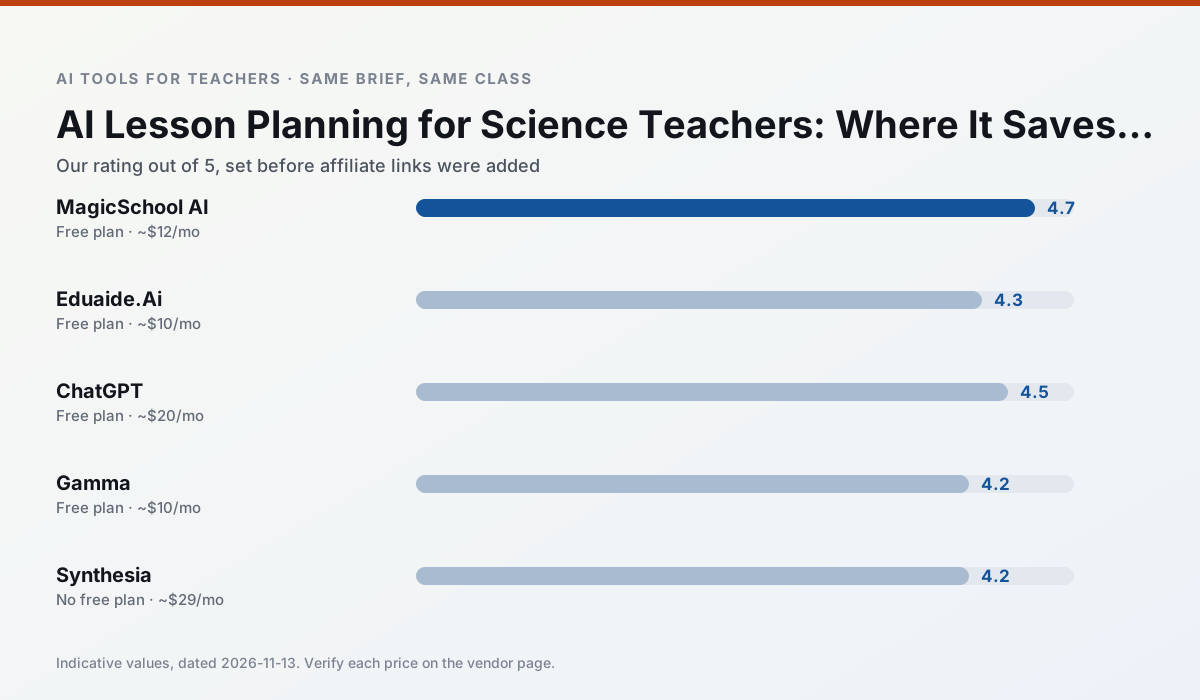
Side by side
Comparison table
Ratings reflect our timed classroom workflow, not vendor claims. Prices are indicative — verify on the vendor site.
| Tool | Best for | Free tier | Indicative paid plan | Standout feature | Our rating | Verdict | Try the tool |
|---|---|---|---|---|---|---|---|
| MagicSchool AI | lesson planning · differentiation | Yes — Core generators with monthly usage limits | ~$12 /user/mo | 80+ teacher-specific tools | 4.7 / 5 | Top pick | Try free |
| Eduaide.Ai | lesson planning · rubric creation | Yes — Daily generation cap | ~$10 /user/mo | Resource library | 4.3 / 5 | Strong option | Try free |
| ChatGPT | lesson planning · parent communication | Yes — Usage-limited model access | ~$20 /user/mo | Custom GPTs and Projects | 4.5 / 5 | Top pick | Try free |
| Gamma | slide decks · parent communication | Yes — Credit-limited generation | ~$10 /user/mo | Prompt-to-deck | 4.2 / 5 | Strong option | Try free |
| Synthesia | flipped lessons · video lessons | No ongoing free plan | ~$29 /user/mo | 140+ languages | 4.2 / 5 | Strong option | Try free |
| HeyGen | video lessons · translation | Yes — Limited credit plan | ~$29 /user/mo | Video translation | 4.3 / 5 | Strong option | Try free |
Match your situation
Best for X
Different jobs need different tools. Here is what we would open first in each case.
MagicSchool AI is the one we would open on a normal planning day because the first output is editable rather than restructurable, and the free plan covers a single teacher's routine.
Eduaide.Ai's free plan is the most usable in this comparison: a quota that survives a normal week. Not enough for a department, enough for one teacher to decide.
ChatGPT answers the three questions a district actually asks: rostering, admin controls and a data-processing agreement. That is usually what decides a school purchase.
Gamma has the shortest path from opening a tab to a usable draft, which matters more than the feature count on a Monday.
Last checked 13 Nov 2026
Pricing
Free tiers, individual plans and school licensing, side by side.
| Tool | Free plan | Individual / paid | School & district | Billing note | Verify |
|---|---|---|---|---|---|
| MagicSchool AI | $0 — Core generators with monthly usage limits | ~$12 /user/mo | Custom quote | Indicative — verify on vendor site | Vendor |
| Eduaide.Ai | $0 — Daily generation cap | ~$10 /user/mo | Custom quote | Indicative — verify on vendor site | Vendor |
| ChatGPT | $0 — Usage-limited model access | ~$20 /user/mo | ~$25+ /user/mo | Indicative — verify on vendor site | Vendor |
| Gamma | $0 — Credit-limited generation | ~$10 /user/mo | ~$20 /user/mo | Indicative — verify on vendor site | Vendor |
| Synthesia | No ongoing free tier | ~$29 /user/mo | Custom quote | Indicative — verify on vendor site | Vendor |
| HeyGen | $0 — Limited credit plan | ~$29 /user/mo | Custom quote | Indicative — verify on vendor site | Vendor |
Editorial rule: pricing is re-checked every 2–3 months and the top 50 pages are refreshed every 6 months. See our funding policy.
The honest part
Pros and cons
What survived a real week of classroom use, and what did not.
Pros
- Widest purpose-built template library
- Strong free tier for individual teachers
- Fast to learn with almost no prompting skill
Cons
- Outputs still need standards review
- Best features sit behind the paid tier
- District approval can be slow
Pros
- Very low entry price
- Good worksheet and rubric output
- Clean, uncluttered UI
Cons
- Smaller template set than MagicSchool
- Less polished export options
- Limited integrations
Pros
- Most flexible option available
- Huge community of teacher prompt libraries
- Strong multilingual support
Cons
- Requires prompt skills for consistent results
- No built-in standards alignment
- District privacy review usually required
Pros
- Fastest path from outline to deck
- Modern-looking output by default
- Good export options
Cons
- Design control is limited
- Credits run out quickly
- Not built for student data
Pros
- No camera or editing skills required
- Excellent multilingual voice output
- Easy updates to existing videos
Cons
- Cost is hard to justify for a single teacher
- Avatar video can feel impersonal
- No free ongoing tier
In the classroom
Use cases
Five concrete workflows, with the tool we would open for each one.
A weekly family newsletter from bullet notes
Newsletters fail on length, not tone. Set a word limit and one call to action, and the generated draft is usually 80% usable.
Recommended: MagicSchool AIRegrouping students after an assessment
Summarise anonymised results into skill groups, then generate one activity per group. Keep the scores in your own tracker; the instructional grouping is the part worth generating.
Recommended: Eduaide.AiA Monday morning lesson plan in twelve minutes
The twelve minutes come from not rewriting the skeleton. Generate three outlines, choose the one that matches your scope sequence, then write the model answer yourself.
Recommended: ChatGPTThree reading levels from one source text
Paste a vetted text, ask for supported, core and extension versions, then check the vocabulary list by hand. Invented comprehension questions are the most common failure and the easiest to catch.
Recommended: GammaRubric and feedback comments in one pass
Reorder the workflow so the rubric is yours and the comments are generated. Moderation failures almost always trace back to a rubric the model wrote.
Recommended: Synthesia
Questions teachers ask us
FAQ
Direct answers, also published as FAQPage structured data for search and AI assistants.
Can AI do lesson planning at mixed-grade level?
Which tool is best for lesson planning?
What is the biggest risk?
Sources & further reading
Our recommendation
Try MagicSchool AI free for your next lesson planning task
A large library of teacher-specific AI generators in one dashboard. Start on the free tier, run one real science lesson, and only consider upgrading if the quota is what stops you. Disclosure: we may earn a commission (30% recurring) at no extra cost to you.
Some links on this page are affiliate links. We may earn a commission at no extra cost to you. Our rankings are editorial and never pay-to-play. Never enter student PII into a free consumer account.
Keep reading
Related comparisons in this cluster.
Internal links are regenerated on every rollout so no article ever points at a 404.