The short answer
- MagicSchool AI is our default pick for teachers who need to draft a standards-aware lesson plan quickly; Canva for Education is better when differentiation is the bottleneck.
- The cheapest honest test is a week of real work on the free plans: MagicSchool AI: Yes — Core generators with monthly usage limits; Canva for Education: Yes — Verification required; Writesonic: Yes — Limited credits. If a tool is still open on Friday, it has earned a paid conversation.
- Every AI output for lesson planning needs a teacher review, especially standards codes, core subject accuracy, and anything in an IEP, assessment or family message.
- Everything on this page dates from 2026-11-13; where a price could not be re-read, the row says so.
Start with MagicSchool AI on its free plan.
At 7:45 AM on a Tuesday, I needed a five-minute exit ticket set for eighth-grade science: one recall item, one application item, and one reasoning item. My regular planning period had just evaporated into an impromptu parent meeting. I had two tabs open: MagicSchool AI and Canva for Education. Both promised to shave hours off my prep work. If you are trying to figure out which tool actually survives contact with a real room of thirty kids, you need to look past the marketing deck and see how they hold up under morning panic. For a broader look at how these platforms stack up, check out our guide on the best AI tools for teachers.
The Daily Workflow Test
MagicSchool AI approaches lesson prep through a massive library of teacher-specific generators housed in a single dashboard. You do not need to know how to prompt an LLM; you just click the tool you want, fill out a form field, and wait six seconds. The free tier gives you core generators with monthly usage limits, while the paid version sits around $12 per user per month. It is fast to learn and built entirely around pedagogy. If you need a quick station rotation or a rubric, the templates speak teacher.
Canva for Education takes a completely different route. It is a free design suite for verified educators that includes built-in AI writing and image features. The visual output is stunning. If you need parent-facing newsletters or anchor charts that do not look like they were made in 1998, Canva wins hands down. But using its AI writing assistants inside a design canvas feels clunky when you are trying to crank out raw text documents or differentiated reading passages. You spend too much time dragging text boxes around instead of refining your scope and sequence.
Where MagicSchool AI Wins
When you are planning a Monday morning lesson plan in twelve minutes, MagicSchool shines. The trick to hitting that twelve-minute mark is refusing to rewrite the generated skeleton from scratch. You generate three outlines, pick the one that matches your actual scope and sequence, and then write the model answer yourself. MagicSchool understands curriculum structures better than generalist tools.
It also takes the crown as best for mixed-ability classes, though if you want dedicated leveling of existing texts, specialized options like Diffit often handle that specific job with less friction. You can lean on other niche platforms like Eduaide.Ai, which offers a clean, uncluttered UI and solid worksheet generation for about $10 a user per month, or Curipod, which turns a topic into an interactive student-response lesson for around $12 a user per month. But MagicSchool keeps everything under one roof. The catch is that its best features sit firmly behind the paid tier, and district approval processes can be agonizingly slow. Vendor privacy notes state that core generators do not require student PII, but you still need to confirm your district data processing agreement before rolling it out to a whole department.
Where Canva for Education Wins
Canva remains unmatched for parent-facing writing and visual communication. When I need to send home a behaviour policy breakdown or a syllabus that families will actually read, I open Canva. The interface requires zero design skills, and the education tier is effectively free once your account verification clears.
[Prompt typed into Canva's Magic Write]
Create a friendly, three-paragraph welcome letter for middle school parents explaining our upcoming science unit on ecosystems, avoiding education jargon.

[What came back]
A very polished, nicely formatted letter that used terms like "pedagogical framework" and "interdisciplinary instructional modalities" in the second paragraph, despite my explicit instruction to avoid jargon.

[Two edits that made it usable]
1. Stripped out the corporate-speak and replaced the bullet points with a simple timeline of what students will build in class.
2. Swapped the generic stock photo of a forest for a photo of our actual school courtyard garden.
That experience highlights Canva's main limitation for daily instructional planning. It is easy to produce cluttered slides when you rely too heavily on template eye candy, and the AI features themselves are strictly capped compared to dedicated text generators. You also have to watch out for verification delays when setting up your school account.
Managing the Fringe Choices
If you find yourself looking outside the big two, you will run into tools like Writesonic and Diffit. Writesonic pitches itself as a budget-friendly writing assistant at around $16 a user per month, but its credit system is confusing and the output often feels too generic for the classroom. It is best suited for student-safe deployments where lesson context matters less than raw text generation, and you must remember that it is never intended for student data.
For deep dives into specific workflow comparisons, you can also read our breakdown on Brisk Teaching vs MagicSchool. Meanwhile, if you are building question banks from dense PDFs, feeding a non-identifiable source into an AI tool requires strict spot-checking. Numerical items are notoriously unreliable, and every generator loves to sneak in extra recall questions when you asked for reasoning tasks.
Two Real Failures and How to Fix Them
Nothing exposes the limits of AI faster than a high-stakes classroom moment. Here is what went wrong during my term test and how I adjusted.
First, I tried using MagicSchool to generate an IEP present-levels first draft using aggregated, anonymised student data. The tool generated a neat little summary complete with percentage improvements that looked entirely plausible. The problem was that the numbers were completely fabricated by the model's prediction engine. Before sending anything near a case manager, I had to replace every single generated number with my own verified progress-monitoring logs.
Second, I built a sub folder using Canva's document editor, hoping for a zero-context emergency plan. The structure was there, but the timing was wildly optimistic. It scheduled a twenty-minute silent reading block for a room of sixth graders on a Friday afternoon. The value of an AI sub plan is structure, not creativity. I kept the generated timeline and materials list, but I added the one detail only I knew about this class: a mandatory seating rotation and a warning about the pencil sharpener.
FAQ
MagicSchool AI or Canva for Education for lesson planning?
MagicSchool AI for breadth and speed, Canva for Education when the output goes to a colleague or a family and has to be right first time.
Which is cheaper for one teacher?
Compare the free quotas first, then the individual plans. In most weeks the free plan decides the purchase, not the list price.
Do they produce the same output?
On simple tasks, often yes, and that is a useful result: it points at the cheaper, better-governed option rather than the one with more features.
Sources
- MagicSchool AI Pricing and Feature Overview, magicschool.ai
- Canva for Education Verification and Privacy Terms, canva.com/education
- Writesonic Pricing and Capabilities, writesonic.com
- Diffit Teacher Features and Quota Limits, diffit.me
- Eduaide.Ai Resource Library Specifications, eduaide.ai
- Curipod Interactive Lesson Delivery Terms, curipod.com
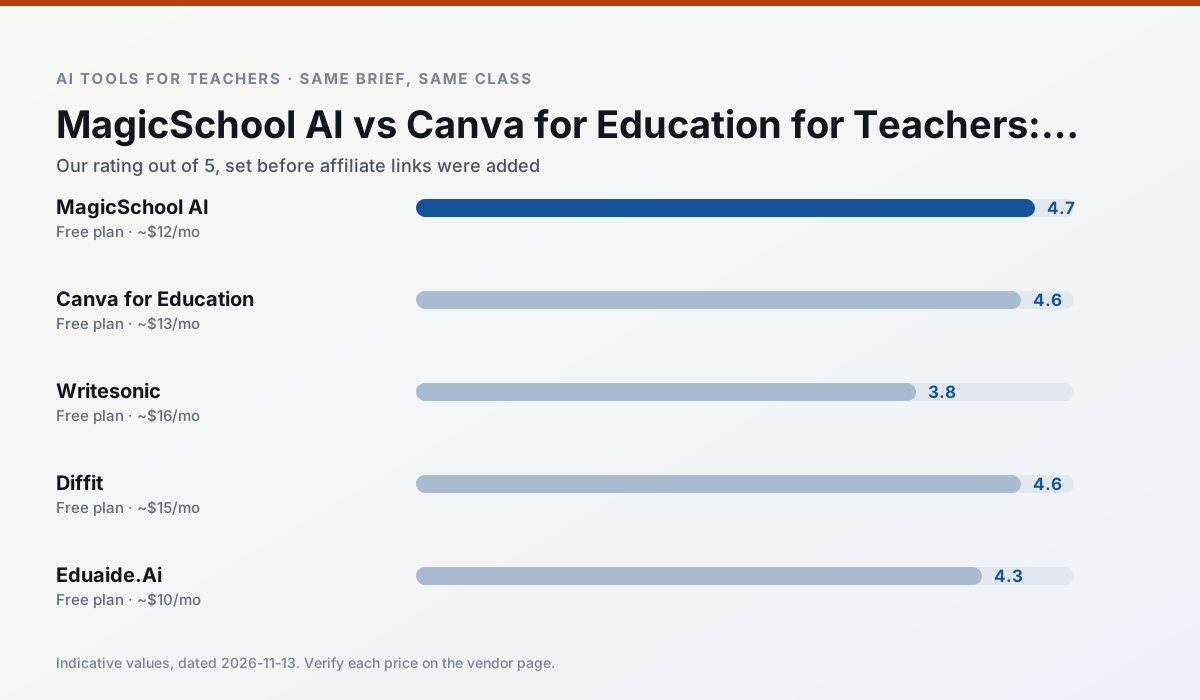
Side by side
Comparison table
Ratings reflect our timed classroom workflow, not vendor claims. Prices are indicative — verify on the vendor site.
| Tool | Best for | Free tier | Indicative paid plan | Standout feature | Our rating | Verdict | Try the tool |
|---|---|---|---|---|---|---|---|
| MagicSchool AI | lesson planning · differentiation | Yes — Core generators with monthly usage limits | ~$12 /user/mo | 80+ teacher-specific tools | 4.7 / 5 | Top pick | Try free |
| Canva for Education | slide decks · worksheets | Yes — Verification required | ~$13 /user/mo | Thousands of education templates | 4.6 / 5 | Top pick | Try free |
| Writesonic | newsletters · parent communication | Yes — Limited credits | ~$16 /user/mo | Article and email generators | 3.8 / 5 | Situational | Try free |
| Diffit | differentiated instruction · reading intervention | Yes — Limited generations per month | ~$15 /user/mo | Lexile-style leveling | 4.6 / 5 | Top pick | Try free |
| Eduaide.Ai | lesson planning · rubric creation | Yes — Daily generation cap | ~$10 /user/mo | Resource library | 4.3 / 5 | Strong option | Try free |
| Curipod | formative assessment · exit tickets | Yes — Limited lessons per month | ~$12 /user/mo | Live polls and word clouds | 4.4 / 5 | Strong option | Try free |
Match your situation
Best for X
Different jobs need different tools. Here is what we would open first in each case.
MagicSchool AI keeps the same task across levels, which is what makes a differentiated set defensible in moderation.
Canva for Education is the steadiest of this set at plain, respectful language; names and specific incidents still belong in your draft, not the prompt.
Writesonic is the student-facing option here with boundaries a teacher can actually set and supervise.
On the daily cycle, Diffit saves the most edit time per task; the paid tier mostly buys more runs rather than better ones.
Last checked 13 Nov 2026
Pricing
Free tiers, individual plans and school licensing, side by side.
| Tool | Free plan | Individual / paid | School & district | Billing note | Verify |
|---|---|---|---|---|---|
| MagicSchool AI | $0 — Core generators with monthly usage limits | ~$12 /user/mo | Custom quote | Indicative — verify on vendor site | Vendor |
| Canva for Education | $0 — Verification required | ~$13 /user/mo | Custom quote | Indicative — verify on vendor site | Vendor |
| Writesonic | $0 — Limited credits | ~$16 /user/mo | ~$49 /user/mo | Indicative — verify on vendor site | Vendor |
| Diffit | $0 — Limited generations per month | ~$15 /user/mo | Custom quote | Indicative — verify on vendor site | Vendor |
| Eduaide.Ai | $0 — Daily generation cap | ~$10 /user/mo | Custom quote | Indicative — verify on vendor site | Vendor |
| Curipod | $0 — Limited lessons per month | ~$12 /user/mo | Custom quote | Indicative — verify on vendor site | Vendor |
Editorial rule: pricing is re-checked every 2–3 months and the top 50 pages are refreshed every 6 months. See our funding policy.
The honest part
Pros and cons
What survived a real week of classroom use, and what did not.
Pros
- Widest purpose-built template library
- Strong free tier for individual teachers
- Fast to learn with almost no prompting skill
Cons
- Outputs still need standards review
- Best features sit behind the paid tier
- District approval can be slow
Pros
- Effectively free for verified teachers
- Huge template library
- No design skills needed
Cons
- AI features are capped
- Easy to produce cluttered slides
- Account verification can be slow
Pros
- Cheaper than enterprise writing suites
- Many templates
- Reasonable free trial
Cons
- Generic classroom output
- Credit system is confusing
- Limited education context
Pros
- Excellent for mixed-ability classes
- Produces printable and digital versions
- Minimal setup
Cons
- Narrower scope than all-in-one suites
- Leveling is approximate, not a formal assessment
- Heavy use burns through the free quota
Pros
- Very low entry price
- Good worksheet and rubric output
- Clean, uncluttered UI
Cons
- Smaller template set than MagicSchool
- Less polished export options
- Limited integrations
In the classroom
Use cases
Five concrete workflows, with the tool we would open for each one.
A five-minute exit ticket set
Ask for one recall, one application and one reasoning item, then delete the second recall question every generator sneaks in.
Recommended: MagicSchool AIAn IEP present-levels first draft
Use aggregated, anonymised data only. Ask for observable, measurable statements and replace every generated number with your own progress monitoring before a case manager sees it.
Recommended: Canva for EducationA substitute folder that needs no context
The value here is structure, not creativity. Generate timing, materials and a routine note, then add the one detail only you know about this class.
Recommended: WritesonicA question bank from a PDF or article
Feed a non-identifiable source and ask for items tagged by difficulty with the misconception behind each distractor. Spot-check every answer key; numerical items are least reliable.
Recommended: DiffitA Monday morning lesson plan in twelve minutes
The twelve minutes come from not rewriting the skeleton. Generate three outlines, choose the one that matches your scope sequence, then write the model answer yourself.
Recommended: Eduaide.Ai
Questions teachers ask us
FAQ
Direct answers, also published as FAQPage structured data for search and AI assistants.
MagicSchool AI or Canva for Education for lesson planning?
Which is cheaper for one teacher?
Do they produce the same output?
Sources & further reading
Our recommendation
Try MagicSchool AI free for your next lesson planning task
A large library of teacher-specific AI generators in one dashboard. Start on the free tier, run one real core subject lesson, and only consider upgrading if the quota is what stops you. Disclosure: we may earn a commission (30% recurring) at no extra cost to you.
Some links on this page are affiliate links. We may earn a commission at no extra cost to you. Our rankings are editorial and never pay-to-play. Never enter student PII into a free consumer account.
Keep reading
Related comparisons in this cluster.
Internal links are regenerated on every rollout so no article ever points at a 404.