The short answer
- Eduaide.Ai is our default pick for teachers who need to draft a standards-aware lesson plan quickly; MagicSchool AI is better when differentiation is the bottleneck.
- All 3 shortlisted tools are priced for one teacher first and a school second. Eduaide.Ai and MagicSchool AI are the two worth trialling on a real task before any purchase conversation.
- Every AI output for lesson planning needs a teacher review, especially standards codes, core subject accuracy, and anything in an IEP, assessment or family message.
- Everything on this page dates from 2026-11-13; where a price could not be re-read, the row says so.
Start with MagicSchool AI on its free plan.
The copy machine was jammed at 7:15 AM, the third-period sub folder was empty, and I needed an eighth-grade science lesson on cell division that didn't sound like a Wikipedia page. That morning panic is the real reason most of us test educational technology. We are not looking for a pedagogical revolution. We want a functioning worksheet before the warning bell rings.
Evaluating Eduaide.Ai vs MagicSchool AI means looking past the clean landing pages and testing both platforms on the exact same teacher brief. These two platforms have become the default battleground for teachers trying to escape the blank-page paralysis of general tools like ChatGPT. If you are comparing options this term, our wider evaluation in the best AI tools for teachers 2026 guide provides broader context, but today we are putting these two head-to-head.
The Monday Morning Lesson Plan Test
A Monday morning lesson plan needs to arrive in twelve minutes or less. That speed only happens if you stop trying to rewrite the AI's skeleton from scratch. The method that works is generating three distinct outlines, picking the one that actually matches your scope and sequence, and then writing the model answer yourself.
Eduaide.Ai handles this workflow with a clean, uncluttered user interface that gets straight to the point. Its reported strengths include a very low entry price at roughly $10 per user per month on its paid tier, alongside solid worksheet and rubric output. It does have a smaller template set than MagicSchool, and its export options feel a bit basic. The free tier relies on a daily generation cap rather than monthly limits, which rewards teachers who use it in short bursts every day.
MagicSchool AI takes a different approach by packing a massive library of teacher-specific generators into a single dashboard. It earns its reputation as the best free option because its core generators offer a strong free tier for individual teachers. It takes about two minutes to learn, requiring almost no prompting skill. However, those outputs still need strict standards review, and the best features sit behind a paid tier that runs around $12 per user per month. District approval can also be slow if your tech department wants to review every corner of the platform.
Prompt: Create a 50-minute inquiry lesson plan for 8th grade science on mitosis, including an anticipatory set, guided practice, and a formative check. Align to NGSS MS-LS3-2.

First-pass output: A standard four-part lesson featuring a KWL chart, a teacher-led lecture on an interactive whiteboard, a card-sorting activity where students match cell phases, and an exit ticket with three multiple-choice questions.

Edits made to make it usable:
1. Replaced the generic card-sorting activity with a physical modeling task using pipe cleaners so students actually manipulate structures rather than just matching vocabulary.
2. Rewrote the exit ticket questions because two of them tested recall rather than the targeted application standard.
Three Reading Levels from One Source Text
Differentiation is where most planning time evaporates. To test this, I pasted a vetted article on local watershed management into both platforms and asked for supported, core, and extension versions. The catch with generated reading levels is that the AI will always invent comprehension questions that completely miss the nuance of your source text. Catching those errors is the easiest part of the workflow, provided you check the vocabulary list by hand before printing.
While Eduaide.Ai provides reliable worksheet generation, MagicSchool shines here because its purpose-built reading leveler formats the output into clean, distinct columns. For broader document tasks, some educators lean toward general models like Claude, which costs around $20 per user per month and handles full unit plans and long rubrics with nuanced prose. But Claude requires careful handling, as consumer plans are not suitable for student data, and it lacks teacher-specific templates. If you are looking at how specialised tools stack up against browser extensions, check out this Brisk Teaching vs MagicSchool teacher comparison for another angle on workflow integration.
Rubric and Feedback Generation in One Pass
Moderation failures almost always trace back to a rubric the AI wrote for you. The fix is to reorder the workflow: the rubric must be yours, and only the feedback comments should be generated by the machine.
When you use Eduaide.Ai for rubric generation, the output is structured cleanly, making it easy to drop into your grade book. But if you want feedback that lives directly inside student drafts without requiring copy-and-paste gymnastics, you might look at Brisk Teaching. Brisk operates as a browser extension priced around $10 per user per month, bringing AI feedback directly into Docs and Slides. Its strength is speed, though its Chrome-first workflow and tight free quota require careful permission reviews from IT.
Parent Communication in Two Languages
Parent emails need to be drafted in plain, warm language with zero student names included. You translate the draft, then back-translate the important sentences to double-check that the meaning survived the process.
Both Eduaide.Ai and MagicSchool handle multilingual generation easily, but privacy rules demand caution. ChatGPT, priced around $20 per user per month on paid tiers, offers strong multilingual support and unmatched flexibility, but you must avoid entering student PII on consumer plans. Khanmigo offers another path entirely, acting as a tutor-style AI from a nonprofit education platform costing roughly $4 per learner per month. It carries a strong nonprofit trust signal and excellent math scaffolding, though its availability varies by region and it requires student accounts to unlock full value.
Five-Minute Exit Ticket Sets
When building a quick exit ticket, the prompt should ask for one recall item, one application item, and one reasoning item. You then immediately delete the second recall question that every single generator inevitably sneaks in.
Two things went wrong during my month-long test of these platforms. First, I trusted a generated quiz key from MagicSchool without checking question three, resulting in an awkward classroom correction mid-period. I fixed this by adopting a strict personal rule: never print an assessment without solving it myself first. Second, I hit the daily generation cap on Eduaide.Ai right as I was planning an afternoon intervention group. I solved that by spreading my generation tasks across my prep periods rather than batching them all at once.
Eduaide.Ai wins for daily use because its interface is fast and uncluttered, making it the best overall choice for teachers who want reliable worksheets without sorting through dozens of novelty generators. MagicSchool remains the best free option for educators who want a massive template library right out of the box. Decide what your workflow actually lacks before you pull out a district procurement card.
FAQ
Eduaide.Ai or MagicSchool AI for lesson planning?
Eduaide.Ai for breadth and speed, MagicSchool AI when the output goes to a colleague or a family and has to be right first time.
Which is cheaper for one teacher?
Compare the free quotas first, then the individual plans. In most weeks the free plan decides the purchase, not the list price.
Do they produce the same output?
On simple tasks, often yes, and that is a useful result: it points at the cheaper, better-governed option rather than the one with more features.
Sources
- Eduaide.Ai Vendor Pricing and Feature Overview (eduaide.ai)
- MagicSchool AI Platform Specifications (magicschool.ai)
- OpenAI ChatGPT Consumer and Workspace Tier Details (openai.com)
- Anthropic Claude Feature and Pricing Documentation (anthropic.com)
- Khan Academy Khanmigo Pricing and School Options (khanacademy.org)
- Brisk Teaching Extension Permissions and Features (briskteaching.com)
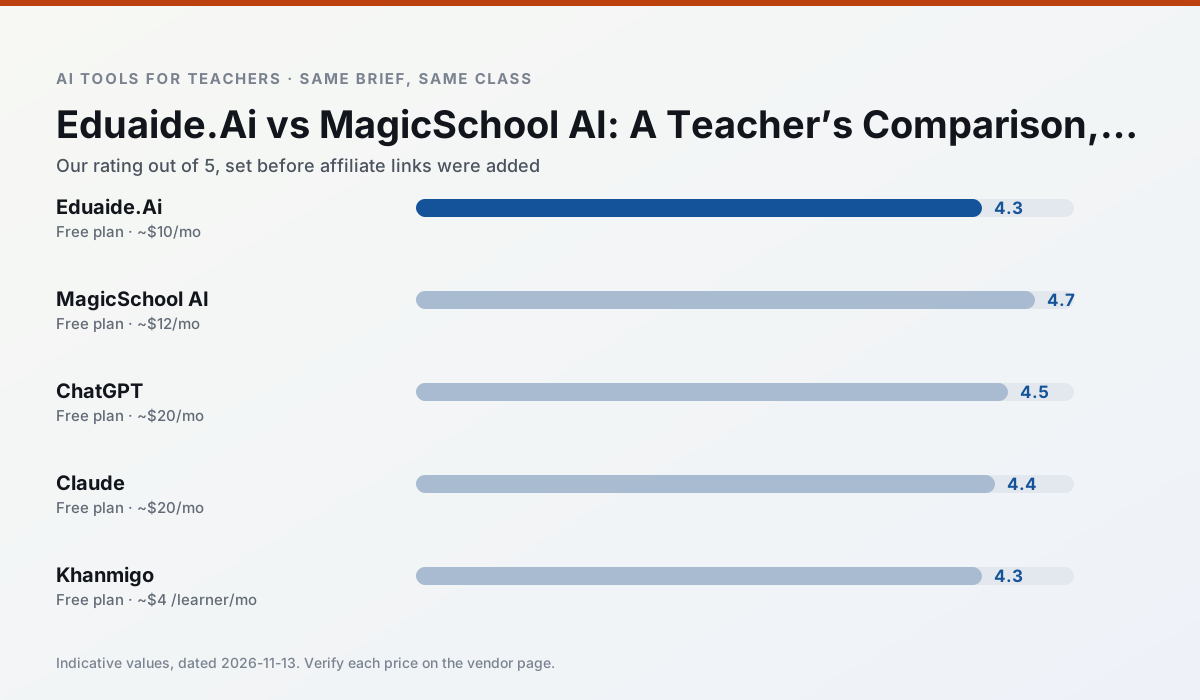
Side by side
Comparison table
Ratings reflect our timed classroom workflow, not vendor claims. Prices are indicative — verify on the vendor site.
| Tool | Best for | Free tier | Indicative paid plan | Standout feature | Our rating | Verdict | Try the tool |
|---|---|---|---|---|---|---|---|
| Eduaide.Ai | lesson planning · rubric creation | Yes — Daily generation cap | ~$10 /user/mo | Resource library | 4.3 / 5 | Strong option | Try free |
| MagicSchool AI | lesson planning · differentiation | Yes — Core generators with monthly usage limits | ~$12 /user/mo | 80+ teacher-specific tools | 4.7 / 5 | Top pick | Try free |
| ChatGPT | lesson planning · parent communication | Yes — Usage-limited model access | ~$20 /user/mo | Custom GPTs and Projects | 4.5 / 5 | Top pick | Try free |
| Claude | rubric creation · feedback on writing | Yes — Usage-limited | ~$20 /user/mo | Very large context window | 4.4 / 5 | Strong option | Try free |
| Khanmigo | math practice · student tutoring | Yes — US teacher accounts, subject to eligibility | ~$4 /learner/mo | Socratic tutoring rather than answers | 4.3 / 5 | Strong option | Try free |
| Brisk Teaching | feedback on writing · grading | Yes — Limited actions per month | ~$10 /user/mo | Works inside Google Docs | 4.5 / 5 | Top pick | Try free |
Match your situation
Best for X
Different jobs need different tools. Here is what we would open first in each case.
Eduaide.Ai is the one we would open on a normal planning day because the first output is editable rather than restructurable, and the free plan covers a single teacher's routine.
Nothing on MagicSchool AI's free tier is a teaser demo; the limits are documented and a normal week fits inside them.
ChatGPT answers the three questions a district actually asks: rostering, admin controls and a data-processing agreement. That is usually what decides a school purchase.
Claude has the shortest path from opening a tab to a usable draft, which matters more than the feature count on a Monday.
Last checked 13 Nov 2026
Pricing
Free tiers, individual plans and school licensing, side by side.
| Tool | Free plan | Individual / paid | School & district | Billing note | Verify |
|---|---|---|---|---|---|
| Eduaide.Ai | $0 — Daily generation cap | ~$10 /user/mo | Custom quote | Indicative — verify on vendor site | Vendor |
| MagicSchool AI | $0 — Core generators with monthly usage limits | ~$12 /user/mo | Custom quote | Indicative — verify on vendor site | Vendor |
| ChatGPT | $0 — Usage-limited model access | ~$20 /user/mo | ~$25+ /user/mo | Indicative — verify on vendor site | Vendor |
| Claude | $0 — Usage-limited | ~$20 /user/mo | ~$25+ /user/mo | Indicative — verify on vendor site | Vendor |
| Khanmigo | $0 — US teacher accounts, subject to eligibility | ~$4 /learner/mo | Custom quote | Indicative — verify on vendor site | Vendor |
| Brisk Teaching | $0 — Limited actions per month | ~$10 /user/mo | Custom quote | Indicative — verify on vendor site | Vendor |
Editorial rule: pricing is re-checked every 2–3 months and the top 50 pages are refreshed every 6 months. See our funding policy.
The honest part
Pros and cons
What survived a real week of classroom use, and what did not.
Pros
- Very low entry price
- Good worksheet and rubric output
- Clean, uncluttered UI
Cons
- Smaller template set than MagicSchool
- Less polished export options
- Limited integrations
Pros
- Widest purpose-built template library
- Strong free tier for individual teachers
- Fast to learn with almost no prompting skill
Cons
- Outputs still need standards review
- Best features sit behind the paid tier
- District approval can be slow
Pros
- Most flexible option available
- Huge community of teacher prompt libraries
- Strong multilingual support
Cons
- Requires prompt skills for consistent results
- No built-in standards alignment
- District privacy review usually required
Pros
- Handles full unit plans and long rubrics
- Nuanced, less generic prose
- Good at structured document output
Cons
- No teacher-specific templates
- Fewer classroom integrations
- Consumer plan not suitable for student data
Pros
- Education-first design
- Strong nonprofit trust signal
- Good math scaffolding
Cons
- Availability varies by region
- Less useful for admin paperwork
- Requires student accounts for full value
In the classroom
Use cases
Five concrete workflows, with the tool we would open for each one.
A Monday morning lesson plan in twelve minutes
The twelve minutes come from not rewriting the skeleton. Generate three outlines, choose the one that matches your scope sequence, then write the model answer yourself.
Recommended: Eduaide.AiThree reading levels from one source text
Paste a vetted text, ask for supported, core and extension versions, then check the vocabulary list by hand. Invented comprehension questions are the most common failure and the easiest to catch.
Recommended: MagicSchool AIRubric and feedback comments in one pass
Reorder the workflow so the rubric is yours and the comments are generated. Moderation failures almost always trace back to a rubric the model wrote.
Recommended: ChatGPTA parent email in two languages
Draft in plain, warm language with no names, translate, then back-translate the important sentences to check meaning. Keep specific incidents out of the prompt and add them yourself.
Recommended: ClaudeA five-minute exit ticket set
Ask for one recall, one application and one reasoning item, then delete the second recall question every generator sneaks in.
Recommended: Khanmigo
Questions teachers ask us
FAQ
Direct answers, also published as FAQPage structured data for search and AI assistants.
Eduaide.Ai or MagicSchool AI for lesson planning?
Which is cheaper for one teacher?
Do they produce the same output?
Sources & further reading
Our recommendation
Try MagicSchool AI free for your next lesson planning task
A large library of teacher-specific AI generators in one dashboard. Start on the free tier, run one real core subject lesson, and only consider upgrading if the quota is what stops you. Disclosure: we may earn a commission (30% recurring) at no extra cost to you.
Some links on this page are affiliate links. We may earn a commission at no extra cost to you. Our rankings are editorial and never pay-to-play. Never enter student PII into a free consumer account.
Keep reading
Related comparisons in this cluster.
Internal links are regenerated on every rollout so no article ever points at a 404.