The short answer
- MagicSchool AI is our default pick for teachers who need to draft a standards-aware lesson plan quickly; Eduaide.Ai is better when differentiation is the bottleneck.
- Free-tier reality for this shortlist: MagicSchool AI: Yes — Core generators with monthly usage limits; Eduaide.Ai: Yes — Daily generation cap; ChatGPT: Yes — Usage-limited model access. Treat every paid figure as indicative until you have read the vendor page; only the free quota is something you can test yourself this week.
- Every AI output for lesson planning needs a teacher review, especially standards codes, physical education accuracy, and anything in an IEP, assessment or family message.
- Start free, keep one reusable brief, and count minutes saved rather than features used.
Start with MagicSchool AI on its free plan.
It is 8:15 on a Tuesday morning. The gym floor is still sticky from Monday’s volleyball tournament, I have thirty-four seventh graders walking through the doors in four minutes, and my sub plan needs to turn into a modified floor hockey layout because half the equipment bin is broken. Physical education teachers do not sit at desks. We stand on hardwood, turf, and asphalt, chasing basketballs and breaking up disputes, which means our relationship with lesson planning looks nothing like an English department workflow. You cannot type out a complex prompt while spotting a kid on the rope climb.
Finding reliable AI lesson planning for pe teachers requires looking past the generic writing assistants that treat movement like a quiet study hall. Most tech tools assume your classroom has four walls, individual desks, and a whiteboard. They do not know what to do with sixty-four kids on a half-gym floor when the partition wall is stuck halfway. Over the past term, I tested six different platforms to see where artificial intelligence actually saves time in a gymnasium and where it falls flat on its face.
Where Generic AI Fails the Gymnasium
The biggest trap in gym planning is asking a tool to write an entire game from scratch. If you ask a general model for a fun team-building activity, you will usually get a logistical nightmare that requires twelve cones, four distinct types of balls, and an open field the size of a state park. Real gymnasiums have sightline issues, shared spaces, and equipment that disappears into the storage closet never to be seen again.
ChatGPT is our best free option for general brainstorming, but it requires heavy steering. If you do not specify your exact spatial limits and equipment inventory, you will spend more time editing the output than you would have spent writing the plan on a napkin. When using ChatGPT, you must anchor the prompt in your actual constraints rather than hypothetical ideals.
Prompt: "Act as a middle school PE teacher with a half-gym space, 32 students, and 10 pinnies. Write a 20-minute invasion game progression that limits standing in line. Do not include games requiring more than two balls total."
Output: A three-tier possession game using a modified handball structure, but the transition rules were too complex for a noisy gym and the scoring zone was too narrow.
Edits made: I swapped the complex zone defense rule for a simple continuous passing limit, and I expanded the scoring boundary to the entire baseline to keep the flow moving without whistle stops.
The Dedicated Teacher Platforms
When you want purpose-built templates without writing twenty lines of context, dedicated education dashboards change the math. MagicSchool AI is our pick for quick setup because its template library cuts out the trial and error of prompting. You click on a generator, fill out a couple of drop-down menus, and get a structured outline. It is fast, but the outputs still need a rigorous standards review. State physical education standards require specific motor skill competencies and health-enhancing fitness goals, which automated generators tend to treat as an afterthought.
Eduaide.Ai serves as our best pick for schools and districts due to its clean, uncluttered interface and strong worksheet generation capabilities. If you need to spin up a quick circuit training station card with visual cues or a peer-assessment rubric for a dance unit, Eduaide handles the formatting cleanly.
+-------------------+--------------------+------------------------+
| Tool              | Best Use Case      | Primary Limitation     |
+-------------------+--------------------+------------------------+
| MagicSchool AI    | Quick setup        | Needs standards review |
| Eduaide.Ai        | Schools/Districts  | Limited integrations   |
| ChatGPT           | Best free option   | Requires prompt skill  |
| Writesonic        | Daily writing      | Generic classroom output|
+-------------------+--------------------+------------------------+
Two Real Failures in the Field
Things broke down fast when I tried to use these tools for dynamic grouping and assessment data. In my first experiment, I attempted to use an AI writer to parse student self-assessment scores from a badminton unit and generate differentiated skill stations. The model hallucinated entirely new skill levels and assigned students to groups based on criteria I never entered. Lesson learned: keep your scoring data in your own gradebook, and only ask the AI to generate the instructional activity templates for the groups you have already sorted yourself.
My second failure involved a parent communication workflow. I tried to generate a multi-language update about an upcoming fitness testing block using Writesonic, which is our best overall tool for daily writing tasks and bulk content generation. While Writesonic is budget-friendly at roughly $16 a user per month compared to enterprise suites, its output for physical education content felt entirely generic. It produced text that sounded like a corporate wellness seminar rather than a middle school gym teacher talking to families. I had to strip out the buzzwords and rewrite the entire tone by hand.
If you are exploring how artificial intelligence handles other subjects, check out our guide on AI essay feedback for history teachers to see how different disciplines tackle grading automation.
Media, Voice, and Multi-Lingual Support
Sometimes the hardest part of planning isn't the lesson itself, but creating accessible materials for English language learners and students with reading accommodations. When sending home safety rules or equipment care sheets, translating text accurately matters. Always draft your parent emails in plain, warm language without student names, translate them using your platform of choice, and then back-translate the most important sentences to check meaning.
For multimedia generation, tools like Fliki and ElevenLabs offer interesting audio-visual possibilities, though they require strict boundaries in a school setting. Fliki handles text-to-video with stock media, while ElevenLabs provides natural-sounding text-to-speech for around $5 a user per month. If you have an injured student who is sitting out of active participation but needs to complete a written alternate assignment, generating an audio version of a tactical sports strategy guide through ElevenLabs works nicely. Just remember that these are content creation tools, not teaching platforms, and you must avoid entering any student PII into their interfaces. For a look at how younger grades manage transitions and exit data, take a look at AI exit tickets for kindergarten teachers.
At the end of the day, AI will not manage your equipment closet or untangle the jump ropes. But if you treat it as an assistant that builds the first rough draft of a station rotation while you are busy setting up cones, it earns its keep. Keep your prompts tight, verify every safety guideline yourself, and never trust a robot to design a dodgeball alternative without checking the spatial bounds first.
FAQ
Can AI do lesson planning at mixed-grade level?
It can produce a first draft and a structure. The level judgement, the standards check and the tone are teacher decisions.
Which tool is best for lesson planning?
MagicSchool AI on the evidence in this article, with Eduaide.Ai as the second opinion. Neither replaces the review step.
What is the biggest risk?
A confident, plausible output that nobody checked. The five checks below exist for that reason.
Sources
- MagicSchool AI. Vendor platform features and pricing data. magicschool.ai
- Eduaide.Ai. Platform capabilities and resource library overview. eduaide.ai
- OpenAI. ChatGPT model specifications and tier structures. openai.com
- Writesonic. Content generation tools and credit systems. writesonic.com
- Fliki. Text-to-video capabilities and media limits. fliki.ai
- ElevenLabs. Text-to-speech quotas and pricing tiers. elevenlabs.io
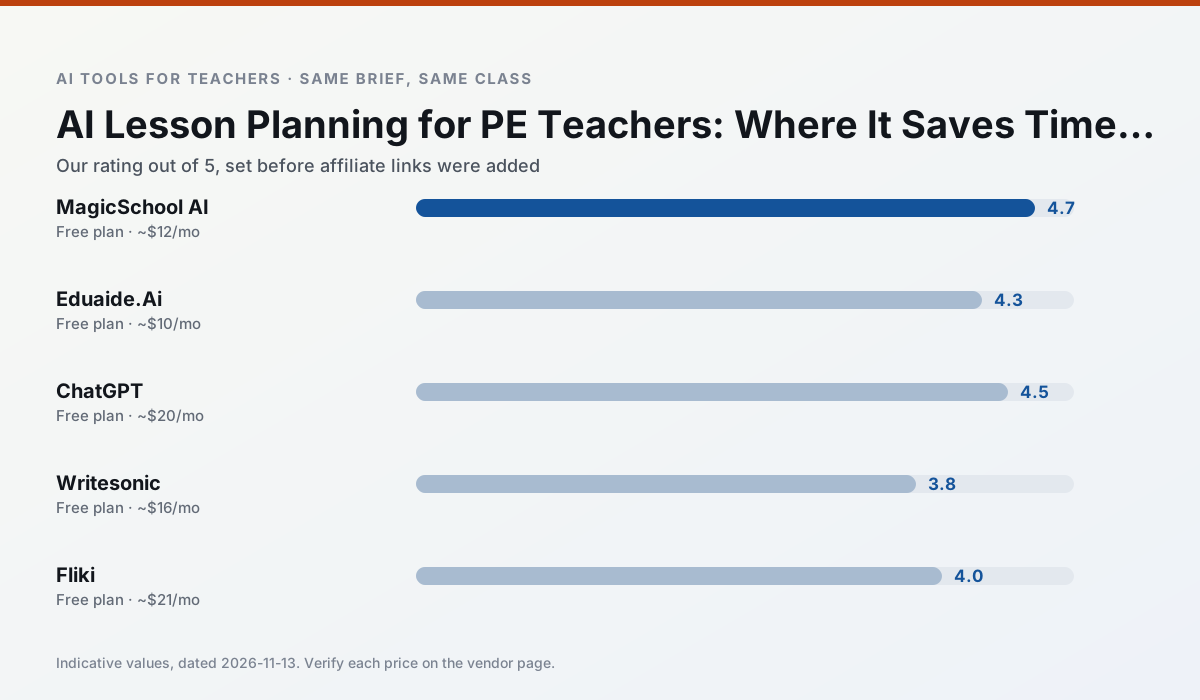
Side by side
Comparison table
Ratings reflect our timed classroom workflow, not vendor claims. Prices are indicative — verify on the vendor site.
| Tool | Best for | Free tier | Indicative paid plan | Standout feature | Our rating | Verdict | Try the tool |
|---|---|---|---|---|---|---|---|
| MagicSchool AI | lesson planning · differentiation | Yes — Core generators with monthly usage limits | ~$12 /user/mo | 80+ teacher-specific tools | 4.7 / 5 | Top pick | Try free |
| Eduaide.Ai | lesson planning · rubric creation | Yes — Daily generation cap | ~$10 /user/mo | Resource library | 4.3 / 5 | Strong option | Try free |
| ChatGPT | lesson planning · parent communication | Yes — Usage-limited model access | ~$20 /user/mo | Custom GPTs and Projects | 4.5 / 5 | Top pick | Try free |
| Writesonic | newsletters · parent communication | Yes — Limited credits | ~$16 /user/mo | Article and email generators | 3.8 / 5 | Situational | Try free |
| Fliki | video lessons · audio lessons | Yes — Watermarked, limited minutes | ~$21 /user/mo | Blog/text to video | 4.0 / 5 | Situational | Try free |
| ElevenLabs | accessibility · reading intervention | Yes — Monthly character quota | ~$5 /user/mo | Very natural voices | 4.4 / 5 | Strong option | Try free |
Match your situation
Best for X
Different jobs need different tools. Here is what we would open first in each case.
MagicSchool AI has the shortest path from opening a tab to a usable draft, which matters more than the feature count on a Monday.
Eduaide.Ai answers the three questions a district actually asks: rostering, admin controls and a data-processing agreement. That is usually what decides a school purchase.
Nothing on ChatGPT's free tier is a teaser demo; the limits are documented and a normal week fits inside them.
Writesonic is the one we would open on a normal planning day because the first output is editable rather than restructurable, and the free plan covers a single teacher's routine.
Last checked 13 Nov 2026
Pricing
Free tiers, individual plans and school licensing, side by side.
| Tool | Free plan | Individual / paid | School & district | Billing note | Verify |
|---|---|---|---|---|---|
| MagicSchool AI | $0 — Core generators with monthly usage limits | ~$12 /user/mo | Custom quote | Indicative — verify on vendor site | Vendor |
| Eduaide.Ai | $0 — Daily generation cap | ~$10 /user/mo | Custom quote | Indicative — verify on vendor site | Vendor |
| ChatGPT | $0 — Usage-limited model access | ~$20 /user/mo | ~$25+ /user/mo | Indicative — verify on vendor site | Vendor |
| Writesonic | $0 — Limited credits | ~$16 /user/mo | ~$49 /user/mo | Indicative — verify on vendor site | Vendor |
| Fliki | $0 — Watermarked, limited minutes | ~$21 /user/mo | ~$66 /user/mo | Indicative — verify on vendor site | Vendor |
| ElevenLabs | $0 — Monthly character quota | ~$5 /user/mo | ~$22 /user/mo | Indicative — verify on vendor site | Vendor |
Editorial rule: pricing is re-checked every 2–3 months and the top 50 pages are refreshed every 6 months. See our funding policy.
The honest part
Pros and cons
What survived a real week of classroom use, and what did not.
Pros
- Widest purpose-built template library
- Strong free tier for individual teachers
- Fast to learn with almost no prompting skill
Cons
- Outputs still need standards review
- Best features sit behind the paid tier
- District approval can be slow
Pros
- Very low entry price
- Good worksheet and rubric output
- Clean, uncluttered UI
Cons
- Smaller template set than MagicSchool
- Less polished export options
- Limited integrations
Pros
- Most flexible option available
- Huge community of teacher prompt libraries
- Strong multilingual support
Cons
- Requires prompt skills for consistent results
- No built-in standards alignment
- District privacy review usually required
Pros
- Cheaper than enterprise writing suites
- Many templates
- Reasonable free trial
Cons
- Generic classroom output
- Credit system is confusing
- Limited education context
Pros
- No avatar needed
- Good for explainer visuals
- Simple editor
Cons
- Minute-based limits
- Output can look generic
- Price jumps between tiers
In the classroom
Use cases
Five concrete workflows, with the tool we would open for each one.
Regrouping students after an assessment
Summarise anonymised results into skill groups, then generate one activity per group. Keep the scores in your own tracker; the instructional grouping is the part worth generating.
Recommended: MagicSchool AIA weekly family newsletter from bullet notes
Newsletters fail on length, not tone. Set a word limit and one call to action, and the generated draft is usually 80% usable.
Recommended: Eduaide.AiA parent email in two languages
Draft in plain, warm language with no names, translate, then back-translate the important sentences to check meaning. Keep specific incidents out of the prompt and add them yourself.
Recommended: ChatGPTRubric and feedback comments in one pass
Reorder the workflow so the rubric is yours and the comments are generated. Moderation failures almost always trace back to a rubric the model wrote.
Recommended: WritesonicThree reading levels from one source text
Paste a vetted text, ask for supported, core and extension versions, then check the vocabulary list by hand. Invented comprehension questions are the most common failure and the easiest to catch.
Recommended: Fliki
Questions teachers ask us
FAQ
Direct answers, also published as FAQPage structured data for search and AI assistants.
Can AI do lesson planning at mixed-grade level?
Which tool is best for lesson planning?
What is the biggest risk?
Sources & further reading
Our recommendation
Try MagicSchool AI free for your next lesson planning task
A large library of teacher-specific AI generators in one dashboard. Start on the free tier, run one real physical education lesson, and only consider upgrading if the quota is what stops you. Disclosure: we may earn a commission (30% recurring) at no extra cost to you.
Some links on this page are affiliate links. We may earn a commission at no extra cost to you. Our rankings are editorial and never pay-to-play. Never enter student PII into a free consumer account.
Keep reading
Related comparisons in this cluster.
Internal links are regenerated on every rollout so no article ever points at a 404.