The short answer
- Quizizz is our default pick for teachers who need to build a balanced question set quickly; Kahoot! is better when differentiation is the bottleneck.
- Pricing is where these pages date fastest. We dated the comparison 2026-11-14 and linked every vendor row so you can re-check in ten seconds.
- Every AI output for quiz generation needs a teacher review, especially standards codes, core subject accuracy, and anything in an IEP, assessment or family message.
- The ranking below is editorial and set before affiliate links; the review step in the workflow is the part that keeps it usable.
Start with MagicSchool AI on its free plan.
At 3:15 on a Thursday afternoon, you are staring at a stack of forty exit tickets about fractions on a number line, wondering why half the class thought three-fourths lives to the right of one. You do not need a philosophical treatise on math instruction. You need a quick assessment built for tomorrow morning that actually targets where those kids tripped up, without spending your entire prep period writing distractors that make sense.
If you teach grades 3 through 5, your students have opinions on gamified tech, and those opinions are loud. They know when a platform is just a glorified flashcard deck with cartoon monsters taped to it. AI quiz generation for 3-5 teachers has evolved past basic multiple-choice guessing games, but it still requires a heavy editorial hand to match intermediate reading levels and actual state standards. Here is how six popular tools actually hold up when the bell rings and the Chromebook cart is half-dead.
Building Standards-Aligned Banks With QuestionWell
When you need questions tied directly to a specific nonfiction article or a tricky science standard, QuestionWell is often the fastest route. It acts as a single-purpose engine: you paste in an objective or a non-identifiable source text, and it kicks out a clean question bank. The best for mixed-ability classes, it generates items with clear objective tagging so you can sort by cognitive demand.
The catch is that QuestionWell does one thing and does it strictly. It is not a live game platform by itself. You generate the items, then export them to your LMS or a quiz tool your students already use.
Prompt: Create 10 multiple-choice questions for 4th-grade science on ecosystems and food webs based on this text. Include four options per question and label each with the misconception behind the distractor.
First draft result: Ten questions arrived with distractors labeled nicely, but two questions used vocabulary words above a Lexile 900 level that would trip up my borderline readers.
The two edits: First, I added a line specifying "maximum 4th-grade reading level, short sentences." Second, I manually swapped out a distractor about apex predators that was too obvious.
Running Live Games With Quizizz And Kahoot!
For student-safe deployments, Quizizz remains a reliable anchor in intermediate elementary classrooms. Students already know the interface, and the reporting features actually break down who missed what standard. The free tier covers core quiz creation, while paid tiers hover around $15 per user monthly (indicative). The live games run smoothly even on older district devices, which matters when half your Chromebook keys are missing letters. Writing high-quality AI questions still needs your review, and the gamification can occasionally distract students who care more about meme animations than the math behind them.
If you need instant engagement with almost zero onboarding time, Kahoot! is hard to beat. It is best for parent-facing writing and quick review sessions where energy needs to stay high. The free tier limits player counts, and paid options run around $10 per user monthly (indicative). For younger intermediate students, use nicknames rather than real names to keep data privacy tight. The main limitation in grades 3-5 is that the time pressure suits rapid recall far better than multistep reasoning.
Fast Lesson Delivery With Curipod And Eduaide.Ai
If you want to turn a raw topic into an interactive slide deck where students draw, vote, and answer short prompts without needing individual student accounts for basic use, Curipod is worth a look. It handles checks for understanding gracefully on the fly. Free lessons are limited, and paid plans sit around $12 per user monthly (indicative). It focuses purely on delivery rather than long-term planning, so you still need your own scope and sequence.
For a broader mix of worksheets, rubrics, and planning support, Eduaide.Ai offers a clean interface with a daily generation cap on its free tier and paid plans around $10 per user monthly (indicative). It outputs solid practice sheets, though its template library is smaller than some competitors, and you will want to verify data retention settings if student information touches the platform.
When you are trying to group students after an assessment, you can feed anonymised results into these platforms to generate targeted skill groups and one activity per group, while keeping actual scores safely in your own gradebook. For more ideas on differentiation, see our guide on AI accommodations for elementary teachers, or read up on younger cohorts in AI accommodations for k-2 classrooms.
Quick Setup With ChatGPT
When you need maximum flexibility and do not mind doing the formatting heavy lifting yourself, ChatGPT remains the most versatile option for quick setup. The free tier offers usage-limited model access, while paid plans run around $20 per user monthly (indicative). It shines when you need to draft a weekly family newsletter from messy bullet notes. Newsletters fail on length, not tone. If you set a strict word limit and one clear call to action in your prompt, the generated draft is usually eighty percent usable right out of the box.
Using general-purpose models requires strict adherence to privacy rules. Never enter student PII on consumer plans; stick to approved district workspace tiers.
Two distinct failures happen frequently when teachers rush AI quiz generation. First, numerical items are notoriously unreliable. If you ask an AI tool to generate fraction word problems, the answer keys frequently contain mathematical errors because the model predicts tokens rather than calculating values. Spot-check every single answer key before printing or assigning. Second, AI-generated distractors are often so absurd that students eliminate them instantly, rendering the multiple-choice question a simple two-option coin flip.
To fix this, prompt the AI to make distractors reflect common student errors rather than obviously wrong statements. When an AI tool drafts an IEP present-levels statement using aggregated, anonymised data, treat it strictly as a rough first draft. Replace every generated number with your own hard classroom progress monitoring before a case manager or parent ever sees the document. AI is a fast assistant for structuring the raw clay, but the final sculpture has to match the real kids sitting in your room.
FAQ
Can AI do quiz generation at 3-5 level?
It can produce a first draft and a structure. The level judgement, the standards check and the tone are teacher decisions.
Which tool is best for quiz generation?
Quizizz on the evidence in this article, with Kahoot! as the second opinion. Neither replaces the review step.
What is the biggest risk?
A confident, plausible output that nobody checked. The five checks below exist for that reason.
Sources
- Quizizz Vendor Pricing and Features: https://quizizz.com/
- Kahoot! Education Plans: https://kahoot.com/
- QuestionWell Platform Overview: https://www.questionwell.ai/
- OpenAI ChatGPT Pricing and Terms: https://openai.com/chatgpt/
- Curipod Interactive Lessons: https://curipod.com/
- Eduaide.Ai Resource Generator: https://www.eduaide.ai/
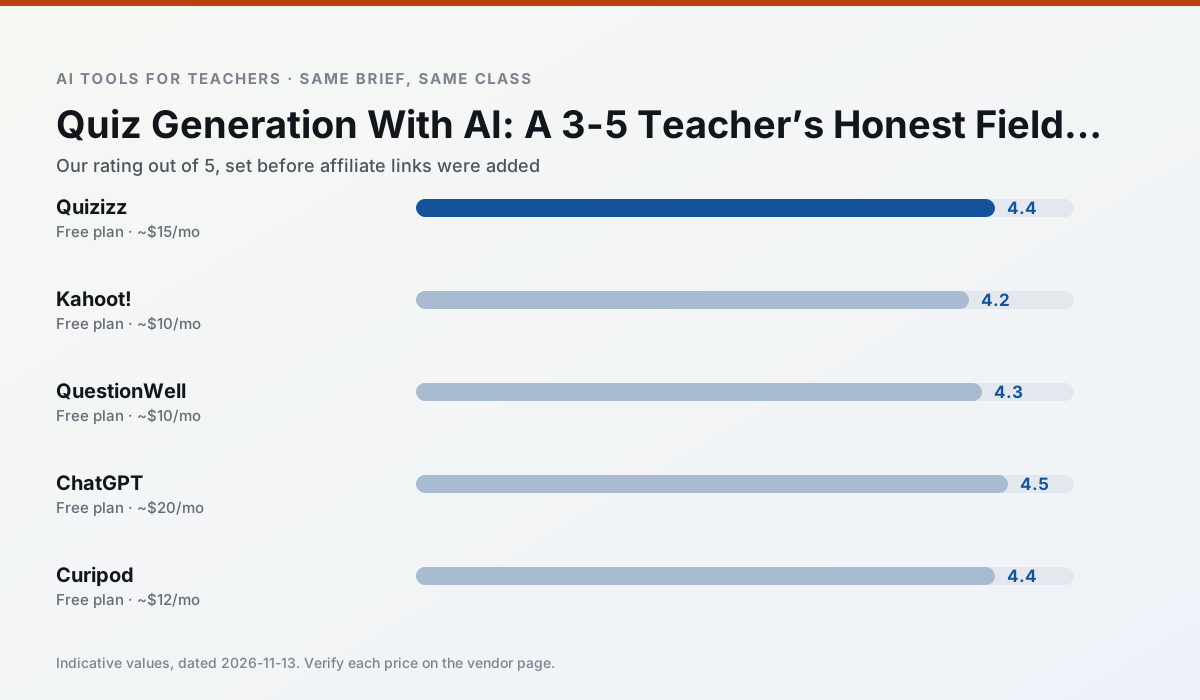
Side by side
Comparison table
Ratings reflect our timed classroom workflow, not vendor claims. Prices are indicative — verify on the vendor site.
| Tool | Best for | Free tier | Indicative paid plan | Standout feature | Our rating | Verdict | Try the tool |
|---|---|---|---|---|---|---|---|
| Quizizz | quiz generation · formative assessment | Yes — Core quiz creation | ~$15 /user/mo | AI question generator | 4.4 / 5 | Strong option | Try free |
| Kahoot! | quiz generation · review lessons | Yes — Limited player count | ~$10 /user/mo | AI question builder | 4.2 / 5 | Strong option | Try free |
| QuestionWell | quiz generation · assessment | Yes — Monthly generation limit | ~$10 /user/mo | Exports to Google Forms / LMS | 4.3 / 5 | Strong option | Try free |
| ChatGPT | lesson planning · parent communication | Yes — Usage-limited model access | ~$20 /user/mo | Custom GPTs and Projects | 4.5 / 5 | Top pick | Try free |
| Curipod | formative assessment · exit tickets | Yes — Limited lessons per month | ~$12 /user/mo | Live polls and word clouds | 4.4 / 5 | Strong option | Try free |
| Eduaide.Ai | lesson planning · rubric creation | Yes — Daily generation cap | ~$10 /user/mo | Resource library | 4.3 / 5 | Strong option | Try free |
Match your situation
Best for X
Different jobs need different tools. Here is what we would open first in each case.
Quizizz is the student-facing option here with boundaries a teacher can actually set and supervise.
Kahoot! is the steadiest of this set at plain, respectful language; names and specific incidents still belong in your draft, not the prompt.
QuestionWell keeps the same task across levels, which is what makes a differentiated set defensible in moderation.
ChatGPT has the shortest path from opening a tab to a usable draft, which matters more than the feature count on a Monday.
Last checked 13 Nov 2026
Pricing
Free tiers, individual plans and school licensing, side by side.
| Tool | Free plan | Individual / paid | School & district | Billing note | Verify |
|---|---|---|---|---|---|
| Quizizz | $0 — Core quiz creation | ~$15 /user/mo | Custom quote | Indicative — verify on vendor site | Vendor |
| Kahoot! | $0 — Limited player count | ~$10 /user/mo | Custom quote | Indicative — verify on vendor site | Vendor |
| QuestionWell | $0 — Monthly generation limit | ~$10 /user/mo | Custom quote | Indicative — verify on vendor site | Vendor |
| ChatGPT | $0 — Usage-limited model access | ~$20 /user/mo | ~$25+ /user/mo | Indicative — verify on vendor site | Vendor |
| Curipod | $0 — Limited lessons per month | ~$12 /user/mo | Custom quote | Indicative — verify on vendor site | Vendor |
| Eduaide.Ai | $0 — Daily generation cap | ~$10 /user/mo | Custom quote | Indicative — verify on vendor site | Vendor |
Editorial rule: pricing is re-checked every 2–3 months and the top 50 pages are refreshed every 6 months. See our funding policy.
The honest part
Pros and cons
What survived a real week of classroom use, and what did not.
Pros
- Students already know the interface
- Good reporting
- Works on low-end devices
Cons
- Writing high-quality AI questions still needs review
- Gamification can distract
- Advanced analytics are paid
Pros
- Instant engagement
- Very low training time
- Strong brand familiarity
Cons
- Less depth for higher-order assessment
- Paid tiers needed for larger classes
- Time pressure suits recall more than reasoning
Pros
- Saves the most time on question writing
- Clean export workflow
- Good objective tagging
Cons
- Single-purpose tool
- Question quality varies by source text
- Limited student-facing features
Pros
- Most flexible option available
- Huge community of teacher prompt libraries
- Strong multilingual support
Cons
- Requires prompt skills for consistent results
- No built-in standards alignment
- District privacy review usually required
Pros
- High student engagement out of the box
- Great for quick checks for understanding
- No student accounts required for basic use
Cons
- Focused on delivery, not planning
- Requires reliable classroom devices
- Free tier is restrictive
In the classroom
Use cases
Five concrete workflows, with the tool we would open for each one.
Regrouping students after an assessment
Summarise anonymised results into skill groups, then generate one activity per group. Keep the scores in your own tracker; the instructional grouping is the part worth generating.
Recommended: QuizizzA weekly family newsletter from bullet notes
Newsletters fail on length, not tone. Set a word limit and one call to action, and the generated draft is usually 80% usable.
Recommended: Kahoot!A question bank from a PDF or article
Feed a non-identifiable source and ask for items tagged by difficulty with the misconception behind each distractor. Spot-check every answer key; numerical items are least reliable.
Recommended: QuestionWellA substitute folder that needs no context
The value here is structure, not creativity. Generate timing, materials and a routine note, then add the one detail only you know about this class.
Recommended: ChatGPTAn IEP present-levels first draft
Use aggregated, anonymised data only. Ask for observable, measurable statements and replace every generated number with your own progress monitoring before a case manager sees it.
Recommended: Curipod
Questions teachers ask us
FAQ
Direct answers, also published as FAQPage structured data for search and AI assistants.
Can AI do quiz generation at 3-5 level?
Which tool is best for quiz generation?
What is the biggest risk?
Sources & further reading
Our recommendation
Try MagicSchool AI free for your next quiz generation task
A large library of teacher-specific AI generators in one dashboard. Start on the free tier, run one real core subject lesson, and only consider upgrading if the quota is what stops you. Disclosure: we may earn a commission (30% recurring) at no extra cost to you.
Some links on this page are affiliate links. We may earn a commission at no extra cost to you. Our rankings are editorial and never pay-to-play. Never enter student PII into a free consumer account.
Keep reading
Related comparisons in this cluster.
Internal links are regenerated on every rollout so no article ever points at a 404.