The short answer
- MagicSchool AI is our default pick for teachers who need to write clear, warm parent emails quickly; ChatGPT is better when differentiation is the bottleneck.
- Free-tier reality for this shortlist: MagicSchool AI: Yes — Core generators with monthly usage limits; ChatGPT: Yes — Usage-limited model access; Gamma: Yes — Credit-limited generation. Treat every paid figure as indicative until you have read the vendor page; only the free quota is something you can test yourself this week.
- Every AI output for parent communication needs a teacher review, especially standards codes, core subject accuracy, and anything in an IEP, assessment or family message.
- Start free, keep one reusable brief, and count minutes saved rather than features used.
Start with MagicSchool AI on its free plan.
At 4:45 PM on a Thursday, I stared at a parent email about a biting incident in the block corner and felt my brain short out. Writing to parents of six-year-olds requires a specific kind of linguistic gymnastics. You have to be firm, warm, professional, entirely non-defamatory, and clear enough that a tired parent on their commute actually understands what happened. Doing that six times a week drains the remaining battery of any primary teacher. That is why I started experimenting with AI parent communication for k-2 teachers, testing every major tool through a full term to see which ones actually save time without sounding like a corporate liability lawyer.
Why Primary Teachers Need Different Tools
Middle school teachers might use AI to draft rubrics or analyze essay structures. We do not. Our writing needs to bridge the gap between early childhood pedagogy and anxious parents who want to know if their child ate their carrots and why another kid took their Magna-Tile.
If you use general writing tools, you end up with emails that sound like a press release from a tech startup. Parents of kindergartners do not want a synergy update about their child's socio-emotional growth trajectory. They want to know that Johnny had a tough time sharing at recess and that we have a plan in place.
Finding the right software means filtering out the marketing noise. Tools designed for marketing agencies or district PR teams will not help you write a Friday newsletter that fits on a single piece of paper. You need utilities that handle the tone just right, keep student data locked down, and work fast enough to use during a twenty-minute planning period.
The Weekly Newsletter Reality Check
Every Sunday night, I used to stare at a blank Google Doc trying to turn fifteen bullet points about sight words, library day, and missing library books into an engaging family update. Newsletters fail on length, not tone. If it takes more than two minutes to read, parents skim it and miss the date for picture day.
I started dropping my messy bullet notes into ChatGPT, which serves as our best for parent-facing writing pick. The trick is setting hard constraints in your prompt. If you ask a general model to write a newsletter, it will give you three pages of cheerful fluff.
Prompt: Write a weekly Friday classroom newsletter for a 1st-grade class using these bullet points: phonics focus on long a, library on Tuesday, field trip slips due Wednesday, missing sweater pile in room 102. Keep it under 200 words, use a warm and direct tone, and put the field trip deadline in bold.
Draft Returned: A cheerful, well-structured 180-word update that hit every bullet point, though it added a slightly overly enthusiastic opening about autumn leaves that I immediately deleted.
Edits Made:
- Removed the generic seasonal intro to keep the total read time under 60 seconds.
- Verified that the field trip deadline matched our actual school calendar before hitting send.
ChatGPT handles multilingual support better than almost anything else. When I need to translate my weekly blasts into Spanish and Mandarin for our dual-language families, it produces natural phrasing instead of literal, clunky translations that confuse parents. Remember to keep student names out of consumer chat interfaces entirely. Refer to students generically or strip out any identifiers before generating.
Streamlining Special Education Updates
Writing present-levels drafts for IEPs or composing delicate emails about behavioral interventions requires intense care. You cannot paste student names or identifying details into standard public tools. That is where MagicSchool AI earns its spot as our best for student-safe deployments option.
MagicSchool features a purpose-built template library designed specifically for K-12 educators. Because its core generators are built with school contexts in mind, it avoids the corporate marketing speak of tools like Jasper or Writesonic. Jasper costs around $39 per user per month and Writesonic sits at about $16, but both are built for content marketers and lack the pedagogical guardrails we need. MagicSchool offers a strong free tier with monthly usage limits, while its paid tier runs around $12 per user per month.
When drafting an update about a student struggling with transitions, I aggregate anonymized data in my own offline tracker first. Then I use MagicSchool to generate objective, observable statements. You must replace every generated placeholder with your own concrete progress monitoring numbers before a case manager or parent lays eyes on it. AI gives you the structural draft, but your professional judgment provides the truth.
Polishing High-Stakes Parent Emails
When you are sending an email that addresses a sensitive behavioral issue, a single poorly chosen word can trigger an angry reply. This is where Grammarly becomes essential as our best for quick setup choice.
Grammarly acts as a real-time writing assistant that catches tone issues and basic errors right inside your browser. The free tier handles core grammar and tone checks, while the paid tier costs roughly $12 per user per month and unlocks advanced tone rewriting. It works directly inside your district email client, which saves you from copy-pasting text back and forth between tabs.
The risk with Grammarly is that it can flatten your natural voice into something that sounds entirely robotic. I had to adjust its settings so it stops trying to turn my casual, direct teacher voice into a formal Victorian novel. When writing to a parent who is upset about a playground incident, I use it strictly to catch typos and soften my phrasing, ensuring I sound firm yet empathetic without losing my personality.
Moving Beyond Text to Visuals
Sometimes text emails are not enough. During conferences or back-to-school night, parents need to see data visually. Gamma helps you generate presentation decks and documents from a single prompt, making it our top pick for mixed-ability classes when you need to whip up visual aids for parent workshops.
Gamma's free tier offers credit-limited generation, and its paid tier runs about $10 per user per month. It takes an outline about our literacy stations or math frameworks and turns it into a modern-looking deck in under a minute.
You have to watch the credit consumption closely, as heavy formatting changes will drain your balance fast. Like all content tools on this list, never upload student work or identifiable performance data into Gamma. Use it to build slide decks explaining grade-level standards to parents, leaving the individual student metrics in your secure grade book.
If you are looking to overhaul your entire workflow this term, take a look at our broader guide on best ai tools for teachers-2026 for a wider system view, or check out our resource on ai accommodations for elementary teachers to streamline your instructional prep alongside your parent outreach.
FAQ
Can AI do parent communication at K-2 level?
It can produce a first draft and a structure. The level judgement, the standards check and the tone are teacher decisions.
Which tool is best for parent communication?
MagicSchool AI on the evidence in this article, with ChatGPT as the second opinion. Neither replaces the review step.
What is the biggest risk?
A confident, plausible output that nobody checked. The five checks below exist for that reason.
Sources
- MagicSchool AI Pricing and Feature Documentation, 2026.
- OpenAI ChatGPT Enterprise and Consumer Privacy Guidelines, 2026.
- Gamma App Pricing and Credit Limits, 2026.
- Grammarly Education Plan Specifications, 2026.
- Jasper Pricing and Brand Voice Documentation, 2026.
- Writesonic Plan Structure and Feature Overview, 2026.
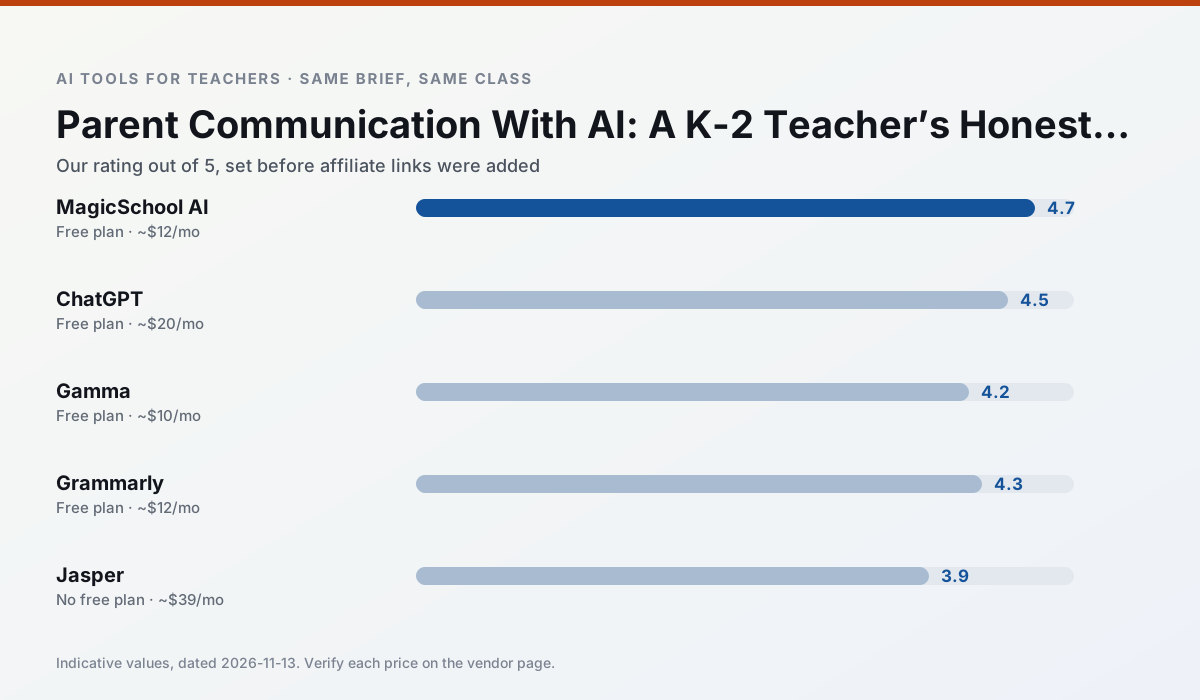
Side by side
Comparison table
Ratings reflect our timed classroom workflow, not vendor claims. Prices are indicative — verify on the vendor site.
| Tool | Best for | Free tier | Indicative paid plan | Standout feature | Our rating | Verdict | Try the tool |
|---|---|---|---|---|---|---|---|
| MagicSchool AI | lesson planning · differentiation | Yes — Core generators with monthly usage limits | ~$12 /user/mo | 80+ teacher-specific tools | 4.7 / 5 | Top pick | Try free |
| ChatGPT | lesson planning · parent communication | Yes — Usage-limited model access | ~$20 /user/mo | Custom GPTs and Projects | 4.5 / 5 | Top pick | Try free |
| Gamma | slide decks · parent communication | Yes — Credit-limited generation | ~$10 /user/mo | Prompt-to-deck | 4.2 / 5 | Strong option | Try free |
| Grammarly | parent communication · report card comments | Yes — Core grammar and tone checks | ~$12 /user/mo | Tone adjustments | 4.3 / 5 | Strong option | Try free |
| Jasper | newsletters · parent communication | No ongoing free plan | ~$39 /user/mo | Brand voice profiles | 3.9 / 5 | Situational | Try free |
| Writesonic | newsletters · parent communication | Yes — Limited credits | ~$16 /user/mo | Article and email generators | 3.8 / 5 | Situational | Try free |
Match your situation
Best for X
Different jobs need different tools. Here is what we would open first in each case.
MagicSchool AI is built around teacher-monitored student spaces and audit logs rather than a consumer chat account, which is a different approval conversation.
Family-facing drafts from ChatGPT need the fewest rewrites for warmth without overpromising, which is the usual failure mode.
For three reading groups and one text, Gamma needs the least manual relabelling of vocabulary and questions.
Setup cost is one login for Grammarly; everything else can wait until you know the tool is useful.
Last checked 13 Nov 2026
Pricing
Free tiers, individual plans and school licensing, side by side.
| Tool | Free plan | Individual / paid | School & district | Billing note | Verify |
|---|---|---|---|---|---|
| MagicSchool AI | $0 — Core generators with monthly usage limits | ~$12 /user/mo | Custom quote | Indicative — verify on vendor site | Vendor |
| ChatGPT | $0 — Usage-limited model access | ~$20 /user/mo | ~$25+ /user/mo | Indicative — verify on vendor site | Vendor |
| Gamma | $0 — Credit-limited generation | ~$10 /user/mo | ~$20 /user/mo | Indicative — verify on vendor site | Vendor |
| Grammarly | $0 — Core grammar and tone checks | ~$12 /user/mo | ~$15 /user/mo | Indicative — billed annually | Vendor |
| Jasper | No ongoing free tier | ~$39 /user/mo | ~$59+ /user/mo | Indicative — verify on vendor site | Vendor |
| Writesonic | $0 — Limited credits | ~$16 /user/mo | ~$49 /user/mo | Indicative — verify on vendor site | Vendor |
Editorial rule: pricing is re-checked every 2–3 months and the top 50 pages are refreshed every 6 months. See our funding policy.
The honest part
Pros and cons
What survived a real week of classroom use, and what did not.
Pros
- Widest purpose-built template library
- Strong free tier for individual teachers
- Fast to learn with almost no prompting skill
Cons
- Outputs still need standards review
- Best features sit behind the paid tier
- District approval can be slow
Pros
- Most flexible option available
- Huge community of teacher prompt libraries
- Strong multilingual support
Cons
- Requires prompt skills for consistent results
- No built-in standards alignment
- District privacy review usually required
Pros
- Fastest path from outline to deck
- Modern-looking output by default
- Good export options
Cons
- Design control is limited
- Credits run out quickly
- Not built for student data
Pros
- Catches errors in high-stakes parent emails
- Works everywhere you already write
- Very low learning curve
Cons
- Not education-specific
- Can flatten teacher voice
- Premium needed for tone rewriting
Pros
- Consistent tone across communications
- Strong long-form editor
- Good for district comms teams
Cons
- Priced for marketing teams
- Overkill for one classroom
- No education-specific features
In the classroom
Use cases
Five concrete workflows, with the tool we would open for each one.
Regrouping students after an assessment
Summarise anonymised results into skill groups, then generate one activity per group. Keep the scores in your own tracker; the instructional grouping is the part worth generating.
Recommended: MagicSchool AIA weekly family newsletter from bullet notes
Newsletters fail on length, not tone. Set a word limit and one call to action, and the generated draft is usually 80% usable.
Recommended: ChatGPTA question bank from a PDF or article
Feed a non-identifiable source and ask for items tagged by difficulty with the misconception behind each distractor. Spot-check every answer key; numerical items are least reliable.
Recommended: GammaA substitute folder that needs no context
The value here is structure, not creativity. Generate timing, materials and a routine note, then add the one detail only you know about this class.
Recommended: GrammarlyAn IEP present-levels first draft
Use aggregated, anonymised data only. Ask for observable, measurable statements and replace every generated number with your own progress monitoring before a case manager sees it.
Recommended: Jasper
Questions teachers ask us
FAQ
Direct answers, also published as FAQPage structured data for search and AI assistants.
Can AI do parent communication at K-2 level?
Which tool is best for parent communication?
What is the biggest risk?
Sources & further reading
Our recommendation
Try MagicSchool AI free for your next parent communication task
A large library of teacher-specific AI generators in one dashboard. Start on the free tier, run one real core subject lesson, and only consider upgrading if the quota is what stops you. Disclosure: we may earn a commission (30% recurring) at no extra cost to you.
Some links on this page are affiliate links. We may earn a commission at no extra cost to you. Our rankings are editorial and never pay-to-play. Never enter student PII into a free consumer account.
Keep reading
Related comparisons in this cluster.
Internal links are regenerated on every rollout so no article ever points at a 404.