The short answer
- Notion AI is our default pick for teachers who need to sequence a three-week unit quickly; Colossyan is better when differentiation is the bottleneck.
- Pricing is where these pages date fastest. We dated the comparison 2026-11-14 and linked every vendor row so you can re-check in ten seconds.
- Every AI output for unit planning needs a teacher review, especially standards codes, core subject accuracy, and anything in an IEP, assessment or family message.
- Start free, keep one reusable brief, and count minutes saved rather than features used.
Start with Notion AI on its free plan.
Three weeks before the state-mandated American literature midterm, I realized my World War I poetry unit was completely missing a scaffolded reading pathway for four struggling juniors. Panic set in at 4:30 PM on a Friday. Most AI unit planning for 9-12 teachers sounds like a tech conference keynote where every lesson flows like poetry and students weep with joy. In reality, it is a messy business of matching state standards, wrangling messy PDFs, and trying to keep high schoolers engaged when they would rather stare at their phones.
Building a coherent three-week block used to mean spending a Sunday with three different anthology books, two state standards spreadsheets, and a lukewarm cup of coffee. This term, I tested a handful of platforms to see which ones actually cut down prep time without turning my curriculum into generic robot-speak. Some tools lived up to the hype, while others required so much hand-holding I could have written the material from scratch twice.
The Reality of Long-Term Curriculum Mapping
When you are mapping an entire semester for high schoolers, you need a workspace that holds up under the weight of dozens of state standards, assignment links, and pacing adjustments. Notion AI has become my anchor for this exact reason. It combines AI-assisted notes with relational databases, making it the best for quick setup when you need to restructure a whole unit on the fly.
The free tier gives you limited AI usage, while the paid tier runs about $10 per user per month. It excels at long-term curriculum records and team collaboration because you can link standards databases directly to daily lesson pages. The catch is that setup time is significant. You cannot just open it and expect a miracle; you have to build your tables first. Furthermore, it is not purpose-built for lesson generation, meaning the AI is more of a smart assistant than an automated curriculum writer. Never store student personally identifiable information in personal workspaces, and keep your FERPA guard up if your district has not vetted the enterprise tier.
If you are looking to branch out into multimedia or district-wide professional development, tools like Colossyan and ElevenLabs handle different parts of the production pipeline. Colossyan builds training and explainer videos from documents and scripts at around $27 per user per month. It is remarkably fast for staff training or compliance modules, though it has no permanent free plan and is less suited to K-12 student-facing content. Meanwhile, ElevenLabs fills the audio gap with natural-sounding text-to-speech for roughly $5 per user per month on its paid tier, working well on a monthly character quota to generate accessible audio versions of reading materials for diverse learners.
Turning Source Texts Into Differentiated Reading
One of the heaviest lifts in a 9-12 classroom is differentiation. You cannot hand the same dense excerpt to an English Language Learner, an on-grade-level reader, and an advanced placement student and expect equal engagement. Here is how I use AI to split a single source text without losing my sanity.
Prompt: "Act as a high school English curriculum designer. Read the attached excerpt from Erich Maria Remarque. Provide three versions of this text: a supported version for developing readers with simplified sentence structures but preserved theme, a core on-grade-level version, and an extension version with higher-level vocabulary intact. Include a vocabulary gloss for each version."
First response: The model generated three nicely formatted versions, but it completely hallucinated two lines in the core version and invented comprehension questions with no correct answers.
First edit: I pasted our vetted primary source text directly into the prompt box instead of letting the model pull from its memory bank to stop the hallucinations.
Second edit: I stripped out the model's invented comprehension questions entirely, keeping only the differentiated reading passages and vocabulary glosses to verify by hand.
This workflow highlights a fundamental truth about AI unit planning for 9-12 teachers: the model is a drafting machine, not a pedagogical expert. For broader insights on tailoring instruction, take a look at our guide on AI accommodations for middle school classrooms to see how these strategies scale down a grade band.
Assessment, Grading, and the Question Bank Trap
Once the unit is planned and the readings are differentiated, you have to find out if the kids actually learned anything. This is where assessment tools enter the rotation, and where things can easily go off the rails if you rely too heavily on automation.
Formative stands out as the best overall for daily use, costing about $15 per user per month for advanced features alongside a core free tier. It handles live formative assessment with auto-grading and standards tracking, pulling in existing PDFs and Docs while integrating smoothly with major learning management systems. It provides strong data for intervention groups, though the price adds up per teacher if your school is not footing the bill.
When you need to grade piles of paper assessments, Gradescope steps in with AI-assisted rubric grading for scanned and handwritten work. It saves massive amounts of time on paper assessments and ensures consistent rubric application, but the institutional pricing is opaque and setup effort is real. Because it handles student work directly, a full DPA and FERPA review is mandatory.
For quick reviews, Kahoot! remains a staple for quiz games and AI-assisted question generation, running around $10 per user per month with a limited player count on the free tier. It offers instant engagement and very low training time, though its time pressure suits recall more than deep reasoning.
Two distinct failures taught me to tighten my workflow with these platforms. First, I once used an AI model to generate a question bank from a complex scientific article without checking the answer key. Half of the numerical items were mathematically impossible because the model guessed the calculations. Second, I tried letting an AI write grading rubrics and feedback comments in one pass. The moderation failed completely because the model's generated rubric did not match my actual teaching targets.
My rule now is simple: reorder the workflow so the rubric is strictly yours and the comments or question drafts are generated afterward.
Making Monday Mornings Manageable
Putting all these pieces together is how you survive a high school teaching load without burning out by Thanksgiving. A Monday morning lesson plan in twelve minutes sounds like an impossible dream, but it is achievable if you stop rewriting the structural skeleton.
The secret is generating three distinct outlines, choosing the one that actually matches your scope and sequence, and then writing the specific model answers and teacher script yourself. You are the professional in the room; the AI is just there to clear the blank page panic.
If you want to explore how these planning methods connect across different grade levels, consult our comprehensive breakdown of the best AI tools for teachers in 2026 for broader ecosystem recommendations. High school unit planning will never run entirely on autopilot, and frankly, it shouldn't. But with the right guardrails, you can spend less time wrestling with formatting and more time actually talking to the teenagers in front of you.
FAQ
Can AI do unit planning at 9-12 level?
It can produce a first draft and a structure. The level judgement, the standards check and the tone are teacher decisions.
Which tool is best for unit planning?
Notion AI on the evidence in this article, with Colossyan as the second opinion. Neither replaces the review step.
What is the biggest risk?
A confident, plausible output that nobody checked. The five checks below exist for that reason.
Sources
- Notion AI Pricing and Workspace Documentation (notion.so/pricing)
- Colossyan Feature Overview and Video Generation Specs (colossyan.com)
- ElevenLabs Audio Quotas and Text-to-Speech Guidelines (elevenlabs.io)
- Formative Assessment Platform and District Pricing (smartative.com)
- Gradescope Workflow and Institutional Security Standards (gradescope.com)
- Kahoot! Educator Tiers and AI Question Generation (kahoot.com)
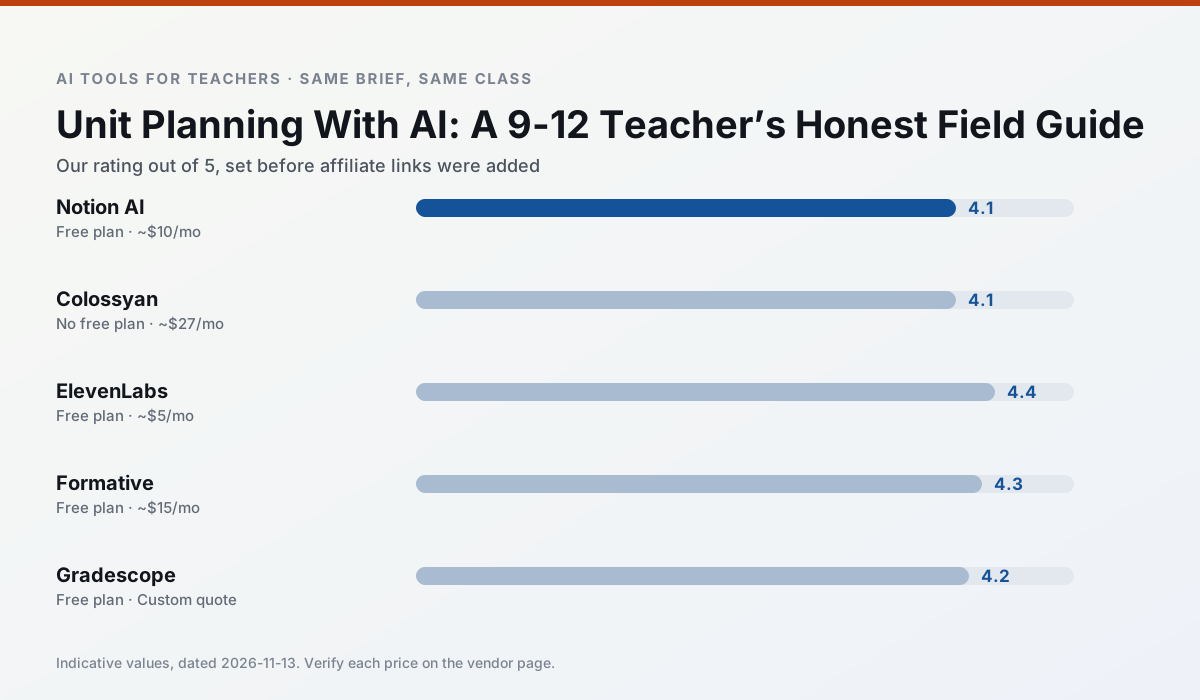
Side by side
Comparison table
Ratings reflect our timed classroom workflow, not vendor claims. Prices are indicative — verify on the vendor site.
| Tool | Best for | Free tier | Indicative paid plan | Standout feature | Our rating | Verdict | Try the tool |
|---|---|---|---|---|---|---|---|
| Notion AI | curriculum mapping · unit planning | Yes — Limited AI usage | ~$10 /user/mo | Linked databases | 4.1 / 5 | Situational | Try free |
| Colossyan | PD materials · video lessons | No ongoing free plan | ~$27 /user/mo | PDF/PPT-to-video | 4.1 / 5 | Situational | Try free |
| ElevenLabs | accessibility · reading intervention | Yes — Monthly character quota | ~$5 /user/mo | Very natural voices | 4.4 / 5 | Strong option | Try free |
| Formative | formative assessment · grading | Yes — Core assessment tools | ~$15 /user/mo | Live student responses | 4.3 / 5 | Strong option | Try free |
| Gradescope | grading · rubric creation | Yes — Limited courses | Custom quote | Bubble sheet and handwriting capture | 4.2 / 5 | Strong option | Try free |
| Kahoot! | quiz generation · review lessons | Yes — Limited player count | ~$10 /user/mo | AI question builder | 4.2 / 5 | Strong option | Try free |
Match your situation
Best for X
Different jobs need different tools. Here is what we would open first in each case.
Notion AI runs in a browser tab with no extension, no student accounts and no onboarding call, so you can test it in a free period.
Colossyan answers the three questions a district actually asks: rostering, admin controls and a data-processing agreement. That is usually what decides a school purchase.
If there is no budget, start with ElevenLabs: free plan with clearest quota is the least punishing free tier here.
Formative is the one we would open on a normal planning day because the first output is editable rather than restructurable, and the free plan covers a single teacher's routine.
Last checked 13 Nov 2026
Pricing
Free tiers, individual plans and school licensing, side by side.
| Tool | Free plan | Individual / paid | School & district | Billing note | Verify |
|---|---|---|---|---|---|
| Notion AI | $0 — Limited AI usage | ~$10 /user/mo | ~$8 /user/mo | Indicative — verify on vendor site | Vendor |
| Colossyan | No ongoing free tier | ~$27 /user/mo | Custom quote | Indicative — verify on vendor site | Vendor |
| ElevenLabs | $0 — Monthly character quota | ~$5 /user/mo | ~$22 /user/mo | Indicative — verify on vendor site | Vendor |
| Formative | $0 — Core assessment tools | ~$15 /user/mo | Custom quote | Indicative — verify on vendor site | Vendor |
| Gradescope | $0 — Limited courses | Custom quote | Custom quote | LMS integration and support | Vendor |
| Kahoot! | $0 — Limited player count | ~$10 /user/mo | Custom quote | Indicative — verify on vendor site | Vendor |
Editorial rule: pricing is re-checked every 2–3 months and the top 50 pages are refreshed every 6 months. See our funding policy.
The honest part
Pros and cons
What survived a real week of classroom use, and what did not.
Pros
- Great for long-term curriculum records
- Strong team collaboration
- Flexible structure
Cons
- Setup time is significant
- AI add-on pricing changed more than once
- Not purpose-built for lesson generation
Pros
- Strong for staff training, not just lessons
- Good compliance/LMS export
- Fast document-to-video
Cons
- No permanent free plan
- Higher price point
- Less suited to K-12 student-facing content
Pros
- Excellent for accessible audio versions
- Low entry price
- Fast generation
Cons
- Quota-based billing
- Voice cloning consent considerations
- Not a teaching platform
Pros
- Strong data for intervention groups
- Works with existing PDFs and Docs
- Good LMS integrations
Cons
- Steeper setup than quiz games
- Best value requires school-wide rollout
- Price adds up per teacher
Pros
- Large time savings on paper assessments
- Consistent rubric application
- Detailed item analytics
Cons
- Overkill for elementary classrooms
- Institutional pricing is opaque
- Setup effort is real
In the classroom
Use cases
Five concrete workflows, with the tool we would open for each one.
A parent email in two languages
Draft in plain, warm language with no names, translate, then back-translate the important sentences to check meaning. Keep specific incidents out of the prompt and add them yourself.
Recommended: Notion AIRubric and feedback comments in one pass
Reorder the workflow so the rubric is yours and the comments are generated. Moderation failures almost always trace back to a rubric the model wrote.
Recommended: ColossyanThree reading levels from one source text
Paste a vetted text, ask for supported, core and extension versions, then check the vocabulary list by hand. Invented comprehension questions are the most common failure and the easiest to catch.
Recommended: ElevenLabsA Monday morning lesson plan in twelve minutes
The twelve minutes come from not rewriting the skeleton. Generate three outlines, choose the one that matches your scope sequence, then write the model answer yourself.
Recommended: FormativeA question bank from a PDF or article
Feed a non-identifiable source and ask for items tagged by difficulty with the misconception behind each distractor. Spot-check every answer key; numerical items are least reliable.
Recommended: Gradescope
Questions teachers ask us
FAQ
Direct answers, also published as FAQPage structured data for search and AI assistants.
Can AI do unit planning at 9-12 level?
Which tool is best for unit planning?
What is the biggest risk?
Sources & further reading
Our recommendation
Try Notion AI free for your next unit planning task
AI-assisted notes, databases and curriculum planning in one workspace. Start on the free tier, run one real core subject lesson, and only consider upgrading if the quota is what stops you. Disclosure: we may earn a commission (varies) at no extra cost to you.
Some links on this page are affiliate links. We may earn a commission at no extra cost to you. Our rankings are editorial and never pay-to-play. Never enter student PII into a free consumer account.
Keep reading
Related comparisons in this cluster.
Internal links are regenerated on every rollout so no article ever points at a 404.