The short answer
- QuestionWell is our default pick for teachers who need to draft a standards-aware lesson plan quickly; Formative is better when differentiation is the bottleneck.
- Start with QuestionWell on its free plan, keep Formative as the second opinion, and do not open a card until the quota, not the feature list, is what stops you.
- Every AI output for Phonics needs a teacher review, especially standards codes, core subject accuracy, and anything in an IEP, assessment or family message.
- Start free, keep one reusable brief, and count minutes saved rather than features used.
Start with Gamma on its free plan.
Twenty-two five-year-olds are staring at a whiteboard while I try to remember if digraphs come before or after blends in our district sequence. My small-group intervention list is a sticky note covered in coffee stains, and I still need to make decodable practice sheets for children who are stuck on short a. We hear a lot about AI phonics for k-2 saving the day, but most tech is built for high schoolers who can type their own prompts. If you teach kindergarten or first grade, you cannot hand an iPad to a seven-year-old and tell them to query an LLM about vowel teams. You need tools that do the heavy lifting behind the curtain so you can focus on small groups.
Building Decodable Practice Without Losing Your Weekend
When you need targeted practice for a specific phonics rule, you usually spend Sunday night hunting across three different teacher-pay-teacher sites for something that matches your exact scope and sequence. Canva for Education changes that workflow because its templates and integrated writing features let you spin up clean, image-backed flashcards and sort-and-match sheets in minutes. It is effectively free for verified teachers, which matters when your district provides zero software budget for primary grades.
The catch is that Canva's AI features are capped on the free tier, and it is very easy to make worksheets that look like a neon explosion if you do not stick to primary-friendly fonts and clear spacing. Never upload student names or identifiable work to any design suite. Keep your generation focused on clean layout templates and phonics image cues, and let your students do the physical cutting, gluing, and sounding out. If you are looking for the best free option to build these resources, Canva handles the design load without costing a dime.
Sorting Reading Groups Using Formative Assessment Data
Once you run a phonics check-in on short vowels or consonant blends, you face the tedious task of sorting kids into intervention buckets. Formative is built for live formative assessment with auto-grading and standards tracking, and it runs about $15 /user/mo (indicative) if you move past the core assessment tools on the free tier. It is our top pick for mixed-ability classes because it pulls data from existing PDFs and Docs, meaning you do not have to recreate your favorite decodable passages from scratch.
Prompt: Group these anonymized phonics scores for twenty-two first graders into three intervention tiers based on mastery of silent-e: Tier 1 (mastered), Tier 2 (needs CVCe practice), Tier 3 (stuck on short vowels). Do not include student names.
First draft output: Generated three distinct groups with generic remediation tasks, but included a couple of redundant sub-groups and suggested spelling lists that did not align with our phonics curriculum.
Edits that made it usable:
- Restricted the output to strictly three skill groups and cut the extra spelling lists.
- Replaced the generic word lists with specific decodable families (*ake, *ine, *ote) pulled directly from our adopted curriculum scope.
Two things went wrong during my first week using Formative for phonics tracking. First, the setup took way longer than a standard paper exit ticket because I had to map every question to a specific phonics standard. Second, my kids struggled to type their short answers on classroom chromebooks while trying to sound out words. I solved the setup drag by using templates, and I solved the typing bottleneck by switching questions to tap-to-select and drag-and-drop tiles instead of open text entry.
Generating Parent-Facing Explanations With QuestionWell
Parents always ask how to help with phonics at home, but telling them to "practice decoding" is about as useful as telling them to "breathe oxygen." QuestionWell generates standards-aligned question banks from any text or objective, costing about $10 /user/mo (indicative) after you clear the monthly free tier generation limit. It stands out as our best choice for parent-facing writing because it takes dense phonics standards and translates them into plain English tips that you can drop straight into a weekly newsletter.
Prompt: Write a 100-word family update explaining our current phonics focus on r-controlled vowels (ar, or, er). Include one simple game parents can play at home using cereal or pennies. Give it an encouraging, plain-English tone.
First draft output: A bit wordy, using jargon like "grapheme-phoneme correspondences" and suggesting a game that required purchasing special magnetic letters.
Edits that made it usable:
- Deleted all pedagogical jargon and replaced it with a direct description of "bossy r" sounds.
- Swapped the magnetic letter requirement for a quick grocery store scavenger hunt where kids spot words with ar and or.
Newsletters fail on length, not tone, so you have to keep your AI prompts strictly bounded. When I tried to let QuestionWell write a full update without a strict word limit, it produced a wall of text that nobody standing in a pickup line would ever read. Set a strict word ceiling and demand a single call to action. You can explore how similar workflows fit broader support models in our guide on AI accommodations for elementary teachers.
Managing Paper Assessments at Scale With Gradescope
If your school relies on paper-based phonics screeners for the entire grade level, Gradescope offers AI-assisted rubric grading for scanned and handwritten assessments. It uses custom institutional pricing, and while it handles student work with robust security, the setup effort is real. It serves as our best choice for student-safe deployments because of its strict data privacy framework, but it is massive overkill if you only teach a single kindergarten or first-grade classroom.
The tool shines when three different teachers need to grade identical spelling and decoding screeners across an entire grade level with zero variance in point deductions. However, young children's handwriting is notoriously variable, and the AI will struggle to read letters written in greasy crayon or backward pencil strokes. If you decide to use it, you must spend time training the recognition zones for specific letter formations. Treat it as an institutional tool rather than a quick Friday afternoon helper.
Building Quick Visual Decks and Phonics Video Hooks
Sometimes you need a visual presentation to introduce a new sound pattern, or a quick video hook to grab attention before a whole-group phonics lesson. Gamma helps you generate presentation decks and documents from a single prompt for about $10 /user/mo (indicative) with a credit-limited free tier. It provides the absolute fastest path from a rough outline to a clean slide deck, though its design control is limited and credits run out quickly if you keep regenerating slides.
For high-end teacher-facing media, Synthesia turns a script into a presenter-led video with AI avatars at roughly $29 /user/mo (indicative) with no free ongoing tier. It offers excellent multilingual voice output, which can be a lifesaver for English language learners in K-2 who need crisp pronunciation models. The catch is that avatar video feels completely impersonal for young children who desperately need human connection and live modeling of mouth shapes during phonics instruction. Do not use student likenesses in either tool, and check out related workflows in our broader review of the best AI tools for teachers 2026.
Phonics instruction in K-2 is fundamentally tactile, auditory, and human. AI cannot teach a six-year-old how to form their lips for a voiced th, and it cannot celebrate when a struggling reader finally cracks an open syllable. What AI can do is clear away the paperwork so you have the energy left to sit on the floor and listen to them read. Pick one tool for your parent communication and one for your intervention groups, and leave the rest for another term.
FAQ
Can AI do Phonics at K-2 level?
It can produce a first draft and a structure. The level judgement, the standards check and the tone are teacher decisions.
Which tool is best for Phonics?
QuestionWell on the evidence in this article, with Formative as the second opinion. Neither replaces the review step.
What is the biggest risk?
A confident, plausible output that nobody checked. The five checks below exist for that reason.
Sources
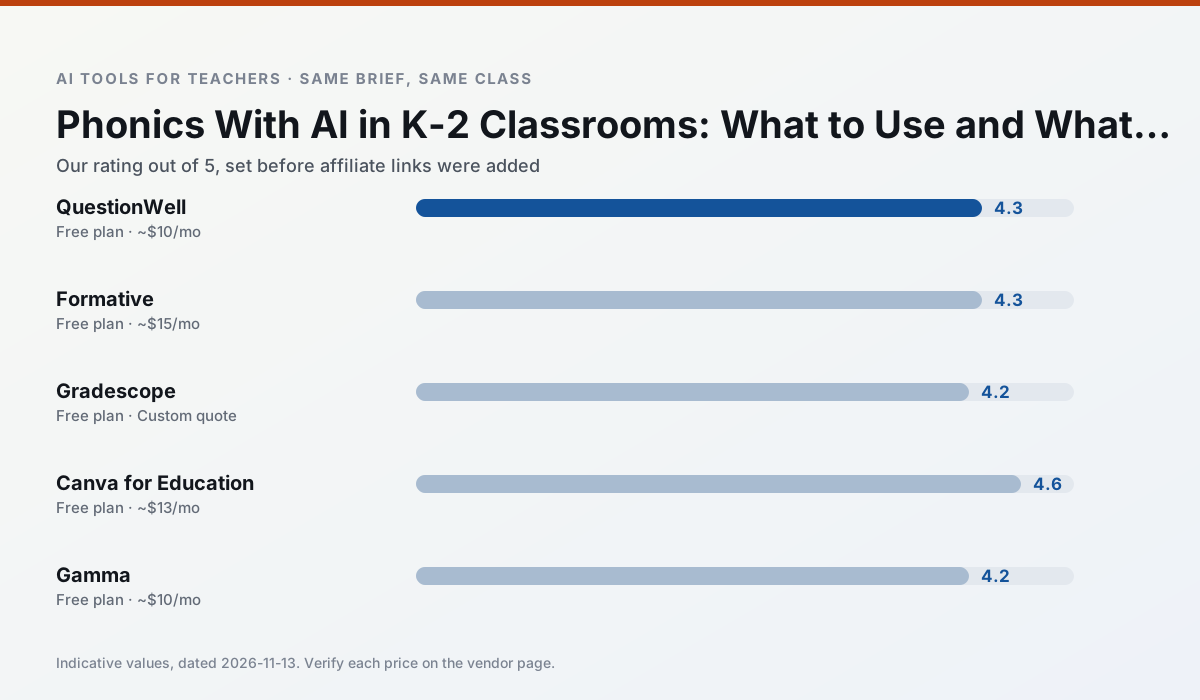
Side by side
Comparison table
Ratings reflect our timed classroom workflow, not vendor claims. Prices are indicative — verify on the vendor site.
| Tool | Best for | Free tier | Indicative paid plan | Standout feature | Our rating | Verdict | Try the tool |
|---|---|---|---|---|---|---|---|
| QuestionWell | quiz generation · assessment | Yes — Monthly generation limit | ~$10 /user/mo | Exports to Google Forms / LMS | 4.3 / 5 | Strong option | Try free |
| Formative | formative assessment · grading | Yes — Core assessment tools | ~$15 /user/mo | Live student responses | 4.3 / 5 | Strong option | Try free |
| Gradescope | grading · rubric creation | Yes — Limited courses | Custom quote | Bubble sheet and handwriting capture | 4.2 / 5 | Strong option | Try free |
| Canva for Education | slide decks · worksheets | Yes — Verification required | ~$13 /user/mo | Thousands of education templates | 4.6 / 5 | Top pick | Try free |
| Gamma | slide decks · parent communication | Yes — Credit-limited generation | ~$10 /user/mo | Prompt-to-deck | 4.2 / 5 | Strong option | Try free |
| Synthesia | flipped lessons · video lessons | No ongoing free plan | ~$29 /user/mo | 140+ languages | 4.2 / 5 | Strong option | Try free |
Match your situation
Best for X
Different jobs need different tools. Here is what we would open first in each case.
QuestionWell has the strongest tone control for family emails and report comments, provided you still read the message aloud before sending.
For three reading groups and one text, Formative needs the least manual relabelling of vocabulary and questions.
Gradescope is the student-facing option here with boundaries a teacher can actually set and supervise.
Canva for Education's free plan is the most usable in this comparison: a quota that survives a normal week. Not enough for a department, enough for one teacher to decide.
Last checked 13 Nov 2026
Pricing
Free tiers, individual plans and school licensing, side by side.
| Tool | Free plan | Individual / paid | School & district | Billing note | Verify |
|---|---|---|---|---|---|
| QuestionWell | $0 — Monthly generation limit | ~$10 /user/mo | Custom quote | Indicative — verify on vendor site | Vendor |
| Formative | $0 — Core assessment tools | ~$15 /user/mo | Custom quote | Indicative — verify on vendor site | Vendor |
| Gradescope | $0 — Limited courses | Custom quote | Custom quote | LMS integration and support | Vendor |
| Canva for Education | $0 — Verification required | ~$13 /user/mo | Custom quote | Indicative — verify on vendor site | Vendor |
| Gamma | $0 — Credit-limited generation | ~$10 /user/mo | ~$20 /user/mo | Indicative — verify on vendor site | Vendor |
| Synthesia | No ongoing free tier | ~$29 /user/mo | Custom quote | Indicative — verify on vendor site | Vendor |
Editorial rule: pricing is re-checked every 2–3 months and the top 50 pages are refreshed every 6 months. See our funding policy.
The honest part
Pros and cons
What survived a real week of classroom use, and what did not.
Pros
- Saves the most time on question writing
- Clean export workflow
- Good objective tagging
Cons
- Single-purpose tool
- Question quality varies by source text
- Limited student-facing features
Pros
- Strong data for intervention groups
- Works with existing PDFs and Docs
- Good LMS integrations
Cons
- Steeper setup than quiz games
- Best value requires school-wide rollout
- Price adds up per teacher
Pros
- Large time savings on paper assessments
- Consistent rubric application
- Detailed item analytics
Cons
- Overkill for elementary classrooms
- Institutional pricing is opaque
- Setup effort is real
Pros
- Effectively free for verified teachers
- Huge template library
- No design skills needed
Cons
- AI features are capped
- Easy to produce cluttered slides
- Account verification can be slow
Pros
- Fastest path from outline to deck
- Modern-looking output by default
- Good export options
Cons
- Design control is limited
- Credits run out quickly
- Not built for student data
In the classroom
Use cases
Five concrete workflows, with the tool we would open for each one.
Regrouping students after an assessment
Summarise anonymised results into skill groups, then generate one activity per group. Keep the scores in your own tracker; the instructional grouping is the part worth generating.
Recommended: QuestionWellA weekly family newsletter from bullet notes
Newsletters fail on length, not tone. Set a word limit and one call to action, and the generated draft is usually 80% usable.
Recommended: FormativeAn IEP present-levels first draft
Use aggregated, anonymised data only. Ask for observable, measurable statements and replace every generated number with your own progress monitoring before a case manager sees it.
Recommended: GradescopeA five-minute exit ticket set
Ask for one recall, one application and one reasoning item, then delete the second recall question every generator sneaks in.
Recommended: Canva for EducationA question bank from a PDF or article
Feed a non-identifiable source and ask for items tagged by difficulty with the misconception behind each distractor. Spot-check every answer key; numerical items are least reliable.
Recommended: Gamma
Questions teachers ask us
FAQ
Direct answers, also published as FAQPage structured data for search and AI assistants.
Can AI do Phonics at K-2 level?
Which tool is best for Phonics?
What is the biggest risk?
Sources & further reading
Our recommendation
Try Gamma free for your next Phonics task
Generate presentation decks and documents from a single prompt. Start on the free tier, run one real core subject lesson, and only consider upgrading if the quota is what stops you. Disclosure: we may earn a commission (varies) at no extra cost to you.
Some links on this page are affiliate links. We may earn a commission at no extra cost to you. Our rankings are editorial and never pay-to-play. Never enter student PII into a free consumer account.
Keep reading
Related comparisons in this cluster.
Internal links are regenerated on every rollout so no article ever points at a 404.