The short answer
- Eduaide.Ai is our default pick for teachers who need to write criterion-referenced rubrics quickly; Claude is better when differentiation is the bottleneck.
- All 3 shortlisted tools are priced for one teacher first and a school second. Eduaide.Ai and Claude are the two worth trialling on a real task before any purchase conversation.
- Every AI output for rubric creation needs a teacher review, especially standards codes, core subject accuracy, and anything in an IEP, assessment or family message.
- Everything on this page dates from 2026-11-13; where a price could not be re-read, the row says so.
Start with Originality.ai on its free plan.
At four o'clock on a Tuesday afternoon in November 2026, I was staring at a stack of twenty-eight fourth-grade opinion writing pieces about whether school days should be longer, wondering why I had made the rubric four pages long with six distinct sub-categories. My coffee had gone cold hours ago. Writing rubrics from scratch for every history project, science poster, and narrative writing piece is the administrative quicksand of upper elementary teaching. It eats planning periods alive. That is why AI rubric creation for 3-5 teachers has quietly become the most practical timesaver in my weekly routine, provided you know which tools actually understand nine-year-olds and which ones just spit out academic jargon.
Why Upper Elementary Rubrics Need Special Care
Third through fifth grade is a strange pedagogical valley. Students are moving past basic decoding and single-paragraph writing into multi-paragraph essays, multi-step word problems, and collaborative group presentations. If you use a generic AI prompt to build a rubric for this age group, you usually get descriptors like "demonstrates profound critical analysis" or "exhibits exemplary syntax." None of those terms help a nine-year-old understand why they got a two out of four on their paragraph transition. You need tools that let you anchor expectations to concrete milestones, like whether they used transition words or included three pieces of evidence from the text.
When looking at the current landscape, MagicSchool AI stands out as the most accessible starting point. It offers a large library of teacher-specific AI generators in one dashboard, and the core generators are available on a free tier with monthly usage limits, while the paid version runs around $12 per user per month. Its biggest strength is a wide purpose-built template library that is fast to learn with almost no prompting skill required. The catch is that its outputs still need rigorous standards review, and the best features sit behind the paid tier. When you want something quick for an upcoming science model without fussing over prompt engineering, MagicSchool gets you a solid draft in seconds.
Best for Mixed-Ability Classes: Eduaide.Ai
If your classroom includes students reading at a second-grade level alongside kids who consume fantasy novels for breakfast, your grading tools need flexibility. Eduaide.Ai handles lesson, rubric, and worksheet generation with an uncluttered interface and a strong teaching-resource library. It operates on a free tier with a daily generation cap, with a paid tier costing roughly $10 per user per month. It is our top pick for mixed-ability classes because its rubric outputs are clean and easy to modify for different tiers of learners.
Prompt: Create a 4-point rubric for a 4th-grade informational poster about ecosystems. Include distinct descriptors for developing, proficient, and advanced learners, focusing on habitat facts and visual layout.
Result: Eduaide returned a clean three-column table with clear, kid-friendly indicators for text accuracy and diagram labels, though the advanced column originally demanded bibliography skills more suited to middle school.
Edits: I swapped the citation requirement for a prompt to include a food web diagram, and I softened the developing column language from "missing data" to "includes at least one core fact about the habitat."
Two things went wrong during my first month using Eduaide. First, I tried to export my rubrics directly into our district's archaic learning management system, only to find that the export options are less polished than what you get with larger platforms. I ended up copying and pasting the markdown tables into Google Docs instead. Second, I got a bit too ambitious and generated twenty rubrics in one afternoon, quickly hitting the daily generation cap on the free tier. Now I pace my prep work across the week. If you need a broader look at how technology shapes instruction, our guide on AI tools for teachers in 2026 covers the wider ecosystem.
Handling Long-Form Planning with Claude
Sometimes a single rubric is not enough, and you need to align an entire three-week project-based learning unit across writing, science, and oral presentation standards. For document-heavy planning, Claude is the strongest option. It is a long-context assistant available on a usage-limited free tier, with a consumer paid plan running around $20 per user per month. It excels at handling full unit plans and long rubrics, producing nuanced prose that sounds less generic than other models.
The limitation here is that Claude has no teacher-specific templates and fewer direct classroom integrations. You have to prompt it carefully to get what you need. Furthermore, the consumer plan is not suitable for student data, so you must use an approved workspace tier if any school-related documents contain identifiable information. I use Claude when I am building complex, multi-tiered rubrics for project-based learning where students evaluate each other's collaborative skills alongside their final science artifacts.
Grading Paper Assessments with Gradescope
If your upper elementary students still complete math tests and reading response sheets on physical paper, Gradescope offers AI-assisted rubric grading for scanned and handwritten assessments. It is available on limited free courses with custom institutional pricing. Its reported strengths include massive time savings on paper assessments, consistent rubric application, and detailed item analytics that show you which fraction concept your entire fourth-grade cohort missed.
However, Gradescope is an institutional tool with real setup effort. It can feel like overkill for a single elementary classroom, and its pricing is opaque. Because it handles scanned student work, a full data privacy agreement and FERPA review are mandatory before deployment. If your school has already purchased a site license, it transforms how you grade stack-of-paper exit tickets, but do not expect to log in and use it as an individual teacher without administrative backing.
Managing Writing Quality Control
When you are publishing student work, creating district communications, or auditing curriculum documents, you occasionally run into tools built for entirely different industries. Originality.ai offers AI-detection and plagiarism scanning for publisher and admin workflows with a transparent credit model starting around $12 per user per month. While it is useful for content publishing quality assurance, its AI detection produces false positives and should never be used as the sole evidence of academic misconduct. It is not a teaching tool, and you should never use detector scores for disciplinary decisions.
Similarly, Jasper functions as a brand-voice writing assistant for school communications teams, priced at roughly $39 per user per month. It provides consistent tone across communications and a strong long-form editor, but it is priced for marketing teams and is entirely overkill for a single classroom. For elementary teachers drowning in paperwork, stick to tools built for lesson design and assessment like MagicSchool or Eduaide, and check out related resources like AI accommodations for elementary teachers for support with differentiation.
Keeping the Human Element in Assessment
AI rubric creation does not replace teacher judgment. It merely replaces the blank page. When I hand a generated rubric to my fifth graders, we read it together and translate the academic headings into what the work actually looks like on paper. If an AI model suggests a category that feels disconnected from our actual classroom discussions, I delete it immediately. The goal is to spend less time typing grading criteria and more time actually talking to students about their progress.
FAQ
Can AI do rubric creation at 3-5 level?
It can produce a first draft and a structure. The level judgement, the standards check and the tone are teacher decisions.
Which tool is best for rubric creation?
Eduaide.Ai on the evidence in this article, with Claude as the second opinion. Neither replaces the review step.
What is the biggest risk?
A confident, plausible output that nobody checked. The five checks below exist for that reason.
Sources
- Eduaide.Ai feature and pricing overview, retrieved November 2026 from eduaide.ai.
- Anthropic Claude usage tiers and documentation, retrieved November 2026 from anthropic.com.
- Gradescope educator documentation and institutional workflows, retrieved November 2026 from gradescope.com.
- Originality.ai pricing and credit structure, retrieved November 2026 from originality.ai.
- Jasper AI workspace plans and features, retrieved November 2026 from jasper.ai.
- MagicSchool AI teacher generator library and tier breakdown, retrieved November 2026 from magicschool.ai.
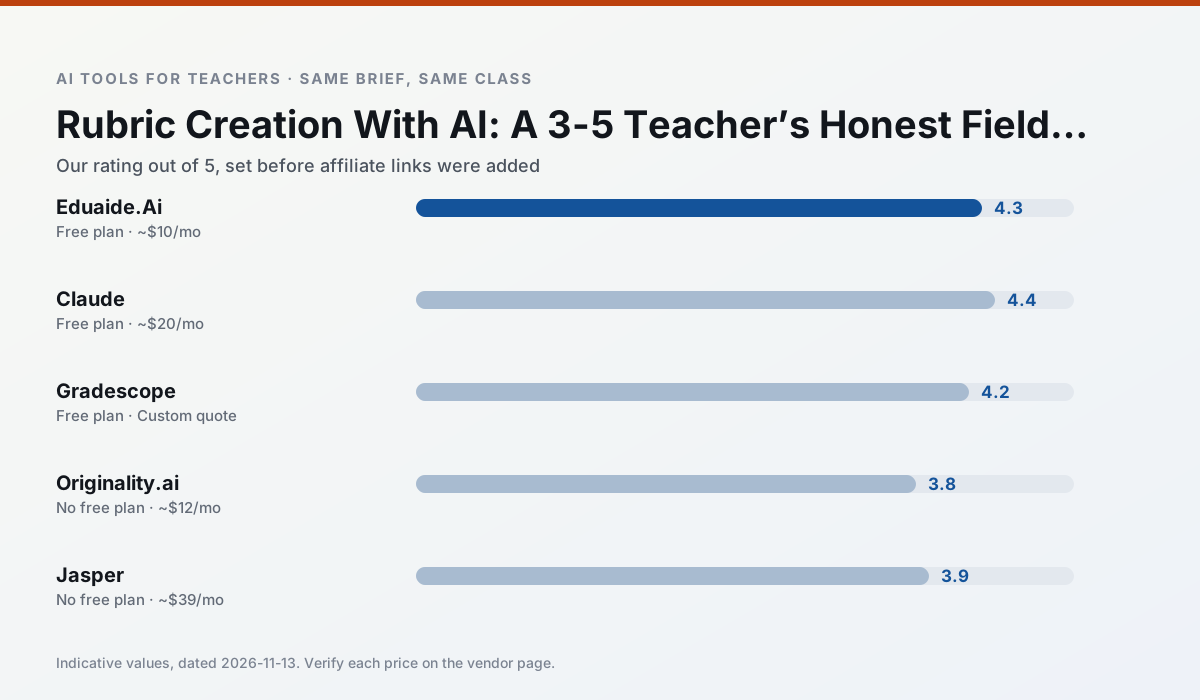
Side by side
Comparison table
Ratings reflect our timed classroom workflow, not vendor claims. Prices are indicative — verify on the vendor site.
| Tool | Best for | Free tier | Indicative paid plan | Standout feature | Our rating | Verdict | Try the tool |
|---|---|---|---|---|---|---|---|
| Eduaide.Ai | lesson planning · rubric creation | Yes — Daily generation cap | ~$10 /user/mo | Resource library | 4.3 / 5 | Strong option | Try free |
| Claude | rubric creation · feedback on writing | Yes — Usage-limited | ~$20 /user/mo | Very large context window | 4.4 / 5 | Strong option | Try free |
| Gradescope | grading · rubric creation | Yes — Limited courses | Custom quote | Bubble sheet and handwriting capture | 4.2 / 5 | Strong option | Try free |
| Originality.ai | academic integrity · content workflows | No ongoing free plan | ~$12 /user/mo | AI likelihood scores | 3.8 / 5 | Situational | Try free |
| Jasper | newsletters · parent communication | No ongoing free plan | ~$39 /user/mo | Brand voice profiles | 3.9 / 5 | Situational | Try free |
| MagicSchool AI | lesson planning · differentiation | Yes — Core generators with monthly usage limits | ~$12 /user/mo | 80+ teacher-specific tools | 4.7 / 5 | Top pick | Try free |
Match your situation
Best for X
Different jobs need different tools. Here is what we would open first in each case.
Eduaide.Ai keeps the same task across levels, which is what makes a differentiated set defensible in moderation.
Family-facing drafts from Claude need the fewest rewrites for warmth without overpromising, which is the usual failure mode.
Gradescope is the student-facing option here with boundaries a teacher can actually set and supervise.
Originality.ai wins on the default path: fewer clicks to a usable draft, and the interface does not get in the way at 7:40am.
Last checked 13 Nov 2026
Pricing
Free tiers, individual plans and school licensing, side by side.
| Tool | Free plan | Individual / paid | School & district | Billing note | Verify |
|---|---|---|---|---|---|
| Eduaide.Ai | $0 — Daily generation cap | ~$10 /user/mo | Custom quote | Indicative — verify on vendor site | Vendor |
| Claude | $0 — Usage-limited | ~$20 /user/mo | ~$25+ /user/mo | Indicative — verify on vendor site | Vendor |
| Gradescope | $0 — Limited courses | Custom quote | Custom quote | LMS integration and support | Vendor |
| Originality.ai | No ongoing free tier | ~$12 /user/mo | Custom quote | Indicative — verify on vendor site | Vendor |
| Jasper | No ongoing free tier | ~$39 /user/mo | ~$59+ /user/mo | Indicative — verify on vendor site | Vendor |
| MagicSchool AI | $0 — Core generators with monthly usage limits | ~$12 /user/mo | Custom quote | Indicative — verify on vendor site | Vendor |
Editorial rule: pricing is re-checked every 2–3 months and the top 50 pages are refreshed every 6 months. See our funding policy.
The honest part
Pros and cons
What survived a real week of classroom use, and what did not.
Pros
- Very low entry price
- Good worksheet and rubric output
- Clean, uncluttered UI
Cons
- Smaller template set than MagicSchool
- Less polished export options
- Limited integrations
Pros
- Handles full unit plans and long rubrics
- Nuanced, less generic prose
- Good at structured document output
Cons
- No teacher-specific templates
- Fewer classroom integrations
- Consumer plan not suitable for student data
Pros
- Large time savings on paper assessments
- Consistent rubric application
- Detailed item analytics
Cons
- Overkill for elementary classrooms
- Institutional pricing is opaque
- Setup effort is real
Pros
- Useful for content publishing QA
- Fast bulk scanning
- Transparent credit model
Cons
- AI detection produces false positives
- Should never be sole evidence of misconduct
- Not a teaching tool
Pros
- Consistent tone across communications
- Strong long-form editor
- Good for district comms teams
Cons
- Priced for marketing teams
- Overkill for one classroom
- No education-specific features
In the classroom
Use cases
Five concrete workflows, with the tool we would open for each one.
A weekly family newsletter from bullet notes
Newsletters fail on length, not tone. Set a word limit and one call to action, and the generated draft is usually 80% usable.
Recommended: Eduaide.AiRegrouping students after an assessment
Summarise anonymised results into skill groups, then generate one activity per group. Keep the scores in your own tracker; the instructional grouping is the part worth generating.
Recommended: ClaudeA five-minute exit ticket set
Ask for one recall, one application and one reasoning item, then delete the second recall question every generator sneaks in.
Recommended: GradescopeAn IEP present-levels first draft
Use aggregated, anonymised data only. Ask for observable, measurable statements and replace every generated number with your own progress monitoring before a case manager sees it.
Recommended: Originality.aiA substitute folder that needs no context
The value here is structure, not creativity. Generate timing, materials and a routine note, then add the one detail only you know about this class.
Recommended: Jasper
Questions teachers ask us
FAQ
Direct answers, also published as FAQPage structured data for search and AI assistants.
Can AI do rubric creation at 3-5 level?
Which tool is best for rubric creation?
What is the biggest risk?
Sources & further reading
Our recommendation
Try Originality.ai free for your next rubric creation task
AI-detection and plagiarism scanning for publisher and admin workflows. Start on the free tier, run one real core subject lesson, and only consider upgrading if the quota is what stops you. Disclosure: we may earn a commission (25% recurring) at no extra cost to you.
Some links on this page are affiliate links. We may earn a commission at no extra cost to you. Our rankings are editorial and never pay-to-play. Never enter student PII into a free consumer account.
Keep reading
Related comparisons in this cluster.
Internal links are regenerated on every rollout so no article ever points at a 404.