The short answer
- HeyGen is our default pick for teachers who need to send family messages in home languages quickly; Writesonic is better when differentiation is the bottleneck.
- Start with HeyGen on its free plan, keep Writesonic as the second opinion, and do not open a card until the quota, not the feature list, is what stops you.
- Every AI output for translation needs a teacher review, especially standards codes, core subject accuracy, and anything in an IEP, assessment or family message.
- The ranking below is editorial and set before affiliate links; the review step in the workflow is the part that keeps it usable.
Start with HeyGen on its free plan.
At 3:45 on a Friday afternoon, my classroom usually smells like damp coats and discarded fruit snacks. On this particular day, it smelled like pure panic. I was staring at a weekly newsletter that needed to go out to twenty-six families, twelve of whom spoke languages other than English at home. My school district has a translation service, but the turnaround time is three business days. By then, the field trip permission slip I was trying to send home would be completely useless. I needed something fast, and standard machine translation tools were producing clunky sentences that made my third-grade directions sound like a ransom note. That was when I started testing AI family translation for elementary teachers to see what actually worked in a real school building without violating privacy laws.
Using AI for family communication is completely different from generating worksheets or lesson plans. When a lesson plan fails, you pivot and fix it on the fly. When a translated parent message fails, a family might miss a minimum-day dismissal or misunderstand a medical notification. Over the past term, I have run dozens of classroom communication workflows through various platforms to find out where the technology helps and where it creates dangerous misunderstandings. If you are trying to bridge the gap with multilingual households in 2026, you need a realistic map of these tools, starting with the ones that handle parent-facing writing best.
Parent-Facing Writing and Video Messages
When you need to send clear, polished updates to families who prefer reading or listening in their home language, HeyGen stands out as best for parent-facing writing and video translation. The free tier offers a limited credit plan, while paid plans run around $29 per user per month. Its biggest strength is its best-in-class lip-sync translation and utility for multilingual families, letting you translate video announcements into natural-sounding audio and video in multiple languages. However, the credit-based pricing is confusing, and voice cloning raises serious consent questions that require documented permission before you clone your own voice to speak Spanish or Vietnamese to your families. It is definitely overkill for everyday lesson planning, but for weekly family video briefings, it is remarkably effective.
For standard text-based announcements, newsletters, and email updates, Writesonic operates as best for mixed-ability classes and multilingual writing support. Priced around $16 per user per month with a limited free tier, it provides a cheaper alternative to enterprise writing suites and offers many templates. The catch is that its output can feel quite generic for elementary classrooms, and its credit system is just as opaque as HeyGen's.
Prompt: Write a weekly classroom newsletter update for elementary parents in clear, simple English, explaining our upcoming fractions unit and Friday's field trip.
First response: A very long, corporate-sounding bulletin that used words like "pedagogical framework" and "scholastic expedition" alongside generic clipart placeholders.
Edits:
- Cut the jargon and explicitly asked the AI to write at a third-grade reading level for the parents.
- Added bullet points for dates, times, and packing instructions so scanning families wouldn't miss the details.
Streamlining Student-Safe Deployments
If your translation workflow also involves checking student understanding or sending home interactive practice that families can review together, Quizizz remains a reliable choice. It functions as best for student-safe deployments, offering core quiz creation on its free tier and paid upgrades around $15 per user per month. Students already know the interface, reporting is straightforward, and it works well on low-end devices. The limitation is that writing high-quality AI questions still requires heavy teacher review, and the gamification can sometimes distract younger learners. COPPA and FERPA documentation is readily available, though you should always confirm details with your district IT department.
For everyday document translation and real-time writing support inside your browser, Brisk Teaching acts as the best free option on the market. With a limited number of free actions per month and paid tiers around $10 per user per month, Brisk brings AI feedback directly into Google Docs and Slides without forcing you to copy and paste text between tabs. The learning curve is gentle, though it is a Chrome-first workflow that requires extension permissions from your IT administrator. Because the extension reads document content as you work, you must review data privacy agreements and scope carefully before pasting student text.
Managing Comprehensive Teacher Generators
When you need an all-in-one platform to generate translated parent letters, leveled reading passages, and graphic organizers simultaneously, MagicSchool AI provides the widest purpose-built template library for educators. Its free tier is exceptionally generous for individual teachers, while the paid tier sits around $12 per user per month. It is fast to learn with almost no prompting skill required. The main downside is that its outputs still need rigorous standards review, and the most useful administrative and translation features sit behind the paid wall. District approval can also be slow, though the vendor states that no student personally identifiable information is required for core generators.
A close sibling to MagicSchool is Eduaide.Ai, which focuses heavily on lesson, rubric, and worksheet generation alongside a dedicated teaching-resource library. Priced around $10 per user per month with a daily generation cap on its free tier, it offers a very low entry price and a clean, uncluttered user interface. It features a smaller template set than MagicSchool and less polished export options, but it gets the job done when you need quick, bilingual resource generation. For a broader look at how these tools fit into daily routines, check out our guide on AI accommodations for elementary teachers and our deeper dive into AI accommodations for K-2 classrooms.
What Went Wrong in Real Classroom Use
Nothing tests an AI tool quite like a Tuesday morning when the school Wi-Fi drops halfway through printing translated parent flyers. During my third week using these platforms for family translation, I ran into two major roadblocks that nearly derailed my communication plan.
First, I trusted an AI text generator to translate a complex behavior incident report directly into Spanish for a parent conference. The tool produced fluent Spanish, but it translated an idiom about a student "dragging their feet" literally, which sounded bizarre and alarming to the parent when read out of context. I spent the first ten minutes of the conference apologizing and clarifying the nuance. Since then, I never send a translated behavior note without running it through a back-translation check or having a bilingual colleague do a quick spot-check first.
Second, I tried to use a browser-based translation extension on a shared classroom Chromebook while logged into my teacher account. The extension automatically flagged student drafting text that included names and medical accommodations, which instantly triggered a minor compliance flag with our district data privacy officer. I had to uninstall the extension, clear my cache, and pivot to a dedicated web dashboard where I could scrub all student names before pasting text. Protecting family and student privacy is non-negotiable, and convenience should never override local compliance rules.
AI family translation is not a magic wand that instantly erases the language barrier in a diverse elementary school. It is a drafting partner that cuts your typing time in half, provided you keep your hand firmly on the steering wheel. Treat every generated output as a rough first draft, verify the tone before it reaches a parent's hands, and always keep your human empathy at the center of the communication loop.
FAQ
Can AI do translation at Elementary level?
It can produce a first draft and a structure. The level judgement, the standards check and the tone are teacher decisions.
Which tool is best for translation?
HeyGen on the evidence in this article, with Writesonic as the second opinion. Neither replaces the review step.
What is the biggest risk?
A confident, plausible output that nobody checked. The five checks below exist for that reason.
Sources
- HeyGen. (2026). AI Avatar Video and Video Translation Platform Pricing and Features. https://www.heygen.com/
- Writesonic. (2026). AI Writing and Content Generation Tools. https://writesonic.com/
- Quizizz. (2026). Interactive Learning and Assessment Platform Compliance Data. https://quizizz.com/
- Brisk Teaching. (2026). Chrome Extension for AI-Assisted Teaching and Feedback. https://briskteaching.com/
- MagicSchool AI. (2026). AI Platform for Educators and School Districts. https://www.magicschool.ai/
- Eduaide.Ai. (2026). Lesson Planning and Resource Generation Toolkit. https://www.eduaide.ai/
Side by side
Comparison table
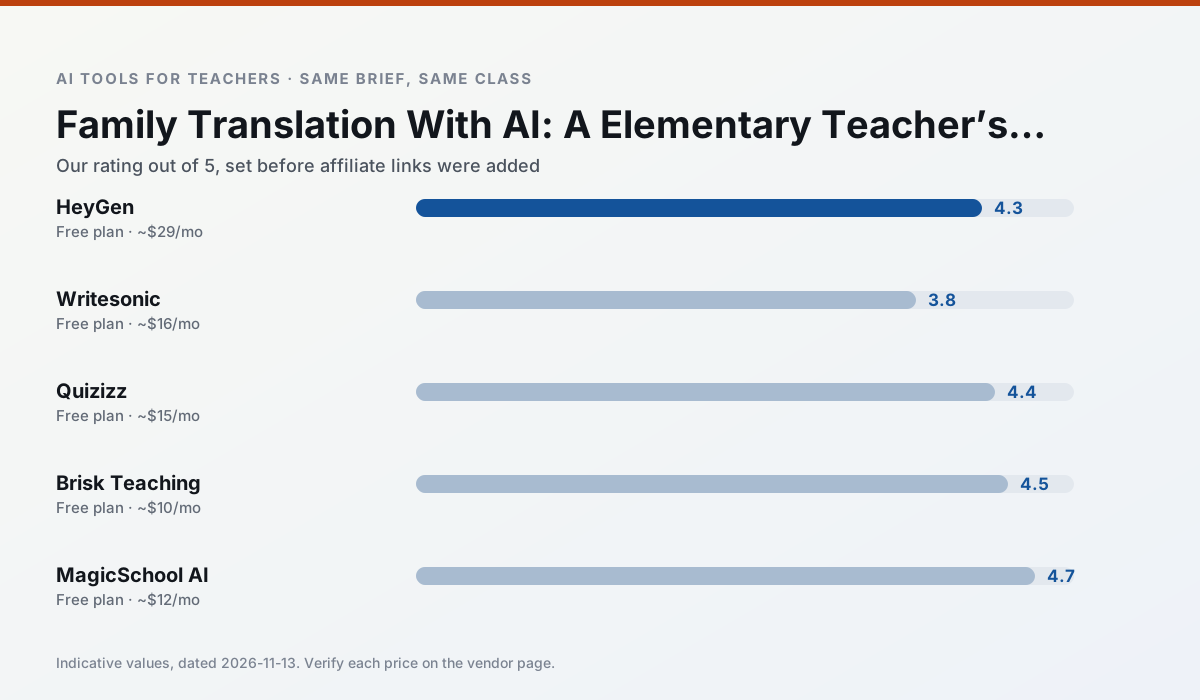
Ratings reflect our timed classroom workflow, not vendor claims. Prices are indicative — verify on the vendor site.
| Tool | Best for | Free tier | Indicative paid plan | Standout feature | Our rating | Verdict | Try the tool |
|---|---|---|---|---|---|---|---|
| HeyGen | video lessons · translation | Yes — Limited credit plan | ~$29 /user/mo | Video translation | 4.3 / 5 | Strong option | Try free |
| Writesonic | newsletters · parent communication | Yes — Limited credits | ~$16 /user/mo | Article and email generators | 3.8 / 5 | Situational | Try free |
| Quizizz | quiz generation · formative assessment | Yes — Core quiz creation | ~$15 /user/mo | AI question generator | 4.4 / 5 | Strong option | Try free |
| Brisk Teaching | feedback on writing · grading | Yes — Limited actions per month | ~$10 /user/mo | Works inside Google Docs | 4.5 / 5 | Top pick | Try free |
| MagicSchool AI | lesson planning · differentiation | Yes — Core generators with monthly usage limits | ~$12 /user/mo | 80+ teacher-specific tools | 4.7 / 5 | Top pick | Try free |
| Eduaide.Ai | lesson planning · rubric creation | Yes — Daily generation cap | ~$10 /user/mo | Resource library | 4.3 / 5 | Strong option | Try free |
Match your situation
Best for X
Different jobs need different tools. Here is what we would open first in each case.
Family-facing drafts from HeyGen need the fewest rewrites for warmth without overpromising, which is the usual failure mode.
For three reading groups and one text, Writesonic needs the least manual relabelling of vocabulary and questions.
For anything students touch directly, Quizizz offers the supervision controls and logging that IT will ask about first.
Nothing on Brisk Teaching's free tier is a teaser demo; the limits are documented and a normal week fits inside them.
Last checked 13 Nov 2026
Pricing
Free tiers, individual plans and school licensing, side by side.
| Tool | Free plan | Individual / paid | School & district | Billing note | Verify |
|---|---|---|---|---|---|
| HeyGen | $0 — Limited credit plan | ~$29 /user/mo | Custom quote | Indicative — verify on vendor site | Vendor |
| Writesonic | $0 — Limited credits | ~$16 /user/mo | ~$49 /user/mo | Indicative — verify on vendor site | Vendor |
| Quizizz | $0 — Core quiz creation | ~$15 /user/mo | Custom quote | Indicative — verify on vendor site | Vendor |
| Brisk Teaching | $0 — Limited actions per month | ~$10 /user/mo | Custom quote | Indicative — verify on vendor site | Vendor |
| MagicSchool AI | $0 — Core generators with monthly usage limits | ~$12 /user/mo | Custom quote | Indicative — verify on vendor site | Vendor |
| Eduaide.Ai | $0 — Daily generation cap | ~$10 /user/mo | Custom quote | Indicative — verify on vendor site | Vendor |
Editorial rule: pricing is re-checked every 2–3 months and the top 50 pages are refreshed every 6 months. See our funding policy.
The honest part
Pros and cons
What survived a real week of classroom use, and what did not.
Pros
- Best-in-class lip-sync translation
- Useful for multilingual families
- Generous trial credits
Cons
- Credit-based pricing is confusing
- Voice cloning raises consent questions
- Overkill for everyday lessons
Pros
- Cheaper than enterprise writing suites
- Many templates
- Reasonable free trial
Cons
- Generic classroom output
- Credit system is confusing
- Limited education context
Pros
- Students already know the interface
- Good reporting
- Works on low-end devices
Cons
- Writing high-quality AI questions still needs review
- Gamification can distract
- Advanced analytics are paid
Pros
- No copy-paste between tools
- Fast inline feedback on student drafts
- Gentle learning curve
Cons
- Chrome-first workflow
- Extension permissions need IT approval
- Free quota is tight
Pros
- Widest purpose-built template library
- Strong free tier for individual teachers
- Fast to learn with almost no prompting skill
Cons
- Outputs still need standards review
- Best features sit behind the paid tier
- District approval can be slow
In the classroom
Use cases
Five concrete workflows, with the tool we would open for each one.
An IEP present-levels first draft
Use aggregated, anonymised data only. Ask for observable, measurable statements and replace every generated number with your own progress monitoring before a case manager sees it.
Recommended: HeyGenA five-minute exit ticket set
Ask for one recall, one application and one reasoning item, then delete the second recall question every generator sneaks in.
Recommended: WritesonicA question bank from a PDF or article
Feed a non-identifiable source and ask for items tagged by difficulty with the misconception behind each distractor. Spot-check every answer key; numerical items are least reliable.
Recommended: QuizizzA substitute folder that needs no context
The value here is structure, not creativity. Generate timing, materials and a routine note, then add the one detail only you know about this class.
Recommended: Brisk TeachingThree reading levels from one source text
Paste a vetted text, ask for supported, core and extension versions, then check the vocabulary list by hand. Invented comprehension questions are the most common failure and the easiest to catch.
Recommended: MagicSchool AI
Questions teachers ask us
FAQ
Direct answers, also published as FAQPage structured data for search and AI assistants.
Can AI do translation at Elementary level?
Which tool is best for translation?
What is the biggest risk?
Sources & further reading
Our recommendation
Try HeyGen free for your next translation task
AI avatar video and video translation for instructional content. Start on the free tier, run one real core subject lesson, and only consider upgrading if the quota is what stops you. Disclosure: we may earn a commission (35% recurring) at no extra cost to you.
Some links on this page are affiliate links. We may earn a commission at no extra cost to you. Our rankings are editorial and never pay-to-play. Never enter student PII into a free consumer account.
Keep reading
Related comparisons in this cluster.
Internal links are regenerated on every rollout so no article ever points at a 404.