The short answer
- Grammarly is our default pick for teachers who need to produce specific, evidence-based comments quickly; ChatGPT is better when differentiation is the bottleneck.
- Free-tier reality for this shortlist: Grammarly: Yes — Core grammar and tone checks; ChatGPT: Yes — Usage-limited model access; Curipod: Yes — Limited lessons per month. Treat every paid figure as indicative until you have read the vendor page; only the free quota is something you can test yourself this week.
- Every AI output for report card comments needs a teacher review, especially standards codes, core subject accuracy, and anything in an IEP, assessment or family message.
- Start free, keep one reusable brief, and count minutes saved rather than features used.
Start with Grammarly on its free plan.
It is 9:45 PM on a Tuesday in November, and I am staring at my forty-fourth blank comment box in the district's grading portal. Three hours ago, I promised myself I would write distinct, meaningful paragraphs for every kid in period four. Instead, I am cycling through variations of "shows good effort" and "needs to participate more," hoping nobody in administration actually reads these things. High school grading periods are a special kind of endurance test, and term reports always break us. Writing AI report card comments for 9-12 teachers has gone from a weird experiment to a standard survival tactic across our department. Let us look at what actually works without drowning your students' personalities in generic robot fluff.
The Problem With Generic AI Feedback
The biggest trap with using generative tools for term reports is the tone wall. If you feed an unconstrained model a student name and a letter grade, you get back prose that sounds like a LinkedIn post written by a depressed robot. It talks about stakeholders, holistic skill development, and synergistic engagement. No parent has ever read that and felt seen. High school parents want to know if their teenager is sleeping through first period or actually thinking critically about the industrial revolution.
When we look at platforms like MagicSchool AI, which offers purpose-built template libraries for teachers priced around $12 /user/mo (indicative), the structure is much better than a blank chat window. You plug in traits, select a tone, and get a usable paragraph in seconds. The free tier gives you enough monthly usage to test it out during progress report season without pulling out a purchase order. Even so, if you do not inject specific behavioral notes, the output still reads like a horoscope.
Why General Models Beat Niche Templates
For daily high school workloads, many of us end up back in a general-purpose assistant. ChatGPT runs about $20 /user/mo (indicative) for the paid tier, with a free option that gives you usage-limited model access. It stands out as our best overall choice for daily use because you can paste in a bulleted list of a student's actual habits and get a nuanced paragraph back instantly.
Prompt: "Write a constructive 3-sentence report card comment for a 11th-grade US History student named Alex. Tone: warm, direct, professional. Include these notes: consistently submits homework late, but dominates the Socratic seminars with deep textual analysis. Needs to bridge the gap between spoken insight and written follow-through."
First pass: Alex demonstrates a commendable ability to engage in Socratic seminars, offering deep textual analysis that enriches class discussions. However, their homework submissions are frequently tardy, indicating a disconnect between verbal participation and written accountability. To improve this term, Alex must work on bridging the gap between spoken insight and written follow-through by managing time more effectively.
Two edits that made it usable:
- Swapped "commendable ability" for "sharp instincts" to sound like an actual human teacher.
- Cut the final clause about time management because it sounds like parental lecture fodder and added a specific mention of keeping a planner.
If you are already managing multiple preps, you might also look at Claude, which costs around $20 /user/mo (indicative) on its paid tier. Its long-context window makes it unmatched when you need to feed an entire rubric and twenty student notes into one prompt without the tool losing the plot halfway through. Just remember the data rule: do not enter student PII on consumer plans. Use approved workspace tiers or stick to anonymous placeholders like "Student A" until your district clears the platform.
Polishing Tone and Catching Red Flags
Once you have your drafts generated, you still need a safety net for grammar and professional polish. Grammarly remains our best free option, offering core grammar and tone checks on its free tier, with paid plans running around $12 /user/mo (indicative). Its superpower is living everywhere you write, whether you are typing directly into your gradebook or sending a high-stakes parent email about a failing grade. It catches those midnight typos where you accidentally write "your" instead of "you're" to a department head.
Keep in mind that Grammarly can flatten your voice if you let it accept every single recommendation. I treat it purely as a spelling and syntax guardrail. If you want to dive deeper into how different grade bands handle writing assistants, check out our guide on best AI tools for teachers 2026 for a broader view of classroom tech.
Two specific things went sideways for me during my first term using these tools for reports. First, I trusted a batch generator to pull themes from my gradebook, and it hallucinated a stellar attendance record for a kid who missed twenty days. I caught it because I cross-referenced my own tracker, which taught me never to let the AI assume attendance or behavioral data. Second, I used a casual prompt that resulted in five different students getting nearly identical comments with just their names swapped. Parents talk to each other at football games; identical feedback is a quick way to lose trust. Now, I run every batch through a strict spot-check and force the prompt to include at least one unique vocabulary word or specific project reference per student.
District Tools and Purpose-Built Safety
If your school district is terrified of consumer-grade AI apps leaking student data, you need an option built from the ground up for education. Khanmigo provides an education-first design backed by a strong nonprofit trust signal, with US teacher accounts subject to eligibility, and student access priced around $4 /learner/mo (indicative). It takes the crown as our best option for schools and districts because its safety guardrails are tight enough for nervous superintendents.
While Khanmigo leans more toward tutoring and math scaffolding than bulk report card generation, its presence in a district ecosystem paves the way for teachers to use AI without constantly second-guessing compliance. For interactive lesson delivery on days when grading feels too heavy, tools like Curipod offer a nice mental break, running about $12 /user/mo (indicative) for paid plans after a restrictive free tier. It turns static topics into interactive student responses in minutes without requiring student accounts.
Writing report cards will never be your favorite weekend activity. But with a disciplined prompting workflow and proper data hygiene, you can reclaim your Sundays and still give parents an honest, readable snapshot of how their teenager is doing in room 214.
FAQ
Can AI do report card comments at 9-12 level?
It can produce a first draft and a structure. The level judgement, the standards check and the tone are teacher decisions.
Which tool is best for report card comments?
Grammarly on the evidence in this article, with ChatGPT as the second opinion. Neither replaces the review step.
What is the biggest risk?
A confident, plausible output that nobody checked. The five checks below exist for that reason.
Sources
- OpenAI. ChatGPT Pricing and Model Specifications. https://openai.com/chatgpt/pricing/
- Anthropic. Claude Feature Overview and Context Windows. https://www.anthropic.com/claude
- MagicSchool AI. Teacher Tool Directory and Privacy Committers. https://www.magicschool.ai/
- Grammarly. Free and Premium Plan Comparisons. https://www.grammarly.com/plans
- Khan Academy. Khanmigo for Teachers and Districts. https://www.khanacademy.org/khanmigo
- Curipod. Interactive Lesson Platform Features. https://curipod.com/
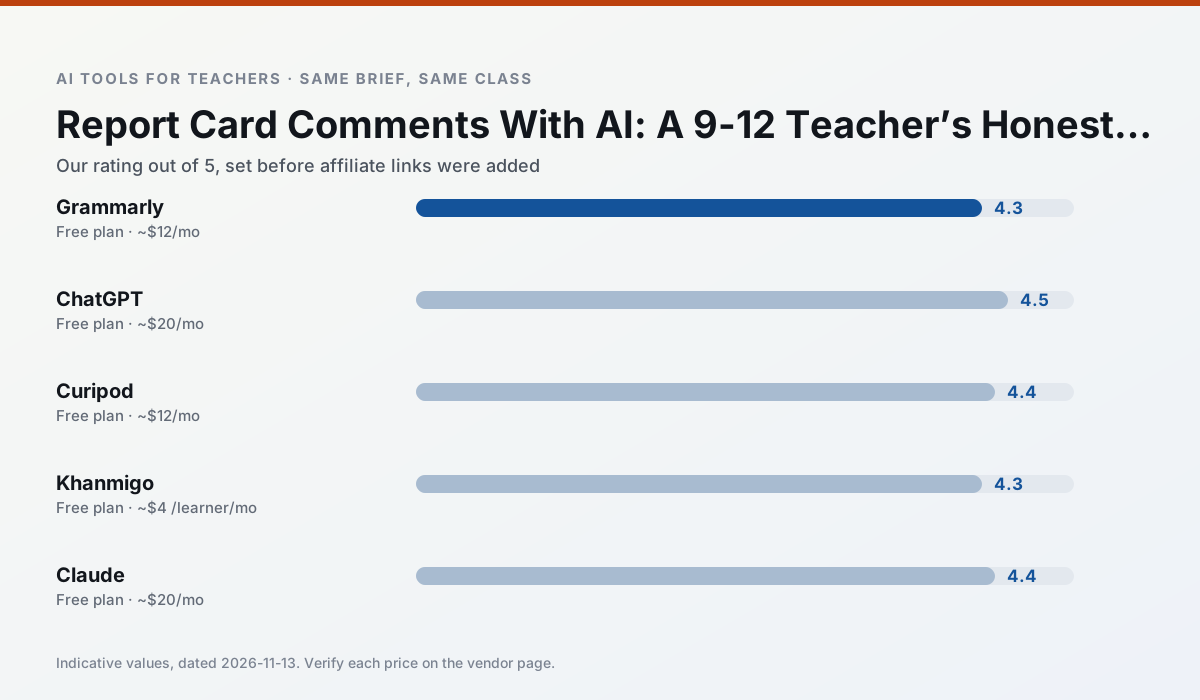
Side by side
Comparison table
Ratings reflect our timed classroom workflow, not vendor claims. Prices are indicative — verify on the vendor site.
| Tool | Best for | Free tier | Indicative paid plan | Standout feature | Our rating | Verdict | Try the tool |
|---|---|---|---|---|---|---|---|
| Grammarly | parent communication · report card comments | Yes — Core grammar and tone checks | ~$12 /user/mo | Tone adjustments | 4.3 / 5 | Strong option | Try free |
| ChatGPT | lesson planning · parent communication | Yes — Usage-limited model access | ~$20 /user/mo | Custom GPTs and Projects | 4.5 / 5 | Top pick | Try free |
| Curipod | formative assessment · exit tickets | Yes — Limited lessons per month | ~$12 /user/mo | Live polls and word clouds | 4.4 / 5 | Strong option | Try free |
| Khanmigo | math practice · student tutoring | Yes — US teacher accounts, subject to eligibility | ~$4 /learner/mo | Socratic tutoring rather than answers | 4.3 / 5 | Strong option | Try free |
| Claude | rubric creation · feedback on writing | Yes — Usage-limited | ~$20 /user/mo | Very large context window | 4.4 / 5 | Strong option | Try free |
| MagicSchool AI | lesson planning · differentiation | Yes — Core generators with monthly usage limits | ~$12 /user/mo | 80+ teacher-specific tools | 4.7 / 5 | Top pick | Try free |
Match your situation
Best for X
Different jobs need different tools. Here is what we would open first in each case.
Grammarly's free plan is the most usable in this comparison: a quota that survives a normal week. Not enough for a department, enough for one teacher to decide.
ChatGPT is the one we would open on a normal planning day because the first output is editable rather than restructurable, and the free plan covers a single teacher's routine.
Setup cost is one login for Curipod; everything else can wait until you know the tool is useful.
Khanmigo is the option IT is least likely to block: single sign-on, admin removal of AI features and an agreement on file.
Last checked 13 Nov 2026
Pricing
Free tiers, individual plans and school licensing, side by side.
| Tool | Free plan | Individual / paid | School & district | Billing note | Verify |
|---|---|---|---|---|---|
| Grammarly | $0 — Core grammar and tone checks | ~$12 /user/mo | ~$15 /user/mo | Indicative — billed annually | Vendor |
| ChatGPT | $0 — Usage-limited model access | ~$20 /user/mo | ~$25+ /user/mo | Indicative — verify on vendor site | Vendor |
| Curipod | $0 — Limited lessons per month | ~$12 /user/mo | Custom quote | Indicative — verify on vendor site | Vendor |
| Khanmigo | $0 — US teacher accounts, subject to eligibility | ~$4 /learner/mo | Custom quote | Indicative — verify on vendor site | Vendor |
| Claude | $0 — Usage-limited | ~$20 /user/mo | ~$25+ /user/mo | Indicative — verify on vendor site | Vendor |
| MagicSchool AI | $0 — Core generators with monthly usage limits | ~$12 /user/mo | Custom quote | Indicative — verify on vendor site | Vendor |
Editorial rule: pricing is re-checked every 2–3 months and the top 50 pages are refreshed every 6 months. See our funding policy.
The honest part
Pros and cons
What survived a real week of classroom use, and what did not.
Pros
- Catches errors in high-stakes parent emails
- Works everywhere you already write
- Very low learning curve
Cons
- Not education-specific
- Can flatten teacher voice
- Premium needed for tone rewriting
Pros
- Most flexible option available
- Huge community of teacher prompt libraries
- Strong multilingual support
Cons
- Requires prompt skills for consistent results
- No built-in standards alignment
- District privacy review usually required
Pros
- High student engagement out of the box
- Great for quick checks for understanding
- No student accounts required for basic use
Cons
- Focused on delivery, not planning
- Requires reliable classroom devices
- Free tier is restrictive
Pros
- Education-first design
- Strong nonprofit trust signal
- Good math scaffolding
Cons
- Availability varies by region
- Less useful for admin paperwork
- Requires student accounts for full value
Pros
- Handles full unit plans and long rubrics
- Nuanced, less generic prose
- Good at structured document output
Cons
- No teacher-specific templates
- Fewer classroom integrations
- Consumer plan not suitable for student data
In the classroom
Use cases
Five concrete workflows, with the tool we would open for each one.
Regrouping students after an assessment
Summarise anonymised results into skill groups, then generate one activity per group. Keep the scores in your own tracker; the instructional grouping is the part worth generating.
Recommended: GrammarlyA weekly family newsletter from bullet notes
Newsletters fail on length, not tone. Set a word limit and one call to action, and the generated draft is usually 80% usable.
Recommended: ChatGPTThree reading levels from one source text
Paste a vetted text, ask for supported, core and extension versions, then check the vocabulary list by hand. Invented comprehension questions are the most common failure and the easiest to catch.
Recommended: CuripodA Monday morning lesson plan in twelve minutes
The twelve minutes come from not rewriting the skeleton. Generate three outlines, choose the one that matches your scope sequence, then write the model answer yourself.
Recommended: KhanmigoA parent email in two languages
Draft in plain, warm language with no names, translate, then back-translate the important sentences to check meaning. Keep specific incidents out of the prompt and add them yourself.
Recommended: Claude
Questions teachers ask us
FAQ
Direct answers, also published as FAQPage structured data for search and AI assistants.
Can AI do report card comments at 9-12 level?
Which tool is best for report card comments?
What is the biggest risk?
Sources & further reading
Our recommendation
Try Grammarly free for your next report card comments task
Writing assistant for polished parent emails, newsletters and reports. Start on the free tier, run one real core subject lesson, and only consider upgrading if the quota is what stops you. Disclosure: we may earn a commission ($20 per paid upgrade + $0.20/signup) at no extra cost to you.
Some links on this page are affiliate links. We may earn a commission at no extra cost to you. Our rankings are editorial and never pay-to-play. Never enter student PII into a free consumer account.
Keep reading
Related comparisons in this cluster.
Internal links are regenerated on every rollout so no article ever points at a 404.