The short answer
- Quizizz is our default pick for teachers who need to build a balanced question set quickly; Kahoot! is better when differentiation is the bottleneck.
- Pricing is where these pages date fastest. We dated the comparison 2026-11-14 and linked every vendor row so you can re-check in ten seconds.
- Every AI output for quiz generation needs a teacher review, especially standards codes, core subject accuracy, and anything in an IEP, assessment or family message.
- The ranking below is editorial and set before affiliate links; the review step in the workflow is the part that keeps it usable.
Start with MagicSchool AI on its free plan.
At 7:45 on a Tuesday morning, I stared at a stack of seventy-two American history essays and realized my formative quiz for period four was still unwritten. I needed ten stimulus-based multiple-choice questions on the Gilded Age, balanced for DOK levels one through three, and I needed them before the first bell rang at eight. That is the exact moment when AI quiz generation stops being an abstract pedagogical debate and becomes a survival mechanism for high school teachers. If you are exploring broader options, you can read our guide on best AI tools for teachers 2026. Over the last year, I have tested six distinct platforms to see which ones actually survive a high school classroom without making extra work.
Why High School Quiz Generation Is Different
Middle school teachers often look for high-energy gamification, but ninth through twelfth graders develop radar for sloppy test items. If an AI generates a distracter that is obviously ridiculous or tests a minor trivia point rather than a core concept, teenagers will call it out immediately. Furthermore, high school standards demand stimulus-based questions, document analysis, and claims-evidence reasoning rather than simple vocabulary matching. We need tools that can handle dense text excerpts, align with state standards, and export cleanly into our learning management systems without requiring a complete rewrite of every single question stem.
The Dedicated Quiz Platforms Compared
When it comes to putting a live assessment in front of students, Quizizz and Kahoot! remain the heavy hitters in most 9-12 buildings. Quizizz earns our pick as the best free option because its core quiz creation tier lets you build robust assignments without hitting an immediate paywall. Students already know the interface, the reporting is solid, and it runs smoothly on those district Chromebooks that struggle to load heavy web applications. The catch is that the AI-generated questions still need a careful read-through for quality, and the gamification elements can sometimes distract students who are trying to focus on complex text analysis. Kahoot!, priced at roughly $10 per user per month on its paid tiers with a limited free player count, takes the crown as best overall for daily use due to its instant engagement and practically zero training time. It is unmatched for quick review sessions, though the inherent time pressure means it suits rapid recall much better than nuanced historical reasoning or advanced mathematical proof-checking.
Prompt: Generate five multiple-choice questions based on this excerpt from Upton Sinclair's The Jungle, focusing on working conditions and targeting 11th-grade reading standards.
Result: The tool spat out five questions, but three of them tested trivial plot details about Jurgis's lunch rather than the intended theme of industrial labor exploitation.
Edits:
- Restructured the prompt to explicitly demand that correct answers require inference rather than direct text matching.
- Replaced two distractor choices that were obviously incorrect with plausible misconceptions about early twentieth-century labor laws.
Specialized Generators and Long-Context Assistants
If your primary bottleneck is drafting questions from scratch rather than hosting live games, QuestionWell is the standout choice for quick setup at roughly $10 per user per month with a monthly free generation limit. It saves the most time on question writing by taking any pasted text or learning objective and spitting out clean, standards-aligned question banks with a neat export workflow. It is a single-purpose tool, which means your students won't use it directly, but for teacher planning, it is remarkably efficient. For deeper pedagogical scaffolding, Khanmigo brings an education-first design from a trusted nonprofit, making it our top pick for schools and districts at approximately $4 per learner per month, with free accounts available for eligible US teachers. Its math scaffolding is particularly strong, though its availability varies by region and it requires student accounts to unlock its full utility.
When you need to build quizzes from entire curriculum units rather than a single article, general-purpose models like Claude step in. At roughly $20 per user per month with a usage-limited free tier, Claude handles full unit plans and long rubrics with a nuanced prose style that avoids the robotic phrasing of smaller tools. It has no teacher-specific templates or classroom integrations, and its consumer tier should never be used with identifiable student data, but its structured document output makes light work of complex blueprinting. Similarly, Eduaide.Ai offers worksheet, rubric, and assessment generation for around $10 per user per month with a daily generation cap. It features a very low entry price and a clean, uncluttered user interface, though its template set is smaller than some of its competitors and its export options are somewhat basic. For more ways to support diverse learners during these assessments, check out our guide on AI accommodations for middle school classrooms.
Two Failures That Taught Me Hard Lessons
Using these generators in a live department will humble you quickly if you do not establish strict guardrails. Early in the fall term, I pasted a complex primary source into a quiz generator and trusted the automated distractor generation completely. Halfway through fourth period, multiple students raised their hands to point out that two different options on question four were factually identical, which immediately invalidated the assessment data and made me look unprepared. Now, I run every AI-generated question bank through a strict personal filter, treating the output as a rough first draft rather than a finished product.
My second major misstep involved ignoring data privacy boundaries when trying to generate diagnostic quiz groups based on student performance metrics. I pasted raw formative assessment scores containing student identifiers into a consumer-tier LLM to save time sorting intervention groups. My department chair caught it during a walkthrough and rightly pointed out that feeding student data into unvetted platforms violates our district's data governance policies, even if the intent was purely pedagogical. Since that day, I only use pseudonyms or aggregate data when prompting models for grouping strategies, and I rely exclusively on district-approved tools like Khanmigo or Quizizz for anything touching student records. AI quiz generators are powerful levers for high school planning, but they require the steady hand of a teacher who refuses to outsource professional judgment.
FAQ
Can AI do quiz generation at 9-12 level?
It can produce a first draft and a structure. The level judgement, the standards check and the tone are teacher decisions.
Which tool is best for quiz generation?
Quizizz on the evidence in this article, with Kahoot! as the second opinion. Neither replaces the review step.
What is the biggest risk?
A confident, plausible output that nobody checked. The five checks below exist for that reason.
Sources
- Quizizz Vendor Overview and Pricing, https://quizizz.com/
- Kahoot! Educational Features and Plans, https://kahoot.com/
- QuestionWell Platform Documentation, https://www.questionwell.ai/
- Khanmigo for Teachers and Districts, https://www.khanacademy.org/khanmigo
- Anthropic Claude Plan Details, https://claude.ai/
- Eduaide.Ai Resource Library Specifications, https://www.eduaide.ai/
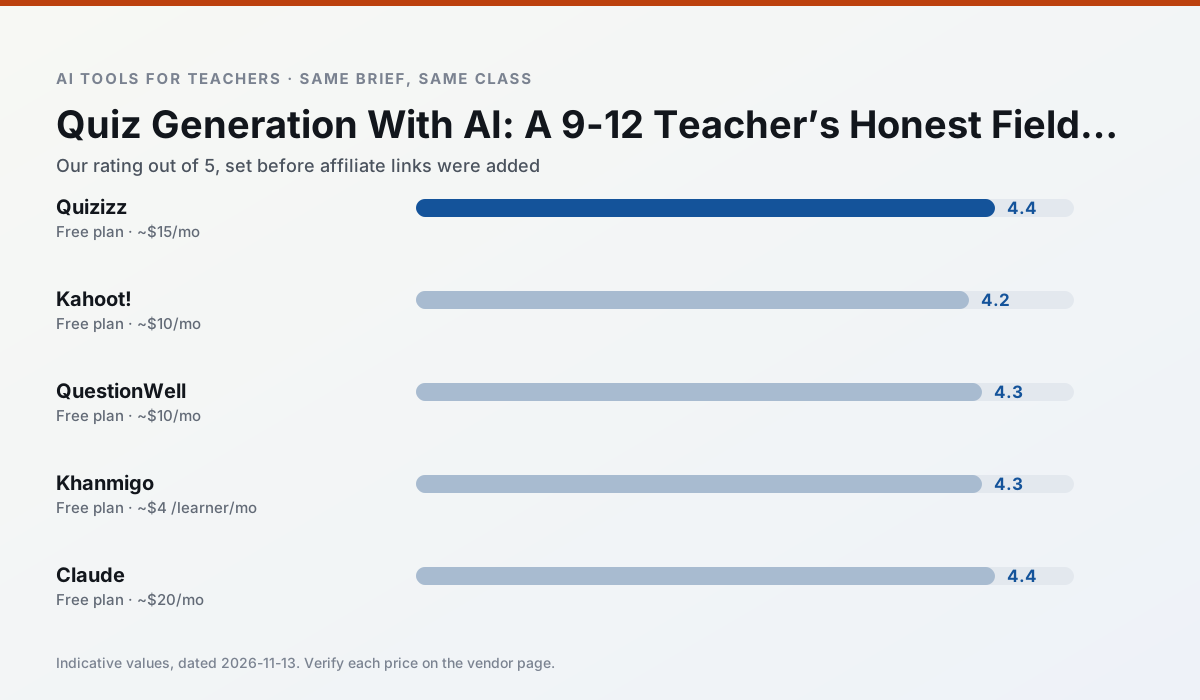
Side by side
Comparison table
Ratings reflect our timed classroom workflow, not vendor claims. Prices are indicative — verify on the vendor site.
| Tool | Best for | Free tier | Indicative paid plan | Standout feature | Our rating | Verdict | Try the tool |
|---|---|---|---|---|---|---|---|
| Quizizz | quiz generation · formative assessment | Yes — Core quiz creation | ~$15 /user/mo | AI question generator | 4.4 / 5 | Strong option | Try free |
| Kahoot! | quiz generation · review lessons | Yes — Limited player count | ~$10 /user/mo | AI question builder | 4.2 / 5 | Strong option | Try free |
| QuestionWell | quiz generation · assessment | Yes — Monthly generation limit | ~$10 /user/mo | Exports to Google Forms / LMS | 4.3 / 5 | Strong option | Try free |
| Khanmigo | math practice · student tutoring | Yes — US teacher accounts, subject to eligibility | ~$4 /learner/mo | Socratic tutoring rather than answers | 4.3 / 5 | Strong option | Try free |
| Claude | rubric creation · feedback on writing | Yes — Usage-limited | ~$20 /user/mo | Very large context window | 4.4 / 5 | Strong option | Try free |
| Eduaide.Ai | lesson planning · rubric creation | Yes — Daily generation cap | ~$10 /user/mo | Resource library | 4.3 / 5 | Strong option | Try free |
Match your situation
Best for X
Different jobs need different tools. Here is what we would open first in each case.
Quizizz's free plan is the most usable in this comparison: a quota that survives a normal week. Not enough for a department, enough for one teacher to decide.
Kahoot! is the one we would open on a normal planning day because the first output is editable rather than restructurable, and the free plan covers a single teacher's routine.
QuestionWell runs in a browser tab with no extension, no student accounts and no onboarding call, so you can test it in a free period.
Khanmigo answers the three questions a district actually asks: rostering, admin controls and a data-processing agreement. That is usually what decides a school purchase.
Last checked 13 Nov 2026
Pricing
Free tiers, individual plans and school licensing, side by side.
| Tool | Free plan | Individual / paid | School & district | Billing note | Verify |
|---|---|---|---|---|---|
| Quizizz | $0 — Core quiz creation | ~$15 /user/mo | Custom quote | Indicative — verify on vendor site | Vendor |
| Kahoot! | $0 — Limited player count | ~$10 /user/mo | Custom quote | Indicative — verify on vendor site | Vendor |
| QuestionWell | $0 — Monthly generation limit | ~$10 /user/mo | Custom quote | Indicative — verify on vendor site | Vendor |
| Khanmigo | $0 — US teacher accounts, subject to eligibility | ~$4 /learner/mo | Custom quote | Indicative — verify on vendor site | Vendor |
| Claude | $0 — Usage-limited | ~$20 /user/mo | ~$25+ /user/mo | Indicative — verify on vendor site | Vendor |
| Eduaide.Ai | $0 — Daily generation cap | ~$10 /user/mo | Custom quote | Indicative — verify on vendor site | Vendor |
Editorial rule: pricing is re-checked every 2–3 months and the top 50 pages are refreshed every 6 months. See our funding policy.
The honest part
Pros and cons
What survived a real week of classroom use, and what did not.
Pros
- Students already know the interface
- Good reporting
- Works on low-end devices
Cons
- Writing high-quality AI questions still needs review
- Gamification can distract
- Advanced analytics are paid
Pros
- Instant engagement
- Very low training time
- Strong brand familiarity
Cons
- Less depth for higher-order assessment
- Paid tiers needed for larger classes
- Time pressure suits recall more than reasoning
Pros
- Saves the most time on question writing
- Clean export workflow
- Good objective tagging
Cons
- Single-purpose tool
- Question quality varies by source text
- Limited student-facing features
Pros
- Education-first design
- Strong nonprofit trust signal
- Good math scaffolding
Cons
- Availability varies by region
- Less useful for admin paperwork
- Requires student accounts for full value
Pros
- Handles full unit plans and long rubrics
- Nuanced, less generic prose
- Good at structured document output
Cons
- No teacher-specific templates
- Fewer classroom integrations
- Consumer plan not suitable for student data
In the classroom
Use cases
Five concrete workflows, with the tool we would open for each one.
Three reading levels from one source text
Paste a vetted text, ask for supported, core and extension versions, then check the vocabulary list by hand. Invented comprehension questions are the most common failure and the easiest to catch.
Recommended: QuizizzA Monday morning lesson plan in twelve minutes
The twelve minutes come from not rewriting the skeleton. Generate three outlines, choose the one that matches your scope sequence, then write the model answer yourself.
Recommended: Kahoot!A parent email in two languages
Draft in plain, warm language with no names, translate, then back-translate the important sentences to check meaning. Keep specific incidents out of the prompt and add them yourself.
Recommended: QuestionWellRubric and feedback comments in one pass
Reorder the workflow so the rubric is yours and the comments are generated. Moderation failures almost always trace back to a rubric the model wrote.
Recommended: KhanmigoAn IEP present-levels first draft
Use aggregated, anonymised data only. Ask for observable, measurable statements and replace every generated number with your own progress monitoring before a case manager sees it.
Recommended: Claude
Questions teachers ask us
FAQ
Direct answers, also published as FAQPage structured data for search and AI assistants.
Can AI do quiz generation at 9-12 level?
Which tool is best for quiz generation?
What is the biggest risk?
Sources & further reading
Our recommendation
Try MagicSchool AI free for your next quiz generation task
A large library of teacher-specific AI generators in one dashboard. Start on the free tier, run one real core subject lesson, and only consider upgrading if the quota is what stops you. Disclosure: we may earn a commission (30% recurring) at no extra cost to you.
Some links on this page are affiliate links. We may earn a commission at no extra cost to you. Our rankings are editorial and never pay-to-play. Never enter student PII into a free consumer account.
Keep reading
Related comparisons in this cluster.
Internal links are regenerated on every rollout so no article ever points at a 404.