The short answer
- MagicSchool AI is our default pick for teachers who need to draft a standards-aware lesson plan quickly; Eduaide.Ai is better when differentiation is the bottleneck.
- Start with MagicSchool AI on its free plan, keep Eduaide.Ai as the second opinion, and do not open a card until the quota, not the feature list, is what stops you.
- Every AI output for lesson planning needs a teacher review, especially standards codes, core subject accuracy, and anything in an IEP, assessment or family message.
- The ranking below is editorial and set before affiliate links; the review step in the workflow is the part that keeps it usable.
Start with MagicSchool AI on its free plan.
At 3:15 PM on a Tuesday, my desk looked like a paper recycling bin had exploded over it. I had forty-two diagnostic tests from my eighth-grade physical science classes sitting in a messy stack, three different lesson plans to revise for the morning, and zero energy left to invent differentiated reading passages about plate tectonics. That is usually the hour when teachers turn to Google, desperate for a shortcut, and end up burning twenty minutes clicking through spammy worksheet mills that want your credit card just to see an answer key. This year, if you are looking at AI lesson planning for 6-8 teachers, you need tools that actually survive contact with early adolescents without demanding a computer science degree to operate.
Middle school is a strange zone for lesson planning. Sixth graders are still figuring out how to use a locker, while eighth graders are eye-rolling their way through quadratic equations or early American political factions, and a single-track lesson plan dies a fast death in that environment. Over the past year, I have tested the major platforms to see which ones save actual minutes and which ones just add another tab to your browser. You can find our broader overview in our guide to the best AI tools for teachers 2026, but let us look specifically at how these platforms handle the daily grind of the middle school schedule.
MagicSchool AI for Student-Safe Deployments
When you want a platform built by someone who has actually stood in front of thirty twelve-year-olds, MagicSchool AI is usually where you start. It is our top pick for student-safe deployments because its vendor states no student PII is required for core generators, though you still need to confirm your district's DPA before rolling anything out broadly. The interface is organized around a massive library of teacher-specific generators rather than a blank chat box. That means you do not need to spend ten minutes crafting the perfect prompt just to get a warm-up activity.
The strength here is its sheer breadth of purpose-built templates. You can take those forty-two diagnostic tests, drop the anonymized score patterns into a generator, and sort your kids into skill groups for the next day's station rotation. The downside is that its best features sit behind the paid tier, which runs around $12 per user per month, and the free tier comes with monthly usage limits that always seem to run out during midterms. The outputs still require a careful standards review, especially when it comes to regional state frameworks, but it gets you an 80 percent solution in seconds.
Eduaide.Ai for Parent-Facing Writing
Middle school communication can make or break your relationship with families. When you need to turn rough bullet points into a weekly family newsletter, tone matters more than vocabulary. Eduaide.Ai shines here, earning our spot as the best for parent-facing writing due to its clean, uncluttered UI and a low entry price around $10 per user per month. Newsletters usually fail because teachers try to include every single detail of the week. If you set a strict word limit and one clear call to action, the generated draft is surprisingly polished and saves you from sounding overly punitive or overly casual.
Prompt: Write a brief, encouraging weekly update for 7th-grade science parents about our upcoming energy transfer unit. Limit to 150 words. Include one call to action: ask families to save clean plastic water bottles for our solar oven lab by Thursday.
First Response: The AI returned a very cheerful, slightly robotic note about the wonders of thermal dynamics, but it missed the tone entirely and asked for donations of "polyethylene containers" instead of water bottles.
Two Edits:
- Swapped the fancy science jargon for plain English so it sounds like a real human wrote it.
- Clarified the drop-off location in the classroom so parents know exactly where to send the bottles.
The daily generation cap on the free tier can catch you off guard, and the platform has a smaller template set than MagicSchool, but for quick rubrics, worksheets, and parent emails, it stays out of your way. For more specific ideas on modifying text for older students, check out our guide on AI accommodations for middle school classrooms.
ChatGPT for Mixed-Ability Classes
If you want absolute flexibility, ChatGPT remains the heavy hitter. It is our choice for mixed-ability classes because it adapts to almost any instructional task you throw at it. You can take a dense, un-adapted nonfiction article about the industrial revolution, feed it into the model, and ask for a question bank tagged by difficulty with the specific misconception behind each distractor. When you teach sixth grade, having built-in trap answers that expose where kids are misreading the text is gold.
The catch is that ChatGPT requires actual prompt skills to get consistent results, and it has no built-in standards alignment unless you feed your exact state indicators into the system. You also have to be careful with privacy. Never enter student PII on consumer plans, and make sure your district uses an approved workspace tier. At roughly $20 per user per month for paid models, it is the most expensive option on this list, but its multilingual support and sheer adaptability make it the swiss army knife of the bunch.
HeyGen and Colossyan for Video and Sub Folders
Sometimes your lesson planning involves prepping for someone else to teach. When you have to build a substitute folder that needs no context, the value lies in structure rather than creative flair. You generate the timing, materials list, and a routine note, then add the one detail only you know about how your third-period class behaves. For video-based instruction, tools like HeyGen and Colossyan offer different paths. HeyGen is our pick for quick setup, featuring best-in-class lip-sync translation and generous trial credits, though its credit-based pricing can be confusing and voice cloning requires strict consent. Colossyan leans more toward staff training and compliance exports, translating documents to video quickly at around $27 per user per month, but it lacks a permanent free plan and feels a bit corporate for standard K-12 classrooms.
Gamma for Instant Slide Decks
We have all stayed up until 11 PM trying to make a slide deck look modern instead of like a PowerPoint from 2004. Gamma solves this by generating presentation decks and documents from a single text prompt. At roughly $10 per user per month with a credit-limited free tier, it is the fastest path from a rough outline to a clean visual presentation. The downside is that design control is limited once the layout is generated, and your credits will run out quickly if you experiment too much. Treat it as a content tool only, and never upload student work into its generators.
AI won't grade your papers or manage the hallway traffic, but used correctly, it clears the administrative brush so you can focus on the human work of teaching. Start small with a single worksheet or newsletter, and keep your hands on the wheel for the final edit.
FAQ
Can AI do lesson planning at 6-8 level?
It can produce a first draft and a structure. The level judgement, the standards check and the tone are teacher decisions.
Which tool is best for lesson planning?
MagicSchool AI on the evidence in this article, with Eduaide.Ai as the second opinion. Neither replaces the review step.
What is the biggest risk?
A confident, plausible output that nobody checked. The five checks below exist for that reason.
Sources
- MagicSchool AI Vendor Pricing and Feature Overview (magicschool.ai)
- Eduaide.Ai Platform Specifications and Free Tier Limits (eduaide.ai)
- OpenAI ChatGPT Enterprise and Consumer Plan Guidelines (openai.com)
- HeyGen Pricing and Translation Feature Documentation (heygen.com)
- Colossyan Documentation and Training Export Specs (colossyan.com)
- Gamma App Feature Set and Credit Structure (gamma.app)
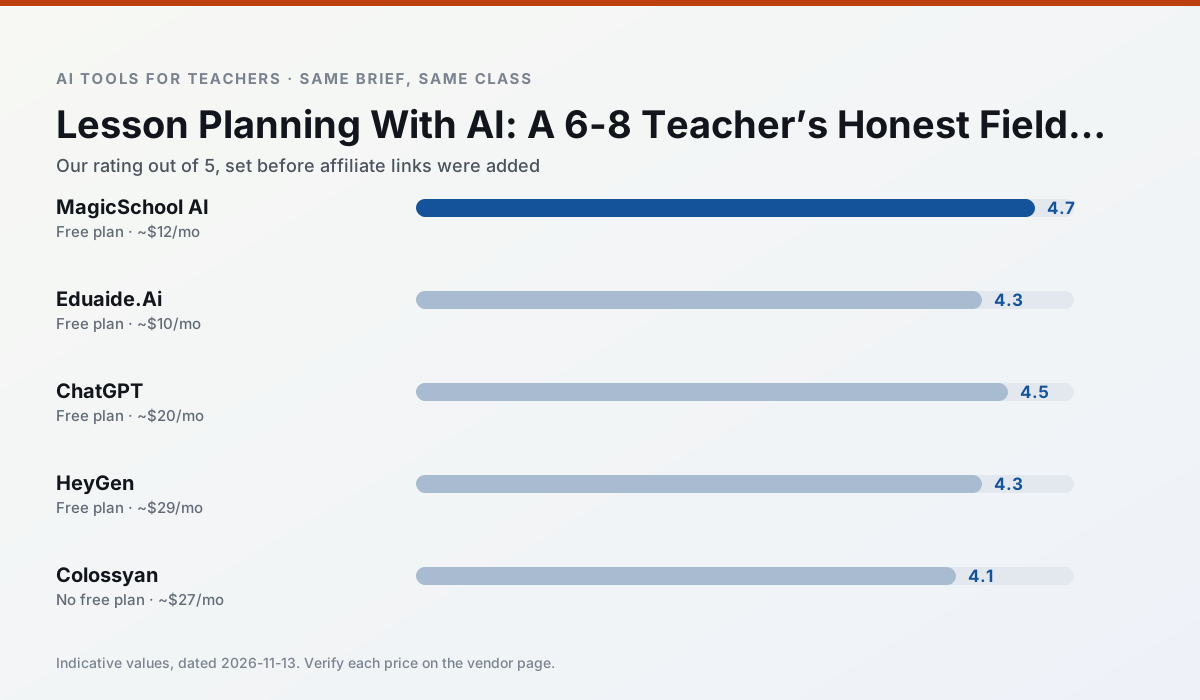
Side by side
Comparison table
Ratings reflect our timed classroom workflow, not vendor claims. Prices are indicative — verify on the vendor site.
| Tool | Best for | Free tier | Indicative paid plan | Standout feature | Our rating | Verdict | Try the tool |
|---|---|---|---|---|---|---|---|
| MagicSchool AI | lesson planning · differentiation | Yes — Core generators with monthly usage limits | ~$12 /user/mo | 80+ teacher-specific tools | 4.7 / 5 | Top pick | Try free |
| Eduaide.Ai | lesson planning · rubric creation | Yes — Daily generation cap | ~$10 /user/mo | Resource library | 4.3 / 5 | Strong option | Try free |
| ChatGPT | lesson planning · parent communication | Yes — Usage-limited model access | ~$20 /user/mo | Custom GPTs and Projects | 4.5 / 5 | Top pick | Try free |
| HeyGen | video lessons · translation | Yes — Limited credit plan | ~$29 /user/mo | Video translation | 4.3 / 5 | Strong option | Try free |
| Colossyan | PD materials · video lessons | No ongoing free plan | ~$27 /user/mo | PDF/PPT-to-video | 4.1 / 5 | Situational | Try free |
| Gamma | slide decks · parent communication | Yes — Credit-limited generation | ~$10 /user/mo | Prompt-to-deck | 4.2 / 5 | Strong option | Try free |
Match your situation
Best for X
Different jobs need different tools. Here is what we would open first in each case.
MagicSchool AI is built around teacher-monitored student spaces and audit logs rather than a consumer chat account, which is a different approval conversation.
Family-facing drafts from Eduaide.Ai need the fewest rewrites for warmth without overpromising, which is the usual failure mode.
ChatGPT keeps the same task across levels, which is what makes a differentiated set defensible in moderation.
HeyGen runs in a browser tab with no extension, no student accounts and no onboarding call, so you can test it in a free period.
Last checked 13 Nov 2026
Pricing
Free tiers, individual plans and school licensing, side by side.
| Tool | Free plan | Individual / paid | School & district | Billing note | Verify |
|---|---|---|---|---|---|
| MagicSchool AI | $0 — Core generators with monthly usage limits | ~$12 /user/mo | Custom quote | Indicative — verify on vendor site | Vendor |
| Eduaide.Ai | $0 — Daily generation cap | ~$10 /user/mo | Custom quote | Indicative — verify on vendor site | Vendor |
| ChatGPT | $0 — Usage-limited model access | ~$20 /user/mo | ~$25+ /user/mo | Indicative — verify on vendor site | Vendor |
| HeyGen | $0 — Limited credit plan | ~$29 /user/mo | Custom quote | Indicative — verify on vendor site | Vendor |
| Colossyan | No ongoing free tier | ~$27 /user/mo | Custom quote | Indicative — verify on vendor site | Vendor |
| Gamma | $0 — Credit-limited generation | ~$10 /user/mo | ~$20 /user/mo | Indicative — verify on vendor site | Vendor |
Editorial rule: pricing is re-checked every 2–3 months and the top 50 pages are refreshed every 6 months. See our funding policy.
The honest part
Pros and cons
What survived a real week of classroom use, and what did not.
Pros
- Widest purpose-built template library
- Strong free tier for individual teachers
- Fast to learn with almost no prompting skill
Cons
- Outputs still need standards review
- Best features sit behind the paid tier
- District approval can be slow
Pros
- Very low entry price
- Good worksheet and rubric output
- Clean, uncluttered UI
Cons
- Smaller template set than MagicSchool
- Less polished export options
- Limited integrations
Pros
- Most flexible option available
- Huge community of teacher prompt libraries
- Strong multilingual support
Cons
- Requires prompt skills for consistent results
- No built-in standards alignment
- District privacy review usually required
Pros
- Best-in-class lip-sync translation
- Useful for multilingual families
- Generous trial credits
Cons
- Credit-based pricing is confusing
- Voice cloning raises consent questions
- Overkill for everyday lessons
Pros
- Strong for staff training, not just lessons
- Good compliance/LMS export
- Fast document-to-video
Cons
- No permanent free plan
- Higher price point
- Less suited to K-12 student-facing content
In the classroom
Use cases
Five concrete workflows, with the tool we would open for each one.
Regrouping students after an assessment
Summarise anonymised results into skill groups, then generate one activity per group. Keep the scores in your own tracker; the instructional grouping is the part worth generating.
Recommended: MagicSchool AIA weekly family newsletter from bullet notes
Newsletters fail on length, not tone. Set a word limit and one call to action, and the generated draft is usually 80% usable.
Recommended: Eduaide.AiA question bank from a PDF or article
Feed a non-identifiable source and ask for items tagged by difficulty with the misconception behind each distractor. Spot-check every answer key; numerical items are least reliable.
Recommended: ChatGPTA substitute folder that needs no context
The value here is structure, not creativity. Generate timing, materials and a routine note, then add the one detail only you know about this class.
Recommended: HeyGenAn IEP present-levels first draft
Use aggregated, anonymised data only. Ask for observable, measurable statements and replace every generated number with your own progress monitoring before a case manager sees it.
Recommended: Colossyan
Questions teachers ask us
FAQ
Direct answers, also published as FAQPage structured data for search and AI assistants.
Can AI do lesson planning at 6-8 level?
Which tool is best for lesson planning?
What is the biggest risk?
Sources & further reading
Our recommendation
Try MagicSchool AI free for your next lesson planning task
A large library of teacher-specific AI generators in one dashboard. Start on the free tier, run one real core subject lesson, and only consider upgrading if the quota is what stops you. Disclosure: we may earn a commission (30% recurring) at no extra cost to you.
Some links on this page are affiliate links. We may earn a commission at no extra cost to you. Our rankings are editorial and never pay-to-play. Never enter student PII into a free consumer account.
Keep reading
Related comparisons in this cluster.
Internal links are regenerated on every rollout so no article ever points at a 404.