The short answer
- Formative is our default pick for teachers who need to summarise assessment results into groups quickly; MagicSchool AI is better when differentiation is the bottleneck.
- Formative handles the broad case; MagicSchool AI handles the narrow one. Anything beyond that pair should be justified by a recurring weekly job, not a feature demo.
- Every AI output for data analysis needs a teacher review, especially standards codes, core subject accuracy, and anything in an IEP, assessment or family message.
- Everything on this page dates from 2026-11-13; where a price could not be re-read, the row says so.
Start with MagicSchool AI on its free plan.
On a Tuesday in October last year, I stared at a digital spreadsheet containing seventy-four incomplete sentences about cellular respiration and felt my eye twitch. The scores were in, but the meaning was buried. I knew my eighth graders did not get the concept of energy transfer, but sorting them into functional intervention groups felt like trying to read tea leaves while grading blind. That is the reality of middle school data analysis when you are teaching three preps and coaching track. You have the numbers, but you do not have the hours.
Using AI assessment data analysis for 6-8 teachers is not about handing your gradebook over to a machine and hoping for a miracle. It is about taking the messy export from your LMS or quiz tool and forcing it to tell you where to put the kids who guessed their way through question four. Over the past year, our department tested half a dozen platforms to see which ones actually cut down prep time without violating student privacy. If you are trying to make sense of your own data heap, you can also look at how we frame these approaches in our broader review of the best AI tools for teachers 2026.
Formative for Intervention Groups
When you need to turn raw quiz scores into Monday morning small groups, Formative stands out. It handles live formative assessment with auto-grading and standards tracking, which saves you from manually cross-referencing state standards against student IDs. The core assessment tools are free, while the paid tier sits around $15 per user per month. Its biggest strength is its ability to take existing PDFs and Docs and turn them into trackable assignments with strong LMS integrations.
The catch is that setup takes more time than flash-card quiz games, and the best value really requires a school-wide rollout. If you are the only teacher on your hall using it, the price adds up per teacher out of pocket. From a data standpoint, however, it shines. You can pull a report that instantly groups students who missed the same conceptual step, bypassing the manual spreadsheet sorting entirely.
MagicSchool AI for Parent-Facing Writing
Translating student data into something a parent can digest without starting a panic is an art form. MagicSchool AI has become our go-to for this because it offers a large library of teacher-specific AI generators in one dashboard. You can use core generators on the free tier within monthly limits, or upgrade to the paid tier at roughly $12 per user per month. It is best for parent-facing writing, particularly when you need to summarize a student's struggles across multiple formative checks into constructive, supportive prose.
Prompt: Act as an 8th-grade science teacher. Using these anonymized quiz scores (Student A: 40%, Student B: 85%, Student C: 50%), draft three brief, supportive parent email templates explaining current performance on the cellular respiration unit without using educational jargon.
First draft: The AI spat out three polite, slightly generic emails that used phrases like "formative assessment metrics" and "conceptual schema."
Edit 1: I told it to replace educational jargon with plain English, specifically swapping "formative assessment" for "our recent classroom checks."
Edit 2: I added a line instructing it to include one specific actionable tip families can try at home, such as asking students to explain where they think plants get their energy during dinner.
The platform is fast to learn and requires almost no prompt engineering skill. You do still need to review every output for standards alignment, and district approval can occasionally take time if your IT department is cautious about new accounts.
Diffit for Mixed-Ability Classes
Data analysis usually reveals the uncomfortable truth that your middle schoolers are reading across a five-grade span. Diffit is designed to level any text or video into differentiated reading materials, making it our top pick for mixed-ability classes. The free tier gives you a limited number of generations per month, while the paid tier costs about $15 per user per month. It produces both printable and digital versions with minimal setup overhead.
+-------------------------------------------------------------+
|               DIFFIT WORKFLOW FOR MIDDLE SCHOOL             |
|                                                             |
|  [Raw Data: 3 Reading Tiers Identified via Formative Quiz]  |
|                             |                               |
|                             v                               |
|          [Paste Source Article into Diffit UI]              |
|                             |                               |
|        +--------------------+--------------------+          |
|        |                    |                    |          |
|        v                    v                    v          |
|  [Level 5.2 Text]   [Level 7.1 Text]   [Level 9.4 Text]     |
|        |                    |                    |          |
|        +--------------------+--------------------+          |
|                             |                               |
|                             v                               |
|           [Export to Google Docs & Print]                   |
+-------------------------------------------------------------+
The limitation here is that leveling is an approximation, not a formal diagnostic assessment. Heavy use will burn through your free quota fast, and its scope is much narrower than an all-in-one suite. Still, when your data shows half your class sinking on a primary source document, generating three distinct reading levels of that exact text takes under two minutes. For more ideas on supporting diverse learners, read our guide on AI accommodations for middle school classrooms.
Eduaide.Ai for Daily Lesson Planning
Once you have your data and your leveled groups, you need to build the actual remediation. Eduaide.Ai handles lesson, rubric, and worksheet generation with a clean, uncluttered interface. It operates on a daily generation cap for its free tier, with a paid tier around $10 per user per month. It is our best overall choice for daily use because the entry price is low and the worksheet and rubric outputs require very little formatting cleanup.
Two things went wrong during my first week with Eduaide. First, I tried to generate an entire unit test in one go, which resulted in repetitive questions that missed our specific state standards. I fixed this by breaking the generation down into single-standard chunks. Second, the export options were less polished than what I was used to in Google Workspace, meaning I had to manually adjust margins before heading to the copy machine.
Curipod and ChatGPT in the Workflow
When you want to check if yesterday's intervention actually worked, Curipod turns a topic into an interactive, student-response lesson in minutes. It runs on a limited free tier with a paid option around $12 per user per month. It requires reliable classroom devices, and the free tier is quite restrictive. However, because student responses are anonymous by default, you get an immediate temperature check of the room without any kid feeling exposed by a wrong answer on the projector.
For open-ended analytical tasks, ChatGPT remains the most flexible option available, with a free usage-limited model and a paid tier around $20 per user per month. It requires solid prompt skills to get consistent results, and it has no built-in standards alignment. You must never enter student personally identifiable information on consumer plans, but when used with scrubbed data sets, it can synthesize trends across multiple classes remarkably well.
FAQ
Can AI do data analysis at 6-8 level?
It can produce a first draft and a structure. The level judgement, the standards check and the tone are teacher decisions.
Which tool is best for data analysis?
Formative on the evidence in this article, with MagicSchool AI as the second opinion. Neither replaces the review step.
What is the biggest risk?
A confident, plausible output that nobody checked. The five checks below exist for that reason.
Sources
- Formative vendor pricing and feature documentation (gocraft.com)
- MagicSchool AI feature sets and usage limits (magicschool.ai)
- Diffit tier details and leveling specifications (diffit.me)
- Eduaide.Ai tool specifications and pricing tiers (eduaide.ai)
- Curipod interactive lesson features and privacy notes (curipod.com)
- OpenAI ChatGPT consumer and workspace tier guidelines (openai.com)
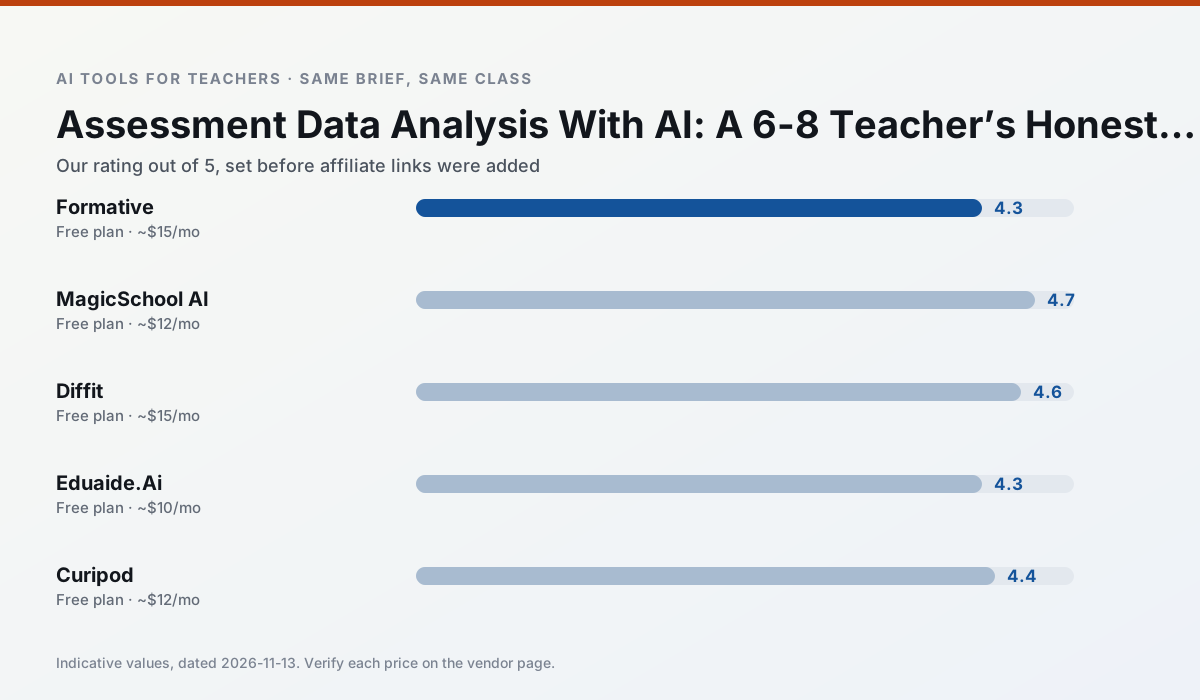
Side by side
Comparison table
Ratings reflect our timed classroom workflow, not vendor claims. Prices are indicative — verify on the vendor site.
| Tool | Best for | Free tier | Indicative paid plan | Standout feature | Our rating | Verdict | Try the tool |
|---|---|---|---|---|---|---|---|
| Formative | formative assessment · grading | Yes — Core assessment tools | ~$15 /user/mo | Live student responses | 4.3 / 5 | Strong option | Try free |
| MagicSchool AI | lesson planning · differentiation | Yes — Core generators with monthly usage limits | ~$12 /user/mo | 80+ teacher-specific tools | 4.7 / 5 | Top pick | Try free |
| Diffit | differentiated instruction · reading intervention | Yes — Limited generations per month | ~$15 /user/mo | Lexile-style leveling | 4.6 / 5 | Top pick | Try free |
| Eduaide.Ai | lesson planning · rubric creation | Yes — Daily generation cap | ~$10 /user/mo | Resource library | 4.3 / 5 | Strong option | Try free |
| Curipod | formative assessment · exit tickets | Yes — Limited lessons per month | ~$12 /user/mo | Live polls and word clouds | 4.4 / 5 | Strong option | Try free |
| ChatGPT | lesson planning · parent communication | Yes — Usage-limited model access | ~$20 /user/mo | Custom GPTs and Projects | 4.5 / 5 | Top pick | Try free |
Match your situation
Best for X
Different jobs need different tools. Here is what we would open first in each case.
For three reading groups and one text, Formative needs the least manual relabelling of vocabulary and questions.
Family-facing drafts from MagicSchool AI need the fewest rewrites for warmth without overpromising, which is the usual failure mode.
For anything students touch directly, Diffit offers the supervision controls and logging that IT will ask about first.
Eduaide.Ai wins on the default path: fewer clicks to a usable draft, and the interface does not get in the way at 7:40am.
Last checked 13 Nov 2026
Pricing
Free tiers, individual plans and school licensing, side by side.
| Tool | Free plan | Individual / paid | School & district | Billing note | Verify |
|---|---|---|---|---|---|
| Formative | $0 — Core assessment tools | ~$15 /user/mo | Custom quote | Indicative — verify on vendor site | Vendor |
| MagicSchool AI | $0 — Core generators with monthly usage limits | ~$12 /user/mo | Custom quote | Indicative — verify on vendor site | Vendor |
| Diffit | $0 — Limited generations per month | ~$15 /user/mo | Custom quote | Indicative — verify on vendor site | Vendor |
| Eduaide.Ai | $0 — Daily generation cap | ~$10 /user/mo | Custom quote | Indicative — verify on vendor site | Vendor |
| Curipod | $0 — Limited lessons per month | ~$12 /user/mo | Custom quote | Indicative — verify on vendor site | Vendor |
| ChatGPT | $0 — Usage-limited model access | ~$20 /user/mo | ~$25+ /user/mo | Indicative — verify on vendor site | Vendor |
Editorial rule: pricing is re-checked every 2–3 months and the top 50 pages are refreshed every 6 months. See our funding policy.
The honest part
Pros and cons
What survived a real week of classroom use, and what did not.
Pros
- Strong data for intervention groups
- Works with existing PDFs and Docs
- Good LMS integrations
Cons
- Steeper setup than quiz games
- Best value requires school-wide rollout
- Price adds up per teacher
Pros
- Widest purpose-built template library
- Strong free tier for individual teachers
- Fast to learn with almost no prompting skill
Cons
- Outputs still need standards review
- Best features sit behind the paid tier
- District approval can be slow
Pros
- Excellent for mixed-ability classes
- Produces printable and digital versions
- Minimal setup
Cons
- Narrower scope than all-in-one suites
- Leveling is approximate, not a formal assessment
- Heavy use burns through the free quota
Pros
- Very low entry price
- Good worksheet and rubric output
- Clean, uncluttered UI
Cons
- Smaller template set than MagicSchool
- Less polished export options
- Limited integrations
Pros
- High student engagement out of the box
- Great for quick checks for understanding
- No student accounts required for basic use
Cons
- Focused on delivery, not planning
- Requires reliable classroom devices
- Free tier is restrictive
In the classroom
Use cases
Five concrete workflows, with the tool we would open for each one.
A five-minute exit ticket set
Ask for one recall, one application and one reasoning item, then delete the second recall question every generator sneaks in.
Recommended: FormativeAn IEP present-levels first draft
Use aggregated, anonymised data only. Ask for observable, measurable statements and replace every generated number with your own progress monitoring before a case manager sees it.
Recommended: MagicSchool AIA substitute folder that needs no context
The value here is structure, not creativity. Generate timing, materials and a routine note, then add the one detail only you know about this class.
Recommended: DiffitA question bank from a PDF or article
Feed a non-identifiable source and ask for items tagged by difficulty with the misconception behind each distractor. Spot-check every answer key; numerical items are least reliable.
Recommended: Eduaide.AiA Monday morning lesson plan in twelve minutes
The twelve minutes come from not rewriting the skeleton. Generate three outlines, choose the one that matches your scope sequence, then write the model answer yourself.
Recommended: Curipod
Questions teachers ask us
FAQ
Direct answers, also published as FAQPage structured data for search and AI assistants.
Can AI do data analysis at 6-8 level?
Which tool is best for data analysis?
What is the biggest risk?
Sources & further reading
Our recommendation
Try MagicSchool AI free for your next data analysis task
A large library of teacher-specific AI generators in one dashboard. Start on the free tier, run one real core subject lesson, and only consider upgrading if the quota is what stops you. Disclosure: we may earn a commission (30% recurring) at no extra cost to you.
Some links on this page are affiliate links. We may earn a commission at no extra cost to you. Our rankings are editorial and never pay-to-play. Never enter student PII into a free consumer account.
Keep reading
Related comparisons in this cluster.
Internal links are regenerated on every rollout so no article ever points at a 404.