The short answer
- Notion AI is our default pick for teachers who need to prepare a no-context cover lesson quickly; Turnitin Clarity / Feedback Studio is better when differentiation is the bottleneck.
- The cheapest honest test is a week of real work on the free plans: Notion AI: Yes — Limited AI usage; Turnitin Clarity / Feedback Studio: No ongoing free plan; Class Companion: Yes — Limited assignments. If a tool is still open on Friday, it has earned a paid conversation.
- Every AI output for substitute plans needs a teacher review, especially standards codes, core subject accuracy, and anything in an IEP, assessment or family message.
- Trial one tool for a week of real substitute plans work before any purchase conversation; the quota is the honest test.
Start with Notion AI on its free plan.
At 6:45 AM, holding a warm mug of stale coffee and fighting a fever, writing sub plans is an act of sheer cruelty. You need something that covers third-period AP Government without descending into chaos, and you need it before your phone starts buzzing with the department chair's text. Most templates require too much typing, and blank documents stare back like a challenge. If you are trying to assemble AI substitute plans for 9-12 teachers under duress, general chatbots will give you fluffy overviews about "civic engagement" that leave a sub stranded when the Wi-Fi drops. You need structured, bulleted execution plans that respect high school teenagers and keep them off their phones.
Building a sub folder that requires zero context is about stealing back your recovery time. High school subs do not want creative writing prompts; they want a strict timeline, clear student groupings, and an exit ticket that proves someone stayed awake. The value here is purely structural, not imaginative. You generate the timing, list the exact handouts, and drop in a routine note about who sits where. Then you add that one specific detail only you know about period four.
Organizing Long-Term Sub Folders with Notion AI
When you are out for a knee surgery or an extended family leave, your sub plans cannot live on loose scraps of paper or a fragmented desktop folder. Notion AI acts as a centralized workspace for long-term curriculum records and daily sub folders. It costs around $10 per user per month on its paid tier, though the free tier offers limited AI usage. The real strength here is flexible structure and team collaboration, which lets you share a live dashboard with your co-teacher or department head.
The catch is that setup time is significant, and you must never store student PII in personal workspaces. If you use it to draft your multi-week sub binder, keep student names out of the database entirely. Rank-wise, Notion AI stands out as best for student-safe deployments because you control the database permissions and visibility down to the page level.
Prompt: Act as a high school department lead. Create a three-day emergency substitute plan template for a 9-12 American Literature unit on The Crucible. Include strict timing, clear student deliverables, and a section for behavioral notes.
First response: Produced a vague outline about reading Act III aloud and discussing Salem hysteria, with no specific questions, no page numbers, and a generic note telling the substitute to "keep students engaged."
Edit 1: Added strict constraints specifying that the substitute must read pages 89 through 112 aloud with designated student actors, followed by a specific five-question textual analysis handout.
Edit 2: Inserted a dedicated classroom management protocol naming the three students who must be seated separately and providing the exact policy for bathroom passes.
Managing Mixed-Ability High School Classes While Away
Substitutes panic when they face mixed-ability classrooms, especially in 9-12 spaces where AP students and intervention learners share the same roster. When you need differentiation that runs smoothly without you in the room, you lean on institutional tools like Turnitin Clarity and Feedback Studio. While individual teachers cannot buy this tool because it requires school-wide licensing, many high schools already have it integrated into their LMS. Pricing is a custom quote, and administrative setup is heavy.
The advantage is a consistent institutional workflow and detailed revision history for high school essays. AI detection remains contested, and you should never rely on it as a single source of truth for academic integrity. However, for sub plans that involve peer review or revision cycles, it is our pick as best for mixed-ability classes because it tracks student revisions reliably across distinct performance tiers.
Generating Scannable Paper Workflows with Class Companion
Many high school elective and math classrooms still rely heavily on paper, which makes leaving sub plans tricky if the sub cannot grade or check work. Class Companion provides AI feedback on handwritten and scanned student work for about $12 per user per month on its paid tier, with a limited assignments free tier. It is useful where work is done on paper, offering fast, specific comments and strong math support.
You must remember that scan quality affects accuracy, and the feedback still requires teacher review before it goes into the gradebook. Because student work is uploaded, a data privacy agreement is mandatory. Despite these limits, it serves well as best for parent-facing writing because you can quickly export clean progress snapshots to share during conferences while you are out.
Deploying District-Approved Safeguards via SchoolAI
If your district restricts third-party LLMs due to privacy mandates, SchoolAI bridges the gap by offering a school-safe AI workspace with teacher-controlled student spaces. Costing around $15 per user per month on its paid tier with limited free seats, it features school-focused DPAs, audit logs, and clear safeguarding defaults. It requires school-wide buy-in and is less flexible than general consumer LLMs, but it gives you deep visibility into student use during a sub day.
This tool ranks as best for schools and districts because it respects local compliance while letting you deploy pre-approved guided activities for subs to run. If your sub needs to keep students working on a self-paced research module, you set the guardrails ahead of time, and the system blocks off-topic prompts automatically.
Building Quick Multimedia Content for Absent Days
Sometimes a sub day requires a quick video introduction or an audio-guided walkthrough of a lab safety protocol. Fliki handles text-to-video with stock media and AI voiceover for around $21 per user per month, featuring a watermarked free tier with limited minutes. It requires no avatars, making it good for clean explainer visuals. You have to watch out for minute-based limits and sharp price jumps between tiers, and because it is a content tool, you must avoid student PII entirely.
Similarly, Murf AI provides studio-quality AI voiceover for presentations and audio materials at roughly $19 per user per month with a trial-only output. It delivers very clean audio and easy slide integration for listening comprehension tasks in modern language classes. The free tier is not usable long-term, and commercial licensing rules matter if you publish the output. Both tools save you from recording your own voice when you have laryngitis, but they remain single-purpose utilities. For a broader look at assistive workflows, review our guide on the best AI tools for teachers.
Crafting Reliable Sub Folder Tasks
Sub plans fail when they ask too much of an untrained guest educator. If you need a question bank from a PDF or article, feed a non-identifiable source and ask for items tagged by difficulty with the misconception behind each distractor. Spot-check every answer key yourself, because numerical items generated by AI are notoriously unreliable. For exit tickets, ask for one recall, one application, and one reasoning item, then delete the second recall question every generator sneaks in.
When you need to announce schedule changes or remind families about upcoming project deadlines while you recover at home, a weekly family newsletter from bullet notes can save your sanity. Newsletters fail on length, not tone. Set a strict word limit and one clear call to action, and the generated draft is usually eighty percent usable right out of the box. Combine these strategies with targeted accommodations, similar to those found in resources for middle school classrooms, and your sub folder will survive the toughest Friday of the semester.
FAQ
Can AI do substitute plans at 9-12 level?
It can produce a first draft and a structure. The level judgement, the standards check and the tone are teacher decisions.
Which tool is best for substitute plans?
Notion AI on the evidence in this article, with Turnitin Clarity / Feedback Studio as the second opinion. Neither replaces the review step.
What is the biggest risk?
A confident, plausible output that nobody checked. The five checks below exist for that reason.
Sources
- Notion AI Pricing and Workspace Documentation: Notion Pricing
- Turnitin Feedback Studio Features: Turnitin Products
- Class Companion Platform Overview: Class Companion
- SchoolAI Privacy and Safety Standards: SchoolAI
- Fliki Video Generation Plans: Fliki Pricing
- Murf AI Voice Generation Terms: Murf AI Pricing
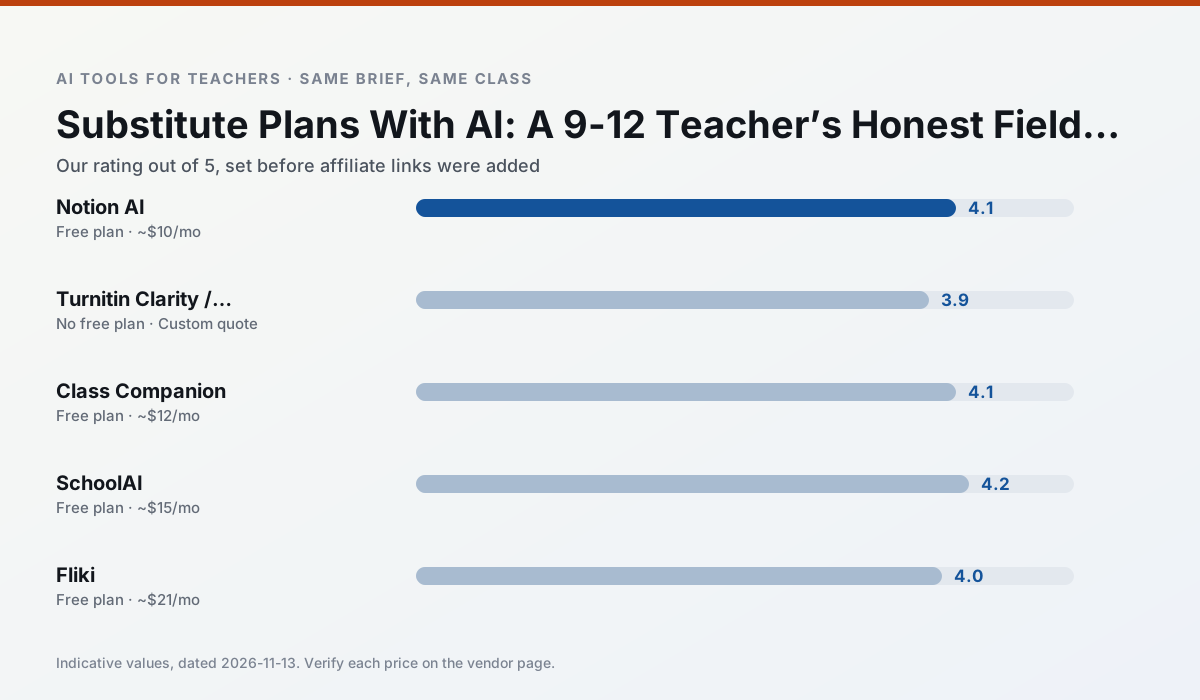
Side by side
Comparison table
Ratings reflect our timed classroom workflow, not vendor claims. Prices are indicative — verify on the vendor site.
| Tool | Best for | Free tier | Indicative paid plan | Standout feature | Our rating | Verdict | Try the tool |
|---|---|---|---|---|---|---|---|
| Notion AI | curriculum mapping · unit planning | Yes — Limited AI usage | ~$10 /user/mo | Linked databases | 4.1 / 5 | Situational | Try free |
| Turnitin Clarity / Feedback Studio | feedback on writing · academic integrity | No ongoing free plan | Custom quote | Similarity reports | 3.9 / 5 | Situational | Try free |
| Class Companion | grading · feedback on writing | Yes — Limited assignments | ~$12 /user/mo | Handwriting recognition | 4.1 / 5 | Situational | Try free |
| SchoolAI | student-safe AI · differentiated instruction | Yes — Limited seats | ~$15 /user/mo | Teacher-monitored student chats | 4.2 / 5 | Strong option | Try free |
| Fliki | video lessons · audio lessons | Yes — Watermarked, limited minutes | ~$21 /user/mo | Blog/text to video | 4.0 / 5 | Situational | Try free |
| Murf AI | audio lessons · accessibility | Yes — Trial-only output | ~$19 /user/mo | Voice fine-tuning | 4.1 / 5 | Situational | Try free |
Match your situation
Best for X
Different jobs need different tools. Here is what we would open first in each case.
Notion AI is the student-facing option here with boundaries a teacher can actually set and supervise.
For three reading groups and one text, Turnitin Clarity / Feedback Studio needs the least manual relabelling of vocabulary and questions.
Family-facing drafts from Class Companion need the fewest rewrites for warmth without overpromising, which is the usual failure mode.
SchoolAI answers the three questions a district actually asks: rostering, admin controls and a data-processing agreement. That is usually what decides a school purchase.
Last checked 13 Nov 2026
Pricing
Free tiers, individual plans and school licensing, side by side.
| Tool | Free plan | Individual / paid | School & district | Billing note | Verify |
|---|---|---|---|---|---|
| Notion AI | $0 — Limited AI usage | ~$10 /user/mo | ~$8 /user/mo | Indicative — verify on vendor site | Vendor |
| Turnitin Clarity / Feedback Studio | No ongoing free tier | Custom quote | Custom quote | LMS-wide deployment | Vendor |
| Class Companion | $0 — Limited assignments | ~$12 /user/mo | Custom quote | Indicative — verify on vendor site | Vendor |
| SchoolAI | $0 — Limited seats | ~$15 /user/mo | Custom quote | Indicative — verify on vendor site | Vendor |
| Fliki | $0 — Watermarked, limited minutes | ~$21 /user/mo | ~$66 /user/mo | Indicative — verify on vendor site | Vendor |
| Murf AI | $0 — Trial-only output | ~$19 /user/mo | ~$39 /user/mo | Indicative — verify on vendor site | Vendor |
Editorial rule: pricing is re-checked every 2–3 months and the top 50 pages are refreshed every 6 months. See our funding policy.
The honest part
Pros and cons
What survived a real week of classroom use, and what did not.
Pros
- Great for long-term curriculum records
- Strong team collaboration
- Flexible structure
Cons
- Setup time is significant
- AI add-on pricing changed more than once
- Not purpose-built for lesson generation
Pros
- Already licensed at many schools
- Consistent institutional workflow
- Detailed revision history
Cons
- Individual teachers cannot buy it
- AI detection remains contested
- Heavy administrative setup
Pros
- Useful where work is done on paper
- Fast, specific comments
- Good math support
Cons
- Scan quality affects accuracy
- Narrow use case
- Feedback still needs teacher review
Pros
- Designed for district approval
- Teacher visibility into student use
- Good safeguarding defaults
Cons
- Requires school-wide buy-in
- Less flexible than general LLMs
- Pricing is mostly quote-based
Pros
- No avatar needed
- Good for explainer visuals
- Simple editor
Cons
- Minute-based limits
- Output can look generic
- Price jumps between tiers
In the classroom
Use cases
Five concrete workflows, with the tool we would open for each one.
A weekly family newsletter from bullet notes
Newsletters fail on length, not tone. Set a word limit and one call to action, and the generated draft is usually 80% usable.
Recommended: Notion AIRegrouping students after an assessment
Summarise anonymised results into skill groups, then generate one activity per group. Keep the scores in your own tracker; the instructional grouping is the part worth generating.
Recommended: Turnitin Clarity / Feedback StudioA substitute folder that needs no context
The value here is structure, not creativity. Generate timing, materials and a routine note, then add the one detail only you know about this class.
Recommended: Class CompanionA question bank from a PDF or article
Feed a non-identifiable source and ask for items tagged by difficulty with the misconception behind each distractor. Spot-check every answer key; numerical items are least reliable.
Recommended: SchoolAIA five-minute exit ticket set
Ask for one recall, one application and one reasoning item, then delete the second recall question every generator sneaks in.
Recommended: Fliki
Questions teachers ask us
FAQ
Direct answers, also published as FAQPage structured data for search and AI assistants.
Can AI do substitute plans at 9-12 level?
Which tool is best for substitute plans?
What is the biggest risk?
Sources & further reading
Our recommendation
Try Notion AI free for your next substitute plans task
AI-assisted notes, databases and curriculum planning in one workspace. Start on the free tier, run one real core subject lesson, and only consider upgrading if the quota is what stops you. Disclosure: we may earn a commission (varies) at no extra cost to you.
Some links on this page are affiliate links. We may earn a commission at no extra cost to you. Our rankings are editorial and never pay-to-play. Never enter student PII into a free consumer account.
Keep reading
Related comparisons in this cluster.
Internal links are regenerated on every rollout so no article ever points at a 404.