The short answer
- MagicSchool AI is our default pick for teachers who need to write clear, warm parent emails quickly; ChatGPT is better when differentiation is the bottleneck.
- MagicSchool AI handles the broad case; ChatGPT handles the narrow one. Anything beyond that pair should be justified by a recurring weekly job, not a feature demo.
- Every AI output for parent communication needs a teacher review, especially standards codes, core subject accuracy, and anything in an IEP, assessment or family message.
- Everything on this page dates from 2026-11-13; where a price could not be re-read, the row says so.
Start with MagicSchool AI on its free plan.
At 4:15 PM on a Tuesday, I stared at a blank screen trying to explain to a parent why their seventh-grader refuses to use a pencil. My usual tone was frayed. I had twenty-four emails waiting, three missing assignment notices to draft, and a classroom newsletter due before I could leave the building. That is the exact moment middle school teachers stop thinking about artificial intelligence as a sci-fi novelty and start treating it as triage. We need tools that strip the emotion out of difficult updates while keeping our actual professional judgment intact. If you want to see how these utilities fit into a broader instructional strategy, take a look at our roundup of the best AI tools for teachers in 2026.
The Reality of Middle School Messaging
Middle school families are anxious. Between shifting hormones, lockers, and changing class periods, parents want clarity, not fluff. When you write home about a failing grade or a behavioral flare-up, every sentence carries weight. You cannot afford a tone that sounds condescending or robotic. AI parent communication for middle school requires systems that translate raw bullet points into professional, empathetic updates without inventing details or violating student privacy.
Most platforms fail this test on the first try. They give you emails that sound like a corporate apology or a cheerful marketing pitch. Worse, they sometimes recommend strategies that ignore the realities of a crowded hallway and a forty-five-minute block schedule. To get useful results, you have to treat the software like a junior assistant who needs explicit boundaries. You provide the facts, set the tone, and check the output for administrative hallucinations before it ever hits an inbox.
MagicSchool AI for District-Aligned Messaging
MagicSchool AI has quickly become the go-to platform for schools and districts because its generators are built by educators who understand IEPs, parent conferences, and progress reports. At roughly $12 per user per month with a workable free tier, it provides the widest purpose-built template library for teachers who do not have time to learn prompt engineering. You click on a communication generator, drop in your notes, and get a structured draft.
The catch is that you still need to review the output for your specific classroom culture. District approval can be slow depending on your tech department, and the best features sit behind the paid tier. Furthermore, you must never paste student PII into the core generators unless your district has an approved Data Privacy Agreement in place. If you are also adapting materials for exceptional learners, you might find our guide on AI accommodations for middle school classrooms helpful for bridging home-school communication gaps.
ChatGPT for Quick Setup and Multilingual Families
ChatGPT remains the most flexible option available for general tasks, running at roughly $20 per user per month with a usage-limited free tier. When you have a family who speaks Spanish, Mandarin, or Arabic, its multilingual translation support for weekly newsletters is unmatched. You type in your rough notes, ask it to draft a warm family update, and request a translated version in a single prompt.
Prompt: "Write a brief, supportive email to a middle school parent about their child missing three consecutive homework assignments in math. Keep the tone collaborative, not punitive. Offer two specific dates for a quick phone check-in."

Generated Output: "Dear Parent, I hope this email finds you well. I wanted to reach out regarding [Student Name]'s recent work in math class. They have missed three homework assignments this week, which is unusual for them. Let's work together to get them back on track. Please let me know if you are available for a quick phone call on Thursday at 3:30 PM or Friday at 8:00 AM."

Teacher Edits:
1. Replaced the generic opening with a specific positive observation about the student's in-class participation.
2. Adjusted the meeting times to match my actual contract hours and conference availability.
The issue with ChatGPT is that it requires deliberate prompt skills to avoid sounding either overly harsh or sickeningly sweet. It has no built-in standards alignment or education-specific guardrails. You must remain the editor in chief at all times.
Gamma and Grammarly for Daily Administrative Workflow
Gamma handles visual presentations and document generation from a single prompt for about $10 per user per month, with a credit-limited free tier. It is our top pick overall for daily use because it is the fastest path from a rough outline to a clean deck for back-to-school night. You feed it your bullet points about grading policies, and it builds a modern-looking layout in seconds. Just remember that it is a content tool, not a student database, so leave student names off the slides entirely.
For everyday writing, Grammarly serves as the best free option at roughly $12 per user per month for premium features, though the free tier handles basic grammar and tone checks reliably. It catches embarrassing typos in high-stakes parent emails before you hit send. It works directly inside your browser where you already write. The main risk is that aggressive settings can flatten your natural teacher voice into sterile corporate speak, so keep the tone adjustments dialed to professional rather than robotic.
Enterprise Tools to Skip: Jasper and Writesonic
Jasper costs roughly $39 per user per month with no free tier, making it explicitly priced for marketing teams and enterprise content creators. It features a strong long-form editor and brand-voice consistency, but it is complete overkill for a single middle school classroom. It lacks any education-specific templates or understanding of school calendars.
Writesonic sits at roughly $16 per user per month with a limited free trial. While it is budget-friendly compared to enterprise writing suites, its credit system is confusing and its output tends to be far too generic for education. When you ask it to generate a behavior intervention plan or a parent conference follow-up, it produces vague platitudes that require a complete rewrite. You are better off sticking with education-first platforms that respect your planning period.
Practical Safeguards for Classroom Deployment
Two things will go wrong during your first week using these tools. First, the AI will invent a policy or a meeting time that does not exist in your syllabus. You fix this by keeping your school handbook open in another tab and verifying every deadline before sending an email. Second, a generator will accidentally mix up student details when you try to batch-write progress updates. You fix this by processing one student at a time, using first initials only, and clearing the chat history between entries. Keep your human judgment where it belongs, and let the software handle the heavy lifting of sentence structure.
FAQ
Can AI do parent communication at Middle School level?
It can produce a first draft and a structure. The level judgement, the standards check and the tone are teacher decisions.
Which tool is best for parent communication?
MagicSchool AI on the evidence in this article, with ChatGPT as the second opinion. Neither replaces the review step.
What is the biggest risk?
A confident, plausible output that nobody checked. The five checks below exist for that reason.
Sources
- MagicSchool AI: https://www.magicschool.ai
- OpenAI ChatGPT: https://openai.com/chatgpt
- Gamma App: https://gamma.app
- Grammarly: https://www.grammarly.com
- Jasper AI: https://www.jasper.ai
- Writesonic: https://writesonic.com
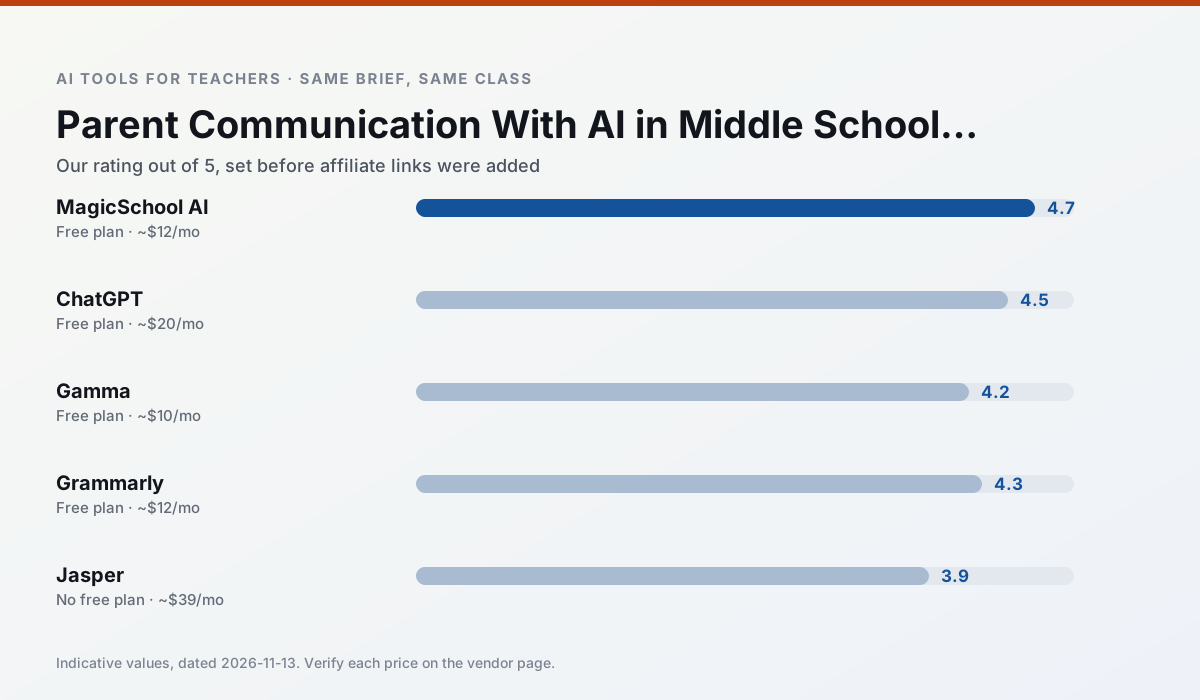
Side by side
Comparison table
Ratings reflect our timed classroom workflow, not vendor claims. Prices are indicative — verify on the vendor site.
| Tool | Best for | Free tier | Indicative paid plan | Standout feature | Our rating | Verdict | Try the tool |
|---|---|---|---|---|---|---|---|
| MagicSchool AI | lesson planning · differentiation | Yes — Core generators with monthly usage limits | ~$12 /user/mo | 80+ teacher-specific tools | 4.7 / 5 | Top pick | Try free |
| ChatGPT | lesson planning · parent communication | Yes — Usage-limited model access | ~$20 /user/mo | Custom GPTs and Projects | 4.5 / 5 | Top pick | Try free |
| Gamma | slide decks · parent communication | Yes — Credit-limited generation | ~$10 /user/mo | Prompt-to-deck | 4.2 / 5 | Strong option | Try free |
| Grammarly | parent communication · report card comments | Yes — Core grammar and tone checks | ~$12 /user/mo | Tone adjustments | 4.3 / 5 | Strong option | Try free |
| Jasper | newsletters · parent communication | No ongoing free plan | ~$39 /user/mo | Brand voice profiles | 3.9 / 5 | Situational | Try free |
| Writesonic | newsletters · parent communication | Yes — Limited credits | ~$16 /user/mo | Article and email generators | 3.8 / 5 | Situational | Try free |
Match your situation
Best for X
Different jobs need different tools. Here is what we would open first in each case.
For a school rollout, MagicSchool AI offers the paperwork and the admin console; the classroom features are standard by comparison.
ChatGPT runs in a browser tab with no extension, no student accounts and no onboarding call, so you can test it in a free period.
Gamma wins on the default path: fewer clicks to a usable draft, and the interface does not get in the way at 7:40am.
If there is no budget, start with Grammarly: free plan with clearest quota is the least punishing free tier here.
Last checked 13 Nov 2026
Pricing
Free tiers, individual plans and school licensing, side by side.
| Tool | Free plan | Individual / paid | School & district | Billing note | Verify |
|---|---|---|---|---|---|
| MagicSchool AI | $0 — Core generators with monthly usage limits | ~$12 /user/mo | Custom quote | Indicative — verify on vendor site | Vendor |
| ChatGPT | $0 — Usage-limited model access | ~$20 /user/mo | ~$25+ /user/mo | Indicative — verify on vendor site | Vendor |
| Gamma | $0 — Credit-limited generation | ~$10 /user/mo | ~$20 /user/mo | Indicative — verify on vendor site | Vendor |
| Grammarly | $0 — Core grammar and tone checks | ~$12 /user/mo | ~$15 /user/mo | Indicative — billed annually | Vendor |
| Jasper | No ongoing free tier | ~$39 /user/mo | ~$59+ /user/mo | Indicative — verify on vendor site | Vendor |
| Writesonic | $0 — Limited credits | ~$16 /user/mo | ~$49 /user/mo | Indicative — verify on vendor site | Vendor |
Editorial rule: pricing is re-checked every 2–3 months and the top 50 pages are refreshed every 6 months. See our funding policy.
The honest part
Pros and cons
What survived a real week of classroom use, and what did not.
Pros
- Widest purpose-built template library
- Strong free tier for individual teachers
- Fast to learn with almost no prompting skill
Cons
- Outputs still need standards review
- Best features sit behind the paid tier
- District approval can be slow
Pros
- Most flexible option available
- Huge community of teacher prompt libraries
- Strong multilingual support
Cons
- Requires prompt skills for consistent results
- No built-in standards alignment
- District privacy review usually required
Pros
- Fastest path from outline to deck
- Modern-looking output by default
- Good export options
Cons
- Design control is limited
- Credits run out quickly
- Not built for student data
Pros
- Catches errors in high-stakes parent emails
- Works everywhere you already write
- Very low learning curve
Cons
- Not education-specific
- Can flatten teacher voice
- Premium needed for tone rewriting
Pros
- Consistent tone across communications
- Strong long-form editor
- Good for district comms teams
Cons
- Priced for marketing teams
- Overkill for one classroom
- No education-specific features
In the classroom
Use cases
Five concrete workflows, with the tool we would open for each one.
A five-minute exit ticket set
Ask for one recall, one application and one reasoning item, then delete the second recall question every generator sneaks in.
Recommended: MagicSchool AIAn IEP present-levels first draft
Use aggregated, anonymised data only. Ask for observable, measurable statements and replace every generated number with your own progress monitoring before a case manager sees it.
Recommended: ChatGPTA weekly family newsletter from bullet notes
Newsletters fail on length, not tone. Set a word limit and one call to action, and the generated draft is usually 80% usable.
Recommended: GammaRegrouping students after an assessment
Summarise anonymised results into skill groups, then generate one activity per group. Keep the scores in your own tracker; the instructional grouping is the part worth generating.
Recommended: GrammarlyRubric and feedback comments in one pass
Reorder the workflow so the rubric is yours and the comments are generated. Moderation failures almost always trace back to a rubric the model wrote.
Recommended: Jasper
Questions teachers ask us
FAQ
Direct answers, also published as FAQPage structured data for search and AI assistants.
Can AI do parent communication at Middle School level?
Which tool is best for parent communication?
What is the biggest risk?
Sources & further reading
Our recommendation
Try MagicSchool AI free for your next parent communication task
A large library of teacher-specific AI generators in one dashboard. Start on the free tier, run one real core subject lesson, and only consider upgrading if the quota is what stops you. Disclosure: we may earn a commission (30% recurring) at no extra cost to you.
Some links on this page are affiliate links. We may earn a commission at no extra cost to you. Our rankings are editorial and never pay-to-play. Never enter student PII into a free consumer account.
Keep reading
Related comparisons in this cluster.
Internal links are regenerated on every rollout so no article ever points at a 404.