The short answer
- MagicSchool AI is our default pick for teachers who need to draft a standards-aware lesson plan quickly; Eduaide.Ai is better when differentiation is the bottleneck.
- Free-tier reality for this shortlist: MagicSchool AI: Yes — Core generators with monthly usage limits; Eduaide.Ai: Yes — Daily generation cap; ChatGPT: Yes — Usage-limited model access. Treat every paid figure as indicative until you have read the vendor page; only the free quota is something you can test yourself this week.
- Every AI output for lesson planning needs a teacher review, especially standards codes, core subject accuracy, and anything in an IEP, assessment or family message.
- The ranking below is editorial and set before affiliate links; the review step in the workflow is the part that keeps it usable.
Start with MagicSchool AI on its free plan.
By 11:15 on a Tuesday, I had thirty-two eleventh-grade essays to grade, forty-five parent emails waiting in my inbox, and zero lesson plans for the following morning. That is the exact moment I stopped trying to build every worksheet from scratch and started figuring out AI lesson planning for high school teachers. If you are reading this, you are probably staring down the same clock. Most tech blogs will tell you that artificial intelligence will magically rewrite your curriculum while you sip artisanal coffee. That is not how it works. Used poorly, it generates generic fluff that teenagers will sniff out in ten seconds. Used deliberately, it takes the friction out of the administrative grind so you can focus on actual teaching.
Why General Chatbots Fall Short for Daily Planning
If you open a general-purpose tool like ChatGPT, which runs about $20 /user/mo on paid tiers with usage-limited free models, you quickly realize it is a blank slate. Its primary strength is flexibility, and its massive community of teacher prompt libraries means you can find a prompt for almost anything. The catch is that it requires real prompt engineering skill to get consistent results, and it lacks built-in standards alignment. You have to feed it your state standards manually, or the output floats in a pedagogical void. Furthermore, consumer plans require strict attention to privacy. You should never enter student personally identifiable information, and district privacy review is usually required before deployment.
For mixed-ability high school classes where you need to scaffold the same text three ways, ChatGPT is remarkably powerful if you know how to talk to it. But if you want a tool that understands what a rubric or an exit ticket looks like without typing a paragraph of context, purpose-built platforms save your sanity.
Prompt: Act as a high school English teacher. Write three differentiated reading comprehension tasks for Chapter 4 of The Great Gatsby. Group A: below grade level. Group B: on grade level. Group C: advanced analysis. Include an answer key.
First Output: The model returned a decent three-tier breakdown, but Group A's text was too childish, and Group C asked for an essay length response that would take two class periods.
Edits:
- Added a constraint: "Group A must use sentence starters and focus on direct character motives, not thematic abstraction."
- Restricted Group C: "Limit Group C task to a single paragraph synthesis with a specific word limit."
Purpose-Built Platforms for Lesson Structures
When you want templates that actually match the rhythm of a high school schedule, MagicSchool AI stands out as best for student-safe deployments. It features a wide library of teacher-specific generators in a single dashboard. The free tier offers core generators with monthly usage limits, while paid access runs around $12 /user/mo. It is remarkably fast to learn with almost no prompting skill required. The main limitation is that outputs still need careful standards review, and your district IT department might drag their feet on approval. On the privacy front, the vendor states that no student PII is required for core generators, though you still need to confirm your local data privacy agreements.
Eduaide.Ai is another strong contender, taking the crown as best for parent-facing writing and resource generation. Priced around $10 /user/mo with a daily generation cap on the free tier, it provides clean, uncluttered worksheets and rubrics. The template set is smaller than MagicSchool, and export options feel a bit basic, but it gets the job done without clutter. For quick setup when you need to spin up materials across a prep period, Writesonic offers budget-friendly content generation around $16 /user/mo with limited free credits. Its limitation is that the output tends to feel generic because the platform lacks deep education context, but the sheer speed makes it useful for initial drafts.
We also see writing assistants like Jasper, which costs about $39 /user/mo with no free tier. It is built for brand-voice communications and long-form editing, making it great for district comms teams, but it is absolute overkill for a single classroom and lacks education-specific features. On the verification side, tools like Originality.ai sit around $12 /user/mo to handle AI detection and plagiarism scanning for publisher workflows. Keep in mind that AI detection produces false positives and should never serve as the sole evidence of student misconduct. It is an administrative QA tool, not a teaching tool.
Five High School Classroom Scenarios That Actually Work
To make these tools useful, you have to apply them to specific, isolated bottlenecks. Here is how they handle the heavy lifting when your planning period vanishes.
Regrouping students after an assessment works best when you summarise anonymised results into skill groups, then generate one activity per group. Keep the scores in your own gradebook. The instructional grouping is the part worth generating, saving you from sorting thirty essays into makeshift remediation piles at midnight.
A weekly family newsletter from bullet notes usually fails because teachers try to write a novel. Newsletters fail on length, not tone. Set a strict word limit and one clear call to action, and the generated draft from a tool like Eduaide is usually eighty percent usable right out of the box.
When you need a question bank from a PDF or article, feed a non-identifiable source into the prompt and ask for items tagged by difficulty with the misconception behind each distractor. Always spot-check every answer key yourself. Numerical and math-adjacent items tend to be the least reliable and require the most human editing.
A substitute folder that needs no context is a lifesaver when you call in sick. The value here is structure, not creativity. Generate timing, materials, and a routine classroom note, then add the one specific detail only you know about how third period behaves when you are out of the room.
Finally, drafting an IEP present-levels section requires extreme care. Use aggregated, anonymised data only. Ask the AI for observable, measurable statements, and then replace every generated number with your actual progress monitoring data before a case manager or ARD committee ever sees the document. If you want to see how these workflows scale down to younger grade bands, take a look at our guide on AI accommodations for middle school classrooms.
Setting Boundaries With Your Planning Time
The biggest trap with AI lesson planning for high school teachers is trading one form of exhaustion for another. If you spend forty minutes tweaking an AI-generated unit plan that you could have written in twenty minutes of traditional focus, you have lost the plot. Use these platforms to break through the blank-page paralysis. Generate the skeleton, inject your own voice, verify the standards alignment, and get home before dark.
FAQ
Can AI do lesson planning at High School level?
It can produce a first draft and a structure. The level judgement, the standards check and the tone are teacher decisions.
Which tool is best for lesson planning?
MagicSchool AI on the evidence in this article, with Eduaide.Ai as the second opinion. Neither replaces the review step.
What is the biggest risk?
A confident, plausible output that nobody checked. The five checks below exist for that reason.
Sources
- MagicSchool AI. (2026). Feature Directory and Educator Pricing. Magicschool.ai.
- Eduaide.Ai. (2026). Resource Library and Tool Capabilities. Eduaide.ai.
- OpenAI. (2026). ChatGPT Pricing and Privacy Policy. OpenAI.com.
- Writesonic. (2026). Pricing Plans and Credit Structures. Writesonic.com.
- Jasper. (2026). Enterprise Features and Brand Voice Tools. Jasper.ai.
- Originality.ai. (2026). Plagiarism and Content Scanners. Originality.ai.
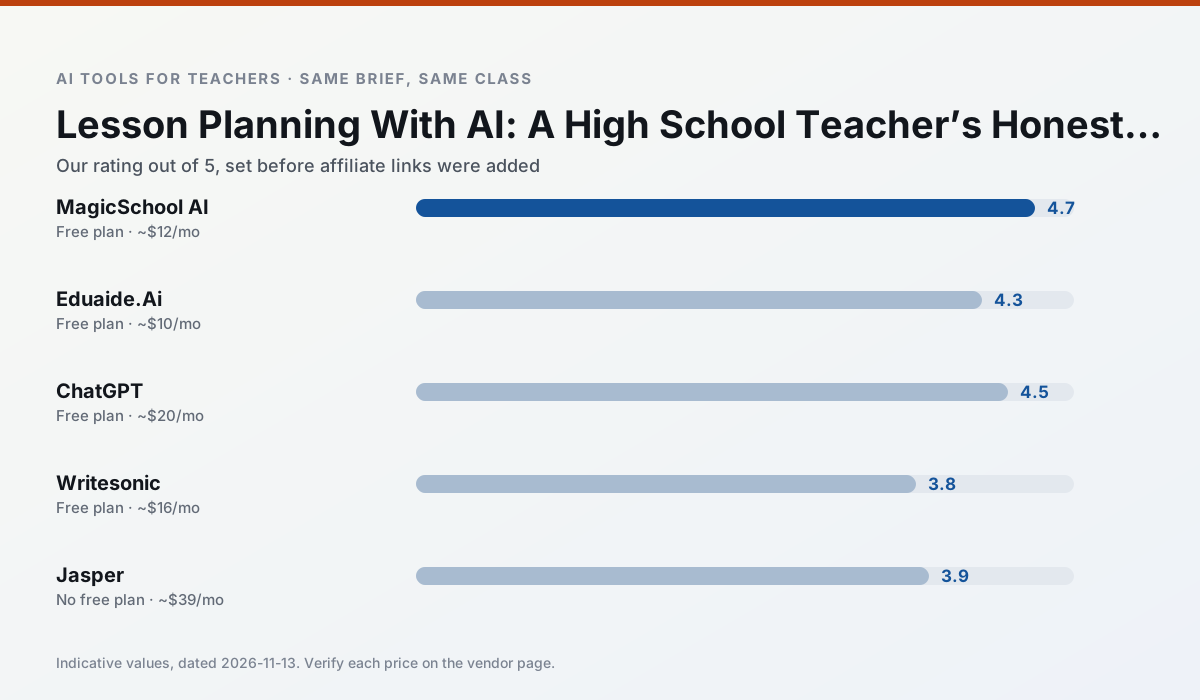
Side by side
Comparison table
Ratings reflect our timed classroom workflow, not vendor claims. Prices are indicative — verify on the vendor site.
| Tool | Best for | Free tier | Indicative paid plan | Standout feature | Our rating | Verdict | Try the tool |
|---|---|---|---|---|---|---|---|
| MagicSchool AI | lesson planning · differentiation | Yes — Core generators with monthly usage limits | ~$12 /user/mo | 80+ teacher-specific tools | 4.7 / 5 | Top pick | Try free |
| Eduaide.Ai | lesson planning · rubric creation | Yes — Daily generation cap | ~$10 /user/mo | Resource library | 4.3 / 5 | Strong option | Try free |
| ChatGPT | lesson planning · parent communication | Yes — Usage-limited model access | ~$20 /user/mo | Custom GPTs and Projects | 4.5 / 5 | Top pick | Try free |
| Writesonic | newsletters · parent communication | Yes — Limited credits | ~$16 /user/mo | Article and email generators | 3.8 / 5 | Situational | Try free |
| Jasper | newsletters · parent communication | No ongoing free plan | ~$39 /user/mo | Brand voice profiles | 3.9 / 5 | Situational | Try free |
| Originality.ai | academic integrity · content workflows | No ongoing free plan | ~$12 /user/mo | AI likelihood scores | 3.8 / 5 | Situational | Try free |
Match your situation
Best for X
Different jobs need different tools. Here is what we would open first in each case.
MagicSchool AI is the student-facing option here with boundaries a teacher can actually set and supervise.
Eduaide.Ai has the strongest tone control for family emails and report comments, provided you still read the message aloud before sending.
ChatGPT produces levelled versions from one source in a single pass, which is the highest-value differentiation shortcut we tested at this level.
Setup cost is one login for Writesonic; everything else can wait until you know the tool is useful.
Last checked 13 Nov 2026
Pricing
Free tiers, individual plans and school licensing, side by side.
| Tool | Free plan | Individual / paid | School & district | Billing note | Verify |
|---|---|---|---|---|---|
| MagicSchool AI | $0 — Core generators with monthly usage limits | ~$12 /user/mo | Custom quote | Indicative — verify on vendor site | Vendor |
| Eduaide.Ai | $0 — Daily generation cap | ~$10 /user/mo | Custom quote | Indicative — verify on vendor site | Vendor |
| ChatGPT | $0 — Usage-limited model access | ~$20 /user/mo | ~$25+ /user/mo | Indicative — verify on vendor site | Vendor |
| Writesonic | $0 — Limited credits | ~$16 /user/mo | ~$49 /user/mo | Indicative — verify on vendor site | Vendor |
| Jasper | No ongoing free tier | ~$39 /user/mo | ~$59+ /user/mo | Indicative — verify on vendor site | Vendor |
| Originality.ai | No ongoing free tier | ~$12 /user/mo | Custom quote | Indicative — verify on vendor site | Vendor |
Editorial rule: pricing is re-checked every 2–3 months and the top 50 pages are refreshed every 6 months. See our funding policy.
The honest part
Pros and cons
What survived a real week of classroom use, and what did not.
Pros
- Widest purpose-built template library
- Strong free tier for individual teachers
- Fast to learn with almost no prompting skill
Cons
- Outputs still need standards review
- Best features sit behind the paid tier
- District approval can be slow
Pros
- Very low entry price
- Good worksheet and rubric output
- Clean, uncluttered UI
Cons
- Smaller template set than MagicSchool
- Less polished export options
- Limited integrations
Pros
- Most flexible option available
- Huge community of teacher prompt libraries
- Strong multilingual support
Cons
- Requires prompt skills for consistent results
- No built-in standards alignment
- District privacy review usually required
Pros
- Cheaper than enterprise writing suites
- Many templates
- Reasonable free trial
Cons
- Generic classroom output
- Credit system is confusing
- Limited education context
Pros
- Consistent tone across communications
- Strong long-form editor
- Good for district comms teams
Cons
- Priced for marketing teams
- Overkill for one classroom
- No education-specific features
In the classroom
Use cases
Five concrete workflows, with the tool we would open for each one.
Regrouping students after an assessment
Summarise anonymised results into skill groups, then generate one activity per group. Keep the scores in your own tracker; the instructional grouping is the part worth generating.
Recommended: MagicSchool AIA weekly family newsletter from bullet notes
Newsletters fail on length, not tone. Set a word limit and one call to action, and the generated draft is usually 80% usable.
Recommended: Eduaide.AiA question bank from a PDF or article
Feed a non-identifiable source and ask for items tagged by difficulty with the misconception behind each distractor. Spot-check every answer key; numerical items are least reliable.
Recommended: ChatGPTA substitute folder that needs no context
The value here is structure, not creativity. Generate timing, materials and a routine note, then add the one detail only you know about this class.
Recommended: WritesonicAn IEP present-levels first draft
Use aggregated, anonymised data only. Ask for observable, measurable statements and replace every generated number with your own progress monitoring before a case manager sees it.
Recommended: Jasper
Questions teachers ask us
FAQ
Direct answers, also published as FAQPage structured data for search and AI assistants.
Can AI do lesson planning at High School level?
Which tool is best for lesson planning?
What is the biggest risk?
Sources & further reading
Our recommendation
Try MagicSchool AI free for your next lesson planning task
A large library of teacher-specific AI generators in one dashboard. Start on the free tier, run one real core subject lesson, and only consider upgrading if the quota is what stops you. Disclosure: we may earn a commission (30% recurring) at no extra cost to you.
Some links on this page are affiliate links. We may earn a commission at no extra cost to you. Our rankings are editorial and never pay-to-play. Never enter student PII into a free consumer account.
Keep reading
Related comparisons in this cluster.
Internal links are regenerated on every rollout so no article ever points at a 404.