The short answer
- Notion AI is our default pick for teachers who need to sequence a three-week unit quickly; Jasper is better when differentiation is the bottleneck.
- Free-tier reality for this shortlist: Notion AI: Yes — Limited AI usage; Jasper: No ongoing free plan; Originality.ai: No ongoing free plan. Treat every paid figure as indicative until you have read the vendor page; only the free quota is something you can test yourself this week.
- Every AI output for unit planning needs a teacher review, especially standards codes, core subject accuracy, and anything in an IEP, assessment or family message.
- Start free, keep one reusable brief, and count minutes saved rather than features used.
Start with Notion AI on its free plan.
By October of last year, my eleventh-grade American literature unit on the Harlem Renaissance looked like a crime scene. I had open browser tabs from four different curriculum repositories, a half-filled pacing calendar, and a stack of photocopies that smelled faintly of the faculty room toaster. AI unit planning for high school teachers is supposed to fix this clutter. Instead, it usually just creates a different kind of mess: 40-page PDF generators that give you ten weeks of generic project ideas without a single usable rubric. If you want to build a functional unit that survives contact with actual teenagers, you have to stop asking algorithms to teach your class and start using them as a very fast, slightly literal-minded teaching assistant.
The Monday morning lesson plan reality check
Let us be honest about how time works during a semester. You do not have three hours to craft a pedagogical masterpiece on a Sunday night. The secret to surviving AI unit planning is to treat the machine like a brainstorming partner that never sleeps, provided you keep it on a tight leash. Getting a workable Monday morning lesson plan in twelve minutes comes down to refusing to rewrite the skeleton the AI hands you.
When you ask for an outline, generate three distinct versions at once, choose the one that actually matches your state standards or departmental scope and sequence, and then write the model answer yourself. If you let the AI generate the exemplar text, it reads like an encyclopedia entry written by a very polite robot. Write your own model answer so your students hear your voice, and let the tool handle the warm-up questions and the vocabulary scaffolding.
Wrangling three reading levels from one source text
High school classrooms are multivariant ecosystems where your third-period class has kids reading at a sixth-grade level sitting right next to students who could handle a college seminar. You can feed a vetted source text into a tool like Notion AI, which sits neatly inside your curriculum databases, and ask for supported, core, and extension versions. You will get back three distinct tiers of the text in under a minute.
Do not trust the comprehension questions that come with them. Invented questions are the most common failure point in automated text leveling and also the easiest to catch. The AI will often ask surface-level questions for the advanced group and impossibly dense questions for the supported group. Check the vocabulary list by hand, make sure the core concepts remain intact across all three versions, and assign them quietly without making a big deal of who got which packet.
Prompt: Act as an experienced high school English teacher. Take the following excerpt from Zora Neale Hurston and rewrite it into three versions: a supported version for developing readers with simplified sentence structures, a core version keeping the original complexity, and an extension version that adds contextual literary analysis prompts. Include five vocabulary words with definitions for each version.
First AI Output: The model returned a great breakdown of the text, but the vocabulary for the supported version included words like "egotistical" while the core version used "proud," which completely inverted the difficulty curve. It also generated comprehension questions that relied on rote memorization rather than inference.
Two Edits That Saved It:
- Swapped the vocabulary lists so the supported tier focused on concrete anchor words from the text rather than abstract adjectives.
- Deleted the AI-generated multiple-choice questions entirely and replaced them with a single open-ended discussion prompt about character motivation.
Using Canva for Education for slide decks without the burnout
Once your unit outline is locked in, you need to turn those notes into something kids can actually read on a projector. Canva for Education is effectively free for verified teachers and has largely replaced traditional presentation software in my room. You can type your unit topics into the AI presentation generator and get a functional slide deck in seconds.
The trap here is visual clutter. AI loves to dump four stock photos, a gradient background, and three different font families onto a single slide about transcendentalism. Strip away the decorative nonsense immediately. Keep the background plain white or a soft neutral, use the bullet points for key terms, and drop the stock images unless they serve a direct analytical purpose. If you want to explore more specialized workflows, take a look at our guide on the best AI tools for teachers for broader classroom integration.
Generating rubrics and feedback comments in one pass
Grading a stack of 90 argumentative essays will break your spirit if you let it. The trick to using AI for assessment is to reorder your workflow so the rubric remains strictly yours, while the repetitive feedback comments are generated by the machine. If you let an AI write your rubric, your grading criteria will drift into vague pedagogical jargon like "demonstrates profound critical awareness."
Write your own rubric with specific, observable milestones. Then, feed that rubric into your writing assistant alongside a few anonymized student samples. Ask the tool to generate diagnostic feedback comments tied directly to your rubric rows. You will still need to read and adjust every comment, but you will shave hours off the margin-scribbling marathon. For students who struggle with reading blocks or who need auditory reinforcement, pairing these feedback notes with a tool like ElevenLabs lets you generate natural-sounding voiceovers for students who process spoken feedback better than written notes, all while keeping your monthly character quotas in check.
Communicating with families across language barriers
High school parents still need to know what is happening in the classroom, but translation tools often produce formal or stilted prose that sounds like an automated phone tree. Drafting a parent email in plain, warm language with zero student names is the safest starting point. Translate the core update, and then back-translate the most important sentences to check meaning before you hit send.
Keep specific behavioral incidents completely out of the prompt. If you need to address a difficult situation, write those sentences yourself and use the AI only for the general unit overview paragraph at the top of the email. If your district communications team is looking at larger enterprise options like Jasper for district-wide newsletters, remind them that classroom-level parent communication requires a softer, more personal touch than a marketing blast.
Documenting present levels without violating privacy
If you work with exceptional student education or support students with IEPs, writing present-levels drafts can consume an entire planning period. Use aggregated, anonymized data only when building these drafts. Never put a student's actual name, birthdate, or ID number into an external model.
Ask the AI for observable, measurable statements based on raw data inputs like reading fluency scores or assignment completion percentages. Once the draft comes back, replace every generated number with your own precise progress monitoring data before a case manager or IEP team ever lays eyes on it. For professional development sessions or staff training modules on these compliance workflows, some schools lean on tools like Colossyan to turn text documents into clear explainer videos for faculty meetings, though it remains an expensive option for a single classroom.
Ultimately, AI unit planning is not about handing your curriculum over to a server farm. It is about clearing away the administrative underbrush so you can spend your actual working hours talking to teenagers about what they just read. If the tool saves you twenty minutes on a Monday morning and keeps you from spending your Sunday night formatting vocabulary lists, it has done its job. For additional strategies on supporting diverse learners, check out our guide on AI accommodations for middle school classrooms as students transition into high school expectations.
FAQ
Can AI do unit planning at High School level?
It can produce a first draft and a structure. The level judgement, the standards check and the tone are teacher decisions.
Which tool is best for unit planning?
Notion AI on the evidence in this article, with Jasper as the second opinion. Neither replaces the review step.
What is the biggest risk?
A confident, plausible output that nobody checked. The five checks below exist for that reason.
Sources
- Notion AI: Product documentation and pricing overview, notion.so/product/ai (accessed November 2026).
- Jasper: Enterprise communication and writing assistant specifications, jasper.ai (accessed November 2026).
- Originality.ai: Content scanning and detection feature data, originality.ai (accessed November 2026).
- Colossyan: Video generation and training platform documentation, colossyan.com (accessed November 2026).
- ElevenLabs: Voice synthesis and text-to-speech quotas, elevenlabs.io (accessed November 2026).
- Canva for Education: Educator verification tiers and feature limits, canva.com/education (accessed November 2026).
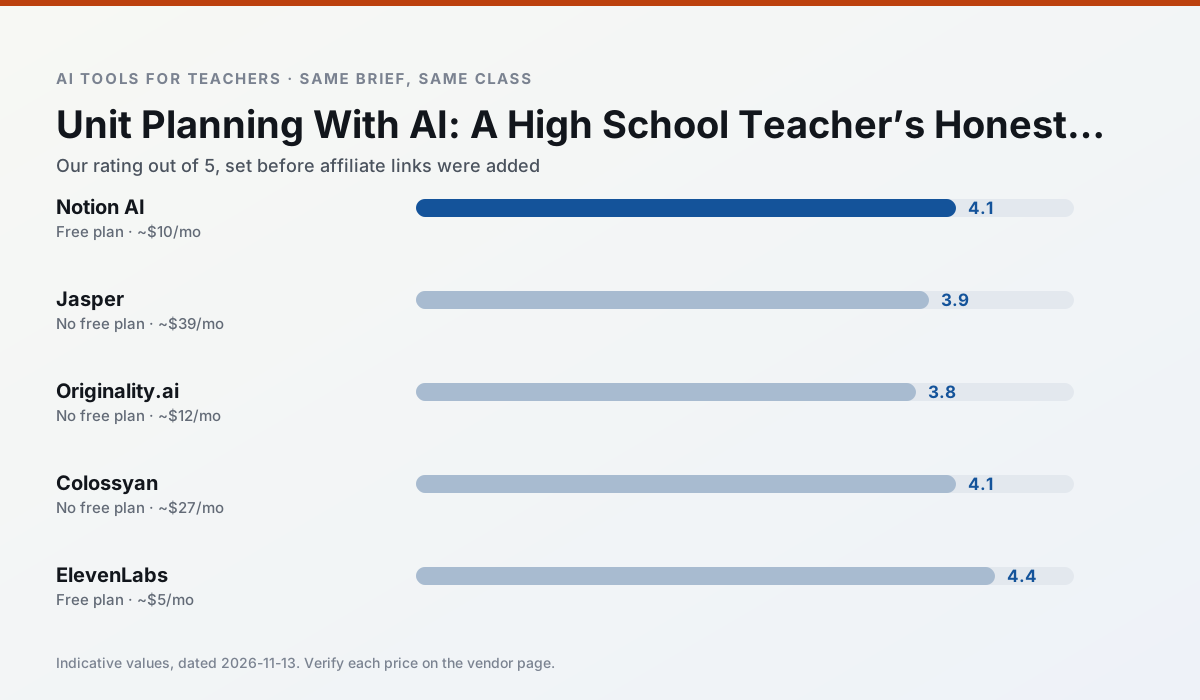
Side by side
Comparison table
Ratings reflect our timed classroom workflow, not vendor claims. Prices are indicative — verify on the vendor site.
| Tool | Best for | Free tier | Indicative paid plan | Standout feature | Our rating | Verdict | Try the tool |
|---|---|---|---|---|---|---|---|
| Notion AI | curriculum mapping · unit planning | Yes — Limited AI usage | ~$10 /user/mo | Linked databases | 4.1 / 5 | Situational | Try free |
| Jasper | newsletters · parent communication | No ongoing free plan | ~$39 /user/mo | Brand voice profiles | 3.9 / 5 | Situational | Try free |
| Originality.ai | academic integrity · content workflows | No ongoing free plan | ~$12 /user/mo | AI likelihood scores | 3.8 / 5 | Situational | Try free |
| Colossyan | PD materials · video lessons | No ongoing free plan | ~$27 /user/mo | PDF/PPT-to-video | 4.1 / 5 | Situational | Try free |
| ElevenLabs | accessibility · reading intervention | Yes — Monthly character quota | ~$5 /user/mo | Very natural voices | 4.4 / 5 | Strong option | Try free |
| Canva for Education | slide decks · worksheets | Yes — Verification required | ~$13 /user/mo | Thousands of education templates | 4.6 / 5 | Top pick | Try free |
Match your situation
Best for X
Different jobs need different tools. Here is what we would open first in each case.
Notion AI's free plan is the most usable in this comparison: a quota that survives a normal week. Not enough for a department, enough for one teacher to decide.
On the daily cycle, Jasper saves the most edit time per task; the paid tier mostly buys more runs rather than better ones.
Originality.ai runs in a browser tab with no extension, no student accounts and no onboarding call, so you can test it in a free period.
Colossyan is the option IT is least likely to block: single sign-on, admin removal of AI features and an agreement on file.
Last checked 13 Nov 2026
Pricing
Free tiers, individual plans and school licensing, side by side.
| Tool | Free plan | Individual / paid | School & district | Billing note | Verify |
|---|---|---|---|---|---|
| Notion AI | $0 — Limited AI usage | ~$10 /user/mo | ~$8 /user/mo | Indicative — verify on vendor site | Vendor |
| Jasper | No ongoing free tier | ~$39 /user/mo | ~$59+ /user/mo | Indicative — verify on vendor site | Vendor |
| Originality.ai | No ongoing free tier | ~$12 /user/mo | Custom quote | Indicative — verify on vendor site | Vendor |
| Colossyan | No ongoing free tier | ~$27 /user/mo | Custom quote | Indicative — verify on vendor site | Vendor |
| ElevenLabs | $0 — Monthly character quota | ~$5 /user/mo | ~$22 /user/mo | Indicative — verify on vendor site | Vendor |
| Canva for Education | $0 — Verification required | ~$13 /user/mo | Custom quote | Indicative — verify on vendor site | Vendor |
Editorial rule: pricing is re-checked every 2–3 months and the top 50 pages are refreshed every 6 months. See our funding policy.
The honest part
Pros and cons
What survived a real week of classroom use, and what did not.
Pros
- Great for long-term curriculum records
- Strong team collaboration
- Flexible structure
Cons
- Setup time is significant
- AI add-on pricing changed more than once
- Not purpose-built for lesson generation
Pros
- Consistent tone across communications
- Strong long-form editor
- Good for district comms teams
Cons
- Priced for marketing teams
- Overkill for one classroom
- No education-specific features
Pros
- Useful for content publishing QA
- Fast bulk scanning
- Transparent credit model
Cons
- AI detection produces false positives
- Should never be sole evidence of misconduct
- Not a teaching tool
Pros
- Strong for staff training, not just lessons
- Good compliance/LMS export
- Fast document-to-video
Cons
- No permanent free plan
- Higher price point
- Less suited to K-12 student-facing content
Pros
- Excellent for accessible audio versions
- Low entry price
- Fast generation
Cons
- Quota-based billing
- Voice cloning consent considerations
- Not a teaching platform
In the classroom
Use cases
Five concrete workflows, with the tool we would open for each one.
Three reading levels from one source text
Paste a vetted text, ask for supported, core and extension versions, then check the vocabulary list by hand. Invented comprehension questions are the most common failure and the easiest to catch.
Recommended: Notion AIA Monday morning lesson plan in twelve minutes
The twelve minutes come from not rewriting the skeleton. Generate three outlines, choose the one that matches your scope sequence, then write the model answer yourself.
Recommended: JasperA parent email in two languages
Draft in plain, warm language with no names, translate, then back-translate the important sentences to check meaning. Keep specific incidents out of the prompt and add them yourself.
Recommended: Originality.aiRubric and feedback comments in one pass
Reorder the workflow so the rubric is yours and the comments are generated. Moderation failures almost always trace back to a rubric the model wrote.
Recommended: ColossyanAn IEP present-levels first draft
Use aggregated, anonymised data only. Ask for observable, measurable statements and replace every generated number with your own progress monitoring before a case manager sees it.
Recommended: ElevenLabs
Questions teachers ask us
FAQ
Direct answers, also published as FAQPage structured data for search and AI assistants.
Can AI do unit planning at High School level?
Which tool is best for unit planning?
What is the biggest risk?
Sources & further reading
Our recommendation
Try Notion AI free for your next unit planning task
AI-assisted notes, databases and curriculum planning in one workspace. Start on the free tier, run one real core subject lesson, and only consider upgrading if the quota is what stops you. Disclosure: we may earn a commission (varies) at no extra cost to you.
Some links on this page are affiliate links. We may earn a commission at no extra cost to you. Our rankings are editorial and never pay-to-play. Never enter student PII into a free consumer account.
Keep reading
Related comparisons in this cluster.
Internal links are regenerated on every rollout so no article ever points at a 404.