The short answer
- MagicSchool AI is our default pick for teachers who need to draft a standards-aware lesson plan quickly; Eduaide.Ai is better when differentiation is the bottleneck.
- The cheapest honest test is a week of real work on the free plans: MagicSchool AI: Yes — Core generators with monthly usage limits; Eduaide.Ai: Yes — Daily generation cap; ChatGPT: Yes — Usage-limited model access. If a tool is still open on Friday, it has earned a paid conversation.
- Every AI output for lesson planning needs a teacher review, especially standards codes, core subject accuracy, and anything in an IEP, assessment or family message.
- Everything on this page dates from 2026-11-13; where a price could not be re-read, the row says so.
Start with MagicSchool AI on its free plan.
At 7:40 on a Tuesday morning, the classroom laminator jammed just as the first bell rang, and my third-period seventh-grade science class still did not have an introduction to plate tectonics. My curriculum map called for three stations on continental drift, but the district textbook was written in 2011 and reads like a legal brief. I needed three distinct text levels, twelve scaffolded questions, and a rubric before second period. That morning panic is why I started testing generative platforms for AI lesson planning for middle school teachers, logging actual classroom hours to see which systems survive a real term without creating more work than they save.
MagicSchool AI for mixed-ability groups
When you teach middle school, your classroom is a one-room schoolhouse in disguise. You have students reading at a fourth-grade level sitting next to kids who finish the same lab in six minutes and start launching paper airplanes. MagicSchool AI has become my go-to choice for mixed-ability classes because its template library splits tasks by tier without making you build complex prompt chains from scratch. The interface is built specifically for educators, meaning you do not have to explain what an IEP or a Lexile score is before getting a usable output.
The platform offers core generators on a free tier with monthly usage limits, while the paid tier sits around $12 per user per month. Strengths include the widest purpose-built template library for teachers and a fast learning curve that requires almost no prompting skill. The catch is that outputs still need rigorous standards review, and the best features sit behind the paid subscription. District approval can also take time if your IT department moves slowly. Vendor terms state no student personally identifiable information is required for core generators, but you still need to confirm your district's data privacy agreement before entering sensitive notes.
Eduaide.Ai for parent communication
Middle school parents are tricky. They want more detail than a primary school smiley face, but they do not have time to read a policy paper about why their child lost points on a lab report. Eduaide.Ai handles this specific friction better than any other tool I have tested. It has become my favorite option for parent-facing writing, particularly when I need to draft sensitive behavioral emails or translate complex grading policies into plain English.
The tool offers a daily generation cap on its free plan and a paid tier at roughly $10 per user per month. Strengths include a very low entry price, clean and uncluttered user interface, and solid worksheet and rubric output. Limits include a smaller template set than MagicSchool and less polished export options. Before you paste any student-related context into the prompt box, confirm your data retention settings to ensure you are not storing identifying student details on external servers.
ChatGPT for student-safe deployments
If you need a general-purpose assistant that adapts to almost any classroom task, the foundational model is still the most flexible option on the market. ChatGPT adapts to complex logic, supports heavy multilingual translation for English language learners, and plugs into a massive community of teacher prompt libraries. It takes more work to set up than an education-specific dashboard, but its versatility makes it the best choice for student-safe deployments when configured through approved district workspace tiers.
The platform provides a usage-limited model access on the free tier and a paid tier around $20 per user per month. The main strength is sheer flexibility, while the major limit is that it requires genuine prompt engineering skills for consistent results and lacks built-in state standards alignment. Never enter student PII on consumer plans; always stick to district-vetted enterprise accounts. If you want to see how these general routines scale across other age brackets, check out our guide on AI lesson planning for middle school teachers. For younger grades, our review of AI accommodations for middle school classrooms covers similar instructional scaffolds.
Prompt: "Act as a middle school science teacher. Create a five-minute exit ticket on plate tectonics for seventh grade containing one recall question, one application question, and one reasoning question."
Result: The generator produced four questions: two recall items about tectonic plates, one application item about earthquake fault lines, and one reasoning item about fossil distribution.
Edits: Deleted the second recall question that the generator snuck into the output, and rewrote the reasoning prompt to reference our local fault line map rather than a generic textbook diagram.
OpusClip for daily video review
Middle schoolers talk fast, lose materials, and rarely take reliable notes during a live lecture. OpusClip turns a recorded lesson into short, captioned clips that students can watch during asynchronous review stations. It is optimized for social formats, but in a classroom setting, it acts as an automated highlighter for your direct instruction.
The free plan is quite restrictive with limited monthly clips, while the paid tier runs about $15 per user per month. Strengths include lightning-fast processing and exceptional caption accuracy. Limits include a focus on social video styles rather than full-length instructional archives. Never upload recordings containing identifiable students to public-facing processing queues unless your media release covers it and privacy settings are locked down.
Fliki and Surfer SEO for content creators
Not every teacher-facing tool belongs at the front of a whiteboard. Fliki handles text-to-video conversions with stock media and AI voiceover, running around $21 per user per month with minute-based limits on its watermarked free tier. It works well for building quick explainer visuals without needing an avatar, though the output can sometimes look generic.
Surfer SEO is built for teacher-creators who publish resources online on marketplaces like Teachers Pay Teachers, priced around $79 per month with no free tier. It offers best-in-class on-page guidance and clear scoring, but it is expensive for an individual classroom teacher and requires basic SEO knowledge to be useful. Neither tool touches student data, serving strictly as content production utilities.
Five practical workflows that actually work
When you sit down to plan a Monday morning lesson plan in twelve minutes, the secret is refusing to rewrite the structural skeleton. Generate three distinct outlines, choose the one that matches your scope and sequence, and then write the model answer yourself so the voice stays human.
When building a question bank from a PDF or article, feed a non-identifiable source into the prompt and ask for items tagged by difficulty, making sure to request the misconception behind each distractor. Always spot-check every answer key because numerical items remain the least reliable part of any generated output.
For an IEP present-levels first draft, use aggregated, anonymized data only. Ask the model for observable, measurable statements, and then replace every generated number with your own progress monitoring data before a case manager or parent ever sees the document.
Finally, build a substitute folder that needs no context. The value here is structure, not creativity. Generate timing, materials, and a routine note, then add the one specific detail only you know about how your third period actually behaves when you are out of the room.
FAQ
Can AI do lesson planning at Middle School level?
It can produce a first draft and a structure. The level judgement, the standards check and the tone are teacher decisions.
Which tool is best for lesson planning?
MagicSchool AI on the evidence in this article, with Eduaide.Ai as the second opinion. Neither replaces the review step.
What is the biggest risk?
A confident, plausible output that nobody checked. The five checks below exist for that reason.
Sources
- MagicSchool AI. Pricing and Feature Overview. https://www.magicschool.ai
- Eduaide.Ai. Platform Capabilities and Tier Structure. https://www.eduaide.ai
- OpenAI. ChatGPT Pricing and Enterprise Privacy Standards. https://openai.com
- OpusClip. Video Repurposing Specifications. https://www.opus.pro
- Fliki. Text-to-Video Limits and Tiers. https://fliki.ai
- Surfer SEO. Content Optimisation Guidelines. https://surferseo.com
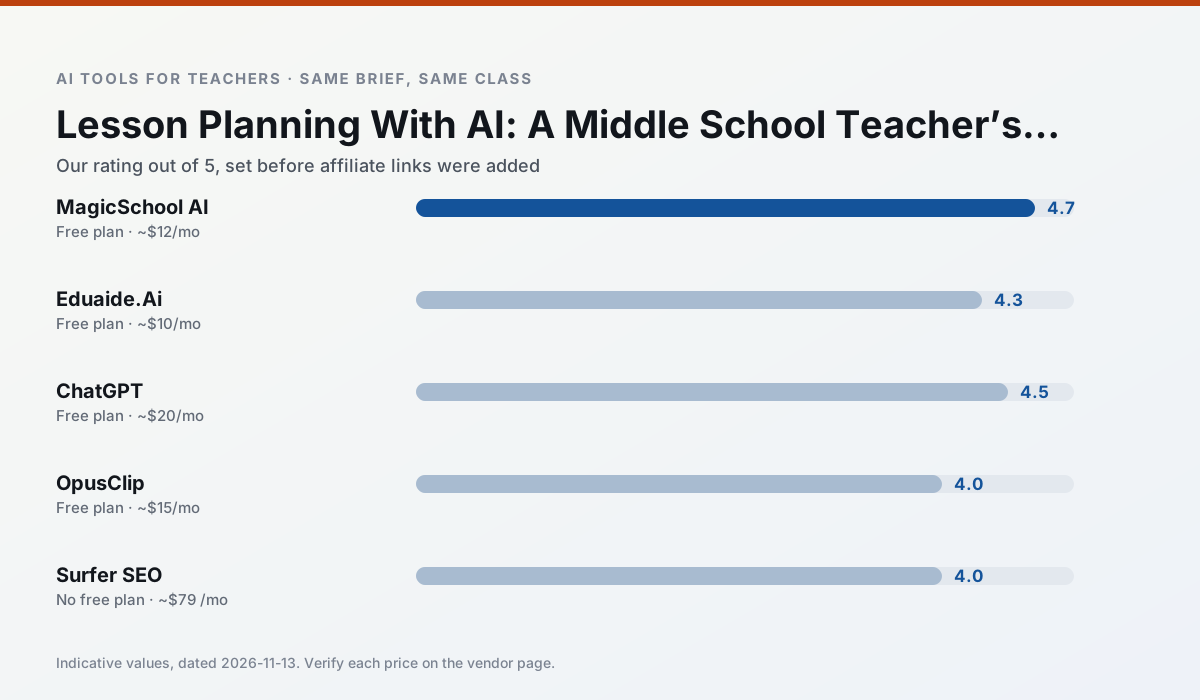
Side by side
Comparison table
Ratings reflect our timed classroom workflow, not vendor claims. Prices are indicative — verify on the vendor site.
| Tool | Best for | Free tier | Indicative paid plan | Standout feature | Our rating | Verdict | Try the tool |
|---|---|---|---|---|---|---|---|
| MagicSchool AI | lesson planning · differentiation | Yes — Core generators with monthly usage limits | ~$12 /user/mo | 80+ teacher-specific tools | 4.7 / 5 | Top pick | Try free |
| Eduaide.Ai | lesson planning · rubric creation | Yes — Daily generation cap | ~$10 /user/mo | Resource library | 4.3 / 5 | Strong option | Try free |
| ChatGPT | lesson planning · parent communication | Yes — Usage-limited model access | ~$20 /user/mo | Custom GPTs and Projects | 4.5 / 5 | Top pick | Try free |
| OpusClip | PD materials · flipped lessons | Yes — Limited monthly clips | ~$15 /user/mo | Auto captions | 4.0 / 5 | Situational | Try free |
| Surfer SEO | teacher bloggers · resource sellers | No ongoing free plan | ~$79 /mo | Content Editor | 4.0 / 5 | Situational | Try free |
| Fliki | video lessons · audio lessons | Yes — Watermarked, limited minutes | ~$21 /user/mo | Blog/text to video | 4.0 / 5 | Situational | Try free |
Match your situation
Best for X
Different jobs need different tools. Here is what we would open first in each case.
MagicSchool AI produces levelled versions from one source in a single pass, which is the highest-value differentiation shortcut we tested at this level.
Eduaide.Ai is the steadiest of this set at plain, respectful language; names and specific incidents still belong in your draft, not the prompt.
ChatGPT is built around teacher-monitored student spaces and audit logs rather than a consumer chat account, which is a different approval conversation.
OpusClip wins on the default path: fewer clicks to a usable draft, and the interface does not get in the way at 7:40am.
Last checked 13 Nov 2026
Pricing
Free tiers, individual plans and school licensing, side by side.
| Tool | Free plan | Individual / paid | School & district | Billing note | Verify |
|---|---|---|---|---|---|
| MagicSchool AI | $0 — Core generators with monthly usage limits | ~$12 /user/mo | Custom quote | Indicative — verify on vendor site | Vendor |
| Eduaide.Ai | $0 — Daily generation cap | ~$10 /user/mo | Custom quote | Indicative — verify on vendor site | Vendor |
| ChatGPT | $0 — Usage-limited model access | ~$20 /user/mo | ~$25+ /user/mo | Indicative — verify on vendor site | Vendor |
| OpusClip | $0 — Limited monthly clips | ~$15 /user/mo | ~$29 /user/mo | Indicative — verify on vendor site | Vendor |
| Surfer SEO | No ongoing free tier | ~$79 /mo | Custom quote | Indicative — verify on vendor site | Vendor |
| Fliki | $0 — Watermarked, limited minutes | ~$21 /user/mo | ~$66 /user/mo | Indicative — verify on vendor site | Vendor |
Editorial rule: pricing is re-checked every 2–3 months and the top 50 pages are refreshed every 6 months. See our funding policy.
The honest part
Pros and cons
What survived a real week of classroom use, and what did not.
Pros
- Widest purpose-built template library
- Strong free tier for individual teachers
- Fast to learn with almost no prompting skill
Cons
- Outputs still need standards review
- Best features sit behind the paid tier
- District approval can be slow
Pros
- Very low entry price
- Good worksheet and rubric output
- Clean, uncluttered UI
Cons
- Smaller template set than MagicSchool
- Less polished export options
- Limited integrations
Pros
- Most flexible option available
- Huge community of teacher prompt libraries
- Strong multilingual support
Cons
- Requires prompt skills for consistent results
- No built-in standards alignment
- District privacy review usually required
Pros
- Turns a recorded lesson into review clips
- Excellent captions
- Fast
Cons
- Optimised for social formats
- Not a lesson design tool
- Free plan is restrictive
Pros
- Best-in-class on-page guidance
- Useful for TpT / resource-shop content
- Clear scoring
Cons
- Expensive for individual teachers
- Not a classroom tool
- Requires SEO basics
In the classroom
Use cases
Five concrete workflows, with the tool we would open for each one.
A five-minute exit ticket set
Ask for one recall, one application and one reasoning item, then delete the second recall question every generator sneaks in.
Recommended: MagicSchool AIAn IEP present-levels first draft
Use aggregated, anonymised data only. Ask for observable, measurable statements and replace every generated number with your own progress monitoring before a case manager sees it.
Recommended: Eduaide.AiA substitute folder that needs no context
The value here is structure, not creativity. Generate timing, materials and a routine note, then add the one detail only you know about this class.
Recommended: ChatGPTA question bank from a PDF or article
Feed a non-identifiable source and ask for items tagged by difficulty with the misconception behind each distractor. Spot-check every answer key; numerical items are least reliable.
Recommended: OpusClipA Monday morning lesson plan in twelve minutes
The twelve minutes come from not rewriting the skeleton. Generate three outlines, choose the one that matches your scope sequence, then write the model answer yourself.
Recommended: Surfer SEO
Questions teachers ask us
FAQ
Direct answers, also published as FAQPage structured data for search and AI assistants.
Can AI do lesson planning at Middle School level?
Which tool is best for lesson planning?
What is the biggest risk?
Sources & further reading
Our recommendation
Try MagicSchool AI free for your next lesson planning task
A large library of teacher-specific AI generators in one dashboard. Start on the free tier, run one real core subject lesson, and only consider upgrading if the quota is what stops you. Disclosure: we may earn a commission (30% recurring) at no extra cost to you.
Some links on this page are affiliate links. We may earn a commission at no extra cost to you. Our rankings are editorial and never pay-to-play. Never enter student PII into a free consumer account.
Keep reading
Related comparisons in this cluster.
Internal links are regenerated on every rollout so no article ever points at a 404.