The short answer
- Claude is our default pick for teachers who need to give actionable draft feedback quickly; Brisk Teaching is better when differentiation is the bottleneck.
- Free-tier reality for this shortlist: Claude: Yes — Usage-limited; Brisk Teaching: Yes — Limited actions per month; Turnitin Clarity / Feedback Studio: No ongoing free plan. Treat every paid figure as indicative until you have read the vendor page; only the free quota is something you can test yourself this week.
- Every AI output for feedback on student writing needs a teacher review, especially standards codes, core subject accuracy, and anything in an IEP, assessment or family message.
- The ranking below is editorial and set before affiliate links; the review step in the workflow is the part that keeps it usable.
Start with MagicSchool AI on its free plan.
At 3:45 on a Tuesday afternoon, my desk is buried under twenty-eight third-grade paragraphs about sea turtles. Twelve of them say only that sea turtles live in the ocean and eat jellyfish. Six more are written backward. My eyes cross, my coffee is stone cold, and I still have to plan a morning meeting. This is the reality of trying to give real, developmental AI feedback on student writing for 3-5 teachers who are expected to individualize instruction for every kid in the room. We do not need a chatbot that writes poetry about pedagogy. We need tools that help us coach nine-year-olds on how to add a supporting detail without losing our minds or our weekends.
Using AI for writing feedback in upper elementary is a delicate business. If you hand a raw generative model a stack of student narratives, you will get back generic praise that sounds like a fortune cookie or harsh corrections that make a reluctant writer shut their notebook forever. Over the past term, I have tested the major options in my 3rd-grade inclusion room. Some live inside the browser, some handle scanned paper, and others require district paperwork thick enough to stop a bullet. If you want to see how these fit into broader primary workflows, take a look at our roundup of the best AI tools for teachers 2026. Let's look at what actually works when the bell rings and the papers are piled high.
Claude for Quick Document Layouts and Rubric Coaching
When you need a thought partner to untangle a messy writing rubric or help draft instructional scaffolding, Claude is the best for quick setup. It handles large context windows easily, meaning you can drop in a complete state writing standard, a district expectations document, and three anchor papers without choking the system. The prose it generates feels less robotic than other models, which matters when you are trying to model sentence variety for third graders who start every single sentence with "Then."
The catch is that Claude is a consumer and workspace assistant, not a dedicated classroom platform. You cannot upload identifiable student drafts without violating basic privacy guidelines unless your district has provisioned an approved enterprise workspace. I use it strictly for planning the feedback language myself. For teachers looking at specialized primary support, our guide on AI accommodations for elementary teachers offers helpful parallel workflows. You have to feed it your own rubrics; if you let Claude write the rubric from scratch, your moderation fails will skyrocket because the model has no idea what your specific group of students actually managed to practice that week.
Prompt typed into Claude: "Act as an elementary writing coach. Here is our third-grade opinion writing rubric for book reviews (4-point scale on focus, evidence, and conclusion). Write three sets of supportive teacher conference prompts for students who state an opinion but forget to include a specific detail from the text."
What came back: A set of polite, slightly dry questions like, "Have you considered incorporating a direct quotation from the narrative?"
Two edits that made it usable:
- Added a constraint: "Rewrite these for an eight-year-old using friendly, oral language like, 'Show me the exact page where the author made you laugh.'"
- Removed references to "quoting text" and replaced it with "finding the exact part in the story."
Brisk Teaching for Inline Chrome Document Workflows
Brisk Teaching is the best for schools and districts that want to cut out the endless cycle of copy-pasting text into external chat windows. It operates as a browser extension that brings AI feedback directly into Google Docs, Slides, and web articles. When my students are typing their rough drafts on Chromebooks, I can click the Brisk icon right inside their document to generate inline comments, highlight areas needing expansion, or check readability levels without leaving the tab.
The learning curve is gentle, which is a rare mercy for busy elementary staff. However, because it lives in the browser, your school IT department has to approve the extension permissions, and the scope of what the extension reads requires a careful look at your district's data privacy agreement. The free tier gives you a very tight quota of actions per month, so you will run out by Wednesday if you try to use it for a whole grade level. When used sparingly for targeted draft interventions, it saves precious minutes during writing workshop conferences.
Turnitin Clarity and Feedback Studio for Institutional Workflows
If your middle or upper elementary school is already locked into the Turnitin ecosystem, you are looking at the best free option from a budget standpoint, assuming your licensing is covered at the district level. Turnitin Clarity and Feedback Studio handle institutional writing feedback and similarity checking with a heavy-duty backend that individual teachers cannot purchase on their own. The workflow is built for consistency across grade bands, tracking revision histories so you can see if a student actually rewrote their paragraph or just swapped out a few adjectives using a thesaurus.
The administrative setup is notoriously heavy, and AI detection tools within the platform remain a contested space with far too many false positives for elementary students who mimic AI sentence structures naturally. The interface feels built for high-end research papers rather than a ten-year-old writing about their weekend soccer game. It is a powerful engine, but it is often entirely too much machinery for an elementary writing block.
Class Companion for Daily Scanned and Handwritten Work
Class Companion is the best overall for daily use, particularly if your students still do a massive amount of their writing by hand with a pencil on lined paper. In third grade, typing everything out slows down idea generation for kids who are still hunting for the letter keys. This tool lets you snap pictures or scan student work, providing fast, specific comments on assignments. It also features robust math support, which makes it a versatile daily driver.
The limitation here is that scan quality directly affects accuracy. If a student writes in faint pencil smudge or erases a hole through the paper, the OCR stumbles, and the AI feedback starts commenting on letters that do not exist. You still have to review every single comment before handing it back, because the AI cannot read a child's emotional state or know if they are having a rough day. Student work is uploaded to their servers, so an approved data privacy agreement is non-negotiable before you scan a single page.
QuestionWell and Formative for Assessment and Practice
When you need to build background knowledge checks or comprehension quizzes to support a writing unit, QuestionWell and Formative fill the gaps. QuestionWell generates standards-aligned question banks from any article or objective, saving hours of typing. You must feed it non-identifiable source text, and you always need to spot-check the answer key because numerical or tricky logic items can drift off target.
Formative takes those questions and turns them into live assessments with auto-grading and standards tracking, working smoothly with existing PDFs and Google Docs. The data feeds directly into intervention groups, but the pricing adds up fast if you buy it as an individual, and the setup requires more upfront time than simple quiz platforms. Used together, these tools handle the preparatory heavy lifting so your energy can go into the actual writing conferences.
FAQ
Can AI do feedback on student writing at 3-5 level?
It can produce a first draft and a structure. The level judgement, the standards check and the tone are teacher decisions.
Which tool is best for feedback on student writing?
Claude on the evidence in this article, with Brisk Teaching as the second opinion. Neither replaces the review step.
What is the biggest risk?
A confident, plausible output that nobody checked. The five checks below exist for that reason.
Sources
- Anthropic. "Claude Model Card and Enterprise Privacy Standards." anthropic.com
- Brisk Teaching. "Chrome Extension Documentation and Data Privacy." briskteaching.com
- Turnitin. "Feedback Studio and Clarity Feature Overview." turnitin.com
- Class Companion. "AI-Powered Feedback for Handwritten Student Work." classcompanion.com
- QuestionWell. "Standards-Aligned Question Generation." questionwell.com
- Formative. "Live Formative Assessment and LMS Integration." smartative.com
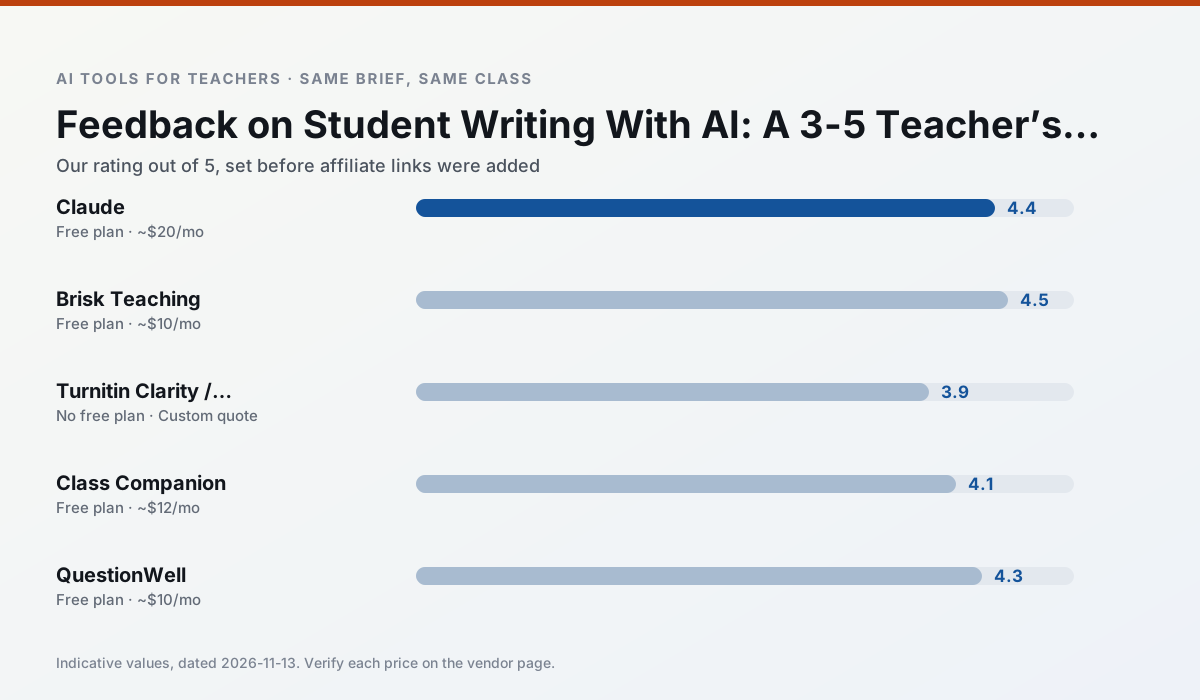
Side by side
Comparison table
Ratings reflect our timed classroom workflow, not vendor claims. Prices are indicative — verify on the vendor site.
| Tool | Best for | Free tier | Indicative paid plan | Standout feature | Our rating | Verdict | Try the tool |
|---|---|---|---|---|---|---|---|
| Claude | rubric creation · feedback on writing | Yes — Usage-limited | ~$20 /user/mo | Very large context window | 4.4 / 5 | Strong option | Try free |
| Brisk Teaching | feedback on writing · grading | Yes — Limited actions per month | ~$10 /user/mo | Works inside Google Docs | 4.5 / 5 | Top pick | Try free |
| Turnitin Clarity / Feedback Studio | feedback on writing · academic integrity | No ongoing free plan | Custom quote | Similarity reports | 3.9 / 5 | Situational | Try free |
| Class Companion | grading · feedback on writing | Yes — Limited assignments | ~$12 /user/mo | Handwriting recognition | 4.1 / 5 | Situational | Try free |
| QuestionWell | quiz generation · assessment | Yes — Monthly generation limit | ~$10 /user/mo | Exports to Google Forms / LMS | 4.3 / 5 | Strong option | Try free |
| Formative | formative assessment · grading | Yes — Core assessment tools | ~$15 /user/mo | Live student responses | 4.3 / 5 | Strong option | Try free |
Match your situation
Best for X
Different jobs need different tools. Here is what we would open first in each case.
Claude has the shortest path from opening a tab to a usable draft, which matters more than the feature count on a Monday.
For a school rollout, Brisk Teaching offers the paperwork and the admin console; the classroom features are standard by comparison.
If there is no budget, start with Turnitin Clarity / Feedback Studio: free plan with clearest quota is the least punishing free tier here.
Class Companion wins on the default path: fewer clicks to a usable draft, and the interface does not get in the way at 7:40am.
Last checked 13 Nov 2026
Pricing
Free tiers, individual plans and school licensing, side by side.
| Tool | Free plan | Individual / paid | School & district | Billing note | Verify |
|---|---|---|---|---|---|
| Claude | $0 — Usage-limited | ~$20 /user/mo | ~$25+ /user/mo | Indicative — verify on vendor site | Vendor |
| Brisk Teaching | $0 — Limited actions per month | ~$10 /user/mo | Custom quote | Indicative — verify on vendor site | Vendor |
| Turnitin Clarity / Feedback Studio | No ongoing free tier | Custom quote | Custom quote | LMS-wide deployment | Vendor |
| Class Companion | $0 — Limited assignments | ~$12 /user/mo | Custom quote | Indicative — verify on vendor site | Vendor |
| QuestionWell | $0 — Monthly generation limit | ~$10 /user/mo | Custom quote | Indicative — verify on vendor site | Vendor |
| Formative | $0 — Core assessment tools | ~$15 /user/mo | Custom quote | Indicative — verify on vendor site | Vendor |
Editorial rule: pricing is re-checked every 2–3 months and the top 50 pages are refreshed every 6 months. See our funding policy.
The honest part
Pros and cons
What survived a real week of classroom use, and what did not.
Pros
- Handles full unit plans and long rubrics
- Nuanced, less generic prose
- Good at structured document output
Cons
- No teacher-specific templates
- Fewer classroom integrations
- Consumer plan not suitable for student data
Pros
- No copy-paste between tools
- Fast inline feedback on student drafts
- Gentle learning curve
Cons
- Chrome-first workflow
- Extension permissions need IT approval
- Free quota is tight
Pros
- Already licensed at many schools
- Consistent institutional workflow
- Detailed revision history
Cons
- Individual teachers cannot buy it
- AI detection remains contested
- Heavy administrative setup
Pros
- Useful where work is done on paper
- Fast, specific comments
- Good math support
Cons
- Scan quality affects accuracy
- Narrow use case
- Feedback still needs teacher review
Pros
- Saves the most time on question writing
- Clean export workflow
- Good objective tagging
Cons
- Single-purpose tool
- Question quality varies by source text
- Limited student-facing features
In the classroom
Use cases
Five concrete workflows, with the tool we would open for each one.
A parent email in two languages
Draft in plain, warm language with no names, translate, then back-translate the important sentences to check meaning. Keep specific incidents out of the prompt and add them yourself.
Recommended: ClaudeRubric and feedback comments in one pass
Reorder the workflow so the rubric is yours and the comments are generated. Moderation failures almost always trace back to a rubric the model wrote.
Recommended: Brisk TeachingThree reading levels from one source text
Paste a vetted text, ask for supported, core and extension versions, then check the vocabulary list by hand. Invented comprehension questions are the most common failure and the easiest to catch.
Recommended: Turnitin Clarity / Feedback StudioA Monday morning lesson plan in twelve minutes
The twelve minutes come from not rewriting the skeleton. Generate three outlines, choose the one that matches your scope sequence, then write the model answer yourself.
Recommended: Class CompanionA question bank from a PDF or article
Feed a non-identifiable source and ask for items tagged by difficulty with the misconception behind each distractor. Spot-check every answer key; numerical items are least reliable.
Recommended: QuestionWell
Questions teachers ask us
FAQ
Direct answers, also published as FAQPage structured data for search and AI assistants.
Can AI do feedback on student writing at 3-5 level?
Which tool is best for feedback on student writing?
What is the biggest risk?
Sources & further reading
Our recommendation
Try MagicSchool AI free for your next feedback on student writing task
A large library of teacher-specific AI generators in one dashboard. Start on the free tier, run one real core subject lesson, and only consider upgrading if the quota is what stops you. Disclosure: we may earn a commission (30% recurring) at no extra cost to you.
Some links on this page are affiliate links. We may earn a commission at no extra cost to you. Our rankings are editorial and never pay-to-play. Never enter student PII into a free consumer account.
Keep reading
Related comparisons in this cluster.
Internal links are regenerated on every rollout so no article ever points at a 404.