The short answer
- Canva for Education is our default pick for teachers who need to document accessible alternatives quickly; Gradescope is better when differentiation is the bottleneck.
- Canva for Education handles the broad case; Gradescope handles the narrow one. Anything beyond that pair should be justified by a recurring weekly job, not a feature demo.
- Every AI output for accommodations needs a teacher review, especially standards codes, core subject accuracy, and anything in an IEP, assessment or family message.
- Trial one tool for a week of real accommodations work before any purchase conversation; the quota is the honest test.
Start with OpusClip on its free plan.
Seventeen out of twenty-two six-year-olds are staring at you. Four of them are chewing their sleeves, two are under the kidney table, and you are trying to rewrite a phonics worksheet three different ways before morning centers. The standard accommodation advice tells you to differentiate on the fly. Reality tells you that you have twelve minutes of planning period left and a lukewarm cup of coffee.
Using AI accommodations for k-2 students is not about letting algorithms run your classroom. It is about scraping back twenty minutes of your evening so you can actually read your students' handwriting tomorrow. Some tools save your sanity. Others create more paperwork than they solve. Let us look at what actually works in an early childhood room and what belongs in the digital recycle bin.
Why K-2 Differentiated Planning Crushes Teachers
Every primary teacher knows the administrative grind. You have three kids reading at a second-grade level, eight right on benchmark, and six who need picture-supported decoding prompts just to get through a sentence about cats. Creating three versions of a Tuesday morning task usually takes an hour of hunting for clip art and adjusting font sizes.
That is where tools like Canva for Education step in as our best pick for mixed-ability classes. Because the education tier is free for verified teachers, you can pull up a massive template library and quickly swap text levels or add visual icons next to written instructions. The catch is that it is easy to produce cluttered slides if you lean too hard into the decorative elements. Keep the visual noise low so you do not overwhelm kids with sensory processing needs.
When you need daily practice sets without hunting through three different workbooks, QuestionWell takes the crown as our best overall for daily use. It generates standards-aligned question banks from any text or objective, letting you export straight to your preferred format.
Prompt: Create three tiered reading comprehension questions for a first-grade text about bees. Level 1 must use picture-word matching, Level 2 must use simple sentence completion, and Level 3 must require a short written sentence.
First pass output: Generated a standard multiple-choice quiz with complex vocabulary and zero picture supports for Level 1, plus four open-ended questions for Level 3.
Two edits that made it usable: First, I added a strict negative constraint: "No multiple choice for Level 1; include image placeholder tags." Second, I capped Level 3 at a single sentence prompt and specified a Lexile range.
Turning Raw Data into Intervention Groups
Assessment data in early years classrooms is messy. You have sticky notes, running records on clipboards, and mental notes about who struggled with subtraction. Regrouping students after an assessment usually means spending your lunch break sorting name cards into piles.
To streamline this, load anonymized results into Formative, which serves as our top choice for student-safe deployments due to its robust school-grade Data Processing Agreement. It groups students automatically and pairs well with existing PDFs and Docs. It is a bit steeper to set up than a casual quiz game, but the standards tracking saves hours when report card time rolls around.
If you are drafting parent-facing updates or managing complex paperwork like an IEP present-levels first draft, Gradescope helps organize the written load. While it is often seen as a secondary or higher education tool for paper assessments, its consistent rubric application and detailed item analytics make it surprisingly useful for organizing large batches of student writing samples for progress reports. Always use aggregated, anonymised data only, and replace every generated number with your own progress monitoring before a case manager sees it.
When Video and Audio Tools Fall Short in Primary
It is tempting to throw high-tech media solutions at every engagement problem. You might consider using OpusClip to turn a recorded circle-time lesson into review clips, or Colossyan to build training and explainer videos from documents and scripts. Both platforms have serious limitations in a K-2 context. OpusClip is optimized for social formats and vertical feeds, which rarely match how young children interact with learning media. Colossyan is slick for staff training and compliance videos, but it lacks the tactile, immediate feedback that six-year-olds need.
Furthermore, video tools carry steep subscription costs, with Colossyan sitting at around $27 a user per month and offering no permanent free plan. If you are exploring broader strategies across grade bands, check out our guide on AI accommodations for elementary teachers to see where media generation actually fits.
Building a Bulletproof Sub Folder
Every teacher dreads the morning they wake up with a fever and have to cobble together a sub folder. The value of AI here is structure, not creativity. When you use QuestionWell or Canva to put together emergency materials, ask for timing, clear materials lists, and a routine note. Then add the one detail only you know about this class, like which student needs a visual timer during transitions.
Keep your workflows grounded in actual classroom needs rather than novelty. Whether you are building a five-minute exit ticket set—asking for one recall, one application, and one reasoning item while deleting the extra fluff the generator sneaks in—or writing a weekly family newsletter from bullet notes, the key is strict human editing. Newsletters fail on length, not tone. Set a strict word limit and a single call to action. For a deeper look at how these tools fit into a broader modern stack, read our roundup of the best AI tools for teachers in 2026.
FAQ
Can AI do accommodations at K-2 level?
It can produce a first draft and a structure. The level judgement, the standards check and the tone are teacher decisions.
Which tool is best for accommodations?
Canva for Education on the evidence in this article, with Gradescope as the second opinion. Neither replaces the review step.
What is the biggest risk?
A confident, plausible output that nobody checked. The five checks below exist for that reason.
Sources
- Canva for Education: Educator features, pricing, and verification guidelines (canva.com/education)
- Gradescope: Rubric grading and workflow specifications (gradescope.com)
- Formative: Assessment, data tracking, and privacy documentation (goformative.com)
- QuestionWell: Question generation limits and export workflows (questionwell.ai)
- OpusClip: Video repurposing and plan limitations (opus.pro)
- Colossyan: AI video creation and data residency details (colossyan.com)
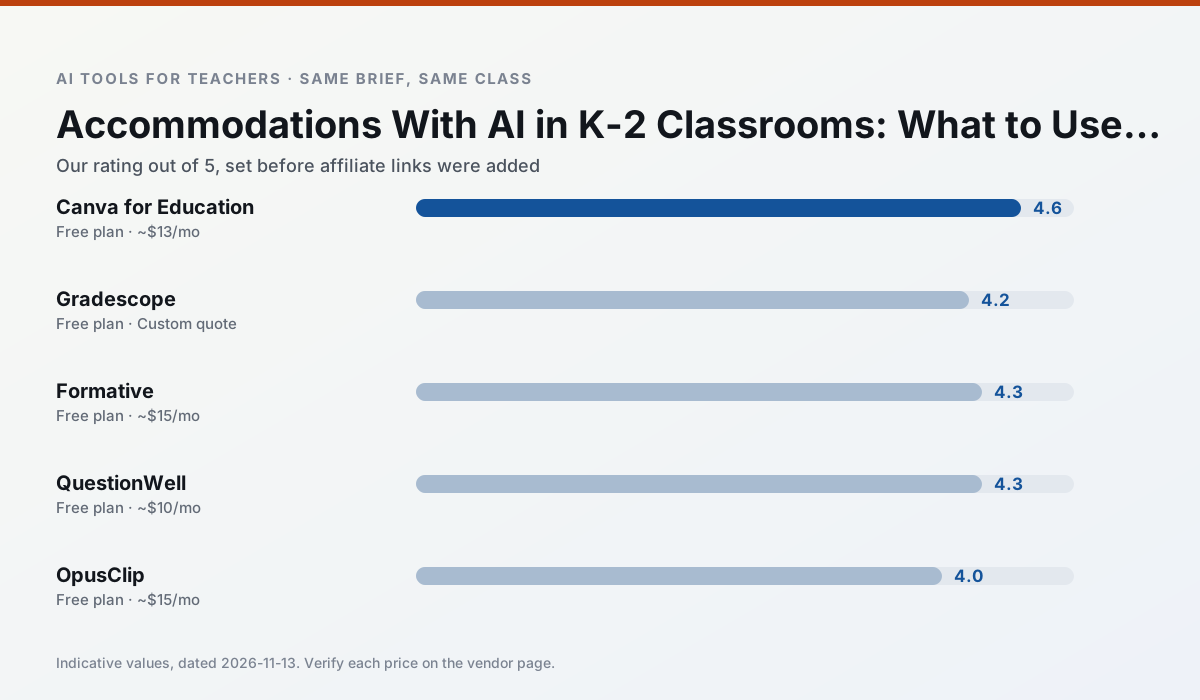
Side by side
Comparison table
Ratings reflect our timed classroom workflow, not vendor claims. Prices are indicative — verify on the vendor site.
| Tool | Best for | Free tier | Indicative paid plan | Standout feature | Our rating | Verdict | Try the tool |
|---|---|---|---|---|---|---|---|
| Canva for Education | slide decks · worksheets | Yes — Verification required | ~$13 /user/mo | Thousands of education templates | 4.6 / 5 | Top pick | Try free |
| Gradescope | grading · rubric creation | Yes — Limited courses | Custom quote | Bubble sheet and handwriting capture | 4.2 / 5 | Strong option | Try free |
| Formative | formative assessment · grading | Yes — Core assessment tools | ~$15 /user/mo | Live student responses | 4.3 / 5 | Strong option | Try free |
| QuestionWell | quiz generation · assessment | Yes — Monthly generation limit | ~$10 /user/mo | Exports to Google Forms / LMS | 4.3 / 5 | Strong option | Try free |
| OpusClip | PD materials · flipped lessons | Yes — Limited monthly clips | ~$15 /user/mo | Auto captions | 4.0 / 5 | Situational | Try free |
| Colossyan | PD materials · video lessons | No ongoing free plan | ~$27 /user/mo | PDF/PPT-to-video | 4.1 / 5 | Situational | Try free |
Match your situation
Best for X
Different jobs need different tools. Here is what we would open first in each case.
Canva for Education produces levelled versions from one source in a single pass, which is the highest-value differentiation shortcut we tested at this level.
Family-facing drafts from Gradescope need the fewest rewrites for warmth without overpromising, which is the usual failure mode.
Formative is the student-facing option here with boundaries a teacher can actually set and supervise.
On the daily cycle, QuestionWell saves the most edit time per task; the paid tier mostly buys more runs rather than better ones.
Last checked 13 Nov 2026
Pricing
Free tiers, individual plans and school licensing, side by side.
| Tool | Free plan | Individual / paid | School & district | Billing note | Verify |
|---|---|---|---|---|---|
| Canva for Education | $0 — Verification required | ~$13 /user/mo | Custom quote | Indicative — verify on vendor site | Vendor |
| Gradescope | $0 — Limited courses | Custom quote | Custom quote | LMS integration and support | Vendor |
| Formative | $0 — Core assessment tools | ~$15 /user/mo | Custom quote | Indicative — verify on vendor site | Vendor |
| QuestionWell | $0 — Monthly generation limit | ~$10 /user/mo | Custom quote | Indicative — verify on vendor site | Vendor |
| OpusClip | $0 — Limited monthly clips | ~$15 /user/mo | ~$29 /user/mo | Indicative — verify on vendor site | Vendor |
| Colossyan | No ongoing free tier | ~$27 /user/mo | Custom quote | Indicative — verify on vendor site | Vendor |
Editorial rule: pricing is re-checked every 2–3 months and the top 50 pages are refreshed every 6 months. See our funding policy.
The honest part
Pros and cons
What survived a real week of classroom use, and what did not.
Pros
- Effectively free for verified teachers
- Huge template library
- No design skills needed
Cons
- AI features are capped
- Easy to produce cluttered slides
- Account verification can be slow
Pros
- Large time savings on paper assessments
- Consistent rubric application
- Detailed item analytics
Cons
- Overkill for elementary classrooms
- Institutional pricing is opaque
- Setup effort is real
Pros
- Strong data for intervention groups
- Works with existing PDFs and Docs
- Good LMS integrations
Cons
- Steeper setup than quiz games
- Best value requires school-wide rollout
- Price adds up per teacher
Pros
- Saves the most time on question writing
- Clean export workflow
- Good objective tagging
Cons
- Single-purpose tool
- Question quality varies by source text
- Limited student-facing features
Pros
- Turns a recorded lesson into review clips
- Excellent captions
- Fast
Cons
- Optimised for social formats
- Not a lesson design tool
- Free plan is restrictive
In the classroom
Use cases
Five concrete workflows, with the tool we would open for each one.
A weekly family newsletter from bullet notes
Newsletters fail on length, not tone. Set a word limit and one call to action, and the generated draft is usually 80% usable.
Recommended: Canva for EducationRegrouping students after an assessment
Summarise anonymised results into skill groups, then generate one activity per group. Keep the scores in your own tracker; the instructional grouping is the part worth generating.
Recommended: GradescopeA five-minute exit ticket set
Ask for one recall, one application and one reasoning item, then delete the second recall question every generator sneaks in.
Recommended: FormativeAn IEP present-levels first draft
Use aggregated, anonymised data only. Ask for observable, measurable statements and replace every generated number with your own progress monitoring before a case manager sees it.
Recommended: QuestionWellA substitute folder that needs no context
The value here is structure, not creativity. Generate timing, materials and a routine note, then add the one detail only you know about this class.
Recommended: OpusClip
Questions teachers ask us
FAQ
Direct answers, also published as FAQPage structured data for search and AI assistants.
Can AI do accommodations at K-2 level?
Which tool is best for accommodations?
What is the biggest risk?
Sources & further reading
Our recommendation
Try OpusClip free for your next accommodations task
Repurpose long recordings into short, captioned clips. Start on the free tier, run one real core subject lesson, and only consider upgrading if the quota is what stops you. Disclosure: we may earn a commission (varies) at no extra cost to you.
Some links on this page are affiliate links. We may earn a commission at no extra cost to you. Our rankings are editorial and never pay-to-play. Never enter student PII into a free consumer account.
Keep reading
Related comparisons in this cluster.
Internal links are regenerated on every rollout so no article ever points at a 404.