The short answer
- Diffit is our default pick for teachers who need to level one resource for three reading groups quickly; Brisk Teaching is better when differentiation is the bottleneck.
- Pricing is where these pages date fastest. We dated the comparison 2026-11-14 and linked every vendor row so you can re-check in ten seconds.
- Every AI output for differentiated instruction needs a teacher review, especially standards codes, core subject accuracy, and anything in an IEP, assessment or family message.
- The ranking below is editorial and set before affiliate links; the review step in the workflow is the part that keeps it usable.
Start with Jasper on its free plan.
Middle school differentiation usually feels like trying to steer a raft through white water while someone hands you three more passengers every ten minutes. Last October, I had twenty-eight eighth-graders in front of me reading at levels spanning from fourth grade to high school sophomore. My old method involved sitting at the laminator until my fingers cramped, manually cutting articles into three tiers, and hoping nobody noticed they had the baby version. By 2026-11-13, the landscape of AI differentiated instruction for 6-8 classrooms has shifted past the stage of empty hype. We have specific tools that handle the mechanical labor of leveling texts and providing inline feedback, provided you know which buttons to push and which ones to ignore entirely.
The Reality of Three Reading Levels from One Source Text
The fastest way to burn out in a middle school humanities class is rewriting a primary source document three times for different lexile bands. Diffit stands out as the best free option here, letting you take any URL, PDF, or pasted text and instantly level it down or up. When you drop in a complex article about the industrial revolution, the tool generates a core version, a supported version for struggling readers, and an extension version. The catch is that the automated comprehension questions it spits out are often weak. They lean heavily on literal recall rather than the analytical inference middle schoolers need.
Prompt: "Level this article on water scarcity into three distinct tiers for grades 6, 7, and 8. Include a vocabulary list of five academic terms for each tier, and generate three open-ended discussion questions per level that require students to cite text evidence."
First output: The tool generated a solid three-tier layout with vocabulary definitions. However, the level 6 comprehension questions were multiple-choice trivia, and the level 8 questions were poorly phrased.
Two edits that made it usable:
- Manually replaced the multiple-choice items with a single sentence-stem prompt requiring textual proof.
- Trimmed the academic vocabulary list down from eight terms to four high-utility words that would actually show up in the unit test.
Heavy use burns through the free quota quickly, so you learn to save your generations for anchor texts rather than every minor worksheet. If you want to dive deeper into middle school specific accommodations, check our guide on ai-accommodations-for-middle-school-classrooms. Just remember that leveling is approximate and never a formal assessment of reading ability.
Inline Feedback and Daily Drafting in Google Docs
When you want to stop copy-pasting text back and forth between browser tabs, Brisk Teaching operates directly inside Google Docs and Slides as a browser extension. It is the best overall for daily use because it meets you where the students are already writing. If a student is stuck staring at a blinking cursor during an argumentative essay draft, you can highlight their paragraph and request targeted hints that guide them toward their thesis statement without rewriting their thoughts for them.
Two things went wrong in my first week with Brisk. First, the Chrome extension required district IT approval, which stalled our rollout by four days while security paperwork cleared. Second, the free quota is remarkably tight for a teacher who grades four periods of writing daily. I ended up burning my monthly limit by Wednesday afternoon testing out the report card comment generator. To keep it sustainable, I now reserve Brisk exclusively for live conferencing days when I need rapid, on-the-spot differentiation for students who need extra scaffolding on their thesis paragraphs.
Safe Student Workspaces and Guardrails
If your administration gets nervous about general-purpose chatbots in the hands of thirteen-year-olds, SchoolAI provides a school-safe workspace with teacher-controlled student spaces. It is the best for quick setup when you need a digital station that keeps students on task without wandering off to unauthorized parts of the internet. You can spin up a custom tutor or a guided activity in minutes, and the teacher dashboard gives you a live bird's-eye view of every student chat session in real time.
The limitation here is that SchoolAI is less flexible than open-ended language models, and the pricing structure is mostly quote-based rather than transparently listed on a simple checkout page. It requires buy-in from your team or building principal to justify the cost. Yet, the safeguarding defaults are robust enough that I can comfortably send a struggling group to a Chromebook station to work through a guided review of cell structures while I pull a small group to my back table.
Sorting Scores and Regrouping After Common Assessments
Formative assessment data is useless if it sits in a spreadsheet until Friday afternoon. When I need to regroup students after a unit quiz, I anonymize the student scores, feed the raw data into an AI assistant, and ask it to sort the kids into three skill-focused instructional pods. I keep the actual gradebook numbers in my own secure tracker, but the instructional grouping is the part genuinely worth generating.
Once the groups are set, you can quickly spin up differentiated task cards for each cluster. Station one might focus on identifying counterclaim weaknesses, while station three works on basic paragraph structure with heavy sentence frames. This workflow saves hours of Sunday night prep, but you must keep student identifiers completely out of the prompt. For a broader look at how these strategies scale across different grade levels, read our comprehensive overview of the best-ai-tools-for-teachers-2026.
What to Skip: Enterprise Marketing and Plagiarism Checkers
Middle school teachers do not need Jasper, which is priced at around $39 per month and built strictly as a brand-voice writing assistant for corporate marketing teams. It lacks education features entirely and is a massive waste of a classroom software budget. Similarly, Originality.ai is designed for publisher and admin workflows to detect AI-generated content at around $12 per month. Detector scores produce false positives with alarming regularity among teenagers whose writing styles shift wildly depending on their mood. You should never use a detector score as the sole evidence of academic dishonesty.
Writesonic sits in a strange middle ground as a budget-friendly content generator at around $16 per month, but its credit system is confusing and its output is far too generic for the nuanced demands of a middle school classroom. Skip the generic writing suites and stick to tools built explicitly for pedagogy.
Drafting Communications Without Losing Your Weekends
Writing a weekly family newsletter used to take me an hour of staring at a blank screen trying to sound professional yet approachable. Newsletters almost always fail on length rather than tone. By taking a few bullet points about upcoming permission slips and algebra tests, you can prompt an AI to draft an update with a strict word limit and one clear call to action.
Prompt: "Draft a weekly parent update for an 8th-grade homeroom based on these three notes: field trip forms due Thursday, algebra midterm on Friday, and picture retakes on Monday. Keep it under 150 words, warm in tone, and include one bolded call to action."
First output: The draft was clean, but it sounded a bit too corporate and used phrases like "valued stakeholders."
Two edits that made it usable:
- Swapped the greeting to plain conversational English ("Hi families,").
- Emphasized the field trip deadline so it popped out on a mobile phone screen.
The resulting draft is almost always eighty percent usable right out of the box. The same trick works for parent emails in two languages. Draft your message in plain, warm language without student names, translate it, and then back-translate the critical sentences to verify that the tone stayed intact. Keep specific behavioral incidents out of the prompt entirely, adding those details by hand afterward to protect student privacy and keep the human touch where it belongs.
FAQ
Can AI do differentiated instruction at 6-8 level?
It can produce a first draft and a structure. The level judgement, the standards check and the tone are teacher decisions.
Which tool is best for differentiated instruction?
Diffit on the evidence in this article, with Brisk Teaching as the second opinion. Neither replaces the review step.
What is the biggest risk?
A confident, plausible output that nobody checked. The five checks below exist for that reason.
Sources
- Diffit product capabilities and pricing tiers: https://diffit.me
- Brisk Teaching browser extension features and workflow data: https://briskteaching.com
- SchoolAI safety guardrails and district administration tools: https://school.ai
- Jasper brand-voice and marketing platform scope: https://jasper.ai
- Originality.ai content scanning and detection parameters: https://originality.ai
- Writesonic content generation plans and credit systems: https://writesonic.com
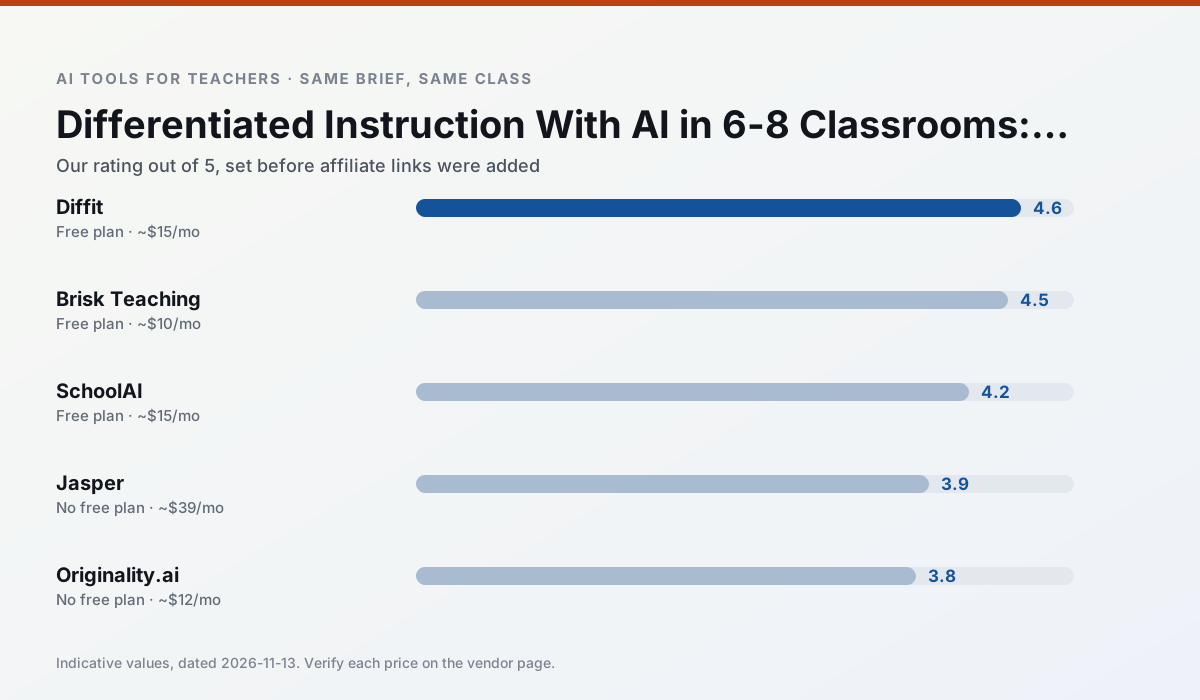
Side by side
Comparison table
Ratings reflect our timed classroom workflow, not vendor claims. Prices are indicative — verify on the vendor site.
| Tool | Best for | Free tier | Indicative paid plan | Standout feature | Our rating | Verdict | Try the tool |
|---|---|---|---|---|---|---|---|
| Diffit | differentiated instruction · reading intervention | Yes — Limited generations per month | ~$15 /user/mo | Lexile-style leveling | 4.6 / 5 | Top pick | Try free |
| Brisk Teaching | feedback on writing · grading | Yes — Limited actions per month | ~$10 /user/mo | Works inside Google Docs | 4.5 / 5 | Top pick | Try free |
| SchoolAI | student-safe AI · differentiated instruction | Yes — Limited seats | ~$15 /user/mo | Teacher-monitored student chats | 4.2 / 5 | Strong option | Try free |
| Jasper | newsletters · parent communication | No ongoing free plan | ~$39 /user/mo | Brand voice profiles | 3.9 / 5 | Situational | Try free |
| Originality.ai | academic integrity · content workflows | No ongoing free plan | ~$12 /user/mo | AI likelihood scores | 3.8 / 5 | Situational | Try free |
| Writesonic | newsletters · parent communication | Yes — Limited credits | ~$16 /user/mo | Article and email generators | 3.8 / 5 | Situational | Try free |
Match your situation
Best for X
Different jobs need different tools. Here is what we would open first in each case.
Nothing on Diffit's free tier is a teaser demo; the limits are documented and a normal week fits inside them.
Brisk Teaching wins on the default path: fewer clicks to a usable draft, and the interface does not get in the way at 7:40am.
SchoolAI runs in a browser tab with no extension, no student accounts and no onboarding call, so you can test it in a free period.
Jasper is the option IT is least likely to block: single sign-on, admin removal of AI features and an agreement on file.
Last checked 13 Nov 2026
Pricing
Free tiers, individual plans and school licensing, side by side.
| Tool | Free plan | Individual / paid | School & district | Billing note | Verify |
|---|---|---|---|---|---|
| Diffit | $0 — Limited generations per month | ~$15 /user/mo | Custom quote | Indicative — verify on vendor site | Vendor |
| Brisk Teaching | $0 — Limited actions per month | ~$10 /user/mo | Custom quote | Indicative — verify on vendor site | Vendor |
| SchoolAI | $0 — Limited seats | ~$15 /user/mo | Custom quote | Indicative — verify on vendor site | Vendor |
| Jasper | No ongoing free tier | ~$39 /user/mo | ~$59+ /user/mo | Indicative — verify on vendor site | Vendor |
| Originality.ai | No ongoing free tier | ~$12 /user/mo | Custom quote | Indicative — verify on vendor site | Vendor |
| Writesonic | $0 — Limited credits | ~$16 /user/mo | ~$49 /user/mo | Indicative — verify on vendor site | Vendor |
Editorial rule: pricing is re-checked every 2–3 months and the top 50 pages are refreshed every 6 months. See our funding policy.
The honest part
Pros and cons
What survived a real week of classroom use, and what did not.
Pros
- Excellent for mixed-ability classes
- Produces printable and digital versions
- Minimal setup
Cons
- Narrower scope than all-in-one suites
- Leveling is approximate, not a formal assessment
- Heavy use burns through the free quota
Pros
- No copy-paste between tools
- Fast inline feedback on student drafts
- Gentle learning curve
Cons
- Chrome-first workflow
- Extension permissions need IT approval
- Free quota is tight
Pros
- Designed for district approval
- Teacher visibility into student use
- Good safeguarding defaults
Cons
- Requires school-wide buy-in
- Less flexible than general LLMs
- Pricing is mostly quote-based
Pros
- Consistent tone across communications
- Strong long-form editor
- Good for district comms teams
Cons
- Priced for marketing teams
- Overkill for one classroom
- No education-specific features
Pros
- Useful for content publishing QA
- Fast bulk scanning
- Transparent credit model
Cons
- AI detection produces false positives
- Should never be sole evidence of misconduct
- Not a teaching tool
In the classroom
Use cases
Five concrete workflows, with the tool we would open for each one.
Regrouping students after an assessment
Summarise anonymised results into skill groups, then generate one activity per group. Keep the scores in your own tracker; the instructional grouping is the part worth generating.
Recommended: DiffitA weekly family newsletter from bullet notes
Newsletters fail on length, not tone. Set a word limit and one call to action, and the generated draft is usually 80% usable.
Recommended: Brisk TeachingThree reading levels from one source text
Paste a vetted text, ask for supported, core and extension versions, then check the vocabulary list by hand. Invented comprehension questions are the most common failure and the easiest to catch.
Recommended: SchoolAIA Monday morning lesson plan in twelve minutes
The twelve minutes come from not rewriting the skeleton. Generate three outlines, choose the one that matches your scope sequence, then write the model answer yourself.
Recommended: JasperA parent email in two languages
Draft in plain, warm language with no names, translate, then back-translate the important sentences to check meaning. Keep specific incidents out of the prompt and add them yourself.
Recommended: Originality.ai
Questions teachers ask us
FAQ
Direct answers, also published as FAQPage structured data for search and AI assistants.
Can AI do differentiated instruction at 6-8 level?
Which tool is best for differentiated instruction?
What is the biggest risk?
Sources & further reading
Our recommendation
Try Jasper free for your next differentiated instruction task
Brand-voice writing assistant for school communications teams. Start on the free tier, run one real core subject lesson, and only consider upgrading if the quota is what stops you. Disclosure: we may earn a commission (varies) at no extra cost to you.
Some links on this page are affiliate links. We may earn a commission at no extra cost to you. Our rankings are editorial and never pay-to-play. Never enter student PII into a free consumer account.
Keep reading
Related comparisons in this cluster.
Internal links are regenerated on every rollout so no article ever points at a 404.