The short answer
- Brisk Teaching is our default pick for teachers who need to shorten the marking cycle quickly; Formative is better when differentiation is the bottleneck.
- Free-tier reality for this shortlist: Brisk Teaching: Yes — Limited actions per month; Formative: Yes — Core assessment tools; Gradescope: Yes — Limited courses. Treat every paid figure as indicative until you have read the vendor page; only the free quota is something you can test yourself this week.
- Every AI output for grading needs a teacher review, especially standards codes, core subject accuracy, and anything in an IEP, assessment or family message.
- Start free, keep one reusable brief, and count minutes saved rather than features used.
Start with Writesonic on its free plan.
At 4:15 PM last Thursday, I was staring at twenty-eight science notebooks. Each one contained a paragraph about the water cycle, and each one needed a rubric check, a spelling correction, and a sentence of constructive feedback before Monday morning. My coffee had gone cold three hours prior. That is the exact moment when teachers start looking for shortcuts, and it is why we need to talk honestly about AI grading for 3-5 teachers.
Most software demos make grading look like a magic trick where you click a button and a pile of essays transforms into neatly organized spreadsheets with zero errors. Real elementary classrooms do not work that way. Handwriting is messy, kids skip questions, and rubrics require nuance that a generic algorithm often misses. If you want to use these systems without losing your mind, you need to know which tools actually handle third through fifth-grade workflows and which ones just add another tab to your browser.
The Reality of 3-5 Assessment Workflows
Upper elementary teaching sits in an awkward middle ground. Students are starting to write multi-paragraph responses and solve open-ended math problems, but they still produce plenty of work on physical paper. That mix of digital drafts and handwritten notebooks means you cannot rely on a single interface.
When looking at AI grading for 3-5 teachers, we have to look past the marketing claims. Some platforms excel at live digital tracking, while others bridge the gap between paper and screen. You also have to consider setup time. If a system takes three hours to configure for a simple spelling quiz, it defeats the purpose.
Brisk Teaching: Best Free Option for Inline Feedback
If you want to test AI feedback without pulling out a credit card, start with Brisk Teaching. It operates as a browser extension that brings AI tools directly into Google Docs, Slides, and articles.
The free tier gives you a limited number of actions per month, which is enough to run a pilot test on one writing assignment. At roughly $10 per user per month for the paid tier, it remains accessible for individual educators. Its main strength is removing the need to copy and paste student text into an external chatbot. You get fast inline feedback on student drafts right where the kids are writing.
The catch is the Chrome-first workflow. If your district restricts extensions or requires lengthy IT approval processes, you will hit a wall quickly. The free quota is also tight, so you will burn through your monthly actions fast if you try to use it for every single assignment.
Formative: Best Overall for Daily Use
For everyday instruction in grades 3 through 5, Formative takes the top spot. It is built around live formative assessment with auto-grading and standards tracking, making it invaluable when you need to know who understood the fraction lesson before they pack up for recess.
Core assessment tools are available on the free tier, but the paid version runs around $15 per user per month. It shines by generating strong data for intervention groups and working seamlessly with existing PDFs and Docs. If your school uses a standard LMS, the integration is smooth.
Prompt: "Generate a 4-question formative check for 4th-grade elapsed time, mixing multiple choice and one open-ended word problem aligned to standard 4.MD.A.2." Result: The tool returned three clean multiple-choice items and a two-step word problem about a bus schedule. Edits: I changed the bus schedule names to match kids in my actual classroom to boost engagement, and I adjusted the rubric scale from a 4-point to a 3-point system to match our report card codes.
The setup is steeper than playing a quick review game, and the best value requires a school-wide rollout. At $15 a teacher, the price adds up fast if you are paying out of pocket. You also need to confirm your rostering scope and district data agreements before uploading student rosters.
Gradescope and Class Companion: Paper and Scans
Upper elementary classrooms still rely heavily on paper. Worksheets, math journals, and spelling tests end up in physical stacks. Gradescope and Class Companion tackle this problem, though they serve very different masters.
Gradescope is the best for quick setup on paper assessments. It offers AI-assisted rubric grading for scanned and handwritten work, resulting in massive time savings on paper tests and detailed item analytics. However, it was built with higher education in mind. It can feel like overkill for elementary classrooms, and institutional pricing is opaque.
Class Companion is our pick for schools and districts that need reliable feedback on handwritten work, particularly for math. At about $12 per user per month, it provides fast, specific comments on uploaded student pages. The limitations are worth noting: scan quality directly affects recognition accuracy, and the use case is narrow. You still have to review the feedback yourself because third-graders write in mysterious ways.
What Went Wrong in Real Use
No matter which platform you choose, things will break down. Last term, I used an AI writing assistant to generate a set of differentiated reading passages and companion questions. The tool spat out three levels in seconds. But when I read the lowest support version aloud to a colleague, I realized the vocabulary simplification had stripped out all the context clues the students actually needed to answer the comprehension questions. The AI created an easier text, but a harder cognitive puzzle.
Another time, I tried to grade a stack of science journals using a platform that struggled with messy cursive and pencil smudges. The system misread half the decimals as whole numbers, creating a grading spreadsheet that was completely fictional. I had to scrap the auto-grades and grade the physical stack by hand anyway.
The lesson here is simple. AI grading tools save you from the blank-page panic and the physical exhaustion of data entry, but they never replace your professional judgment.
Making AI Grading Work for You
Before you adopt any platform, read the privacy policy. Tools that ingest student work require a careful review of your district's student data privacy guidelines and COPPA/FERPA compliance. If a vendor cannot tell you how long student writing is stored on their servers, do not use it.
Start small. Pick one recurring assignment, like a Friday spelling sentence or a weekly exit ticket, and test a tool like Brisk Teaching or Formative on that single task. For more ways to support diverse learners while keeping your workload manageable, take a look at our guide on AI accommodations for elementary teachers, or explore broader instructional workflows in our comprehensive overview of the best AI tools for teachers in 2026.
Grading will never become your favorite part of the job. But with the right guardrails, you might just get your weekends back.
FAQ
Can AI do grading at 3-5 level?
It can produce a first draft and a structure. The level judgement, the standards check and the tone are teacher decisions.
Which tool is best for grading?
Brisk Teaching on the evidence in this article, with Formative as the second opinion. Neither replaces the review step.
What is the biggest risk?
A confident, plausible output that nobody checked. The five checks below exist for that reason.
Sources
- Brisk Teaching Vendor Pricing and Feature Documentation (2026)
- Formative Product Overview and Standards Tracking Specifications (2026)
- Gradescope Institutional Features and Rubric Guidelines (2026)
- Class Companion Documentation on Handwritten Workflows (2026)
- Writesonic Education and Content Generation Limits (2026)
- Murf AI Audio Licensing and Pricing Guidelines (2026)
Side by side
Comparison table
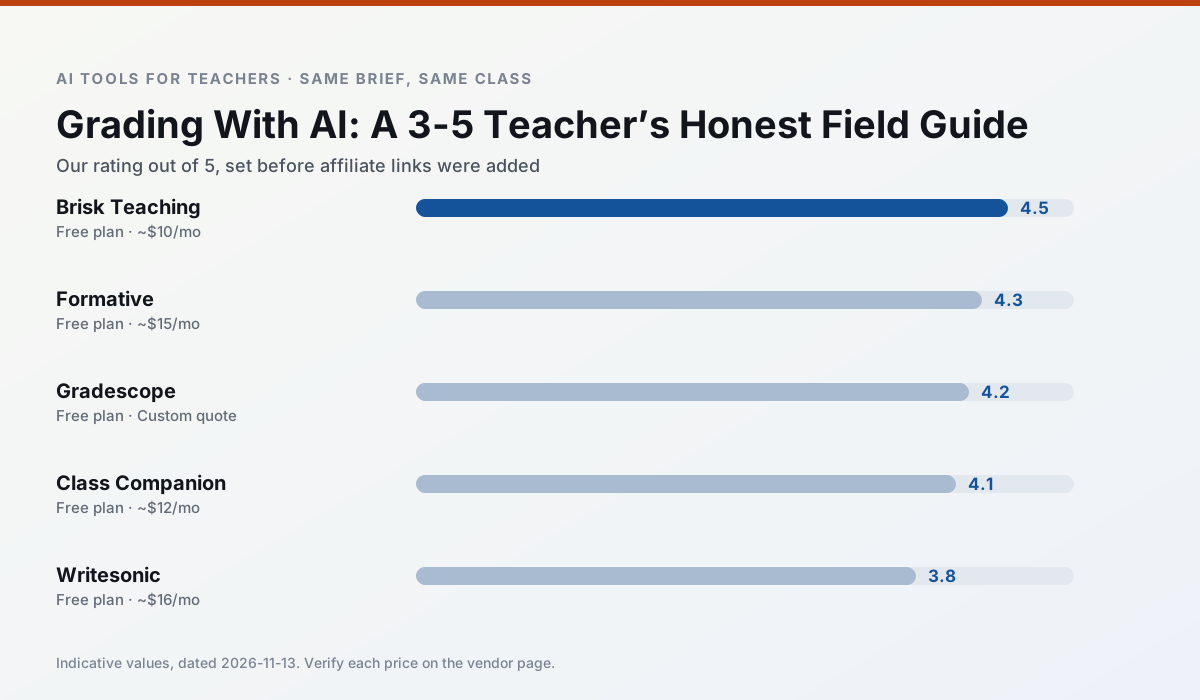
Ratings reflect our timed classroom workflow, not vendor claims. Prices are indicative — verify on the vendor site.
| Tool | Best for | Free tier | Indicative paid plan | Standout feature | Our rating | Verdict | Try the tool |
|---|---|---|---|---|---|---|---|
| Brisk Teaching | feedback on writing · grading | Yes — Limited actions per month | ~$10 /user/mo | Works inside Google Docs | 4.5 / 5 | Top pick | Try free |
| Formative | formative assessment · grading | Yes — Core assessment tools | ~$15 /user/mo | Live student responses | 4.3 / 5 | Strong option | Try free |
| Gradescope | grading · rubric creation | Yes — Limited courses | Custom quote | Bubble sheet and handwriting capture | 4.2 / 5 | Strong option | Try free |
| Class Companion | grading · feedback on writing | Yes — Limited assignments | ~$12 /user/mo | Handwriting recognition | 4.1 / 5 | Situational | Try free |
| Writesonic | newsletters · parent communication | Yes — Limited credits | ~$16 /user/mo | Article and email generators | 3.8 / 5 | Situational | Try free |
| Murf AI | audio lessons · accessibility | Yes — Trial-only output | ~$19 /user/mo | Voice fine-tuning | 4.1 / 5 | Situational | Try free |
Match your situation
Best for X
Different jobs need different tools. Here is what we would open first in each case.
Nothing on Brisk Teaching's free tier is a teaser demo; the limits are documented and a normal week fits inside them.
On the daily cycle, Formative saves the most edit time per task; the paid tier mostly buys more runs rather than better ones.
Setup cost is one login for Gradescope; everything else can wait until you know the tool is useful.
For a school rollout, Class Companion offers the paperwork and the admin console; the classroom features are standard by comparison.
Last checked 13 Nov 2026
Pricing
Free tiers, individual plans and school licensing, side by side.
| Tool | Free plan | Individual / paid | School & district | Billing note | Verify |
|---|---|---|---|---|---|
| Brisk Teaching | $0 — Limited actions per month | ~$10 /user/mo | Custom quote | Indicative — verify on vendor site | Vendor |
| Formative | $0 — Core assessment tools | ~$15 /user/mo | Custom quote | Indicative — verify on vendor site | Vendor |
| Gradescope | $0 — Limited courses | Custom quote | Custom quote | LMS integration and support | Vendor |
| Class Companion | $0 — Limited assignments | ~$12 /user/mo | Custom quote | Indicative — verify on vendor site | Vendor |
| Writesonic | $0 — Limited credits | ~$16 /user/mo | ~$49 /user/mo | Indicative — verify on vendor site | Vendor |
| Murf AI | $0 — Trial-only output | ~$19 /user/mo | ~$39 /user/mo | Indicative — verify on vendor site | Vendor |
Editorial rule: pricing is re-checked every 2–3 months and the top 50 pages are refreshed every 6 months. See our funding policy.
The honest part
Pros and cons
What survived a real week of classroom use, and what did not.
Pros
- No copy-paste between tools
- Fast inline feedback on student drafts
- Gentle learning curve
Cons
- Chrome-first workflow
- Extension permissions need IT approval
- Free quota is tight
Pros
- Strong data for intervention groups
- Works with existing PDFs and Docs
- Good LMS integrations
Cons
- Steeper setup than quiz games
- Best value requires school-wide rollout
- Price adds up per teacher
Pros
- Large time savings on paper assessments
- Consistent rubric application
- Detailed item analytics
Cons
- Overkill for elementary classrooms
- Institutional pricing is opaque
- Setup effort is real
Pros
- Useful where work is done on paper
- Fast, specific comments
- Good math support
Cons
- Scan quality affects accuracy
- Narrow use case
- Feedback still needs teacher review
Pros
- Cheaper than enterprise writing suites
- Many templates
- Reasonable free trial
Cons
- Generic classroom output
- Credit system is confusing
- Limited education context
In the classroom
Use cases
Five concrete workflows, with the tool we would open for each one.
A weekly family newsletter from bullet notes
Give the tool bullet notes only, never a class list. Ask for a short structure with one action item, then read it aloud once; canned phrasing is obvious when spoken.
Recommended: Brisk TeachingThree reading levels from one source text
One source, three versions, same three questions in each. Automatic levelling is an estimate; read the supported version aloud to a colleague before it reaches a reading group.
Recommended: FormativeA Monday morning lesson plan in twelve minutes
Two sentences into the brief: grade, subject, 45 minutes, one mixed-ability group. Ask for three structures, keep one, rewrite the prose yourself. The tool saves the blank-page time, not the thinking time.
Recommended: GradescopeA parent email in two languages
Write the English version with one clear action item, translate it, and read the translation aloud with a colleague who speaks the language if you can. Machine translation is an aid, not a substitute for a family relationship.
Recommended: Class CompanionRubric and feedback comments in one pass
Write the four criteria and the band wording first; generate only the comment bank. That keeps your department's rubric language intact and stops the model inventing a fifth criterion.
Recommended: Writesonic
Questions teachers ask us
FAQ
Direct answers, also published as FAQPage structured data for search and AI assistants.
Can AI do grading at 3-5 level?
Which tool is best for grading?
What is the biggest risk?
Sources & further reading
Our recommendation
Try Writesonic free for your next grading task
Budget-friendly AI writing and content generation. Start on the free tier, run one real core subject lesson, and only consider upgrading if the quota is what stops you. Disclosure: we may earn a commission (varies) at no extra cost to you.
Some links on this page are affiliate links. We may earn a commission at no extra cost to you. Our rankings are editorial and never pay-to-play. Never enter student PII into a free consumer account.
Keep reading
Related comparisons in this cluster.
Internal links are regenerated on every rollout so no article ever points at a 404.