The short answer
- Notion AI is our default pick for teachers who need to sequence a three-week unit quickly; Jasper is better when differentiation is the bottleneck.
- Notion AI handles the broad case; Jasper handles the narrow one. Anything beyond that pair should be justified by a recurring weekly job, not a feature demo.
- Every AI output for unit planning needs a teacher review, especially standards codes, core subject accuracy, and anything in an IEP, assessment or family message.
- Trial one tool for a week of real unit planning work before any purchase conversation; the quota is the honest test.
Start with Notion AI on its free plan.
At 7:45 on a Tuesday morning in October, my fourth graders walked in while I was still trying to figure out how to stretch a three-day science inquiry on ecosystems into a full two-week unit. My district wants every standard covered, every accommodation mapped, and every formative assessment linked before the bell rings. If you teach upper elementary, you know the gap between what curriculum coordinators hand you and what actually works for ten-year-olds who read anywhere from a first-grade level to eighth-grade level. AI unit planning for 3-5 classrooms has become the only way I keep my weekends. But most software marketed for this job is built for corporate boardrooms or high school lecture halls, which makes picking the right utility half the battle.
Before you adopt anything new, check our broader guide on the best AI tools for teachers 2026 to see how these fit into a wider instructional stack. Unit planning in grades 3 through 5 is fundamentally different from high school because our kids are transitioning from learning to read to reading to learn, all while mastering fractions and learning how to work in small groups without tearing each other's construction paper. You need tools that understand the difference between a third-grade vocabulary word and a fifth-grade one, and you need to know which platforms are worth your stipend and which ones are pure hype.
Managing Long-Term Curriculum Records With Notion AI
When your team needs to map out an entire quarter of social studies and science, personal folders and loose Google Docs will cause a meltdown by November. Notion AI acts as a workspace where your notes, databases, and curriculum frameworks live together. It runs around $10 per user per month on its paid tier, with a free tier offering limited AI usage. It is our top pick for schools and districts because it shines at long-term curriculum records, team collaboration, and maintaining a flexible structure across multiple classrooms.
The catch is that setup time is significant. You cannot just open it and expect a neat unit plan to magically appear without building your databases first. The AI add-on pricing has changed more than once, and it is not purpose-built for instant lesson generation out of the box. Most importantly, never store student PII in personal workspaces. If you use it for unit planning, keep student names and identifiable data entirely out of the system.
Generating Daily Instructional Materials With Brisk Teaching
If Notion is your filing cabinet, Brisk Teaching is your assistant sitting right next to you at the desk. It is a browser extension that brings AI feedback directly into Google Docs, Slides, and web articles. The free tier gives you a limited number of actions per month, while the paid tier sits around $10 per user per month, making it our choice for the best free option to start with.
Prompt: Act as an upper elementary reading specialist. Take this vetted third-grade text about desert habitats and generate three distinct reading levels: supported, core, and extension. Include a five-question comprehension check for each level.
First output: The tool generated three clean versions of the text with distinct Lexile ranges, but two of the extension comprehension questions asked about details that did not exist in the source text.
Two edits that made it usable: First, I deleted the invented questions and wrote my own literal-recall questions based strictly on paragraphs two and three. Second, I manually checked the vocabulary list to ensure tier-two words like "adaptation" and "arid" were explicitly defined in the glossary section.
The workflow is fast because you avoid all that tedious copy-pasting between separate tabs. However, it is a Chrome-first workflow, meaning your district IT department will need to approve the extension permissions before you install it on school-issued Chromebooks. The free quota is also quite tight, so you will burn through it quickly if you rely on it for every single lesson of the week.
Creating Quizzes and Assessments With Quizizz
Formative assessment in intermediate grades can eat up your entire prep period if you write every multiple-choice distractor by hand. Quizizz offers AI-assisted quiz creation paired with a massive question bank and gamified live games that ten-year-olds genuinely enjoy. It costs around $15 per user per month on the paid tier, though core quiz creation is available on the free tier.
Students already know the interface, which means zero instructional time wasted on teaching tech on a Monday morning. The reporting is detailed enough to drive small-group reteaching tables, and it works smoothly on low-end devices. Still, writing high-quality AI questions still requires a careful review pass. The gamification can also distract easily excited students if you turn on too many power-ups, and the advanced analytics are locked behind the paid wall. Always confirm district COPPA and FERPA compliance documentation before rolling it out to your grade level.
Adding Accessible Audio With ElevenLabs
Reading aloud every accommodated text to your striving readers or English language learners is physically impossible when you have twenty-five other kids needing small group interventions. ElevenLabs provides natural-sounding AI voiceover and text-to-speech for learning materials. It operates on a monthly character quota on its free tier, with paid plans around $5 per user per month, earning our badge as the best overall for daily use.
Prompt: Generate a two-minute neutral, clear American English voiceover for this fifth-grade math word problem about dividing fractions, pacing the delivery slowly with brief pauses between sentences.
First output: The voice sounded remarkably human and warm, but it rushed through the numerical expressions without pausing for students to process the fraction notation.
Two edits that made it usable: First, I inserted explicit comma pauses and spelled out fraction phrases phonetically where the model stumbled. Second, I paired the generated audio file directly with a visual slide deck so auditory and visual learners had dual access.
The entry price is low, generation is fast, and the audio quality blows standard screen-reader synthetic voices out of the water. Yet, it remains a quota-based billing system, and voice cloning considerations require strict boundaries. Never clone a student or colleague voice without explicit written consent. It is a utility, not a teaching platform on its own.
What to Skip and Why
When district budgets get tight, teachers look at tools like Jasper, priced around $39 per user per month with no free tier, or Colossyan, sitting around $27 per user per month. Jasper is an exceptional brand-voice writing assistant for school communications teams and district public relations departments, but it is pure overkill for one classroom and lacks education-specific features. Similarly, Colossyan builds training and explainer videos from documents and scripts with strong LMS exports, but it has no permanent free plan and is built primarily for adult compliance training rather than K-12 student-facing instruction. For more ideas on handling diverse learning needs without buying enterprise software, read our piece on AI accommodations for elementary teachers.
Unit planning fails when you let the algorithm dictate your pedagogy. Keep your scope and sequence locked in your own head, use Notion AI for long-term storage, lean on Brisk Teaching for inline document adjustments, and let Quizizz handle your Friday checks for understanding.
FAQ
Can AI do unit planning at 3-5 level?
It can produce a first draft and a structure. The level judgement, the standards check and the tone are teacher decisions.
Which tool is best for unit planning?
Notion AI on the evidence in this article, with Jasper as the second opinion. Neither replaces the review step.
What is the biggest risk?
A confident, plausible output that nobody checked. The five checks below exist for that reason.
Sources
- Notion AI pricing and feature documentation: notion.so/product/ai
- Jasper pricing and enterprise communication guidelines: jasper.ai
- ElevenLabs text-to-speech quotas and voice safety policies: elevenlabs.io
- Brisk Teaching browser extension capabilities and privacy disclosures: briskteaching.com
- Colossyan video training tools and data residency standards: colossyan.com
- Quizizz educator tools, compliance, and reporting features: quizizz.com
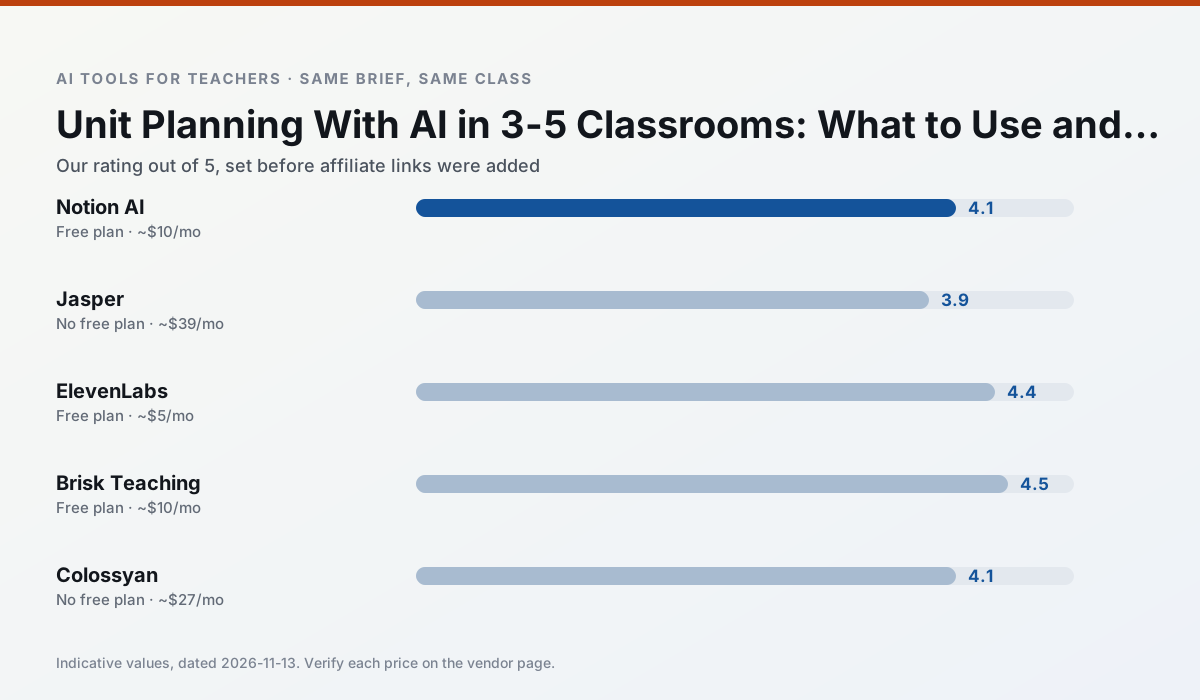
Side by side
Comparison table
Ratings reflect our timed classroom workflow, not vendor claims. Prices are indicative — verify on the vendor site.
| Tool | Best for | Free tier | Indicative paid plan | Standout feature | Our rating | Verdict | Try the tool |
|---|---|---|---|---|---|---|---|
| Notion AI | curriculum mapping · unit planning | Yes — Limited AI usage | ~$10 /user/mo | Linked databases | 4.1 / 5 | Situational | Try free |
| Jasper | newsletters · parent communication | No ongoing free plan | ~$39 /user/mo | Brand voice profiles | 3.9 / 5 | Situational | Try free |
| ElevenLabs | accessibility · reading intervention | Yes — Monthly character quota | ~$5 /user/mo | Very natural voices | 4.4 / 5 | Strong option | Try free |
| Brisk Teaching | feedback on writing · grading | Yes — Limited actions per month | ~$10 /user/mo | Works inside Google Docs | 4.5 / 5 | Top pick | Try free |
| Colossyan | PD materials · video lessons | No ongoing free plan | ~$27 /user/mo | PDF/PPT-to-video | 4.1 / 5 | Situational | Try free |
| Quizizz | quiz generation · formative assessment | Yes — Core quiz creation | ~$15 /user/mo | AI question generator | 4.4 / 5 | Strong option | Try free |
Match your situation
Best for X
Different jobs need different tools. Here is what we would open first in each case.
Notion AI is the option IT is least likely to block: single sign-on, admin removal of AI features and an agreement on file.
Setup cost is one login for Jasper; everything else can wait until you know the tool is useful.
ElevenLabs wins on the default path: fewer clicks to a usable draft, and the interface does not get in the way at 7:40am.
Nothing on Brisk Teaching's free tier is a teaser demo; the limits are documented and a normal week fits inside them.
Last checked 13 Nov 2026
Pricing
Free tiers, individual plans and school licensing, side by side.
| Tool | Free plan | Individual / paid | School & district | Billing note | Verify |
|---|---|---|---|---|---|
| Notion AI | $0 — Limited AI usage | ~$10 /user/mo | ~$8 /user/mo | Indicative — verify on vendor site | Vendor |
| Jasper | No ongoing free tier | ~$39 /user/mo | ~$59+ /user/mo | Indicative — verify on vendor site | Vendor |
| ElevenLabs | $0 — Monthly character quota | ~$5 /user/mo | ~$22 /user/mo | Indicative — verify on vendor site | Vendor |
| Brisk Teaching | $0 — Limited actions per month | ~$10 /user/mo | Custom quote | Indicative — verify on vendor site | Vendor |
| Colossyan | No ongoing free tier | ~$27 /user/mo | Custom quote | Indicative — verify on vendor site | Vendor |
| Quizizz | $0 — Core quiz creation | ~$15 /user/mo | Custom quote | Indicative — verify on vendor site | Vendor |
Editorial rule: pricing is re-checked every 2–3 months and the top 50 pages are refreshed every 6 months. See our funding policy.
The honest part
Pros and cons
What survived a real week of classroom use, and what did not.
Pros
- Great for long-term curriculum records
- Strong team collaboration
- Flexible structure
Cons
- Setup time is significant
- AI add-on pricing changed more than once
- Not purpose-built for lesson generation
Pros
- Consistent tone across communications
- Strong long-form editor
- Good for district comms teams
Cons
- Priced for marketing teams
- Overkill for one classroom
- No education-specific features
Pros
- Excellent for accessible audio versions
- Low entry price
- Fast generation
Cons
- Quota-based billing
- Voice cloning consent considerations
- Not a teaching platform
Pros
- No copy-paste between tools
- Fast inline feedback on student drafts
- Gentle learning curve
Cons
- Chrome-first workflow
- Extension permissions need IT approval
- Free quota is tight
Pros
- Strong for staff training, not just lessons
- Good compliance/LMS export
- Fast document-to-video
Cons
- No permanent free plan
- Higher price point
- Less suited to K-12 student-facing content
In the classroom
Use cases
Five concrete workflows, with the tool we would open for each one.
Rubric and feedback comments in one pass
Reorder the workflow so the rubric is yours and the comments are generated. Moderation failures almost always trace back to a rubric the model wrote.
Recommended: Notion AIA parent email in two languages
Draft in plain, warm language with no names, translate, then back-translate the important sentences to check meaning. Keep specific incidents out of the prompt and add them yourself.
Recommended: JasperA Monday morning lesson plan in twelve minutes
The twelve minutes come from not rewriting the skeleton. Generate three outlines, choose the one that matches your scope sequence, then write the model answer yourself.
Recommended: ElevenLabsThree reading levels from one source text
Paste a vetted text, ask for supported, core and extension versions, then check the vocabulary list by hand. Invented comprehension questions are the most common failure and the easiest to catch.
Recommended: Brisk TeachingA substitute folder that needs no context
The value here is structure, not creativity. Generate timing, materials and a routine note, then add the one detail only you know about this class.
Recommended: Colossyan
Questions teachers ask us
FAQ
Direct answers, also published as FAQPage structured data for search and AI assistants.
Can AI do unit planning at 3-5 level?
Which tool is best for unit planning?
What is the biggest risk?
Sources & further reading
Our recommendation
Try Notion AI free for your next unit planning task
AI-assisted notes, databases and curriculum planning in one workspace. Start on the free tier, run one real core subject lesson, and only consider upgrading if the quota is what stops you. Disclosure: we may earn a commission (varies) at no extra cost to you.
Some links on this page are affiliate links. We may earn a commission at no extra cost to you. Our rankings are editorial and never pay-to-play. Never enter student PII into a free consumer account.
Keep reading
Related comparisons in this cluster.
Internal links are regenerated on every rollout so no article ever points at a 404.