The short answer
- MagicSchool AI is our default pick for teachers who need to write clear, warm parent emails quickly; ChatGPT is better when differentiation is the bottleneck.
- Pricing is where these pages date fastest. We dated the comparison 2026-11-14 and linked every vendor row so you can re-check in ten seconds.
- Every AI output for parent communication needs a teacher review, especially standards codes, core subject accuracy, and anything in an IEP, assessment or family message.
- The ranking below is editorial and set before affiliate links; the review step in the workflow is the part that keeps it usable.
Start with MagicSchool AI on its free plan.
It was 4:15 PM on a Tuesday, and I was staring at an email from a parent who wanted to know why her fourth grader's math grade had dipped on the fraction unit. I had thirty unread messages, two report card comments left to write, and a headache that had settled in around second-period recess. Ten years ago, I would have stared at a blinking cursor for twenty minutes, drafting and deleting sentences to sound professional without sounding cold. Instead, I opened a browser tab, dropped a few rough notes into an AI generator, and had a warm, clear response ready to send before my parking lot cleared.
Parent communication in grades 3 through 5 is a different beast than kindergarten or middle school. Families want concrete data about missing assignments and state testing prep, but they also need reassurance that you actually know their child as a human being. If you are looking to save your evenings without losing your authentic teaching voice, you need to know which tools actually help and which ones just add another tab to your browser. If you are building out a complete stack for the term, you can cross-reference our best AI tools for teachers 2026 guide, but for home-school partnerships specifically, let us look at the tools that survive actual classroom use.
The Reality of AI Parent Communication for 3-5
Using artificial intelligence for family outreach is not about letting a machine talk to parents for you. It is about speed and tone regulation. When you are tired, your emails can come out sharp, overly formal, or vague. AI excels at taking a messy brain dump about a student's missing social studies project and turning it into a collaborative invitation for a parent-teacher conference.
The biggest trap in upper elementary communication is dropping student personally identifiable information into the prompt box. Never put a child's full name, specific disciplinary record, or medical data into a consumer-grade language model. Keep your prompts anonymized, then fill in the names and specific context once the draft is sitting safely in your own email client.
MagicSchool AI for Purpose-Built Templates
MagicSchool AI is the best free option for teachers who do not want to spend twenty minutes learning how to prompt a chatbot. It features a wide library of teacher-specific generators inside one clean dashboard. The parent communication tools include email generators for positive notes, behavior concerns, and conference scheduling.
The main advantage here is that the templates already understand school structures. You select a generator, fill out a few drop-down menus regarding tone and topic, and get a readable output. The free tier gives you access to core generators with monthly usage limits, while the paid tier sits at around $12 per user per month. Outputs still require a quick human check, and district approval can sometimes take a while if your tech department moves slowly, but it remains the fastest way to generate a quick email without tinkering with prompts.
ChatGPT for Daily Flexibility
ChatGPT is the best overall tool for daily use if you are willing to learn basic prompt engineering. As a general-purpose assistant, it adapts to almost any classroom task, from drafting weekly Friday newsletters to translating complex school policies into plain English for multilingual families.
Prompt: Write a warm, professional email to a parent of a 4th-grade student about incomplete reading logs. Tone should be supportive, not punitive. Keep it under 150 words. Offer a quick check-in call if needed.
First Output: Dear Parent, I am writing to inform you that your child has not been completing their weekly reading logs. This is impacting their comprehension growth. Please ensure they read for twenty minutes each night and sign the log. Let me know if you have questions.
Edit 1: Changed "I am writing to inform you" to sound less like a legal warning and more like a partner in education.
Edit 2: Added a specific mention of the book their child currently has on their desk to prove I actually know the student.
The free tier offers usage-limited model access, while the paid version runs around $20 per user per month. It handles multilingual support better than almost anything else on the market, which is a lifesaver when you need to send a parent email in two languages. Draft your message in plain, warm language with no names, translate it, and then back-translate the most important sentences to double-check the meaning.
Gamma for Quick Visual Newsletters
Gamma is the best tool for quick setup when your traditional text newsletter is getting ignored by families. It generates presentation decks and documents from a single text prompt. Instead of spending your Sunday night wrestling with layout templates to show what your fifth graders are learning in science, you paste an outline and let Gamma build a modern, clean slide deck or web page.
The free tier operates on credit-limited generation, and the paid plan costs around $10 per user per month. The main limitation is that design control is relatively restricted, and credits can run out fast if you are picky about aesthetics. Treat it purely as a content tool and never upload student work or grades into the platform.
Grammarly for High-Stakes Polishing
Grammarly acts as your final line of defense before you hit send on a sensitive parent email. It is the best option for schools and districts that want consistent, professional communication across grade levels. The core grammar and tone checks are available on the free tier, while the paid tier costs roughly $12 per user per month.
Unlike education-specific tools, Grammarly works everywhere you already write, living inside your browser as an extension for your district email client. It catches emotional tone slips in high-stakes parent emails before they cause an unnecessary call to the principal. Be sure to check your district data privacy agreement and disable text collection on school devices if your IT department requires it.
Enterprise Options: Jasper and Writesonic
You will occasionally see enterprise marketing tools like Jasper and Writesonic recommended in broader tech roundups. Jasper is priced around $39 per user per month with no free tier, while Writesonic sits at about $16 per user per month with limited credits.
Both tools are built for marketing and communications teams rather than elementary classrooms. They offer strong brand-voice consistency and long-form editors, but they are complete overkill for a single 3-5 classroom teacher. They lack education context, their credit systems can be confusing, and their pricing models assume a corporate budget. Stick with tools designed for educators or flexible general assistants.
What Went Wrong in My Classroom
Even with the best tools, things go sideways. Last term, I used an AI generator to draft a weekly family newsletter from a messy list of bullet notes. Newsletters usually fail on length rather than tone, and I learned this the hard way when the AI produced a four-page essay that no parent in their right mind would read. I had to scrap the draft, set a strict word limit, and demand a single clear call to action, which finally produced an 80% usable draft.
Another time, I tried to speed through writing reading intervention notices by feeding student scores directly into a consumer model. That violated privacy best practices and created outputs that sounded clinical and cold. I quickly learned to keep the scores in my own local tracker, use AI only for the instructional grouping templates, and write the family-facing explanations entirely in my own voice. Keep your boundaries clear, use the technology for the heavy lifting of formatting and translation, and keep the human relationship with your students' families right where it belongs.
FAQ
Can AI do parent communication at 3-5 level?
It can produce a first draft and a structure. The level judgement, the standards check and the tone are teacher decisions.
Which tool is best for parent communication?
MagicSchool AI on the evidence in this article, with ChatGPT as the second opinion. Neither replaces the review step.
What is the biggest risk?
A confident, plausible output that nobody checked. The five checks below exist for that reason.
Sources
- MagicSchool AI. (2026). MagicSchool AI Platform Features and Pricing. Retrieved from https://www.magicschool.ai/
- OpenAI. (2026). ChatGPT Plans and Enterprise Privacy Guidelines. Retrieved from https://openai.com/chatgpt/
- Gamma. (2026). Gamma App: AI-Powered Presentations and Documents. Retrieved from https://gamma.app/
- Grammarly. (2026). Grammarly Business and Education Security Overview. Retrieved from https://www.grammarly.com/
- Jasper. (2026). Jasper AI Pricing and Content Platform. Retrieved from https://www.jasper.ai/
- Writesonic. (2026). Writesonic AI Writing Assistant. Retrieved from https://writesonic.com/
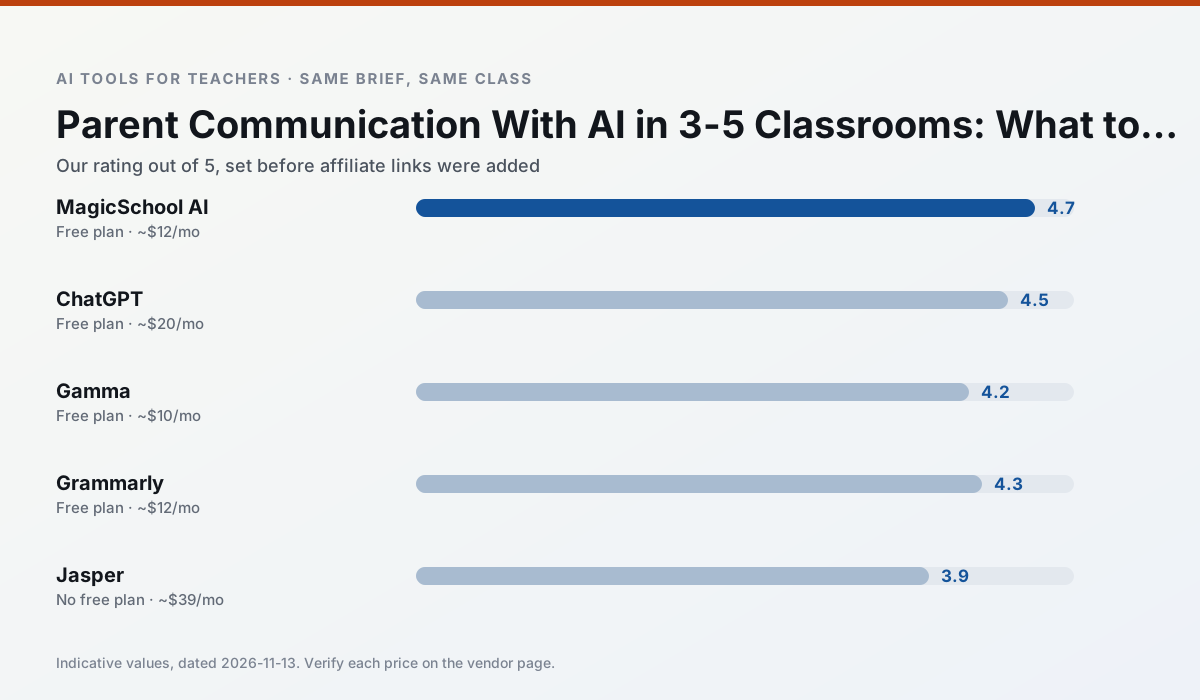
Side by side
Comparison table
Ratings reflect our timed classroom workflow, not vendor claims. Prices are indicative — verify on the vendor site.
| Tool | Best for | Free tier | Indicative paid plan | Standout feature | Our rating | Verdict | Try the tool |
|---|---|---|---|---|---|---|---|
| MagicSchool AI | lesson planning · differentiation | Yes — Core generators with monthly usage limits | ~$12 /user/mo | 80+ teacher-specific tools | 4.7 / 5 | Top pick | Try free |
| ChatGPT | lesson planning · parent communication | Yes — Usage-limited model access | ~$20 /user/mo | Custom GPTs and Projects | 4.5 / 5 | Top pick | Try free |
| Gamma | slide decks · parent communication | Yes — Credit-limited generation | ~$10 /user/mo | Prompt-to-deck | 4.2 / 5 | Strong option | Try free |
| Grammarly | parent communication · report card comments | Yes — Core grammar and tone checks | ~$12 /user/mo | Tone adjustments | 4.3 / 5 | Strong option | Try free |
| Jasper | newsletters · parent communication | No ongoing free plan | ~$39 /user/mo | Brand voice profiles | 3.9 / 5 | Situational | Try free |
| Writesonic | newsletters · parent communication | Yes — Limited credits | ~$16 /user/mo | Article and email generators | 3.8 / 5 | Situational | Try free |
Match your situation
Best for X
Different jobs need different tools. Here is what we would open first in each case.
If there is no budget, start with MagicSchool AI: free plan with clearest quota is the least punishing free tier here.
ChatGPT is the one we would open on a normal planning day because the first output is editable rather than restructurable, and the free plan covers a single teacher's routine.
Gamma has the shortest path from opening a tab to a usable draft, which matters more than the feature count on a Monday.
For a school rollout, Grammarly offers the paperwork and the admin console; the classroom features are standard by comparison.
Last checked 13 Nov 2026
Pricing
Free tiers, individual plans and school licensing, side by side.
| Tool | Free plan | Individual / paid | School & district | Billing note | Verify |
|---|---|---|---|---|---|
| MagicSchool AI | $0 — Core generators with monthly usage limits | ~$12 /user/mo | Custom quote | Indicative — verify on vendor site | Vendor |
| ChatGPT | $0 — Usage-limited model access | ~$20 /user/mo | ~$25+ /user/mo | Indicative — verify on vendor site | Vendor |
| Gamma | $0 — Credit-limited generation | ~$10 /user/mo | ~$20 /user/mo | Indicative — verify on vendor site | Vendor |
| Grammarly | $0 — Core grammar and tone checks | ~$12 /user/mo | ~$15 /user/mo | Indicative — billed annually | Vendor |
| Jasper | No ongoing free tier | ~$39 /user/mo | ~$59+ /user/mo | Indicative — verify on vendor site | Vendor |
| Writesonic | $0 — Limited credits | ~$16 /user/mo | ~$49 /user/mo | Indicative — verify on vendor site | Vendor |
Editorial rule: pricing is re-checked every 2–3 months and the top 50 pages are refreshed every 6 months. See our funding policy.
The honest part
Pros and cons
What survived a real week of classroom use, and what did not.
Pros
- Widest purpose-built template library
- Strong free tier for individual teachers
- Fast to learn with almost no prompting skill
Cons
- Outputs still need standards review
- Best features sit behind the paid tier
- District approval can be slow
Pros
- Most flexible option available
- Huge community of teacher prompt libraries
- Strong multilingual support
Cons
- Requires prompt skills for consistent results
- No built-in standards alignment
- District privacy review usually required
Pros
- Fastest path from outline to deck
- Modern-looking output by default
- Good export options
Cons
- Design control is limited
- Credits run out quickly
- Not built for student data
Pros
- Catches errors in high-stakes parent emails
- Works everywhere you already write
- Very low learning curve
Cons
- Not education-specific
- Can flatten teacher voice
- Premium needed for tone rewriting
Pros
- Consistent tone across communications
- Strong long-form editor
- Good for district comms teams
Cons
- Priced for marketing teams
- Overkill for one classroom
- No education-specific features
In the classroom
Use cases
Five concrete workflows, with the tool we would open for each one.
Regrouping students after an assessment
Summarise anonymised results into skill groups, then generate one activity per group. Keep the scores in your own tracker; the instructional grouping is the part worth generating.
Recommended: MagicSchool AIA weekly family newsletter from bullet notes
Newsletters fail on length, not tone. Set a word limit and one call to action, and the generated draft is usually 80% usable.
Recommended: ChatGPTThree reading levels from one source text
Paste a vetted text, ask for supported, core and extension versions, then check the vocabulary list by hand. Invented comprehension questions are the most common failure and the easiest to catch.
Recommended: GammaA Monday morning lesson plan in twelve minutes
The twelve minutes come from not rewriting the skeleton. Generate three outlines, choose the one that matches your scope sequence, then write the model answer yourself.
Recommended: GrammarlyA parent email in two languages
Draft in plain, warm language with no names, translate, then back-translate the important sentences to check meaning. Keep specific incidents out of the prompt and add them yourself.
Recommended: Jasper
Questions teachers ask us
FAQ
Direct answers, also published as FAQPage structured data for search and AI assistants.
Can AI do parent communication at 3-5 level?
Which tool is best for parent communication?
What is the biggest risk?
Sources & further reading
Our recommendation
Try MagicSchool AI free for your next parent communication task
A large library of teacher-specific AI generators in one dashboard. Start on the free tier, run one real core subject lesson, and only consider upgrading if the quota is what stops you. Disclosure: we may earn a commission (30% recurring) at no extra cost to you.
Some links on this page are affiliate links. We may earn a commission at no extra cost to you. Our rankings are editorial and never pay-to-play. Never enter student PII into a free consumer account.
Keep reading
Related comparisons in this cluster.
Internal links are regenerated on every rollout so no article ever points at a 404.