The short answer
- Brisk Teaching is our default pick for teachers who need to shorten the marking cycle quickly; Formative is better when differentiation is the bottleneck.
- Brisk Teaching handles the broad case; Formative handles the narrow one. Anything beyond that pair should be justified by a recurring weekly job, not a feature demo.
- Every AI output for grading needs a teacher review, especially standards codes, core subject accuracy, and anything in an IEP, assessment or family message.
- Trial one tool for a week of real grading work before any purchase conversation; the quota is the honest test.
Start with Fliki on its free plan.
Middle school grading is a special kind of endurance test. By third period on a Tuesday, I am usually staring at a stack of seventy argument essays, eighty vocabulary worksheets, and a pile of science diagrams that look like they were drawn during an earthquake. If you have spent any time exploring AI grading for 6-8, you know the promise: machines will sweep through the pile while you drink a cup of coffee that is still hot. The reality in a middle school classroom is messier. Some platforms work brilliantly until a student writes their paragraph sideways in colored gel pen, and others require more setup than writing the comments yourself.
We need to look past the marketing pages and figure out which tools actually survive a term with hormone-driven adolescents. If you are building out your stack, check our broader guide on the best AI tools for teachers in 2026 for baseline productivity setups. For subject-specific differentiation alongside your grading workflow, our look at AI accommodations for middle school classrooms offers a helpful companion.
The Daily Struggle of Middle School Rubrics
Grading writing and short answers in sixth through eighth grade means applying a rubric to fifty different interpretations of the prompt. When you try to use AI grading for 6-8 without a clear strategy, moderation failures almost always trace back to a rubric the model wrote itself. If you let the AI generate both the rubric and the feedback, you get generic praise that applies to any paragraph ever written. The trick is to reorder your workflow so the rubric is strictly yours, and the AI comments are generated against your exact wording.
Prompt: "Review the attached student essay against this specific four-point rubric for claim, evidence, and reasoning. Do not alter the rubric criteria. Provide two strengths and one next step for the student, using a supportive teacher tone suitable for an eighth grader."
First pass: The model hallucinated a fifth grading category about comma splices that wasn't in my rubric and gave the student a generic letter grade instead of point values.
Two edits for usability:
- Added a strict constraint: "Score only on the three provided rubric dimensions using a 1-to-4 scale."
- Included a negative constraint: "Do not invent new grading criteria or assign overall letter grades."
Brisk Teaching for Docs and Slides
Brisk Teaching operates as a browser extension that brings AI feedback directly into Google Docs, Slides, and web articles. It is best for schools and districts that want a tool integrated where students are already working. The reported strength is that there is no copy-pasting text back and forth between tabs. You highlight a student draft, click the extension, and inline feedback appears.
The learning curve is gentle, which matters when you are trying to onboard a department on a Wednesday afternoon in-service. However, it is a Chrome-first workflow. If your district restricts extension permissions, you will need IT approval before anything works. The free tier gives you a limited number of actions per month, which runs out fast during essay season. Paid plans run around $10 per user per month. Because the extension reads document content right in the browser, review your district DPA and data scope carefully before rolling it out to all students.
Formative for Live Assessments
If your main bottleneck is quizzes, exit tickets, and short-answer checks, Formative stands out as the best for quick setup. It handles live formative assessment with auto-grading and standards tracking without making you completely redesign your materials. You can upload existing PDFs and Docs, which saves hours of re-typing old quizzes into a new digital platform.
The platform shines when you need strong data to group students for intervention on Thursday morning. The catch is that setup is steeper than playing a gamified quiz app, and the best value requires a school-wide rollout. At roughly $15 per user per month, the price adds up fast if you are paying out of pocket. It integrates well with major LMS platforms, but you must confirm rostering scope and make sure your district has a proper school-grade DPA in place.
Gradescope for Paper and Scanned Assessments
Middle schoolers still produce mountains of paper, especially in math and science. Gradescope is the best overall for daily use when you are dealing with traditional paper assessments. It uses AI-assisted rubric grading for scanned and handwritten work, grouping similar student answers together so you can apply feedback to twenty papers at once instead of one at a time. The time savings on paper assessments are massive, and the item analytics show you precisely which concept your eighth graders missed on the Friday test.
The tool is definitely overkill for elementary classrooms, and institutional pricing can be opaque. Setting up a complex exam template with regions and zones takes real upfront effort. Furthermore, because it handles direct student work, a full DPA and FERPA review is mandatory before you scan a single stack of tests.
Class Companion for Targeted Feedback
For teachers who want a reliable free option, Class Companion provides AI feedback on handwritten and scanned student work. It is particularly useful where work is done on paper, offering fast, specific comments and surprisingly good math support. You assign questions, students submit their work, and the platform flags misconceptions before you grade the final draft.
The limitations are straightforward. Scan quality heavily affects AI accuracy—if a thirteen-year-old submits a crumpled paper photographed in dim hallway lighting, the feedback quality drops. It serves a narrow use case, and you still have to review the feedback yourself because middle school math notation can confuse the parser. Paid plans sit around $12 per user per month if you outgrow the limited assignments on the free tier, and an uploaded student work DPA is required.
What to Skip: Media Tools in a Grading Workflow
When browsing teacher tech lists, you will occasionally see tools like Fliki and Murf AI grouped into productivity suites. Fliki offers text-to-video with stock media and AI voiceover at roughly $21 per user per month, while Murf AI delivers studio-quality voiceover for presentations at around $19 per user per month. Both have free tiers with heavy limits or watermarks.
While these platforms are fun for making explainer videos or cleaning up audio slides, they are content creation tools, not grading tools. They do not help you evaluate student work, track standards, or return essays. More importantly, using them with student artifacts creates unnecessary privacy risks. Keep them out of your assessment stack entirely.
Final Verdict for Middle School Teams
If your district can support it, standardizing on Brisk Teaching for writing and Gradescope for paper tests covers ninety percent of the middle school grading burden. If you are flying solo and need an immediate helper for paper assignments, start with Class Companion's free tier. Protect your sanity by keeping your rubrics human-written, and remember that AI is there to draft the comments, not carry the classroom.
FAQ
Can AI do grading at 6-8 level?
It can produce a first draft and a structure. The level judgement, the standards check and the tone are teacher decisions.
Which tool is best for grading?
Brisk Teaching on the evidence in this article, with Formative as the second opinion. Neither replaces the review step.
What is the biggest risk?
A confident, plausible output that nobody checked. The five checks below exist for that reason.
Sources
- Brisk Teaching Pricing and Features, accessed via briskteaching.com
- Formative Pricing and Platform Overview, accessed via formative.com
- Gradescope Features and Institution Documentation, accessed via gradescope.com
- Class Companion Educator Info, accessed via classcompanion.com
- Fliki Plans and Specifications, accessed via fliki.ai
- Murf AI Studio Details, accessed via murf.ai
Side by side
Comparison table
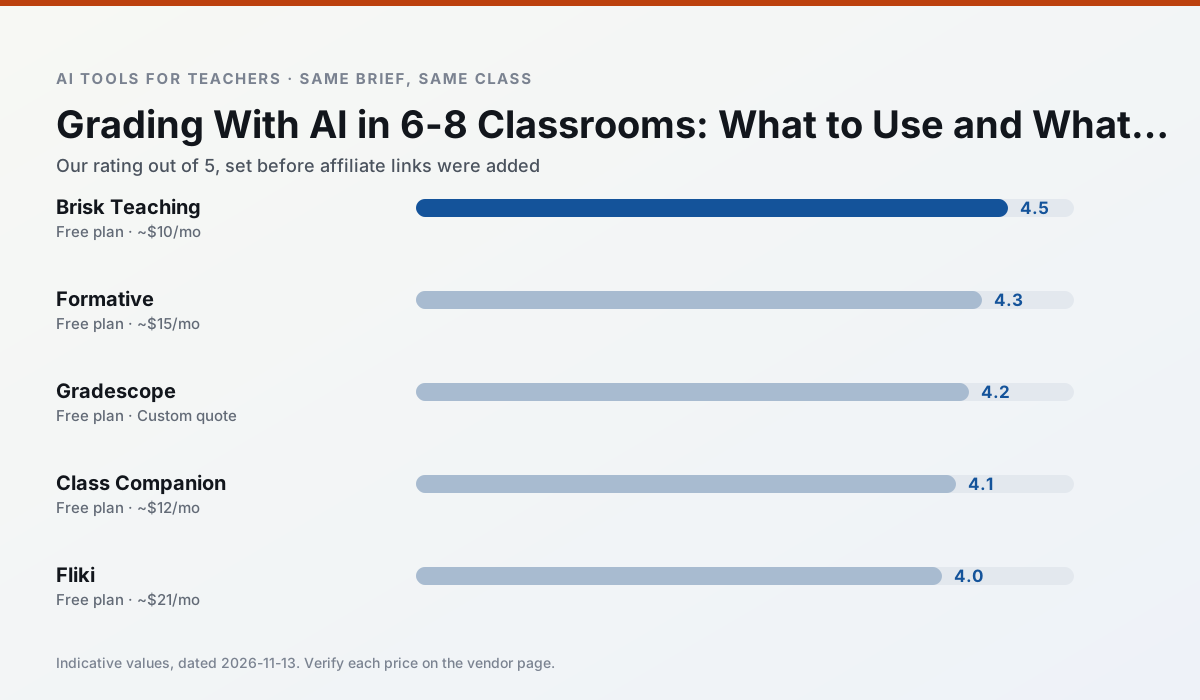
Ratings reflect our timed classroom workflow, not vendor claims. Prices are indicative — verify on the vendor site.
| Tool | Best for | Free tier | Indicative paid plan | Standout feature | Our rating | Verdict | Try the tool |
|---|---|---|---|---|---|---|---|
| Brisk Teaching | feedback on writing · grading | Yes — Limited actions per month | ~$10 /user/mo | Works inside Google Docs | 4.5 / 5 | Top pick | Try free |
| Formative | formative assessment · grading | Yes — Core assessment tools | ~$15 /user/mo | Live student responses | 4.3 / 5 | Strong option | Try free |
| Gradescope | grading · rubric creation | Yes — Limited courses | Custom quote | Bubble sheet and handwriting capture | 4.2 / 5 | Strong option | Try free |
| Class Companion | grading · feedback on writing | Yes — Limited assignments | ~$12 /user/mo | Handwriting recognition | 4.1 / 5 | Situational | Try free |
| Fliki | video lessons · audio lessons | Yes — Watermarked, limited minutes | ~$21 /user/mo | Blog/text to video | 4.0 / 5 | Situational | Try free |
| Murf AI | audio lessons · accessibility | Yes — Trial-only output | ~$19 /user/mo | Voice fine-tuning | 4.1 / 5 | Situational | Try free |
Match your situation
Best for X
Different jobs need different tools. Here is what we would open first in each case.
Brisk Teaching answers the three questions a district actually asks: rostering, admin controls and a data-processing agreement. That is usually what decides a school purchase.
Setup cost is one login for Formative; everything else can wait until you know the tool is useful.
Gradescope is the one we would open on a normal planning day because the first output is editable rather than restructurable, and the free plan covers a single teacher's routine.
Class Companion's free plan is the most usable in this comparison: a quota that survives a normal week. Not enough for a department, enough for one teacher to decide.
Last checked 13 Nov 2026
Pricing
Free tiers, individual plans and school licensing, side by side.
| Tool | Free plan | Individual / paid | School & district | Billing note | Verify |
|---|---|---|---|---|---|
| Brisk Teaching | $0 — Limited actions per month | ~$10 /user/mo | Custom quote | Indicative — verify on vendor site | Vendor |
| Formative | $0 — Core assessment tools | ~$15 /user/mo | Custom quote | Indicative — verify on vendor site | Vendor |
| Gradescope | $0 — Limited courses | Custom quote | Custom quote | LMS integration and support | Vendor |
| Class Companion | $0 — Limited assignments | ~$12 /user/mo | Custom quote | Indicative — verify on vendor site | Vendor |
| Fliki | $0 — Watermarked, limited minutes | ~$21 /user/mo | ~$66 /user/mo | Indicative — verify on vendor site | Vendor |
| Murf AI | $0 — Trial-only output | ~$19 /user/mo | ~$39 /user/mo | Indicative — verify on vendor site | Vendor |
Editorial rule: pricing is re-checked every 2–3 months and the top 50 pages are refreshed every 6 months. See our funding policy.
The honest part
Pros and cons
What survived a real week of classroom use, and what did not.
Pros
- No copy-paste between tools
- Fast inline feedback on student drafts
- Gentle learning curve
Cons
- Chrome-first workflow
- Extension permissions need IT approval
- Free quota is tight
Pros
- Strong data for intervention groups
- Works with existing PDFs and Docs
- Good LMS integrations
Cons
- Steeper setup than quiz games
- Best value requires school-wide rollout
- Price adds up per teacher
Pros
- Large time savings on paper assessments
- Consistent rubric application
- Detailed item analytics
Cons
- Overkill for elementary classrooms
- Institutional pricing is opaque
- Setup effort is real
Pros
- Useful where work is done on paper
- Fast, specific comments
- Good math support
Cons
- Scan quality affects accuracy
- Narrow use case
- Feedback still needs teacher review
Pros
- No avatar needed
- Good for explainer visuals
- Simple editor
Cons
- Minute-based limits
- Output can look generic
- Price jumps between tiers
In the classroom
Use cases
Five concrete workflows, with the tool we would open for each one.
Rubric and feedback comments in one pass
Reorder the workflow so the rubric is yours and the comments are generated. Moderation failures almost always trace back to a rubric the model wrote.
Recommended: Brisk TeachingA parent email in two languages
Draft in plain, warm language with no names, translate, then back-translate the important sentences to check meaning. Keep specific incidents out of the prompt and add them yourself.
Recommended: FormativeA Monday morning lesson plan in twelve minutes
The twelve minutes come from not rewriting the skeleton. Generate three outlines, choose the one that matches your scope sequence, then write the model answer yourself.
Recommended: GradescopeThree reading levels from one source text
Paste a vetted text, ask for supported, core and extension versions, then check the vocabulary list by hand. Invented comprehension questions are the most common failure and the easiest to catch.
Recommended: Class CompanionA substitute folder that needs no context
The value here is structure, not creativity. Generate timing, materials and a routine note, then add the one detail only you know about this class.
Recommended: Fliki
Questions teachers ask us
FAQ
Direct answers, also published as FAQPage structured data for search and AI assistants.
Can AI do grading at 6-8 level?
Which tool is best for grading?
What is the biggest risk?
Sources & further reading
Our recommendation
Try Fliki free for your next grading task
Text-to-video with stock media and AI voiceover. Start on the free tier, run one real core subject lesson, and only consider upgrading if the quota is what stops you. Disclosure: we may earn a commission (varies) at no extra cost to you.
Some links on this page are affiliate links. We may earn a commission at no extra cost to you. Our rankings are editorial and never pay-to-play. Never enter student PII into a free consumer account.
Keep reading
Related comparisons in this cluster.
Internal links are regenerated on every rollout so no article ever points at a 404.