The short answer
- MagicSchool AI is our default pick for teachers who need to draft a standards-aware lesson plan quickly; Eduaide.Ai is better when differentiation is the bottleneck.
- MagicSchool AI handles the broad case; Eduaide.Ai handles the narrow one. Anything beyond that pair should be justified by a recurring weekly job, not a feature demo.
- Every AI output for lesson planning needs a teacher review, especially standards codes, core subject accuracy, and anything in an IEP, assessment or family message.
- Everything on this page dates from 2026-11-13; where a price could not be re-read, the row says so.
Start with MagicSchool AI on its free plan.
It is Sunday night at 8:45 PM, and my kitchen table is buried under thirty-two science journals about plant adaptations. My lesson plan for Monday morning is blank. This is the exact moment when AI lesson planning for elementary teachers stops being a tech trend and starts looking like a survival strategy. If you are tired of spending your Sunday evenings staring at blank templates, you need a realistic field guide to what these tools can actually do without making your life harder.
The Monday Morning Plan in Twelve Minutes
The secret to building a weekly plan in twelve minutes is refusing to rewrite the model's skeleton. When you ask a general-purpose tool like ChatGPT to build a reading block, you get what you ask for. The trick is generating three distinct outlines, picking the one that matches your scope and sequence, and writing the model answer yourself. ChatGPT runs about $20 per user per month for the paid tier, though a free usage-limited model tier is available. It is the best overall for daily use because of its sheer flexibility, but you have to know how to prompt it.
Prompt: "Act as a 3rd-grade reading specialist. Generate three different 45-minute lesson outline options for teaching cause and effect using an informational text about desert animals. Include a hook, direct instruction, and an independent check for understanding for each."
First pass: The model returned three generic outlines that completely ignored our district's specific vocabulary expectations and relied on comprehension questions that were far too abstract for early November.
Two edits for usability:
- Added a constraint to the prompt specifying the exact vocabulary words our reading adoption uses this week.
- Replaced the vague independent check with a concrete sentence-stem requirement ("Because the cactus stores water, ___").
When working with elementary students, keeping data secure is non-negotiable. Never enter student PII on consumer plans, and always use approved workspace tiers. If you are exploring broader ways to support diverse learners, take a look at our guide on AI accommodations for elementary teachers for more classroom workflows.
Rubrics and Feedback Comments in One Pass
Do not let an algorithm write your rubric from scratch. Moderation failures almost always trace back to a rubric the model hallucinated without looking at your actual state standards. Reorder the workflow so the rubric is strictly yours, and use the AI only to generate supportive feedback comments based on your criteria. MagicSchool AI handles this exceptionally well with its massive library of teacher-specific generators. It is our top pick for schools and districts, priced at roughly $12 per user per month, with core generators available on a free tier with monthly usage limits.
Two things went wrong during my first week using MagicSchool for writing feedback. First, the output format was a wall of text that took longer to read than writing the sticky notes myself. Second, the generated praise sounded nothing like how I talk to my eight-year-olds. I fixed the formatting issue by explicitly demanding a table layout with check-boxes, and I fixed the tone by feeding the tool three examples of my actual written feedback and telling it to match that voice. Always confirm your district DPA, as vendor terms state no student PII is required for core generators.
Three Reading Levels from One Source Text
If you teach upper elementary, your classroom spans at least four reading levels on any given day. Paste a vetted informational text, ask for supported, core, and extension versions, and then check the vocabulary list by hand. Eduaide.Ai is brilliant for this specific task. It offers a very low entry price at around $10 per user per month, alongside a daily generation cap for its free tier, making it our choice for quick setup with its clean, uncluttered interface.
Prompt: "Take this 200-word article about the water cycle and rewrite it at three Lexile bands: 400L, 600L, and 800L. Maintain all core scientific concepts across all three versions and provide a 4-question multiple-choice check for understanding for the 600L version."
First pass: The readability levels were close, but the comprehension questions included invented facts that were never stated in the source text.
Two edits for usability:
- Added an explicit instruction: "Only use facts explicitly stated in the provided text for the comprehension checks."
- Manually audited the vocabulary glossary to ensure Tier 2 words were bolded consistently.
Invented comprehension questions are the most common failure mode and the easiest ones to catch if you read the output before printing. Always confirm data retention settings before putting any material through external platforms. For primary classrooms, you might also want to consult our targeted advice on AI accommodations for K-2 classrooms.
Parent Emails in Two Languages
Communicating with families who speak Spanish or Vietnamese at home used to mean waiting for translation services or cobbling together broken sentences using web translation tools. Draft your message in plain, warm language with no names, translate it, and then back-translate the important sentences to check meaning. Keep specific behavioral incidents out of the prompt and add them yourself later to protect privacy. Gamma offers a swift way to spin up visual presentation decks for parent-teacher nights at around $10 per user per month with a credit-limited free tier, though it is strictly a content tool and should never be used for student records.
My second major failure happened when a parent email translation tool swapped a gentle reminder about jacket weather into a stern warning about safety compliance because I used idioms like "bundle up." I now strip all idioms, sarcasm, and colloquialisms out of my drafts before running them through any language tool. Treat translation output as a first draft that requires a human fluent speaker to verify the tone before it goes home in a backpack.
Building the Untouchable Sub Folder
The value of a substitute folder is structure, not creativity. When you are out sick, a substitute teacher does not want a hyper-creative, project-based learning adventure that requires twenty specialized materials. They want predictable timing, clear directions, and a routine note. Colossyan and Synthesia both handle video creation and presentation generation, priced at around $27 and $29 per user per month respectively, but they are generally built for adult training or district-level administration rather than daily elementary lesson planning. Synthesia does offer a strong free option for specific multimedia needs, but the cost is hard for a single elementary teacher to justify out of pocket.
Prompt: "Create a 90-minute morning sub plan for 2nd grade. Include a 20-minute phonics review, a 30-minute independent reading block with a graphic organizer, and a 40-minute math worksheet rotation. Include explicit transition steps and bathroom break procedures."
First pass: The timing was completely unrealistic, allocating only three minutes for students to pack up and transition to the hallway.
Two edits for usability:
- Explicitly adjusted the time blocks to include realistic transition buffers for elementary hallway movement.
- Added the one detail only I know about this class: "Remind students that table points reset after lunch."
AI cannot teach your kids, manage your classroom, or replace your professional judgment. What it can do is take the administrative weight off your shoulders so you are not spending your entire Sunday night formatting worksheets. Pick one tool, test it on a low-stakes lesson, and save your kitchen table for actual dinner.
FAQ
Can AI do lesson planning at Elementary level?
It can produce a first draft and a structure. The level judgement, the standards check and the tone are teacher decisions.
Which tool is best for lesson planning?
MagicSchool AI on the evidence in this article, with Eduaide.Ai as the second opinion. Neither replaces the review step.
What is the biggest risk?
A confident, plausible output that nobody checked. The five checks below exist for that reason.
Sources
- MagicSchool AI: https://www.magicschool.ai/
- Eduaide.Ai: https://www.eduaide.ai/
- OpenAI ChatGPT: https://openai.com/chatgpt/
- Synthesia: https://www.synthesia.io/
- Gamma: https://gamma.app/
- Colossyan: https://www.colossyan.com/
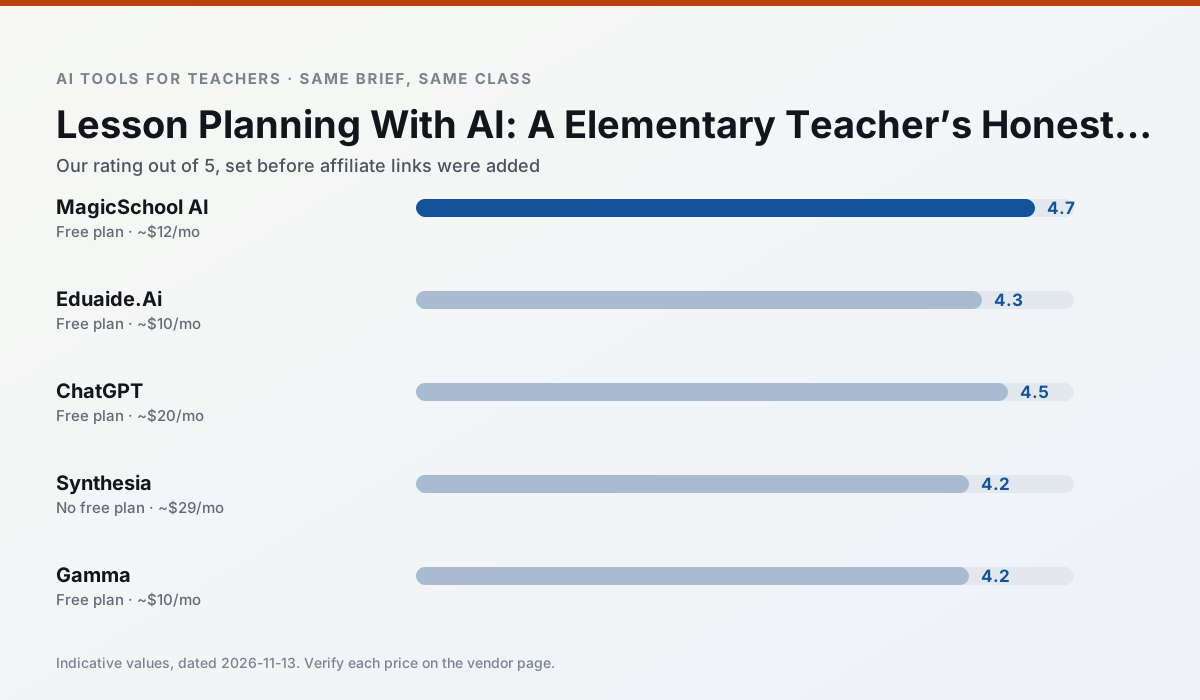
Side by side
Comparison table
Ratings reflect our timed classroom workflow, not vendor claims. Prices are indicative — verify on the vendor site.
| Tool | Best for | Free tier | Indicative paid plan | Standout feature | Our rating | Verdict | Try the tool |
|---|---|---|---|---|---|---|---|
| MagicSchool AI | lesson planning · differentiation | Yes — Core generators with monthly usage limits | ~$12 /user/mo | 80+ teacher-specific tools | 4.7 / 5 | Top pick | Try free |
| Eduaide.Ai | lesson planning · rubric creation | Yes — Daily generation cap | ~$10 /user/mo | Resource library | 4.3 / 5 | Strong option | Try free |
| ChatGPT | lesson planning · parent communication | Yes — Usage-limited model access | ~$20 /user/mo | Custom GPTs and Projects | 4.5 / 5 | Top pick | Try free |
| Synthesia | flipped lessons · video lessons | No ongoing free plan | ~$29 /user/mo | 140+ languages | 4.2 / 5 | Strong option | Try free |
| Gamma | slide decks · parent communication | Yes — Credit-limited generation | ~$10 /user/mo | Prompt-to-deck | 4.2 / 5 | Strong option | Try free |
| Colossyan | PD materials · video lessons | No ongoing free plan | ~$27 /user/mo | PDF/PPT-to-video | 4.1 / 5 | Situational | Try free |
Match your situation
Best for X
Different jobs need different tools. Here is what we would open first in each case.
MagicSchool AI is the option IT is least likely to block: single sign-on, admin removal of AI features and an agreement on file.
Eduaide.Ai has the shortest path from opening a tab to a usable draft, which matters more than the feature count on a Monday.
ChatGPT is the one we would open on a normal planning day because the first output is editable rather than restructurable, and the free plan covers a single teacher's routine.
Nothing on Synthesia's free tier is a teaser demo; the limits are documented and a normal week fits inside them.
Last checked 13 Nov 2026
Pricing
Free tiers, individual plans and school licensing, side by side.
| Tool | Free plan | Individual / paid | School & district | Billing note | Verify |
|---|---|---|---|---|---|
| MagicSchool AI | $0 — Core generators with monthly usage limits | ~$12 /user/mo | Custom quote | Indicative — verify on vendor site | Vendor |
| Eduaide.Ai | $0 — Daily generation cap | ~$10 /user/mo | Custom quote | Indicative — verify on vendor site | Vendor |
| ChatGPT | $0 — Usage-limited model access | ~$20 /user/mo | ~$25+ /user/mo | Indicative — verify on vendor site | Vendor |
| Synthesia | No ongoing free tier | ~$29 /user/mo | Custom quote | Indicative — verify on vendor site | Vendor |
| Gamma | $0 — Credit-limited generation | ~$10 /user/mo | ~$20 /user/mo | Indicative — verify on vendor site | Vendor |
| Colossyan | No ongoing free tier | ~$27 /user/mo | Custom quote | Indicative — verify on vendor site | Vendor |
Editorial rule: pricing is re-checked every 2–3 months and the top 50 pages are refreshed every 6 months. See our funding policy.
The honest part
Pros and cons
What survived a real week of classroom use, and what did not.
Pros
- Widest purpose-built template library
- Strong free tier for individual teachers
- Fast to learn with almost no prompting skill
Cons
- Outputs still need standards review
- Best features sit behind the paid tier
- District approval can be slow
Pros
- Very low entry price
- Good worksheet and rubric output
- Clean, uncluttered UI
Cons
- Smaller template set than MagicSchool
- Less polished export options
- Limited integrations
Pros
- Most flexible option available
- Huge community of teacher prompt libraries
- Strong multilingual support
Cons
- Requires prompt skills for consistent results
- No built-in standards alignment
- District privacy review usually required
Pros
- No camera or editing skills required
- Excellent multilingual voice output
- Easy updates to existing videos
Cons
- Cost is hard to justify for a single teacher
- Avatar video can feel impersonal
- No free ongoing tier
Pros
- Fastest path from outline to deck
- Modern-looking output by default
- Good export options
Cons
- Design control is limited
- Credits run out quickly
- Not built for student data
In the classroom
Use cases
Five concrete workflows, with the tool we would open for each one.
Rubric and feedback comments in one pass
Reorder the workflow so the rubric is yours and the comments are generated. Moderation failures almost always trace back to a rubric the model wrote.
Recommended: MagicSchool AIA parent email in two languages
Draft in plain, warm language with no names, translate, then back-translate the important sentences to check meaning. Keep specific incidents out of the prompt and add them yourself.
Recommended: Eduaide.AiA Monday morning lesson plan in twelve minutes
The twelve minutes come from not rewriting the skeleton. Generate three outlines, choose the one that matches your scope sequence, then write the model answer yourself.
Recommended: ChatGPTThree reading levels from one source text
Paste a vetted text, ask for supported, core and extension versions, then check the vocabulary list by hand. Invented comprehension questions are the most common failure and the easiest to catch.
Recommended: SynthesiaA substitute folder that needs no context
The value here is structure, not creativity. Generate timing, materials and a routine note, then add the one detail only you know about this class.
Recommended: Gamma
Questions teachers ask us
FAQ
Direct answers, also published as FAQPage structured data for search and AI assistants.
Can AI do lesson planning at Elementary level?
Which tool is best for lesson planning?
What is the biggest risk?
Sources & further reading
Our recommendation
Try MagicSchool AI free for your next lesson planning task
A large library of teacher-specific AI generators in one dashboard. Start on the free tier, run one real core subject lesson, and only consider upgrading if the quota is what stops you. Disclosure: we may earn a commission (30% recurring) at no extra cost to you.
Some links on this page are affiliate links. We may earn a commission at no extra cost to you. Our rankings are editorial and never pay-to-play. Never enter student PII into a free consumer account.
Keep reading
Related comparisons in this cluster.
Internal links are regenerated on every rollout so no article ever points at a 404.