The short answer
- Diffit is our default pick for teachers who need to build levelled passages and word work quickly; ElevenLabs is better when differentiation is the bottleneck.
- Pricing is where these pages date fastest. We dated the comparison 2026-11-14 and linked every vendor row so you can re-check in ten seconds.
- Every AI output for reading intervention needs a teacher review, especially standards codes, core subject accuracy, and anything in an IEP, assessment or family message.
- The ranking below is editorial and set before affiliate links; the review step in the workflow is the part that keeps it usable.
Start with ElevenLabs on its free plan.
Seventeen kids are staring at a paragraph about monarch butterflies. Three of them are decoding every single consonant blend, five are reading it at a normal cadence with zero comprehension of the lifecycle, and two are quietly building a fort out of pencil grips. This is the reality of AI reading intervention for elementary classrooms. You do not need another generic worksheet generator. You need specific ways to bridge the gap between a Lexile score and a child who hates reading.
Most software pitched to us assumes we have two hours of planning time and a computer lab that actually works. We do not. Over the past term, I tested six different platforms to see which ones survive the Tuesday morning reality check. Some saved hours. Others created more admin work than they solved.
Three Reading Levels From One Source Text
The fastest way to burn out is rewriting the same science article three times so every reader in your room can access it. When you need to take one vetted text and spin off supported, core, and extension versions, Diffit takes the prize for quick setup. It handles the heavy lifting of adjusting vocabulary density without completely stripping the content of facts.
Prompt: Act as an elementary reading specialist. Take the following text about monarch migration and rewrite it into three distinct tiers for a mixed-ability third-grade classroom: Supported (Lexile 400L), Core (Lexile 650L), and Extension (Lexile 800L). Include five comprehension questions and a vocabulary list for each tier based on the provided text.
Raw Output: Generated three clean tiers with vocabulary lists, but the comprehension questions for the supported tier asked about abstract concepts not explicitly stated in the short text.
Edit 1: I restricted the question generation constraint to demand text-dependent literal retrieval for the lowest tier rather than inferential leaps.
Edit 2: I manually swapped out two vocabulary words in the extension tier that the AI chose incorrectly for 8-year-olds.
Diffit's free tier offers limited generations per month, while paid access runs around $15 per user per month (indicative). The leveling is approximate rather than a formal psychometric assessment, so trust your teacher gut. Never paste identifiable student work into any prompt, and always check your district data policies before uploading proprietary curriculum. If you want a broader view of how these tools fit into daily practice, check our guide on AI accommodations for elementary teachers.
Turning Text Into Audio Without Losing Your Mind
If you have reluctant readers who process spoken language twice as fast as their decoding skills allow, text-to-speech is a non-negotiable accommodation. ElevenLabs provides natural-sounding voiceovers that do not sound like a robotic GPS from 2008. It is rated as best for schools and districts due to its low entry price around $5 per user per month (indicative) and fast generation speeds.
The catch is that it runs on a monthly character quota. If you try to feed it an entire chapter book on a free account, you will hit a wall by Wednesday. More importantly, do not clone a student's or colleague's voice without explicit written consent. It is creepy, it violates privacy boundaries, and it has no place in a public school. Use the pre-made voices to record weekly spelling lists or short reading passages for listening stations.
Managing Assessment Data Without Drowning in Paper
When it comes to tracking intervention progress, Formative takes the crown as best overall for daily use. It is priced at roughly $15 per user per month (indicative) and stands out because it works with your existing PDFs and Docs. You do not have to rebuild your entire quiz library from scratch.
Regrouping students after an assessment used to take an entire planning period. Now, I run a quick check-in through Formative, export the anonymised results, and let the software summarise skill gaps into targeted groups. I keep the actual scores in my own gradebook, but generating the instructional grouping saves me twenty minutes of staring at spreadsheets. The platform offers strong LMS integrations, but the best value requires a school-wide rollout. For younger learners, you still need to be mindful of rostering scope and make sure your district has a proper DPA in place.
Where Generic Content Generation Falls Short
Not every tool on the market belongs in an elementary literacy block. Writesonic is often marketed as a budget-friendly AI writing assistant at about $16 per user per month (indicative), and its free tier offers limited credits. While it is great for churning out marketing copy, its classroom output tends to be far too generic for elementary reading intervention.
When you ask Writesonic to generate phonics intervention prompts, it spits out vague advice about sounding out words rather than targeted word families with controlled decodability. The credit system is confusing, and the lack of an education-specific context means you spend more time editing the output than if you had just written it yourself. It is the best free option if you need a quick blog post for the PTA newsletter, but skip it for structured literacy work.
High-Engagement Review Without the Prep Trap
When kids hit a wall during afternoon intervention blocks, Kahoot! provides an immediate jolt of energy. At roughly $10 per user per month (indicative) with a limited free tier, its AI-assisted question generation lets you spin up a review game from a reading passage in seconds.
The biggest pitfall here is the time pressure. Kahoot rewards speed over reasoning, which is fine for vocabulary recall but useless for deep comprehension checks. Furthermore, keep the player count limits in mind on the free tier, and always have students use funny nicknames rather than their real names to protect student privacy in younger grades. It is a fantastic Friday reward, but it is not a core intervention tool.
Institutional Tools That Are Probably Overkill
You might hear about Gradescope in conversations about AI-assisted rubric grading for scanned and handwritten assessments. It handles paper assessments well and applies rubrics consistently.
However, it is massive overkill for elementary classrooms. The institutional pricing is opaque, the setup effort requires scanning stacks of paper, and it is built primarily for university-level problem sets and lab reports. Because it handles physical student work, you are dealing with heavy FERPA and privacy reviews. Stick to lighter tools that keep your workflow agile.
Reading intervention is hard work because every child is stuck on a different rung of the ladder. AI will not fix a broken curriculum, but used carefully, it can buy you back the one thing you never have enough of: time to sit next to a struggling reader and listen to them sound out their very first chapter book.
FAQ
Can AI do reading intervention at Elementary level?
It can produce a first draft and a structure. The level judgement, the standards check and the tone are teacher decisions.
Which tool is best for reading intervention?
Diffit on the evidence in this article, with ElevenLabs as the second opinion. Neither replaces the review step.
What is the biggest risk?
A confident, plausible output that nobody checked. The five checks below exist for that reason.
Sources
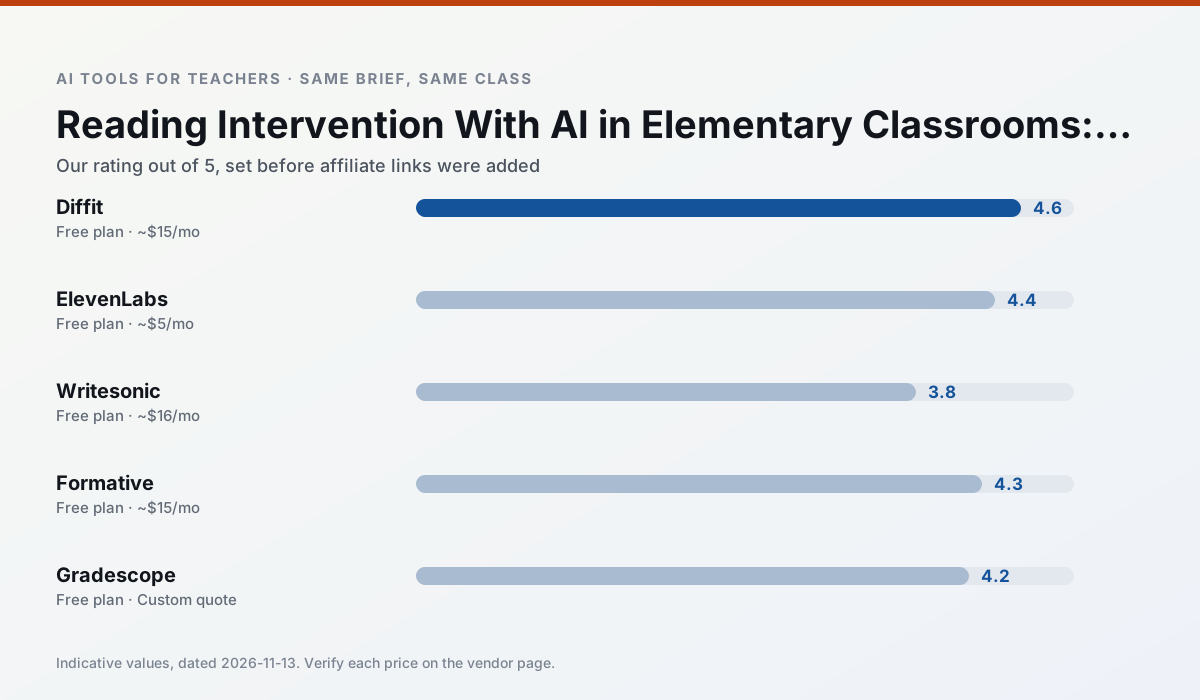
Side by side
Comparison table
Ratings reflect our timed classroom workflow, not vendor claims. Prices are indicative — verify on the vendor site.
| Tool | Best for | Free tier | Indicative paid plan | Standout feature | Our rating | Verdict | Try the tool |
|---|---|---|---|---|---|---|---|
| Diffit | differentiated instruction · reading intervention | Yes — Limited generations per month | ~$15 /user/mo | Lexile-style leveling | 4.6 / 5 | Top pick | Try free |
| ElevenLabs | accessibility · reading intervention | Yes — Monthly character quota | ~$5 /user/mo | Very natural voices | 4.4 / 5 | Strong option | Try free |
| Writesonic | newsletters · parent communication | Yes — Limited credits | ~$16 /user/mo | Article and email generators | 3.8 / 5 | Situational | Try free |
| Formative | formative assessment · grading | Yes — Core assessment tools | ~$15 /user/mo | Live student responses | 4.3 / 5 | Strong option | Try free |
| Gradescope | grading · rubric creation | Yes — Limited courses | Custom quote | Bubble sheet and handwriting capture | 4.2 / 5 | Strong option | Try free |
| Kahoot! | quiz generation · review lessons | Yes — Limited player count | ~$10 /user/mo | AI question builder | 4.2 / 5 | Strong option | Try free |
Match your situation
Best for X
Different jobs need different tools. Here is what we would open first in each case.
Setup cost is one login for Diffit; everything else can wait until you know the tool is useful.
ElevenLabs is the option IT is least likely to block: single sign-on, admin removal of AI features and an agreement on file.
Nothing on Writesonic's free tier is a teaser demo; the limits are documented and a normal week fits inside them.
Formative wins on the default path: fewer clicks to a usable draft, and the interface does not get in the way at 7:40am.
Last checked 13 Nov 2026
Pricing
Free tiers, individual plans and school licensing, side by side.
| Tool | Free plan | Individual / paid | School & district | Billing note | Verify |
|---|---|---|---|---|---|
| Diffit | $0 — Limited generations per month | ~$15 /user/mo | Custom quote | Indicative — verify on vendor site | Vendor |
| ElevenLabs | $0 — Monthly character quota | ~$5 /user/mo | ~$22 /user/mo | Indicative — verify on vendor site | Vendor |
| Writesonic | $0 — Limited credits | ~$16 /user/mo | ~$49 /user/mo | Indicative — verify on vendor site | Vendor |
| Formative | $0 — Core assessment tools | ~$15 /user/mo | Custom quote | Indicative — verify on vendor site | Vendor |
| Gradescope | $0 — Limited courses | Custom quote | Custom quote | LMS integration and support | Vendor |
| Kahoot! | $0 — Limited player count | ~$10 /user/mo | Custom quote | Indicative — verify on vendor site | Vendor |
Editorial rule: pricing is re-checked every 2–3 months and the top 50 pages are refreshed every 6 months. See our funding policy.
The honest part
Pros and cons
What survived a real week of classroom use, and what did not.
Pros
- Excellent for mixed-ability classes
- Produces printable and digital versions
- Minimal setup
Cons
- Narrower scope than all-in-one suites
- Leveling is approximate, not a formal assessment
- Heavy use burns through the free quota
Pros
- Excellent for accessible audio versions
- Low entry price
- Fast generation
Cons
- Quota-based billing
- Voice cloning consent considerations
- Not a teaching platform
Pros
- Cheaper than enterprise writing suites
- Many templates
- Reasonable free trial
Cons
- Generic classroom output
- Credit system is confusing
- Limited education context
Pros
- Strong data for intervention groups
- Works with existing PDFs and Docs
- Good LMS integrations
Cons
- Steeper setup than quiz games
- Best value requires school-wide rollout
- Price adds up per teacher
Pros
- Large time savings on paper assessments
- Consistent rubric application
- Detailed item analytics
Cons
- Overkill for elementary classrooms
- Institutional pricing is opaque
- Setup effort is real
In the classroom
Use cases
Five concrete workflows, with the tool we would open for each one.
Regrouping students after an assessment
Summarise anonymised results into skill groups, then generate one activity per group. Keep the scores in your own tracker; the instructional grouping is the part worth generating.
Recommended: DiffitA weekly family newsletter from bullet notes
Newsletters fail on length, not tone. Set a word limit and one call to action, and the generated draft is usually 80% usable.
Recommended: ElevenLabsA parent email in two languages
Draft in plain, warm language with no names, translate, then back-translate the important sentences to check meaning. Keep specific incidents out of the prompt and add them yourself.
Recommended: WritesonicRubric and feedback comments in one pass
Reorder the workflow so the rubric is yours and the comments are generated. Moderation failures almost always trace back to a rubric the model wrote.
Recommended: FormativeThree reading levels from one source text
Paste a vetted text, ask for supported, core and extension versions, then check the vocabulary list by hand. Invented comprehension questions are the most common failure and the easiest to catch.
Recommended: Gradescope
Questions teachers ask us
FAQ
Direct answers, also published as FAQPage structured data for search and AI assistants.
Can AI do reading intervention at Elementary level?
Which tool is best for reading intervention?
What is the biggest risk?
Sources & further reading
Our recommendation
Try ElevenLabs free for your next reading intervention task
Natural-sounding AI voiceover and text-to-speech for learning materials. Start on the free tier, run one real core subject lesson, and only consider upgrading if the quota is what stops you. Disclosure: we may earn a commission (22% recurring) at no extra cost to you.
Some links on this page are affiliate links. We may earn a commission at no extra cost to you. Our rankings are editorial and never pay-to-play. Never enter student PII into a free consumer account.
Keep reading
Related comparisons in this cluster.
Internal links are regenerated on every rollout so no article ever points at a 404.