The short answer
- Grammarly is our default pick for teachers who need to produce specific, evidence-based comments quickly; ChatGPT is better when differentiation is the bottleneck.
- Start with Grammarly on its free plan, keep ChatGPT as the second opinion, and do not open a card until the quota, not the feature list, is what stops you.
- Every AI output for report card comments needs a teacher review, especially standards codes, core subject accuracy, and anything in an IEP, assessment or family message.
- Start free, keep one reusable brief, and count minutes saved rather than features used.
Start with Grammarly on its free plan.
It was a Sunday evening in November when I realized I had twenty-eight report cards due, and every single one of them needed to sound professional, constructive, and distinct. My old method of staring at a blinking cursor while flipping through dog-eared gradebooks was officially dead. That night, I started testing AI report card comments for elementary students to see if any tool could survive the reality of a third-grade classroom without turning twenty-eight individuals into carbon copies.
The promise is tempting. Type in a few bullet points about a kid who loves fractions but talks too much during independent reading, and get back a polished paragraph. The reality is messier. Some tools sound like a corporate human resources memo, while others need so much prompt engineering you might as well write the comment yourself. If you are comparing tools for the upcoming grading cycle, read our roundup of the best AI tools for teachers for broader context on these platforms.
MagicSchool AI: Best for Fast Templates
MagicSchool AI has become the go-to staff room recommendation because it bypasses the blank page problem entirely. Instead of guessing how to prompt a general chatbot, you click on a dedicated report card comment generator. You plug in a student's name, select their academic and behavioral traits from dropdowns, and set a tone.
The strength here is speed and structure. It organizes feedback into strengths, growth areas, and next steps without requiring you to know prompt engineering. The free tier offers core generators with monthly usage limits, while the paid tier sits around $12 per user per month. The catch is that the output often leans heavily into generic praise. If you do not inject specific anecdotes about reading groups or math centers, the comments start to sound interchangeable. You still have to do the heavy lifting of personalization. Vendor documentation states that no student PII is required for core generators, but your district tech lead will still want to review the DPA.
ChatGPT: Best Overall for Daily Use
When you need flexibility beyond rigid templates, ChatGPT remains the most capable general-purpose assistant. It adapts to almost any classroom task, making it my preferred choice when I need to generate comments that reflect specific classroom observations rather than standard rubric checkboxes.
Prompt: Write a constructive report card comment for a 4th-grade student who excels in science labs but struggles to complete independent writing tasks on time. Tone: warm, encouraging, professional. Keep it under 60 words and do not include the student's name.
First output: [Name] demonstrates a commendable aptitude for hands-on science investigations, showing strong analytical thinking. However, time management during independent writing assignments remains an area for growth. With continued focus on pacing, [Name] will undoubtedly bridge this gap and meet all writing benchmarks.
Two edits made: Replaced "commendable aptitude" with "a real gift for asking questions during science," and changed "bridge this gap" to "build stamina during writer's workshop."
The free tier offers usage-limited model access, while the paid option runs about $20 per user per month. The main drawback is that it requires patience and strong prompting skills to get consistent results across twenty-five kids. You must also guard student privacy fiercely. Never enter real student names or identifiable data on consumer plans. For more ideas on managing diverse student needs throughout the term, check out our guide on AI accommodations for elementary teachers.
Grammarly: Best Free Option for Polished Polish
If your primary struggle is not generating the original thought but making sure your parent-facing reports read clearly and professionally, Grammarly is the safest bet. It functions as a writing assistant that works across browser windows, email clients, and document editors.
The free tier handles core grammar and tone checks, which is often all you need to catch clunky phrasing or overly blunt sentences in your report card drafts. The paid tier costs about $12 per user per month and unlocks advanced tone rewriting. Its main limitation is that it is not education-specific. It will fix your grammar, but it cannot invent a comment about social-emotional growth or reading fluency from scratch. When using it on school devices, make sure to disable text collection settings and confirm your district’s privacy policies.
Claude: Best for Long-Form Document Analysis
Claude handles massive blocks of text better than most competitors, making it a strong partner when you need to synthesize months of running records, anecdotal notes, and rubric scores into coherent narratives.
Priced around $20 per user per month for the paid tier with a usage-limited free option, Claude produces prose that feels less robotic and more human than standard chatbot outputs. It excels at structured document output. If you paste an entire class rubric or a detailed scope and sequence, it maps individual progress against those benchmarks with impressive nuance. The downside is that it lacks teacher-specific templates, meaning you have to supply the context and the framework yourself. As with ChatGPT, consumer plans are entirely unsuitable for student data.
Khanmigo and Curipod: Where They Fit
While Khanmigo and Curipod are less focused on report cards, they deserve mention if you are evaluating your tech stack for the full term. Khanmigo is an education-first design built by a nonprofit, making it the best option for schools and districts seeking strict privacy standards and purpose-built scaffolding. Priced at roughly $4 per learner per month, it shines as an AI tutor for students rather than an admin assistant for teachers.
Curipod, on the other hand, is built to turn a topic into an interactive student-response lesson in minutes. It costs around $12 per user per month for the paid tier, with a restrictive free option. It is brilliant for quick checks for understanding during class, but it will not help you write report cards or manage parent communication.
Using AI for report cards is a balancing act. It can eliminate the dread of the blank page and speed up the mechanical work of drafting, but the soul of the comment must come from your own observation notes. Keep your prompts anonymous, check every generated sentence against your gradebook, and save your energy for the parts of teaching that a screen can never replicate.
FAQ
Can AI do report card comments at Elementary level?
It can produce a first draft and a structure. The level judgement, the standards check and the tone are teacher decisions.
Which tool is best for report card comments?
Grammarly on the evidence in this article, with ChatGPT as the second opinion. Neither replaces the review step.
What is the biggest risk?
A confident, plausible output that nobody checked. The five checks below exist for that reason.
Sources
- Grammarly Pricing and Features. https://www.grammarly.com/pricing
- OpenAI ChatGPT Pricing and Model Access. https://openai.com/chatgpt/pricing
- Curipod Plans and Features. https://curipod.com/pricing
- Khan Academy Khanmigo for Districts and Teachers. https://www.khanacademy.org/khanmigo
- Anthropic Claude Plans. https://claude.ai/pricing
- MagicSchool AI Teacher Tools. https://www.magicschool.ai/
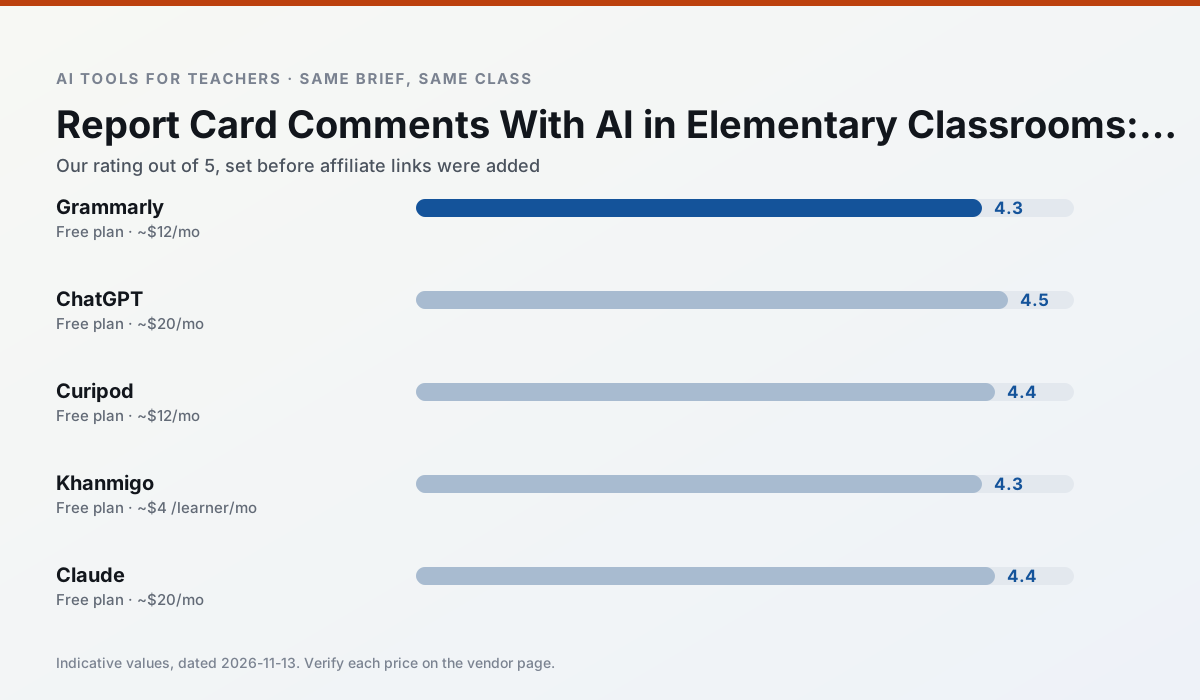
Side by side
Comparison table
Ratings reflect our timed classroom workflow, not vendor claims. Prices are indicative — verify on the vendor site.
| Tool | Best for | Free tier | Indicative paid plan | Standout feature | Our rating | Verdict | Try the tool |
|---|---|---|---|---|---|---|---|
| Grammarly | parent communication · report card comments | Yes — Core grammar and tone checks | ~$12 /user/mo | Tone adjustments | 4.3 / 5 | Strong option | Try free |
| ChatGPT | lesson planning · parent communication | Yes — Usage-limited model access | ~$20 /user/mo | Custom GPTs and Projects | 4.5 / 5 | Top pick | Try free |
| Curipod | formative assessment · exit tickets | Yes — Limited lessons per month | ~$12 /user/mo | Live polls and word clouds | 4.4 / 5 | Strong option | Try free |
| Khanmigo | math practice · student tutoring | Yes — US teacher accounts, subject to eligibility | ~$4 /learner/mo | Socratic tutoring rather than answers | 4.3 / 5 | Strong option | Try free |
| Claude | rubric creation · feedback on writing | Yes — Usage-limited | ~$20 /user/mo | Very large context window | 4.4 / 5 | Strong option | Try free |
| MagicSchool AI | lesson planning · differentiation | Yes — Core generators with monthly usage limits | ~$12 /user/mo | 80+ teacher-specific tools | 4.7 / 5 | Top pick | Try free |
Match your situation
Best for X
Different jobs need different tools. Here is what we would open first in each case.
Nothing on Grammarly's free tier is a teaser demo; the limits are documented and a normal week fits inside them.
ChatGPT is the one we would open on a normal planning day because the first output is editable rather than restructurable, and the free plan covers a single teacher's routine.
Curipod has the shortest path from opening a tab to a usable draft, which matters more than the feature count on a Monday.
For a school rollout, Khanmigo offers the paperwork and the admin console; the classroom features are standard by comparison.
Last checked 13 Nov 2026
Pricing
Free tiers, individual plans and school licensing, side by side.
| Tool | Free plan | Individual / paid | School & district | Billing note | Verify |
|---|---|---|---|---|---|
| Grammarly | $0 — Core grammar and tone checks | ~$12 /user/mo | ~$15 /user/mo | Indicative — billed annually | Vendor |
| ChatGPT | $0 — Usage-limited model access | ~$20 /user/mo | ~$25+ /user/mo | Indicative — verify on vendor site | Vendor |
| Curipod | $0 — Limited lessons per month | ~$12 /user/mo | Custom quote | Indicative — verify on vendor site | Vendor |
| Khanmigo | $0 — US teacher accounts, subject to eligibility | ~$4 /learner/mo | Custom quote | Indicative — verify on vendor site | Vendor |
| Claude | $0 — Usage-limited | ~$20 /user/mo | ~$25+ /user/mo | Indicative — verify on vendor site | Vendor |
| MagicSchool AI | $0 — Core generators with monthly usage limits | ~$12 /user/mo | Custom quote | Indicative — verify on vendor site | Vendor |
Editorial rule: pricing is re-checked every 2–3 months and the top 50 pages are refreshed every 6 months. See our funding policy.
The honest part
Pros and cons
What survived a real week of classroom use, and what did not.
Pros
- Catches errors in high-stakes parent emails
- Works everywhere you already write
- Very low learning curve
Cons
- Not education-specific
- Can flatten teacher voice
- Premium needed for tone rewriting
Pros
- Most flexible option available
- Huge community of teacher prompt libraries
- Strong multilingual support
Cons
- Requires prompt skills for consistent results
- No built-in standards alignment
- District privacy review usually required
Pros
- High student engagement out of the box
- Great for quick checks for understanding
- No student accounts required for basic use
Cons
- Focused on delivery, not planning
- Requires reliable classroom devices
- Free tier is restrictive
Pros
- Education-first design
- Strong nonprofit trust signal
- Good math scaffolding
Cons
- Availability varies by region
- Less useful for admin paperwork
- Requires student accounts for full value
Pros
- Handles full unit plans and long rubrics
- Nuanced, less generic prose
- Good at structured document output
Cons
- No teacher-specific templates
- Fewer classroom integrations
- Consumer plan not suitable for student data
In the classroom
Use cases
Five concrete workflows, with the tool we would open for each one.
Regrouping students after an assessment
Summarise anonymised results into skill groups, then generate one activity per group. Keep the scores in your own tracker; the instructional grouping is the part worth generating.
Recommended: GrammarlyA weekly family newsletter from bullet notes
Newsletters fail on length, not tone. Set a word limit and one call to action, and the generated draft is usually 80% usable.
Recommended: ChatGPTThree reading levels from one source text
Paste a vetted text, ask for supported, core and extension versions, then check the vocabulary list by hand. Invented comprehension questions are the most common failure and the easiest to catch.
Recommended: CuripodA Monday morning lesson plan in twelve minutes
The twelve minutes come from not rewriting the skeleton. Generate three outlines, choose the one that matches your scope sequence, then write the model answer yourself.
Recommended: KhanmigoA parent email in two languages
Draft in plain, warm language with no names, translate, then back-translate the important sentences to check meaning. Keep specific incidents out of the prompt and add them yourself.
Recommended: Claude
Questions teachers ask us
FAQ
Direct answers, also published as FAQPage structured data for search and AI assistants.
Can AI do report card comments at Elementary level?
Which tool is best for report card comments?
What is the biggest risk?
Sources & further reading
Our recommendation
Try Grammarly free for your next report card comments task
Writing assistant for polished parent emails, newsletters and reports. Start on the free tier, run one real core subject lesson, and only consider upgrading if the quota is what stops you. Disclosure: we may earn a commission ($20 per paid upgrade + $0.20/signup) at no extra cost to you.
Some links on this page are affiliate links. We may earn a commission at no extra cost to you. Our rankings are editorial and never pay-to-play. Never enter student PII into a free consumer account.
Keep reading
Related comparisons in this cluster.
Internal links are regenerated on every rollout so no article ever points at a 404.