The short answer
- Quizizz is our default pick for teachers who need to prepare a no-context cover lesson quickly; Kahoot! is better when differentiation is the bottleneck.
- All 3 shortlisted tools are priced for one teacher first and a school second. Quizizz and Kahoot! are the two worth trialling on a real task before any purchase conversation.
- Every AI output for substitute plans needs a teacher review, especially standards codes, core subject accuracy, and anything in an IEP, assessment or family message.
- Trial one tool for a week of real substitute plans work before any purchase conversation; the quota is the honest test.
Start with MagicSchool AI on its free plan.
At 6:45 AM on a Tuesday, the stomach drop hits when you realize you have a fever and need a sub. In an elementary classroom, writing sub plans from scratch takes an hour you simply do not have when you can barely stand up. You need something clear enough for a guest teacher who has never seen your students, and engaging enough that nobody tries to scale the bookshelves.
Many teachers turn to AI substitute plans for elementary classrooms to bridge that gap. The goal is not to let software invent a random school day. The goal is to produce a coherent packet that covers reading, math, and transitions without requiring a master's degree in cryptography to understand. Let us look at what works, what fails, and which tools earn a spot on your desktop before 7:00 AM.
Why Elementary Sub Plans Usually Break Down
The core problem with traditional sub plan templates is that they assume the substitute knows your routines. They write things like "complete usual math block," which means absolute chaos for someone who does not know where your base-ten blocks live or how your reading groups transition. When you use AI to build sub materials, you have to feed it explicit constraints: exact timings, physical locations of supplies, and hard behavioral guardrails.
If you use ChatGPT (~$20 /user/mo indicative; free tier available) for this, it will gladly write a glowing, hyperactive schedule that sounds wonderful on paper. The catch is that it requires prompt skills to keep things grounded, and it lacks built-in standards alignment. You must explicitly tell the model that second graders cannot work independently on a packet for forty-five minutes straight. Without those guardrails, you end up with a fantasy schedule that collapses by the time attendance is finished.
Building the Sub Packet With Claude or ChatGPT
When you sit down to draft the day, you need a tool that handles long text without losing track of your schedule. Claude (~$20 /user/mo indicative; free tier available) excels here because of its long context window, letting you paste your entire daily timetable, restroom procedures, and emergency folder notes all at once. It produces nuanced, less generic prose than other models, which helps the sub read instructions that sound like an actual human wrote them.
Prompt: "Act as an elementary instructional coach. Write a 3-hour morning sub plan for a 1st grade classroom. Schedule: 8:30 morning meeting, 9:00 phonics, 9:30 recess, 10:00 math, 11:00 independent reading. Include exact transition cues, specific locations for supplies in a standard classroom, and a backup quiet activity if phonics finishes early. Do not include student names."
First pass result: The model generated a neat schedule with standard phonics games and math worksheets, but suggested using magnetic letters that were buried in a deep supply closet the sub would never find. It also scheduled a ten-minute transition that assumed eight-year-olds move like chess pieces.
Two edits that made it usable:
- Changed the supply instruction to point directly to the clear plastic tub labeled "Math Centers" on the low shelf by the door.
- Added a hard rule that clean-up music must play for exactly three minutes before transitioning to carpet time.
If you are looking for an educational platform designed specifically with schools in mind, Khanmigo ($4 /learner/mo indicative; free teacher accounts subject to eligibility) offers strong math scaffolding and education-first design. While it is more famous for tutoring, its teacher tools help build structured routines that respect how younger children actually learn. For daily workflow inside Google Docs or Slides where you might draft sub materials, Brisk Teaching ($10 /user/mo indicative; limited free tier) lets you generate inline text and feedback quickly without tab-switching, though you need to watch its Chrome extension permissions and tight free quota.
Interactive Review Lessons That Keep Subs Sane
A substitute teacher's worst enemy is dead time. When kids finish a worksheet early, the room goes sideways. You need built-in review games that run themselves while the sub manages behavior. This is where gamified platforms shine in a sub folder.
Quizizz (~$15 /user/mo indicative; free core quiz creation) is our top pick for schools and districts. Students already know the interface, it works reliably on low-end devices, and the reporting gives you a clear look at what they mastered while you were out. Writing high-quality AI questions still requires your review, and the gamification can occasionally distract students who treat it like a video game rather than a check for understanding, but it saves an enormous amount of preparation time.
For instant engagement with zero training time, Kahoot! (~$10 /user/mo indicative; limited player count on free tier) is hard to beat. Its AI-assisted question generation lets you drop in a reading passage or science topic and instantly spin up a review game. Keep in mind that its time-pressure format suits rapid recall far better than deep reasoning, and younger students should use nicknames rather than real names to protect privacy. If you want to dive deeper into how these platforms fit into daily workflows, read our guide on the best AI tools for teachers.
Two Things That Went Wrong in Real Use
The first failure happened when a colleague generated an entire sub day using a generic prompt on a consumer AI tool. She pasted the resulting PDF into her sub folder and took a personal day. The AI had scheduled a "collaborative science inquiry project using water cups at desks" for first graders. The substitute teacher, faced with twenty-two six-year-olds and unsupervised cups of water, abandoned the plan by 9:15 AM and spent the rest of the day coloring. The fix was establishing a strict rule: never let AI generate novel, messy hands-on activities for a sub. Subs need pencil-and-paper tasks, familiar routines, and digital games that have already been practiced in class.
The second failure involved student data privacy. Another teacher wanted the sub plan to include individualized small-group reading rosters with student names and specific intervention notes. She pasted that text into a free web model. That violates basic district policy regarding student PII. The fix was simple: train yourself to use generic placeholders like "Group A" and "Group B" in any external prompt, keeping your roster keys safely locked in your own physical binder. For more on protecting younger learners, check out our piece on AI accommodations for K-2 classrooms.
Summary Recommendation
Do not try to automate every minute of a substitute's day. Use Claude or ChatGPT to draft the schedule skeleton and transition cues, then drop in a pre-tested Quizizz review link that the kids already know how to play. You will spend ten minutes editing instead of an hour stressing, and you might actually get some rest while you recover.
FAQ
Can AI do substitute plans at Elementary level?
It can produce a first draft and a structure. The level judgement, the standards check and the tone are teacher decisions.
Which tool is best for substitute plans?
Quizizz on the evidence in this article, with Kahoot! as the second opinion. Neither replaces the review step.
What is the biggest risk?
A confident, plausible output that nobody checked. The five checks below exist for that reason.
Sources
- Quizizz Vendor Pricing and Features. https://quizizz.com/
- Kahoot! Plans and Education Features. https://kahoot.com/
- Khanmigo for Teachers Overview. https://www.khanacademy.org/khanmigo
- Brisk Teaching Chrome Extension Details. https://briskteaching.com/
- OpenAI ChatGPT Pricing and Usage Limits. https://openai.com/chatgpt/
- Anthropic Claude Pricing and Feature Documentation. https://www.anthropic.com/claude
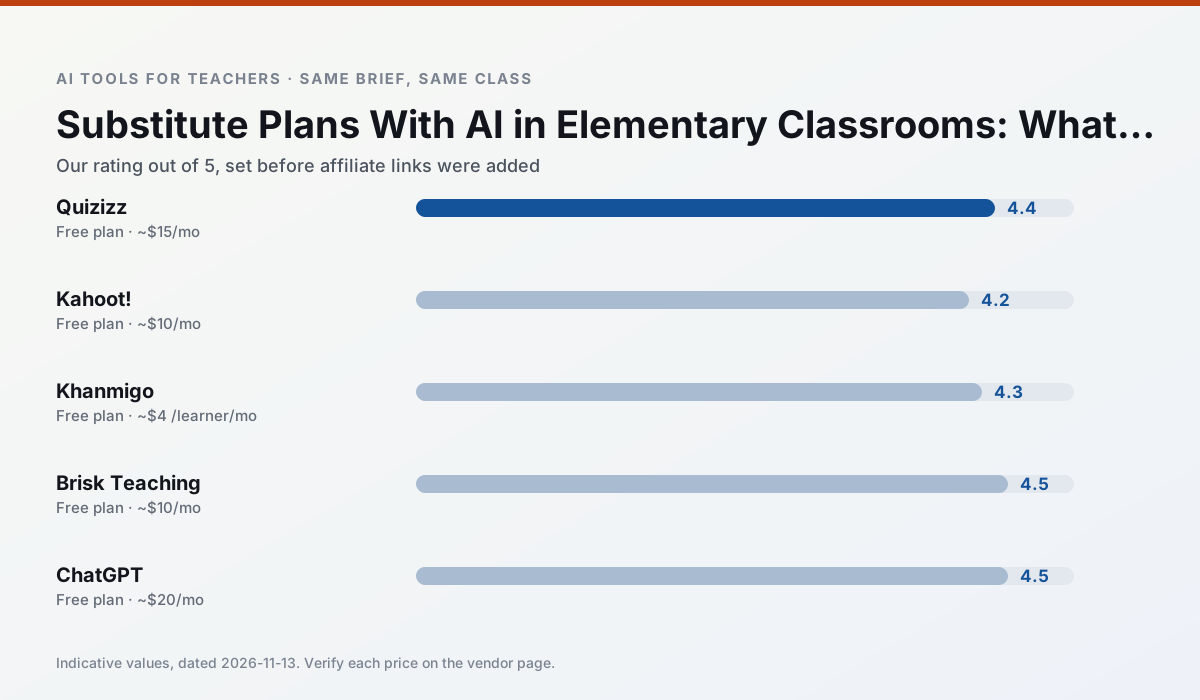
Side by side
Comparison table
Ratings reflect our timed classroom workflow, not vendor claims. Prices are indicative — verify on the vendor site.
| Tool | Best for | Free tier | Indicative paid plan | Standout feature | Our rating | Verdict | Try the tool |
|---|---|---|---|---|---|---|---|
| Quizizz | quiz generation · formative assessment | Yes — Core quiz creation | ~$15 /user/mo | AI question generator | 4.4 / 5 | Strong option | Try free |
| Kahoot! | quiz generation · review lessons | Yes — Limited player count | ~$10 /user/mo | AI question builder | 4.2 / 5 | Strong option | Try free |
| Khanmigo | math practice · student tutoring | Yes — US teacher accounts, subject to eligibility | ~$4 /learner/mo | Socratic tutoring rather than answers | 4.3 / 5 | Strong option | Try free |
| Brisk Teaching | feedback on writing · grading | Yes — Limited actions per month | ~$10 /user/mo | Works inside Google Docs | 4.5 / 5 | Top pick | Try free |
| ChatGPT | lesson planning · parent communication | Yes — Usage-limited model access | ~$20 /user/mo | Custom GPTs and Projects | 4.5 / 5 | Top pick | Try free |
| Claude | rubric creation · feedback on writing | Yes — Usage-limited | ~$20 /user/mo | Very large context window | 4.4 / 5 | Strong option | Try free |
Match your situation
Best for X
Different jobs need different tools. Here is what we would open first in each case.
Quizizz answers the three questions a district actually asks: rostering, admin controls and a data-processing agreement. That is usually what decides a school purchase.
Kahoot! has the shortest path from opening a tab to a usable draft, which matters more than the feature count on a Monday.
On the daily cycle, Khanmigo saves the most edit time per task; the paid tier mostly buys more runs rather than better ones.
Nothing on Brisk Teaching's free tier is a teaser demo; the limits are documented and a normal week fits inside them.
Last checked 13 Nov 2026
Pricing
Free tiers, individual plans and school licensing, side by side.
| Tool | Free plan | Individual / paid | School & district | Billing note | Verify |
|---|---|---|---|---|---|
| Quizizz | $0 — Core quiz creation | ~$15 /user/mo | Custom quote | Indicative — verify on vendor site | Vendor |
| Kahoot! | $0 — Limited player count | ~$10 /user/mo | Custom quote | Indicative — verify on vendor site | Vendor |
| Khanmigo | $0 — US teacher accounts, subject to eligibility | ~$4 /learner/mo | Custom quote | Indicative — verify on vendor site | Vendor |
| Brisk Teaching | $0 — Limited actions per month | ~$10 /user/mo | Custom quote | Indicative — verify on vendor site | Vendor |
| ChatGPT | $0 — Usage-limited model access | ~$20 /user/mo | ~$25+ /user/mo | Indicative — verify on vendor site | Vendor |
| Claude | $0 — Usage-limited | ~$20 /user/mo | ~$25+ /user/mo | Indicative — verify on vendor site | Vendor |
Editorial rule: pricing is re-checked every 2–3 months and the top 50 pages are refreshed every 6 months. See our funding policy.
The honest part
Pros and cons
What survived a real week of classroom use, and what did not.
Pros
- Students already know the interface
- Good reporting
- Works on low-end devices
Cons
- Writing high-quality AI questions still needs review
- Gamification can distract
- Advanced analytics are paid
Pros
- Instant engagement
- Very low training time
- Strong brand familiarity
Cons
- Less depth for higher-order assessment
- Paid tiers needed for larger classes
- Time pressure suits recall more than reasoning
Pros
- Education-first design
- Strong nonprofit trust signal
- Good math scaffolding
Cons
- Availability varies by region
- Less useful for admin paperwork
- Requires student accounts for full value
Pros
- No copy-paste between tools
- Fast inline feedback on student drafts
- Gentle learning curve
Cons
- Chrome-first workflow
- Extension permissions need IT approval
- Free quota is tight
Pros
- Most flexible option available
- Huge community of teacher prompt libraries
- Strong multilingual support
Cons
- Requires prompt skills for consistent results
- No built-in standards alignment
- District privacy review usually required
In the classroom
Use cases
Five concrete workflows, with the tool we would open for each one.
A weekly family newsletter from bullet notes
Newsletters fail on length, not tone. Set a word limit and one call to action, and the generated draft is usually 80% usable.
Recommended: QuizizzRegrouping students after an assessment
Summarise anonymised results into skill groups, then generate one activity per group. Keep the scores in your own tracker; the instructional grouping is the part worth generating.
Recommended: Kahoot!Rubric and feedback comments in one pass
Reorder the workflow so the rubric is yours and the comments are generated. Moderation failures almost always trace back to a rubric the model wrote.
Recommended: KhanmigoA parent email in two languages
Draft in plain, warm language with no names, translate, then back-translate the important sentences to check meaning. Keep specific incidents out of the prompt and add them yourself.
Recommended: Brisk TeachingA Monday morning lesson plan in twelve minutes
The twelve minutes come from not rewriting the skeleton. Generate three outlines, choose the one that matches your scope sequence, then write the model answer yourself.
Recommended: ChatGPT
Questions teachers ask us
FAQ
Direct answers, also published as FAQPage structured data for search and AI assistants.
Can AI do substitute plans at Elementary level?
Which tool is best for substitute plans?
What is the biggest risk?
Sources & further reading
Our recommendation
Try MagicSchool AI free for your next substitute plans task
A large library of teacher-specific AI generators in one dashboard. Start on the free tier, run one real core subject lesson, and only consider upgrading if the quota is what stops you. Disclosure: we may earn a commission (30% recurring) at no extra cost to you.
Some links on this page are affiliate links. We may earn a commission at no extra cost to you. Our rankings are editorial and never pay-to-play. Never enter student PII into a free consumer account.
Keep reading
Related comparisons in this cluster.
Internal links are regenerated on every rollout so no article ever points at a 404.