The short answer
- MagicSchool AI is our default pick for teachers who need to write clear, warm parent emails quickly; ChatGPT is better when differentiation is the bottleneck.
- Free-tier reality for this shortlist: MagicSchool AI: Yes — Core generators with monthly usage limits; ChatGPT: Yes — Usage-limited model access; Gamma: Yes — Credit-limited generation. Treat every paid figure as indicative until you have read the vendor page; only the free quota is something you can test yourself this week.
- Every AI output for parent communication needs a teacher review, especially standards codes, core subject accuracy, and anything in an IEP, assessment or family message.
- Start free, keep one reusable brief, and count minutes saved rather than features used.
Start with MagicSchool AI on its free plan.
By Thursday afternoon, my inbox usually holds thirty unread messages from parents asking why their high schooler's grade dropped three points on a rubric they never looked at. Writing individual replies that balance empathy, boundary-setting, and clear policy takes hours I simply do not have. High school parent communication is a different beast than elementary school conferencing. We deal with college credits, sports eligibility, and teenagers who have mastered the art of telling parents that assignments do not exist. Using AI parent communication for 9-12 classrooms changed how I handle this administrative weight, but it took a lot of trial and error to find what actually saves time without sounding like a robot.
Most teachers start down this road by typing desperate prompts into generic chat windows. We have all done it. You paste a messy grade book note and ask for a polite email, only to get back something that sounds like a nineteenth-century butler who is deeply disappointed in your child. The trick is knowing which platforms handle these tasks reliably and which ones require too much cleanup to be worth the subscription. If you are looking at the broader landscape of software covered in guides like our overview of the best AI tools for teachers in 2026, you will see a massive spread of options. Let us narrow that down specifically to the tools that touch parent contact, newsletters, and difficult conferences.
MagicSchool AI for Pre-Built Templates
When you need a quick draft and do not want to fiddle with prompt engineering, MagicSchool AI is the best free option on the market. It offers a large library of teacher-specific generators housed in a single dashboard, which beats opening a blank chat window every time you need to communicate. You can pull up a template for a positive behavior call home, a failing-grade warning, or an upcoming project overview in three clicks. The free tier gives you access to core generators with monthly usage limits, while the paid tier sits around twelve dollars per user per month.
The main strength here is speed and lack of a learning curve. You do not need to know how to write a prompt because the form fields do the heavy lifting for you. You type in the student's general situation, select a tone, and hit generate. The downside is that outputs often need a human pass to match your actual classroom culture. The platform also requires district approval if you want deeper integration, and the best features sit behind the paid tier. As long as you strip out all personally identifiable information before entering data, it serves as a reliable drafting station for routine emails.
ChatGPT for Daily Customisation and Multilingual Needs
If you want the most flexible option available for daily use, ChatGPT remains the powerhouse, though it demands a bit more technical patience. Operating on a usage-limited free model or a paid tier around twenty dollars per user per month, it adapts to almost any communication task you throw at it. For high school teachers with diverse immigrant communities, its multilingual support is unmatched.
A parent email in two languages requires a specific workflow to avoid awkward machine-translation errors that can confuse or alarm families.
Prompt: Act as a high school English teacher. Write a warm, professional email to a parent explaining that their student missed two consecutive peer review sessions for the upcoming argumentative essay, and invite them to a quick phone check-in on Tuesday. Do not include student names or identifying details. Keep sentences short and clear.
Initial Output: The model returned a polite, slightly formal five-paragraph essay about academic responsibility and the importance of collaborative learning structures in secondary education.
Two Edits for Usability:
- Cut the introductory fluff about the philosophy of peer review so the email starts with the actual concern in sentence two.
- Added a placeholder for specific office hours and translated the core paragraph into Spanish using the platform's localization prompt, then back-translated a sample sentence to verify tone before copying it into my email client.
The major limit with ChatGPT is that it requires prompt skills for consistent results, and it has no built-in standards alignment. Never enter student PII on consumer plans. Stick to approved workspace tiers if your district provides them.
Gamma for Quick Visual Newsletters
High school back-to-school nights and syllabus updates are notoriously dense. Parents rarely read walls of text, which is where Gamma earns its spot as the best tool for quick setup. It generates presentation decks and documents from a single prompt, taking you from a raw outline to a modern-looking layout in under a minute. The free tier operates on limited credits, while the paid option runs around ten dollars per user per month.
When you need to explain complex grading policies, weighted categories, and late work rules to parents who are zoning out in the high school gymnasium, Gamma builds a clean, readable slide deck faster than PowerPoint or Canva. The catch is that design control is limited once the layout generates, and credits run out quickly if you are picky about aesthetics. Treat it strictly as a content tool and never upload student work to its servers.
Grammarly for High-Stakes Polish
When you are firing off an email to an administrator or an upset parent at 6:00 PM, a stray typo can derail the entire conversation. Grammarly functions as a writing assistant for polished parent emails, newsletters, and progress reports, making it the best choice for schools and districts wanting uniform professionalism. The free tier catches core grammar and tone issues, while the paid version costs about twelve dollars per user per month and unlocks full tone rewriting.
The learning curve is practically flat because it works directly inside your browser wherever you already write, whether that is Gmail, Canvas, or an IEP portal. The downside is that it is not education-specific, meaning it can occasionally flatten a teacher's authentic voice into something that sounds like corporate human resources. Be sure to disable text collection on school devices and check your district data privacy agreement before installing extensions on school-issued machines.
Jasper and Writesonic for Specialized Needs
When looking at enterprise writing tools, Jasper and Writesonic pop up frequently in software reviews, but they require careful evaluation for classroom use. Jasper runs around thirty-nine dollars per user per month with no free tier, making it a brand-voice writing assistant built explicitly for marketing and communications teams. While it has a strong long-form editor and maintains a consistent tone across large volumes of text, it is complete overkill for a single classroom and lacks education-specific features.
Writesonic sits at a slightly lower price point around sixteen dollars per user per month with limited free credits. It offers many templates and serves as a budget-friendly alternative to enterprise suites, but the classroom output tends to feel generic. The credit system is also confusing to navigate when you are grading essays and answering emails on a prep period. Neither tool is intended for handling student data, so keep them out of your special education documentation workflows. If you want to explore more tailored accommodations for diverse learners, check out our guide on AI accommodations for middle school classrooms.
Keeping Human Judgment in the Loop
AI can draft the skeleton of a difficult message in seconds, but it cannot sit across the table from a crying parent or understand the subtle context of a teenager's bad week. Use these tools to handle the heavy lifting of translation, formatting, and structural drafting, but always keep your own voice and professional judgment at the center of every message that leaves your building.
FAQ
Can AI do parent communication at 9-12 level?
It can produce a first draft and a structure. The level judgement, the standards check and the tone are teacher decisions.
Which tool is best for parent communication?
MagicSchool AI on the evidence in this article, with ChatGPT as the second opinion. Neither replaces the review step.
What is the biggest risk?
A confident, plausible output that nobody checked. The five checks below exist for that reason.
Sources
- MagicSchool AI: Platform Features and Pricing. https://www.magicschool.ai
- OpenAI: ChatGPT Pricing and Privacy Standards. https://openai.com/chatgpt
- Gamma: Document and Presentation Generation Specs. https://gamma.app
- Grammarly: Writing Assistant and Enterprise Security. https://www.grammarly.com
- Jasper AI: Platform Capabilities and Pricing. https://www.jasper.ai
- Writesonic: Content Generation Features. https://writesonic.com
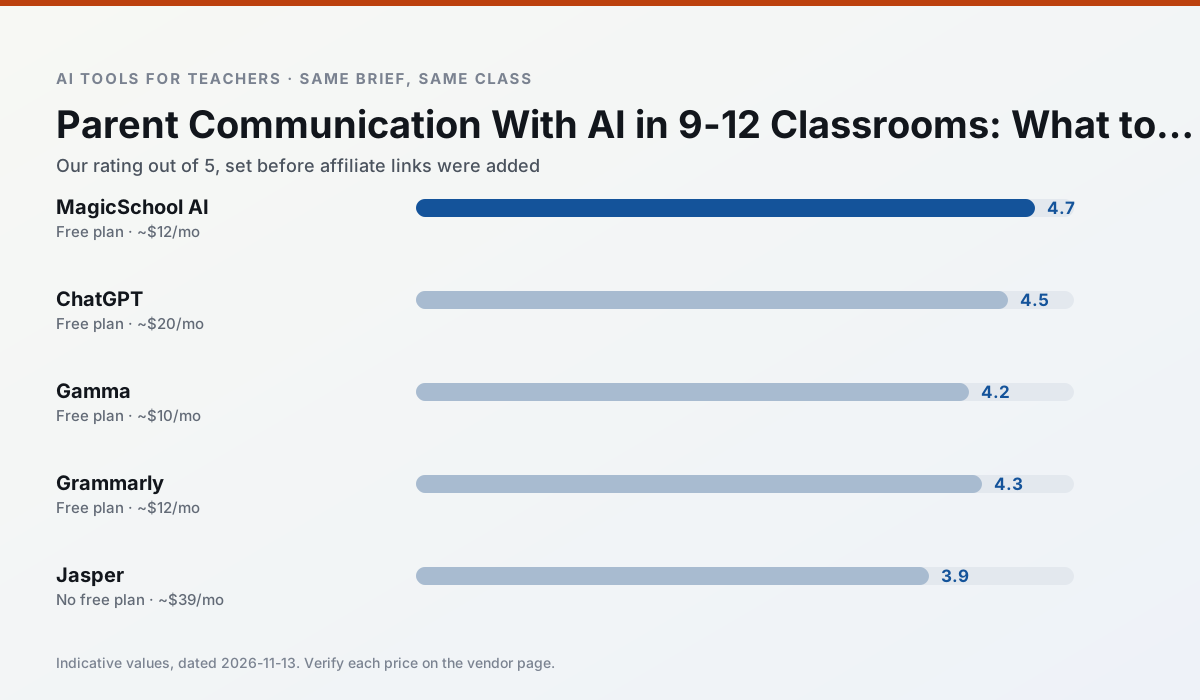
Side by side
Comparison table
Ratings reflect our timed classroom workflow, not vendor claims. Prices are indicative — verify on the vendor site.
| Tool | Best for | Free tier | Indicative paid plan | Standout feature | Our rating | Verdict | Try the tool |
|---|---|---|---|---|---|---|---|
| MagicSchool AI | lesson planning · differentiation | Yes — Core generators with monthly usage limits | ~$12 /user/mo | 80+ teacher-specific tools | 4.7 / 5 | Top pick | Try free |
| ChatGPT | lesson planning · parent communication | Yes — Usage-limited model access | ~$20 /user/mo | Custom GPTs and Projects | 4.5 / 5 | Top pick | Try free |
| Gamma | slide decks · parent communication | Yes — Credit-limited generation | ~$10 /user/mo | Prompt-to-deck | 4.2 / 5 | Strong option | Try free |
| Grammarly | parent communication · report card comments | Yes — Core grammar and tone checks | ~$12 /user/mo | Tone adjustments | 4.3 / 5 | Strong option | Try free |
| Jasper | newsletters · parent communication | No ongoing free plan | ~$39 /user/mo | Brand voice profiles | 3.9 / 5 | Situational | Try free |
| Writesonic | newsletters · parent communication | Yes — Limited credits | ~$16 /user/mo | Article and email generators | 3.8 / 5 | Situational | Try free |
Match your situation
Best for X
Different jobs need different tools. Here is what we would open first in each case.
If there is no budget, start with MagicSchool AI: free plan with clearest quota is the least punishing free tier here.
On the daily cycle, ChatGPT saves the most edit time per task; the paid tier mostly buys more runs rather than better ones.
Gamma has the shortest path from opening a tab to a usable draft, which matters more than the feature count on a Monday.
Grammarly answers the three questions a district actually asks: rostering, admin controls and a data-processing agreement. That is usually what decides a school purchase.
Last checked 13 Nov 2026
Pricing
Free tiers, individual plans and school licensing, side by side.
| Tool | Free plan | Individual / paid | School & district | Billing note | Verify |
|---|---|---|---|---|---|
| MagicSchool AI | $0 — Core generators with monthly usage limits | ~$12 /user/mo | Custom quote | Indicative — verify on vendor site | Vendor |
| ChatGPT | $0 — Usage-limited model access | ~$20 /user/mo | ~$25+ /user/mo | Indicative — verify on vendor site | Vendor |
| Gamma | $0 — Credit-limited generation | ~$10 /user/mo | ~$20 /user/mo | Indicative — verify on vendor site | Vendor |
| Grammarly | $0 — Core grammar and tone checks | ~$12 /user/mo | ~$15 /user/mo | Indicative — billed annually | Vendor |
| Jasper | No ongoing free tier | ~$39 /user/mo | ~$59+ /user/mo | Indicative — verify on vendor site | Vendor |
| Writesonic | $0 — Limited credits | ~$16 /user/mo | ~$49 /user/mo | Indicative — verify on vendor site | Vendor |
Editorial rule: pricing is re-checked every 2–3 months and the top 50 pages are refreshed every 6 months. See our funding policy.
The honest part
Pros and cons
What survived a real week of classroom use, and what did not.
Pros
- Widest purpose-built template library
- Strong free tier for individual teachers
- Fast to learn with almost no prompting skill
Cons
- Outputs still need standards review
- Best features sit behind the paid tier
- District approval can be slow
Pros
- Most flexible option available
- Huge community of teacher prompt libraries
- Strong multilingual support
Cons
- Requires prompt skills for consistent results
- No built-in standards alignment
- District privacy review usually required
Pros
- Fastest path from outline to deck
- Modern-looking output by default
- Good export options
Cons
- Design control is limited
- Credits run out quickly
- Not built for student data
Pros
- Catches errors in high-stakes parent emails
- Works everywhere you already write
- Very low learning curve
Cons
- Not education-specific
- Can flatten teacher voice
- Premium needed for tone rewriting
Pros
- Consistent tone across communications
- Strong long-form editor
- Good for district comms teams
Cons
- Priced for marketing teams
- Overkill for one classroom
- No education-specific features
In the classroom
Use cases
Five concrete workflows, with the tool we would open for each one.
Three reading levels from one source text
Paste a vetted text, ask for supported, core and extension versions, then check the vocabulary list by hand. Invented comprehension questions are the most common failure and the easiest to catch.
Recommended: MagicSchool AIA Monday morning lesson plan in twelve minutes
The twelve minutes come from not rewriting the skeleton. Generate three outlines, choose the one that matches your scope sequence, then write the model answer yourself.
Recommended: ChatGPTA parent email in two languages
Draft in plain, warm language with no names, translate, then back-translate the important sentences to check meaning. Keep specific incidents out of the prompt and add them yourself.
Recommended: GammaRubric and feedback comments in one pass
Reorder the workflow so the rubric is yours and the comments are generated. Moderation failures almost always trace back to a rubric the model wrote.
Recommended: GrammarlyAn IEP present-levels first draft
Use aggregated, anonymised data only. Ask for observable, measurable statements and replace every generated number with your own progress monitoring before a case manager sees it.
Recommended: Jasper
Questions teachers ask us
FAQ
Direct answers, also published as FAQPage structured data for search and AI assistants.
Can AI do parent communication at 9-12 level?
Which tool is best for parent communication?
What is the biggest risk?
Sources & further reading
Our recommendation
Try MagicSchool AI free for your next parent communication task
A large library of teacher-specific AI generators in one dashboard. Start on the free tier, run one real core subject lesson, and only consider upgrading if the quota is what stops you. Disclosure: we may earn a commission (30% recurring) at no extra cost to you.
Some links on this page are affiliate links. We may earn a commission at no extra cost to you. Our rankings are editorial and never pay-to-play. Never enter student PII into a free consumer account.
Keep reading
Related comparisons in this cluster.
Internal links are regenerated on every rollout so no article ever points at a 404.