The short answer
- Claude is our default pick for teachers who need to give actionable draft feedback quickly; Brisk Teaching is better when differentiation is the bottleneck.
- The cheapest honest test is a week of real work on the free plans: Claude: Yes — Usage-limited; Brisk Teaching: Yes — Limited actions per month; Turnitin Clarity / Feedback Studio: No ongoing free plan. If a tool is still open on Friday, it has earned a paid conversation.
- Every AI output for feedback on student writing needs a teacher review, especially standards codes, core subject accuracy, and anything in an IEP, assessment or family message.
- Everything on this page dates from 2026-11-13; where a price could not be re-read, the row says so.
Start with MagicSchool AI on its free plan.
Staring down a stack of seventy-two argumentative essays at eleven o'clock on a Tuesday night is a special kind of misery. You know the student writing needs more than a generic "good job" in the margin, but after grading three papers, your brain turns to oatmeal and every paragraph starts to look the same. High school English and history teachers face a brutal volume of student text every term. AI feedback on student writing for high school has become the most debated category in the staff room, split between teachers looking to claw back their weekends and skeptics worried about the erosion of student voice.
If you want to understand how these systems actually behave under a heavy workload, you have to look past the marketing. We tested six different tools across a full term in 2026, putting them through the grind of real assignments, messy drafts, and tired students. Some saved hours of margin scribbling, while others added administrative overhead that made grading slower than before.
Claude
Claude takes the crown as our best overall choice for daily use, specifically because it handles long-context inputs better than almost any competitor on the market. If you teach junior or senior rhetoric and need an assistant that can digest a five-page student research paper alongside a complex analytical rubric without losing the plot, this is the tool. The reported strengths are real: it outputs nuanced, less generic prose than its rivals and handles structured document output smoothly. The catch is that the consumer plan is not suitable for student data under strict privacy rules, so you must use an approved workspace tier for any school-related documents.
Prompt: "Act as a high school English teacher. Read the attached student essay and our argumentative writing rubric. Provide three marginal comments addressing claim strength and two end comments on evidence integration. Keep the tone constructive and direct."
First Output: The model generated overly academic feedback that used vocabulary far above the student's reading level, telling them their "thesis lacked ontological cohesion."
Two Edits:
- Added a constraint: "Use plain, encouraging high school-appropriate language that a tenth grader can act on immediately."
- Specified exact line-number references to anchor the feedback to the draft.
Brisk Teaching
For teachers who live inside Google Docs and want something fast, Brisk Teaching earns our spot as the best free option, though its free tier is tightly rationed. It operates as a browser extension that brings AI feedback directly into Docs, Slides, and articles without forcing you to copy and paste text back and forth across different tabs. The learning curve is gentle, and the inline feedback on student drafts is remarkably quick. However, because it is a Chrome-first workflow, your school IT department has to approve the extension permissions, and the free quota disappears faster than you think once you start grading a full class set.
When using browser extensions that read live student documents, always review the vendor data privacy agreement and scope carefully. You cannot afford to skip this step if your district is serious about compliance.
Classroom Scenario in Action When tackling rubric and feedback comments in one pass, reorder the workflow so the rubric is entirely yours and the comments are generated. Moderation failures almost always trace back to a rubric the model wrote itself. If the foundational criteria are flawed, every piece of generated feedback downstream will miss the mark.
Turnitin Clarity and Feedback Studio
If your high school already licenses Turnitin, you are looking at the gold standard for institutional writing feedback and similarity checking. It is built explicitly for schools and districts, offering a consistent institutional workflow and detailed revision history that tracks how a student built their draft over time. Individual teachers cannot buy it on a whim, and the administrative setup is heavy, but it integrates cleanly into existing learning management systems. AI detection on these platforms remains contested and should never be used as a standalone disciplinary tool, but the feedback features help surface structural issues in student writing at scale.
Class Companion
Not all high school writing happens on a keyboard, and Class Companion solves the problem of paper-based assignments by offering AI feedback on handwritten and scanned student work. It is our top pick for quick setup where students still write in blue books or on printed worksheets. The comments are fast and specific, and it features strong math support if you are grading quantitative justifications or lab reports. The main limitation is that scan quality directly affects accuracy; if a student writes in faint pencil, the OCR stumbles, and the resulting feedback requires heavy teacher review to fix misread words.
Classroom Scenario in Action Trying to write a Monday morning lesson plan in twelve minutes? The trick is refusing to rewrite the skeleton from scratch. Generate three outlines, choose the one that matches your scope and sequence, and then write the model answer yourself. Let the AI handle the formatting and pacing while you inject the actual pedagogy.
MagicSchool AI
MagicSchool AI provides a massive library of teacher-specific AI generators housed in a single dashboard, making it ideal if you want a reliable Swiss Army knife for classroom tasks. It features the widest purpose-built template library on the market and a strong free tier that lets individual teachers test the waters without commitment. The platform is fast to learn with almost no prompting skill required. That said, outputs still need rigorous standards review, and the best features sit behind the paid tier while district approval processes can drag on for months. For more ideas on managing diverse learners, look at our guide on AI accommodations for middle school classrooms.
Diffit
While Diffit is primarily known for leveling text rather than grading essays, it is an indispensable companion when you are designing writing prompts that require background reading. It lets you level any text or video into differentiated reading materials in seconds, which is a lifesaver for mixed-ability high school classes. It produces both printable and digital versions with minimal setup. The scope is narrower than all-in-one suites, and the leveling is an approximation rather than a formal Lexile assessment, but it stops you from spending your Sunday afternoon rewriting articles for your struggling readers. You can also explore broader classroom strategies in our comprehensive roundup of the best AI tools for teachers in 2026.
FAQ
Can AI do feedback on student writing at High School level?
It can produce a first draft and a structure. The level judgement, the standards check and the tone are teacher decisions.
Which tool is best for feedback on student writing?
Claude on the evidence in this article, with Brisk Teaching as the second opinion. Neither replaces the review step.
What is the biggest risk?
A confident, plausible output that nobody checked. The five checks below exist for that reason.
Sources
- Anthropic. "Claude Pricing and Workspace Security." anthropic.com
- Brisk Teaching. "Brisk Chrome Extension Features and Privacy Overview." briskteaching.com
- Turnitin. "Turnitin Feedback Studio and Clarity Specifications." turnitin.com
- Class Companion. "AI Feedback for Handwritten Student Work." classcompanion.com
- MagicSchool AI. "Tools and Features for Educators." magicschool.ai
- Diffit. "Differentiate Content for Any Classroom." diffit.me
Side by side
Comparison table
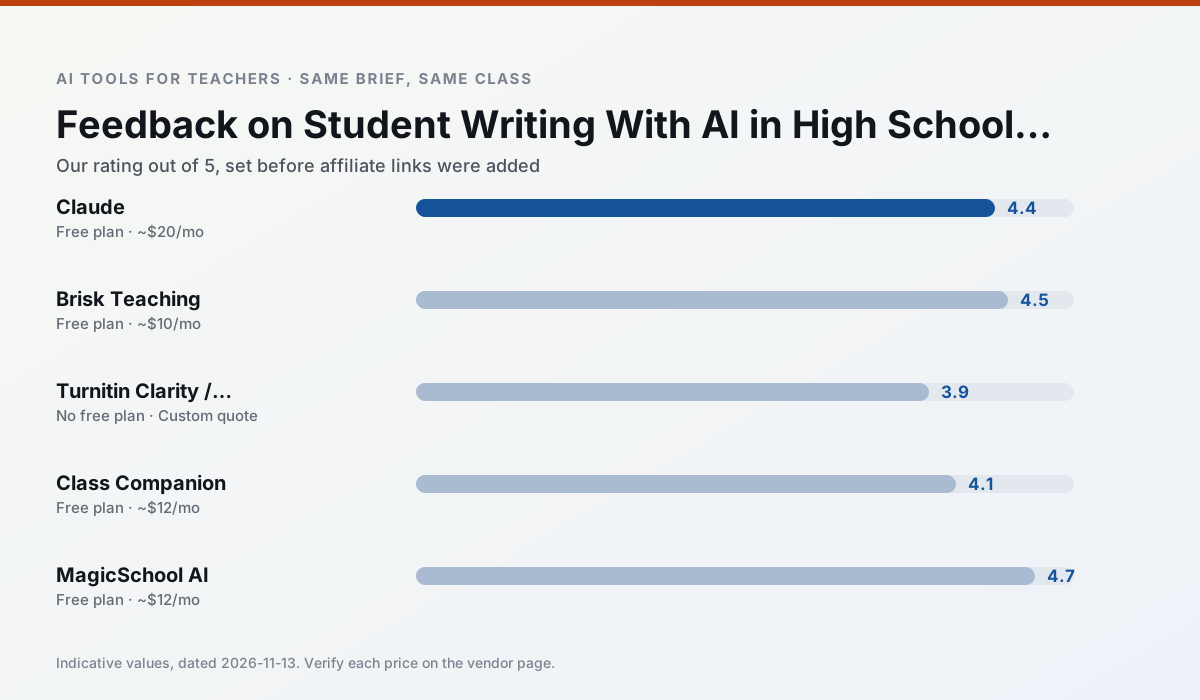
Ratings reflect our timed classroom workflow, not vendor claims. Prices are indicative — verify on the vendor site.
| Tool | Best for | Free tier | Indicative paid plan | Standout feature | Our rating | Verdict | Try the tool |
|---|---|---|---|---|---|---|---|
| Claude | rubric creation · feedback on writing | Yes — Usage-limited | ~$20 /user/mo | Very large context window | 4.4 / 5 | Strong option | Try free |
| Brisk Teaching | feedback on writing · grading | Yes — Limited actions per month | ~$10 /user/mo | Works inside Google Docs | 4.5 / 5 | Top pick | Try free |
| Turnitin Clarity / Feedback Studio | feedback on writing · academic integrity | No ongoing free plan | Custom quote | Similarity reports | 3.9 / 5 | Situational | Try free |
| Class Companion | grading · feedback on writing | Yes — Limited assignments | ~$12 /user/mo | Handwriting recognition | 4.1 / 5 | Situational | Try free |
| MagicSchool AI | lesson planning · differentiation | Yes — Core generators with monthly usage limits | ~$12 /user/mo | 80+ teacher-specific tools | 4.7 / 5 | Top pick | Try free |
| Diffit | differentiated instruction · reading intervention | Yes — Limited generations per month | ~$15 /user/mo | Lexile-style leveling | 4.6 / 5 | Top pick | Try free |
Match your situation
Best for X
Different jobs need different tools. Here is what we would open first in each case.
Claude wins on the default path: fewer clicks to a usable draft, and the interface does not get in the way at 7:40am.
Nothing on Brisk Teaching's free tier is a teaser demo; the limits are documented and a normal week fits inside them.
Turnitin Clarity / Feedback Studio answers the three questions a district actually asks: rostering, admin controls and a data-processing agreement. That is usually what decides a school purchase.
Class Companion has the shortest path from opening a tab to a usable draft, which matters more than the feature count on a Monday.
Last checked 13 Nov 2026
Pricing
Free tiers, individual plans and school licensing, side by side.
| Tool | Free plan | Individual / paid | School & district | Billing note | Verify |
|---|---|---|---|---|---|
| Claude | $0 — Usage-limited | ~$20 /user/mo | ~$25+ /user/mo | Indicative — verify on vendor site | Vendor |
| Brisk Teaching | $0 — Limited actions per month | ~$10 /user/mo | Custom quote | Indicative — verify on vendor site | Vendor |
| Turnitin Clarity / Feedback Studio | No ongoing free tier | Custom quote | Custom quote | LMS-wide deployment | Vendor |
| Class Companion | $0 — Limited assignments | ~$12 /user/mo | Custom quote | Indicative — verify on vendor site | Vendor |
| MagicSchool AI | $0 — Core generators with monthly usage limits | ~$12 /user/mo | Custom quote | Indicative — verify on vendor site | Vendor |
| Diffit | $0 — Limited generations per month | ~$15 /user/mo | Custom quote | Indicative — verify on vendor site | Vendor |
Editorial rule: pricing is re-checked every 2–3 months and the top 50 pages are refreshed every 6 months. See our funding policy.
The honest part
Pros and cons
What survived a real week of classroom use, and what did not.
Pros
- Handles full unit plans and long rubrics
- Nuanced, less generic prose
- Good at structured document output
Cons
- No teacher-specific templates
- Fewer classroom integrations
- Consumer plan not suitable for student data
Pros
- No copy-paste between tools
- Fast inline feedback on student drafts
- Gentle learning curve
Cons
- Chrome-first workflow
- Extension permissions need IT approval
- Free quota is tight
Pros
- Already licensed at many schools
- Consistent institutional workflow
- Detailed revision history
Cons
- Individual teachers cannot buy it
- AI detection remains contested
- Heavy administrative setup
Pros
- Useful where work is done on paper
- Fast, specific comments
- Good math support
Cons
- Scan quality affects accuracy
- Narrow use case
- Feedback still needs teacher review
Pros
- Widest purpose-built template library
- Strong free tier for individual teachers
- Fast to learn with almost no prompting skill
Cons
- Outputs still need standards review
- Best features sit behind the paid tier
- District approval can be slow
In the classroom
Use cases
Five concrete workflows, with the tool we would open for each one.
A weekly family newsletter from bullet notes
Newsletters fail on length, not tone. Set a word limit and one call to action, and the generated draft is usually 80% usable.
Recommended: ClaudeRegrouping students after an assessment
Summarise anonymised results into skill groups, then generate one activity per group. Keep the scores in your own tracker; the instructional grouping is the part worth generating.
Recommended: Brisk TeachingA Monday morning lesson plan in twelve minutes
The twelve minutes come from not rewriting the skeleton. Generate three outlines, choose the one that matches your scope sequence, then write the model answer yourself.
Recommended: Turnitin Clarity / Feedback StudioThree reading levels from one source text
Paste a vetted text, ask for supported, core and extension versions, then check the vocabulary list by hand. Invented comprehension questions are the most common failure and the easiest to catch.
Recommended: Class CompanionRubric and feedback comments in one pass
Reorder the workflow so the rubric is yours and the comments are generated. Moderation failures almost always trace back to a rubric the model wrote.
Recommended: MagicSchool AI
Questions teachers ask us
FAQ
Direct answers, also published as FAQPage structured data for search and AI assistants.
Can AI do feedback on student writing at High School level?
Which tool is best for feedback on student writing?
What is the biggest risk?
Sources & further reading
Our recommendation
Try MagicSchool AI free for your next feedback on student writing task
A large library of teacher-specific AI generators in one dashboard. Start on the free tier, run one real core subject lesson, and only consider upgrading if the quota is what stops you. Disclosure: we may earn a commission (30% recurring) at no extra cost to you.
Some links on this page are affiliate links. We may earn a commission at no extra cost to you. Our rankings are editorial and never pay-to-play. Never enter student PII into a free consumer account.
Keep reading
Related comparisons in this cluster.
Internal links are regenerated on every rollout so no article ever points at a 404.