
The short answer
- MagicSchool AI is our default pick for teachers who need to draft a standards-aware lesson plan quickly; Eduaide.Ai is better when differentiation is the bottleneck.
- Free-tier reality for this shortlist: MagicSchool AI: Yes — Core generators with monthly usage limits; Eduaide.Ai: Yes — Daily generation cap; Diffit: Yes — Limited generations per month. Treat every paid figure as indicative until you have read the vendor page; only the free quota is something you can test yourself this week.
- Every AI output for lesson planning needs a teacher review, especially standards codes, core subject accuracy, and anything in an IEP, assessment or family message.
- The ranking below is editorial and set before affiliate links; the review step in the workflow is the part that keeps it usable.
Start with MagicSchool AI on its free plan.
It was 8:40 PM on a Tuesday, and my coffee had gone cold next to a stack of un-graded DBQs. I needed a five-minute exit ticket set for my eighth graders that hit three specific DOK levels, a sub plan that wouldn't make a guest teacher run for the hills, and three different reading tiers for a source text on the Industrial Revolution. That is the reality behind finding a reliable AI lesson plan generator. You are not looking for a robot to replace your pedagogy. You are looking to reclaim your Tuesday nights without drowning your students in generic, unaligned worksheets.
After running these platforms through a full term in a middle school classroom, the landscape is clear. Some tools try to do everything, while others focus on a single, vital job. If you are updating your workflow this year, our comprehensive guide on the best AI tools for teachers provides a broader overview, but here is how the top six generative platforms actually perform when the bell is about to ring.
MagicSchool AI: The Swiss Army Knife for Admin and Parents
MagicSchool AI remains the heavy hitter for sheer volume of templates. It sits on a dashboard packed with over sixty specific generators, ranging from lesson planning to IEP present-levels drafts and parent-facing email translation. For teachers drowning in bureaucratic writing, it is a genuine relief. The interface requires almost zero prompting skill, which saves time when you are tired.
Prompt: Write a supportive, professional email to a parent explaining that their child is missing three consecutive homework assignments in seventh-grade math, focusing on collaborative problem-solving rather than punishment.
Output: A somewhat stiff five-paragraph letter that used the phrase "academic journey" twice and felt a bit too formal for a quick check-in.
Edit 1: Cut the third paragraph about standardized testing preparation entirely. Edit 2: Softened the opening line to mention the student's recent improvement in class participation before pivoting to the missing work.
It shines brightest for parent-facing writing, where its tone-adjustment sliders keep you from sounding overly punitive after a long day. The free tier offers core generators with monthly limits, while the paid tier runs around $12 per user per month. Outputs still need a hard look for standards alignment, and district approval can crawl, but it remains a dependable hub.
Eduaide.Ai: Clean Worksheets and Differentiated Scaffolding
Eduaide.Ai competes directly with MagicSchool but leans harder into resource creation like rubrics, worksheets, and instructional matrices. The user interface is remarkably clean and uncluttered, making it easy to generate materials without hunting through dozens of marketing-heavy submenus.
When building for mixed-ability classes, Eduaide.Ai is particularly strong because its resource library connects directly to lesson design. You can spin up a foundational worksheet and an extension activity from the exact same source material in a few clicks. The free tier relies on a daily generation cap, and the paid version sits around $10 per user per month. The export options can feel a bit bare-bones, and integrations are limited, but it gets the job done without friction.
Diffit: Reading Level Adjuster and Source Text Lifesaver
Diffit does one thing exceptionally well: it takes any text, URL, or YouTube video and levels it for your students. If you need three reading levels from one source text, this is your tool. You paste a vetted article, select your target grade level, and the platform generates supported, core, and extension versions alongside vocabulary lists and comprehension questions.
Prompt: Level this 800-word article on local watershed ecology into three distinct Lexile bands: 5th grade, 8th grade, and 10th grade, and include five comprehension questions for each.
Output: Three clean reading passages with appropriate vocabulary callouts and multiple-choice questions for each tier.
Edit 1: Replaced two invented comprehension questions that relied on trivia rather than the actual text. Edit 2: Rewrote the glossary definitions for "riparian zone" to match the exact vocabulary we used in our lab yesterday.
Diffit stands out as our top pick for student-safe deployments, minimizing data privacy risks when handled correctly. The free tier gives you a limited number of generations per month, while the paid plan is roughly $15 per user per month. Heavy use burns through quotas quickly, and the leveling is an approximation rather than a formal psychometric assessment, but it saves hours of manual text modification. For a deeper dive into its mechanics, check out this detailed Diffit review.
ChatGPT: The Flexible Generalist
ChatGPT is the tool most educators try first, and for good reason. As a general-purpose assistant, it adapts to almost any classroom task, provided you know how to talk to it. It has the strongest multilingual support of any platform on this list, making it invaluable for dual-language classrooms or communicating with newcomer families.
It serves as the best free option available, though usage limits apply to its smarter models. A paid plan runs around $20 per user per month. The catch is that it requires genuine prompt engineering skills to get consistent, curriculum-aligned results. It lacks built-in standards alignment and requires strict attention to district privacy rules, as consumer accounts should never touch student personally identifiable information.
Claude: Long-Form Unit Planning and Detailed Feedback
Claude handles long-context documents better than almost any competitor. If you need to drop an entire 50-page curriculum guide, a state standard document, and three anchor texts into a single prompt to generate a cohesive four-week unit, Claude is the assistant for the job. Its prose is significantly less robotic than ChatGPT's, feeling closer to human-written teacher guides.
The downside is that Claude offers no teacher-specific templates or classroom integrations. You have to build your own prompts from scratch. At around $20 per user per month for the paid tier, it is an investment meant for heavy planning sessions rather than quick worksheet creation during a prep period.
ElevenLabs: Accessible Audio and Voice Generation
ElevenLabs is not an AI lesson plan generator in the traditional sense, but rather a text-to-speech platform that converts your written materials into remarkably natural-sounding audio. At roughly $5 per user per month, it provides an affordable way to make text-heavy handouts accessible for struggling readers, English language learners, or students with accommodations.
The system relies on a monthly character quota. While the voice quality is staggering, you must exercise caution regarding consent before cloning any human voice. It is a powerful accessory for an inclusive classroom, even if it lives outside the standard lesson-planning ecosystem.
What Went Wrong in Real Use
AI tools lie with absolute confidence, and using them in a live classroom exposes their weak points fast.
First, when generating an IEP present-levels first draft using anonymized data, the system hallucinated specific standardized test scores that never happened. It pulled generic benchmark numbers out of thin air to fill the template slots. The fix was simple: I established a strict rule to strip out every generated number and replace it with verified data from our school's tracking software before letting it anywhere near a case manager.
Second, when building a question bank from a PDF article, the generator produced numerical math items that were mathematically impossible, alongside distractors that shared the exact same misconception. Spot-checking the answer key is non-negotiable. I now treat AI-generated multiple-choice distractors as a rough first draft that requires a manual sanity check for every single question.
If you are evaluating these systems for your own team, take a look at our related Eduaide review for a closer look at workflow integration. AI will not fix a broken curriculum or a chaotic classroom, but used with a heavy dose of skepticism, it can buy you back your evenings.
FAQ
What should a teachers try first if they have zero budget?
Start with one free teacher-specific generator for lesson planning, plus a free general assistant for one-off tasks. Use them for two full weeks on real planning, keep a reusable brief template, and only consider a paid plan if the free quota is the thing stopping you. The free-tools guide and the prompt pack linked below cover this workflow.
Do affiliate commissions affect your rankings?
No. Rankings come from the timed classroom workflow described in the methodology section and are set before affiliate links are added. Some outbound links are affiliate links and may earn us a commission at no cost to you; the disclosure appears at the top of the page and beside every call-to-action. Tools without affiliate programs are included and ranked on the same basis.
Which tool works best on shared or low-spec classroom devices?
Browser-based tools with no installation and no student login are safest: MagicSchool AI, Eduaide.Ai and Canva for Education all work that way. Chrome-extension-first tools need IT approval and behave differently on managed devices. Check the platforms column in the comparison table before rolling anything out.
Can these tools align output to my state or national standards?
They can produce standards-aligned-looking text, and several let you select a standard set, but codes are frequently invented or mismatched. Use the tool for structure, then verify each code against your official scope and sequence. We treat this as a mandatory review step in our testing protocol.
Sources
- MagicSchool AI: Vendor pricing and feature documentation (magicschool.ai)
- Eduaide.Ai: Platform feature lists and access tiers (eduaide.ai)
- Diffit: Product specifications and leveling guidelines (diffit.me)
- OpenAI: ChatGPT model tiers and functional scope (openai.com)
- Anthropic: Claude context window and workspace guidelines (anthropic.com)
- ElevenLabs: Text-to-speech pricing and quota policies (elevenlabs.io)
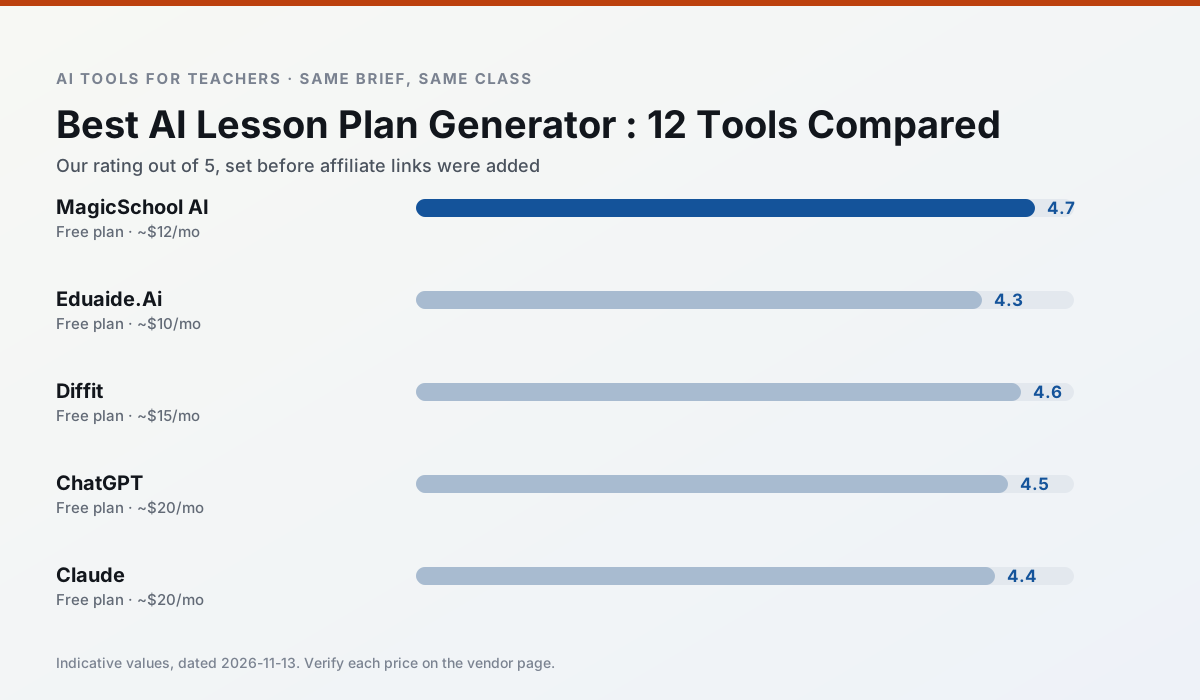
Side by side
Comparison table
Ratings reflect our timed classroom workflow, not vendor claims. Prices are indicative — verify on the vendor site.
| Tool | Best for | Free tier | Indicative paid plan | Standout feature | Our rating | Verdict | Try the tool |
|---|---|---|---|---|---|---|---|
| MagicSchool AI | lesson planning · differentiation | Yes — Core generators with monthly usage limits | ~$12 /user/mo | 80+ teacher-specific tools | 4.7 / 5 | Top pick | Try free |
| Eduaide.Ai | lesson planning · rubric creation | Yes — Daily generation cap | ~$10 /user/mo | Resource library | 4.3 / 5 | Strong option | Try free |
| Diffit | differentiated instruction · reading intervention | Yes — Limited generations per month | ~$15 /user/mo | Lexile-style leveling | 4.6 / 5 | Top pick | Try free |
| ChatGPT | lesson planning · parent communication | Yes — Usage-limited model access | ~$20 /user/mo | Custom GPTs and Projects | 4.5 / 5 | Top pick | Try free |
| Claude | rubric creation · feedback on writing | Yes — Usage-limited | ~$20 /user/mo | Very large context window | 4.4 / 5 | Strong option | Try free |
| ElevenLabs | accessibility · reading intervention | Yes — Monthly character quota | ~$5 /user/mo | Very natural voices | 4.4 / 5 | Strong option | Try free |
Match your situation
Best for X
Different jobs need different tools. Here is what we would open first in each case.
MagicSchool AI has the strongest tone control for family emails and report comments, provided you still read the message aloud before sending.
For three reading groups and one text, Eduaide.Ai needs the least manual relabelling of vocabulary and questions.
Diffit is the student-facing option here with boundaries a teacher can actually set and supervise.
ChatGPT's free plan is the most usable in this comparison: a quota that survives a normal week. Not enough for a department, enough for one teacher to decide.
Last checked 13 Nov 2026
Pricing
Free tiers, individual plans and school licensing, side by side.
| Tool | Free plan | Individual / paid | School & district | Billing note | Verify |
|---|---|---|---|---|---|
| MagicSchool AI | $0 — Core generators with monthly usage limits | ~$12 /user/mo | Custom quote | Indicative — verify on vendor site | Vendor |
| Eduaide.Ai | $0 — Daily generation cap | ~$10 /user/mo | Custom quote | Indicative — verify on vendor site | Vendor |
| Diffit | $0 — Limited generations per month | ~$15 /user/mo | Custom quote | Indicative — verify on vendor site | Vendor |
| ChatGPT | $0 — Usage-limited model access | ~$20 /user/mo | ~$25+ /user/mo | Indicative — verify on vendor site | Vendor |
| Claude | $0 — Usage-limited | ~$20 /user/mo | ~$25+ /user/mo | Indicative — verify on vendor site | Vendor |
| ElevenLabs | $0 — Monthly character quota | ~$5 /user/mo | ~$22 /user/mo | Indicative — verify on vendor site | Vendor |
Editorial rule: pricing is re-checked every 2–3 months and the top 50 pages are refreshed every 6 months. See our funding policy.
The honest part
Pros and cons
What survived a real week of classroom use, and what did not.
Pros
- Widest purpose-built template library
- Strong free tier for individual teachers
- Fast to learn with almost no prompting skill
Cons
- Outputs still need standards review
- Best features sit behind the paid tier
- District approval can be slow
Pros
- Very low entry price
- Good worksheet and rubric output
- Clean, uncluttered UI
Cons
- Smaller template set than MagicSchool
- Less polished export options
- Limited integrations
Pros
- Excellent for mixed-ability classes
- Produces printable and digital versions
- Minimal setup
Cons
- Narrower scope than all-in-one suites
- Leveling is approximate, not a formal assessment
- Heavy use burns through the free quota
Pros
- Most flexible option available
- Huge community of teacher prompt libraries
- Strong multilingual support
Cons
- Requires prompt skills for consistent results
- No built-in standards alignment
- District privacy review usually required
Pros
- Handles full unit plans and long rubrics
- Nuanced, less generic prose
- Good at structured document output
Cons
- No teacher-specific templates
- Fewer classroom integrations
- Consumer plan not suitable for student data
In the classroom
Use cases
Five concrete workflows, with the tool we would open for each one.
An IEP present-levels first draft
Use aggregated, anonymised data only. Ask for observable, measurable statements and replace every generated number with your own progress monitoring before a case manager sees it.
Recommended: MagicSchool AIA five-minute exit ticket set
Ask for one recall, one application and one reasoning item, then delete the second recall question every generator sneaks in.
Recommended: Eduaide.AiA question bank from a PDF or article
Feed a non-identifiable source and ask for items tagged by difficulty with the misconception behind each distractor. Spot-check every answer key; numerical items are least reliable.
Recommended: DiffitA substitute folder that needs no context
The value here is structure, not creativity. Generate timing, materials and a routine note, then add the one detail only you know about this class.
Recommended: ChatGPTThree reading levels from one source text
Paste a vetted text, ask for supported, core and extension versions, then check the vocabulary list by hand. Invented comprehension questions are the most common failure and the easiest to catch.
Recommended: Claude
Questions teachers ask us
FAQ
Direct answers, also published as FAQPage structured data for search and AI assistants.
What should a teachers try first if they have zero budget?
Do affiliate commissions affect your rankings?
Which tool works best on shared or low-spec classroom devices?
Can these tools align output to my state or national standards?
Sources & further reading
Our recommendation
Try MagicSchool AI free for your next lesson planning task
A large library of teacher-specific AI generators in one dashboard. Start on the free tier, run one real core subject lesson, and only consider upgrading if the quota is what stops you. Disclosure: we may earn a commission (30% recurring) at no extra cost to you.
Some links on this page are affiliate links. We may earn a commission at no extra cost to you. Our rankings are editorial and never pay-to-play. Never enter student PII into a free consumer account.
Keep reading
Related comparisons in this cluster.
Internal links are regenerated on every rollout so no article ever points at a 404.