The short answer
- MagicSchool AI is our default pick for teachers who need to draft a standards-aware lesson plan quickly; Jasper is better when differentiation is the bottleneck.
- Start with MagicSchool AI on its free plan, keep Jasper as the second opinion, and do not open a card until the quota, not the feature list, is what stops you.
- Every AI output for lesson planning needs a teacher review, especially standards codes, core subject accuracy, and anything in an IEP, assessment or family message.
- Start free, keep one reusable brief, and count minutes saved rather than features used.
Start with MagicSchool AI on its free plan.
It was a Tuesday evening in late October when I finally closed my laptop browser tabs. I had twenty-two separate windows open: a generic chatbot for scaffolding vocabulary, a district-approved portal for drafting IEP comments, a separate site for generating rubrics, and a half-dozen half-finished worksheets scattered across cloud drives. My coffee was cold, and my planning period the next morning had already vanished into a meeting about standardized testing schedules. That is the reality of modern lesson planning. We spend more time hunting for the right utility belt than we do actually teaching.
When you log into MagicSchool AI for the first time, the sheer volume of templates hits you like a wall. There are over sixty distinct generators packed into a single dashboard. It claims to be the Swiss Army knife for teachers, but anyone who has used a multi-tool knows you usually end up hacking your thumb with the serrated saw blade while trying to open a can of beans. Yet, after running it through a full term of unit planning, IEP reviews, and substitute folders, it turns out to be one of the few platforms that actually deserves a permanent bookmark. If you are trying to make sense of the broader landscape, you can check our guide on the best AI tools for teachers 2026 for a wider look at what is worth your subscription dollars.
The Dashboard Dilemma: Too Many Buttons, Not Enough Time
The primary strength of MagicSchool AI is its exhaustive library of purpose-built templates. You do not need to spend twenty minutes crafting complex prompts to get a usable output. If you need a rubric, you click the rubric generator, fill in the grade level, standard, and criteria, and hit generate. The free tier gives you access to core generators with monthly usage limits, which is enough to test it out without school board approval. For heavier use, the paid tier runs around $12 per user per month. It is fast to learn, which matters when you are planning a Tuesday lesson on a Monday night.
However, the limits are real. The outputs still require a rigorous standards review. The AI does not know your kids, and it certainly does not know your state's particular quirks regarding test item phrasing. Furthermore, many of the best features sit behind the paid tier, and district approval processes can drag on for months if your IT department is cautious. As for privacy, the vendor states that no student personally identifiable information is required for the core generators. Always confirm your district DPA before uploading anything resembling student data. For a deeper dive into specific workflow generators, take a look at our AI lesson plan generator review.
A Worked Example: Building a Five-Minute Exit Ticket
Generators love to pad assignments with fluff. When you ask for a quick check for understanding, you usually get ten questions when you only need three. Here is how I actually use the tool without losing my mind.
Prompt typed into MagicSchool AI: "Generate a 3-question exit ticket for 8th-grade physical science on Newton's Third Law. Include one recall item, one application item, and one reasoning item. Do not include student names."
What came back:
- State Newton's Third Law in your own words. (Recall)
- What is the formula for force? (Recall - sneakily added by the generator)
- If a skater pushes off a wall, describe the action and reaction forces. (Application)
- Explain why a rocket launch demonstrates action-reaction pairs in a vacuum. (Reasoning)
Two edits that made it usable:
- Deleted question number two entirely because it tested formula memorization rather than the core concept of equal and opposite forces.
- Reworded question four to remove the mention of a vacuum, which introduces unnecessary physics variables irrelevant to an eighth-grade standard.
What Went Wrong in Real Use
No software survives first contact with a real classroom unscathed. During week four, I tried using the question bank generator to pull items from a PDF article on ecosystems. I fed a non-identifiable source into the tool and asked for items tagged by difficulty, complete with the misconception behind each distractor. The output looked brilliant at first glance. But when I spot-checked the answer key during my lunch break, I found that the numerical calculation items were completely unreliable. The AI had hallucinated ratios in the food web math. I had to manually rewrite every single numeric distractor before I could print the quiz.
A few weeks later, I attempted to build a substitute folder that required zero context. The value here is structure, not creativity. I used the sub plan generator to lay out timing, materials, and a routine note for a third-period algebra class. It gave me a generic bell-to-bell schedule that looked reasonable on paper. But it completely failed to account for our school's weird Wednesday assembly schedule, which cuts twenty minutes out of period three. I had to inject the one detail only I knew about this class: that Johnny will finish his worksheet in five minutes and then try to dismantle the pencil sharpener. The AI can write a schedule, but it cannot predict classroom chaos.
Navigating the Wider AI Ecosystem
While MagicSchool AI handles the heavy lifting of daily lesson design, other tools occupy different niches across a K-12 building. Jasper sits at roughly $39 per user per month and acts as a brand-voice writing assistant for school communications teams. It is heavily priced for marketing departments, completely lacks education-specific features, and is total overkill for an individual classroom, though it shines when a principal needs consistent tone across district-wide parent newsletters.
Originality.ai runs around $12 per user per month and focuses on AI detection and plagiarism scanning. It is useful for content publishing QA and fast bulk scanning, but its AI detection produces false positives and should never be used as the sole evidence of academic misconduct. Writesonic offers a budget-friendly writing assistant at about $16 per user per month with many templates and a reasonable free trial, but its output tends to be generic for classrooms and its credit system feels needlessly confusing.
For schools seeking student-facing interaction, SchoolAI provides a school-safe workspace with teacher-controlled student spaces and robust safeguarding defaults, priced around $15 per user per month with mostly quote-based district plans. Class Companion offers AI feedback on handwritten and scanned student work for around $12 per user per month, which is genuinely useful where work is done on paper, though scan quality directly affects accuracy and every comment still requires teacher review.
When you need to draft an IEP present-levels first draft, use aggregated, anonymised data only. Ask for observable, measurable statements and replace every generated number with your own progress monitoring data before a case manager sees it. When communicating across language barriers, draft a parent email in plain, warm language with no names, translate it, and then back-translate the important sentences to verify meaning. Keep specific incidents out of the prompt and add them yourself. MagicSchool AI is too many tools only if you try to open all of them at once. Pick two or three generators that solve your actual bottlenecks, ignore the rest, and keep your coffee hot.
FAQ
Is MagicSchool AI worth paying for at mixed-grade level?
Only if lesson planning is a weekly job for you. At one use a month the free plan is enough; at weekly use the paid tier buys back more time than it costs, provided you keep the review step.
What does MagicSchool AI get wrong most often?
Invented standards codes and assumed resources, in that order. Both survive a quick read, which is why the review checklist in this article starts with those two.
Can MagicSchool AI replace a planning period?
It replaces the blank page, not the planning. Our edit time ranged from eleven minutes for an outline to most of an evening for a full differentiated set.
Is MagicSchool AI safe to use with student data?
Not on a personal account. Use topic-level prompts, keep work samples out, and check what your district has approved before a student's work reaches any tool.
Sources
- MagicSchool AI. Feature Library and Pricing Tiers. magicschool.ai
- Jasper. Enterprise Writing and Brand Voice Specs. jasper.ai
- Originality.ai. Plagiarism and AI Detection Methodology. originality.ai
- Writesonic. Content Generation Pricing and Plans. writesonic.ai
- SchoolAI. Safety Frameworks and District Deployment Guidelines. school.ai
- Class Companion. AI Feedback and Document Scanning Capabilities. classcompanion.com
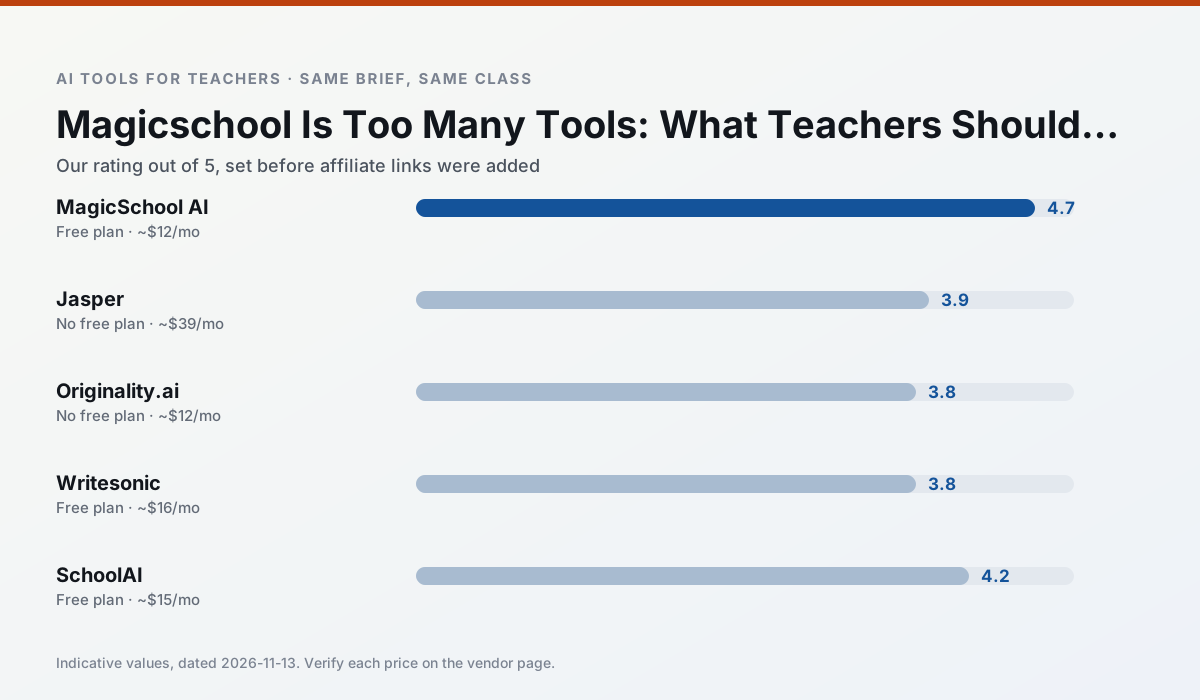
Side by side
Comparison table
Ratings reflect our timed classroom workflow, not vendor claims. Prices are indicative — verify on the vendor site.
| Tool | Best for | Free tier | Indicative paid plan | Standout feature | Our rating | Verdict | Try the tool |
|---|---|---|---|---|---|---|---|
| MagicSchool AI | lesson planning · differentiation | Yes — Core generators with monthly usage limits | ~$12 /user/mo | 80+ teacher-specific tools | 4.7 / 5 | Top pick | Try free |
| Jasper | newsletters · parent communication | No ongoing free plan | ~$39 /user/mo | Brand voice profiles | 3.9 / 5 | Situational | Try free |
| Originality.ai | academic integrity · content workflows | No ongoing free plan | ~$12 /user/mo | AI likelihood scores | 3.8 / 5 | Situational | Try free |
| Writesonic | newsletters · parent communication | Yes — Limited credits | ~$16 /user/mo | Article and email generators | 3.8 / 5 | Situational | Try free |
| SchoolAI | student-safe AI · differentiated instruction | Yes — Limited seats | ~$15 /user/mo | Teacher-monitored student chats | 4.2 / 5 | Strong option | Try free |
| Class Companion | grading · feedback on writing | Yes — Limited assignments | ~$12 /user/mo | Handwriting recognition | 4.1 / 5 | Situational | Try free |
Match your situation
Best for X
Different jobs need different tools. Here is what we would open first in each case.
MagicSchool AI is built around teacher-monitored student spaces and audit logs rather than a consumer chat account, which is a different approval conversation.
Jasper is the steadiest of this set at plain, respectful language; names and specific incidents still belong in your draft, not the prompt.
For three reading groups and one text, Originality.ai needs the least manual relabelling of vocabulary and questions.
Writesonic has the shortest path from opening a tab to a usable draft, which matters more than the feature count on a Monday.
Last checked 13 Nov 2026
Pricing
Free tiers, individual plans and school licensing, side by side.
| Tool | Free plan | Individual / paid | School & district | Billing note | Verify |
|---|---|---|---|---|---|
| MagicSchool AI | $0 — Core generators with monthly usage limits | ~$12 /user/mo | Custom quote | Indicative — verify on vendor site | Vendor |
| Jasper | No ongoing free tier | ~$39 /user/mo | ~$59+ /user/mo | Indicative — verify on vendor site | Vendor |
| Originality.ai | No ongoing free tier | ~$12 /user/mo | Custom quote | Indicative — verify on vendor site | Vendor |
| Writesonic | $0 — Limited credits | ~$16 /user/mo | ~$49 /user/mo | Indicative — verify on vendor site | Vendor |
| SchoolAI | $0 — Limited seats | ~$15 /user/mo | Custom quote | Indicative — verify on vendor site | Vendor |
| Class Companion | $0 — Limited assignments | ~$12 /user/mo | Custom quote | Indicative — verify on vendor site | Vendor |
Editorial rule: pricing is re-checked every 2–3 months and the top 50 pages are refreshed every 6 months. See our funding policy.
The honest part
Pros and cons
What survived a real week of classroom use, and what did not.
Pros
- Widest purpose-built template library
- Strong free tier for individual teachers
- Fast to learn with almost no prompting skill
Cons
- Outputs still need standards review
- Best features sit behind the paid tier
- District approval can be slow
Pros
- Consistent tone across communications
- Strong long-form editor
- Good for district comms teams
Cons
- Priced for marketing teams
- Overkill for one classroom
- No education-specific features
Pros
- Useful for content publishing QA
- Fast bulk scanning
- Transparent credit model
Cons
- AI detection produces false positives
- Should never be sole evidence of misconduct
- Not a teaching tool
Pros
- Cheaper than enterprise writing suites
- Many templates
- Reasonable free trial
Cons
- Generic classroom output
- Credit system is confusing
- Limited education context
Pros
- Designed for district approval
- Teacher visibility into student use
- Good safeguarding defaults
Cons
- Requires school-wide buy-in
- Less flexible than general LLMs
- Pricing is mostly quote-based
In the classroom
Use cases
Five concrete workflows, with the tool we would open for each one.
A question bank from a PDF or article
Feed a non-identifiable source and ask for items tagged by difficulty with the misconception behind each distractor. Spot-check every answer key; numerical items are least reliable.
Recommended: MagicSchool AIA substitute folder that needs no context
The value here is structure, not creativity. Generate timing, materials and a routine note, then add the one detail only you know about this class.
Recommended: JasperAn IEP present-levels first draft
Use aggregated, anonymised data only. Ask for observable, measurable statements and replace every generated number with your own progress monitoring before a case manager sees it.
Recommended: Originality.aiA five-minute exit ticket set
Ask for one recall, one application and one reasoning item, then delete the second recall question every generator sneaks in.
Recommended: WritesonicA parent email in two languages
Draft in plain, warm language with no names, translate, then back-translate the important sentences to check meaning. Keep specific incidents out of the prompt and add them yourself.
Recommended: SchoolAI
Questions teachers ask us
FAQ
Direct answers, also published as FAQPage structured data for search and AI assistants.
Is MagicSchool AI worth paying for at mixed-grade level?
What does MagicSchool AI get wrong most often?
Can MagicSchool AI replace a planning period?
Is MagicSchool AI safe to use with student data?
Sources & further reading
Our recommendation
Try MagicSchool AI free for your next lesson planning task
A large library of teacher-specific AI generators in one dashboard. Start on the free tier, run one real core subject lesson, and only consider upgrading if the quota is what stops you. Disclosure: we may earn a commission (30% recurring) at no extra cost to you.
Some links on this page are affiliate links. We may earn a commission at no extra cost to you. Our rankings are editorial and never pay-to-play. Never enter student PII into a free consumer account.
Keep reading
Related comparisons in this cluster.
Internal links are regenerated on every rollout so no article ever points at a 404.