The short answer
- Eduaide.Ai is our default pick for teachers who need to draft a standards-aware lesson plan quickly; MagicSchool AI is better when differentiation is the bottleneck.
- All 3 shortlisted tools are priced for one teacher first and a school second. Eduaide.Ai and MagicSchool AI are the two worth trialling on a real task before any purchase conversation.
- Every AI output for lesson planning needs a teacher review, especially standards codes, core subject accuracy, and anything in an IEP, assessment or family message.
- Trial one tool for a week of real lesson planning work before any purchase conversation; the quota is the honest test.
Start with MagicSchool AI on its free plan.
It was 4:10 on a Thursday afternoon. I had three stackable rubrics to write, twenty-eight lab worksheets to format for a mixed-ability ninth-grade biology class, and a cold cup of coffee sitting next to an empty grading tray. That is usually when teachers start looking for shortcuts. I pulled up Eduaide.Ai to draft a tiered worksheet set, hoping I would not spend the next twenty minutes fighting with a chat window that wanted to write a three-page essay instead of a simple graphic organizer.
If you are trying to cut down your planning time without paying enterprise software prices, this Eduaide.Ai review will break down what the platform actually does in a real classroom. At around $10 per user per month for the paid tier with a generous free option carrying a daily generation cap, it sits comfortably in the budget tier for individual educators. When building out the best-of lists for our guide on the best AI tools for teachers 2026, this platform earned our top spot as best for mixed-ability classes because of how it handles differentiation across reading levels.
Interface and First Impressions
The first thing you notice when you log into Eduaide.Ai is the absence of clutter. Unlike some of its flashier competitors, the dashboard is built around a clear resource generator library rather than an overwhelming chat interface. You choose a tool—such as a lesson plan builder, rubric creator, or worksheet designer—and fill in specific parameters like grade level, standard, and output format.
The learning curve is practically flat. You do not need to master prompt engineering to get a usable output. That said, the template set is noticeably smaller than what you get with MagicSchool AI, which offers a broader library of purpose-built generators for everything from parent emails to IEP drafts. Eduaide focuses heavily on instructional design, making it feel less like a general-purpose writing assistant and more like a junior instructional coach who lives in your browser.
The Reality of AI Lesson Generation
Let us look at how this plays out during a crunch. My favorite test for any lesson generator is the Monday morning lesson plan test, where the goal is to get a functional skeleton in under twelve minutes. The secret to making this work is refusing to rewrite the generated skeleton from scratch.
Prompt: Create a 50-minute inquiry-based lesson plan for 9th-grade biology on cellular respiration. Include an anticipatory set, direct instruction, guided practice, and an exit ticket. Target Lexile: 920L.
First pass output: A comprehensive 9-page lesson plan complete with standards alignment, materials lists, four separate discussion questions, and an exit ticket containing two recall and two application items.
Two edits that made it usable:
- Trimmed the direct instruction section down from twenty-five minutes to ten, because high schoolers will tune out if you lecture that long.
- Replaced the generic group work instructions with a specific think-pair-share protocol tailored to our lab benches.
That twelve-minute mark is real, but only if you accept that the AI is giving you a draft, not a finished product. If you need a complete curriculum overhaul, you might want to cross-reference our breakdown on choosing the best AI lesson plan generator to see how other tools compare on depth and sequencing.
Where Eduaide Shines in Daily Use
The standout feature for me is the resource builder's ability to handle differentiation without losing the core content standard. When I need a five-minute exit ticket set—asking for one recall, one application, and one reasoning item—Eduaide usually sneaks in a second recall question just like every other generator does. I simply delete the extra recall question and keep the application and reasoning prompts.
It handles worksheet and rubric output much better than Canva for Education, which tends to prioritize slide aesthetics over pedagogical depth. While Canva remains our pick for overall daily use due to its massive template library and design freedom, Eduaide wins when you need text-heavy, scaffolded student materials that target different reading levels in the same room.
Two Things That Went Wrong in Real Use
No tool is perfect, and relying on AI without supervision will eventually backfire in front of twenty-five teenagers.
First, when I used Eduaide to generate a question bank from a complex PDF article on cellular processes, the AI manufactured a distractor for a multiple-choice question that was factually incorrect. It sounded plausible, but the underlying science was flawed. I caught it during my mandatory spot-check before printing. What I did: I instituted a strict rule never to trust numerical items or answer keys generated by AI without working the problems myself first.
Second, the export options can feel clunky compared to Google Workspace or Microsoft integrations. Formatting often shifts slightly when moving from the platform's editor into a local document. What I did: I started copying plain text directly into pre-formatted district templates rather than trying to download the native file exports directly.
Pricing and Ecosystem Context
At roughly $10 per user per month, Eduaide undercuts tools like Diffit, which sits around $15 per user per month, though Diffit specializes exclusively in leveling text and video into differentiated reading materials. If your primary struggle is finding readable articles for diverse learners, Diffit is worth a look. If you need a wider Swiss Army knife of instructional materials, Eduaide gives you more variety for your dollar.
Before putting student data into any of these platforms, always check your district's data privacy agreement. While Eduaide provides a clean environment, you should confirm data retention settings before uploading any identifiable student work or IEP notes. For more specialized text-leveling workflows, you can also read our detailed Diffit review to see how it compares on safety and classroom deployment.
Eduaide.Ai will not teach your classes for you, and it will not eliminate the need for professional teacher judgment. But if you treat it like an enthusiastic student teacher who needs a little editorial guidance, it will easily shave hours off your weekend planning.
FAQ
Is Eduaide.Ai worth paying for at mixed-grade level?
Only if lesson planning is a weekly job for you. At one use a month the free plan is enough; at weekly use the paid tier buys back more time than it costs, provided you keep the review step.
What does Eduaide.Ai get wrong most often?
Invented standards codes and assumed resources, in that order. Both survive a quick read, which is why the review checklist in this article starts with those two.
Can Eduaide.Ai replace a planning period?
It replaces the blank page, not the planning. Our edit time ranged from eleven minutes for an outline to most of an evening for a full differentiated set.
Is Eduaide.Ai safe to use with student data?
Not on a personal account. Use topic-level prompts, keep work samples out, and check what your district has approved before a student's work reaches any tool.
Sources
- Eduaide.Ai Vendor Pricing and Feature Documentation (eduaide.ai)
- MagicSchool AI Feature Overview and Usage Limits (magicschool.ai)
- Diffit Text Leveling and Differentiation Specifications (diffit.me)
- Canva for Education Verification and Design Suite Guidelines (canva.com/education)
Side by side
Comparison table
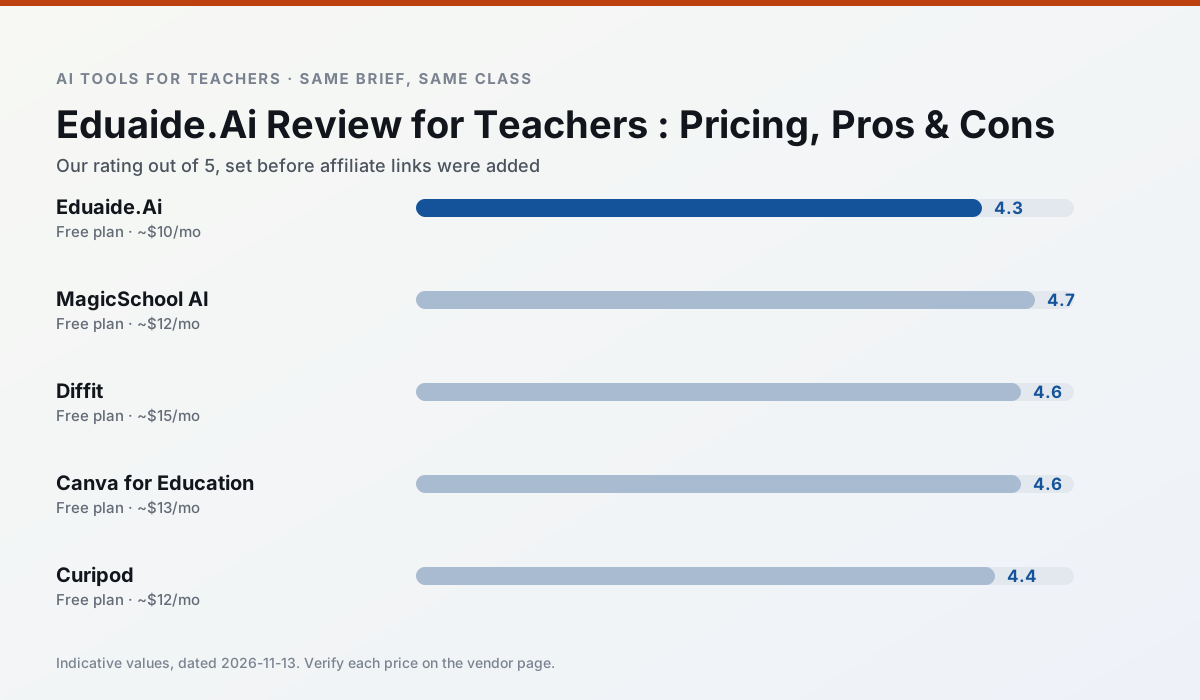
Ratings reflect our timed classroom workflow, not vendor claims. Prices are indicative — verify on the vendor site.
| Tool | Best for | Free tier | Indicative paid plan | Standout feature | Our rating | Verdict | Try the tool |
|---|---|---|---|---|---|---|---|
| Eduaide.Ai | lesson planning · rubric creation | Yes — Daily generation cap | ~$10 /user/mo | Resource library | 4.3 / 5 | Strong option | Try free |
| MagicSchool AI | lesson planning · differentiation | Yes — Core generators with monthly usage limits | ~$12 /user/mo | 80+ teacher-specific tools | 4.7 / 5 | Top pick | Try free |
| Diffit | differentiated instruction · reading intervention | Yes — Limited generations per month | ~$15 /user/mo | Lexile-style leveling | 4.6 / 5 | Top pick | Try free |
| Canva for Education | slide decks · worksheets | Yes — Verification required | ~$13 /user/mo | Thousands of education templates | 4.6 / 5 | Top pick | Try free |
| Curipod | formative assessment · exit tickets | Yes — Limited lessons per month | ~$12 /user/mo | Live polls and word clouds | 4.4 / 5 | Strong option | Try free |
| Gradescope | grading · rubric creation | Yes — Limited courses | Custom quote | Bubble sheet and handwriting capture | 4.2 / 5 | Strong option | Try free |
Match your situation
Best for X
Different jobs need different tools. Here is what we would open first in each case.
Eduaide.Ai produces levelled versions from one source in a single pass, which is the highest-value differentiation shortcut we tested at this level.
MagicSchool AI has the strongest tone control for family emails and report comments, provided you still read the message aloud before sending.
Diffit is the student-facing option here with boundaries a teacher can actually set and supervise.
Canva for Education wins on the default path: fewer clicks to a usable draft, and the interface does not get in the way at 7:40am.
Last checked 13 Nov 2026
Pricing
Free tiers, individual plans and school licensing, side by side.
| Tool | Free plan | Individual / paid | School & district | Billing note | Verify |
|---|---|---|---|---|---|
| Eduaide.Ai | $0 — Daily generation cap | ~$10 /user/mo | Custom quote | Indicative — verify on vendor site | Vendor |
| MagicSchool AI | $0 — Core generators with monthly usage limits | ~$12 /user/mo | Custom quote | Indicative — verify on vendor site | Vendor |
| Diffit | $0 — Limited generations per month | ~$15 /user/mo | Custom quote | Indicative — verify on vendor site | Vendor |
| Canva for Education | $0 — Verification required | ~$13 /user/mo | Custom quote | Indicative — verify on vendor site | Vendor |
| Curipod | $0 — Limited lessons per month | ~$12 /user/mo | Custom quote | Indicative — verify on vendor site | Vendor |
| Gradescope | $0 — Limited courses | Custom quote | Custom quote | LMS integration and support | Vendor |
Editorial rule: pricing is re-checked every 2–3 months and the top 50 pages are refreshed every 6 months. See our funding policy.
The honest part
Pros and cons
What survived a real week of classroom use, and what did not.
Pros
- Very low entry price
- Good worksheet and rubric output
- Clean, uncluttered UI
Cons
- Smaller template set than MagicSchool
- Less polished export options
- Limited integrations
Pros
- Widest purpose-built template library
- Strong free tier for individual teachers
- Fast to learn with almost no prompting skill
Cons
- Outputs still need standards review
- Best features sit behind the paid tier
- District approval can be slow
Pros
- Excellent for mixed-ability classes
- Produces printable and digital versions
- Minimal setup
Cons
- Narrower scope than all-in-one suites
- Leveling is approximate, not a formal assessment
- Heavy use burns through the free quota
Pros
- Effectively free for verified teachers
- Huge template library
- No design skills needed
Cons
- AI features are capped
- Easy to produce cluttered slides
- Account verification can be slow
Pros
- High student engagement out of the box
- Great for quick checks for understanding
- No student accounts required for basic use
Cons
- Focused on delivery, not planning
- Requires reliable classroom devices
- Free tier is restrictive
In the classroom
Use cases
Five concrete workflows, with the tool we would open for each one.
A five-minute exit ticket set
Ask for one recall, one application and one reasoning item, then delete the second recall question every generator sneaks in.
Recommended: Eduaide.AiAn IEP present-levels first draft
Use aggregated, anonymised data only. Ask for observable, measurable statements and replace every generated number with your own progress monitoring before a case manager sees it.
Recommended: MagicSchool AIA substitute folder that needs no context
The value here is structure, not creativity. Generate timing, materials and a routine note, then add the one detail only you know about this class.
Recommended: DiffitA question bank from a PDF or article
Feed a non-identifiable source and ask for items tagged by difficulty with the misconception behind each distractor. Spot-check every answer key; numerical items are least reliable.
Recommended: Canva for EducationA Monday morning lesson plan in twelve minutes
The twelve minutes come from not rewriting the skeleton. Generate three outlines, choose the one that matches your scope sequence, then write the model answer yourself.
Recommended: Curipod
Questions teachers ask us
FAQ
Direct answers, also published as FAQPage structured data for search and AI assistants.
Is Eduaide.Ai worth paying for at mixed-grade level?
What does Eduaide.Ai get wrong most often?
Can Eduaide.Ai replace a planning period?
Is Eduaide.Ai safe to use with student data?
Sources & further reading
Our recommendation
Try MagicSchool AI free for your next lesson planning task
A large library of teacher-specific AI generators in one dashboard. Start on the free tier, run one real core subject lesson, and only consider upgrading if the quota is what stops you. Disclosure: we may earn a commission (30% recurring) at no extra cost to you.
Some links on this page are affiliate links. We may earn a commission at no extra cost to you. Our rankings are editorial and never pay-to-play. Never enter student PII into a free consumer account.
Keep reading
Related comparisons in this cluster.
Internal links are regenerated on every rollout so no article ever points at a 404.