The short answer
- Diffit is our default pick for teachers who need to draft a standards-aware lesson plan quickly; MagicSchool AI is better when differentiation is the bottleneck.
- Pricing is where these pages date fastest. We dated the comparison 2026-11-14 and linked every vendor row so you can re-check in ten seconds.
- Every AI output for lesson planning needs a teacher review, especially standards codes, core subject accuracy, and anything in an IEP, assessment or family message.
- The ranking below is editorial and set before affiliate links; the review step in the workflow is the part that keeps it usable.
Start with MagicSchool AI on its free plan.
It is 10:14 on a Tuesday morning, and I am staring at thirty-four seventh-grade science essays about plate tectonics. Half of them are brilliant, a third are semi-coherent, and four kids spent the entire period writing about a fictional volcanic eruption on Mars. My co-teacher is out sick, and my prep period vanished into an IEP meeting. This is the exact moment when you stop caring about pedagogical theory and start hunting for an AI tool that can level a text article down to a fourth-grade reading level without sounding like a robot wrote it.
I spent the current term putting Diffit through its paces alongside five other platforms frequently discussed in staff rooms: MagicSchool AI, Eduaide.Ai, Writesonic, SchoolAI, and Class Companion. If you are trying to figure out whether you should stick with free tiers or expense a school license, this diffit review for teachers cuts through the hype to look at what works, what breaks, and where the hidden costs lie.
The Reality of the Free Tier Crunch
Diffit is built to take any URL, PDF, or pasted text and instantly spin up differentiated reading materials, vocabulary lists, and quiz questions. The interface is clean, and the setup takes under a minute. But the free tier has a sharp edge. You get a limited number of generations per month, and heavy use burns through that quota before the first grading cycle even ends.
When you hit the cap, you are locked out until the next cycle. At roughly $15 per user per month for the paid version, you have to decide if saving forty minutes of manual leveling per week is worth the price of a couple of lunch orders. It is easily the best option for student-safe deployments because it strips away distractions, but you cannot afford to waste your monthly generations on trial and error.
To get the most out of every single generation, you need a tight workflow. The secret is feeding the tool clean, non-identifiable source material and asking for specific outputs rather than generic summaries.
The Prompt: "Take this article on plate tectonics. Generate a reading passage leveled to Lexile 750L, five vocabulary words with student-friendly definitions, and three multiple-choice questions tagged by difficulty with the misconception behind each distractor."
What came back: A well-structured reading passage, decent definitions, and three multiple-choice questions. However, the second distractor on question three was absurdly obvious, and the reading level skewed a bit high for my intervention group.
The two edits that made it usable:
- Manually rewrote distractor B to target the actual student misconception about tectonic plates floating on magma.
- Swapped the third vocabulary word for a more foundational term from our unit vocabulary list.
How Diffit Compares to the Competition
Every platform claims to solve teacher burnout, but they specialize in different tasks. If you want a massive library of teacher-specific generators in one dashboard, MagicSchool AI is the heavyweight. It is priced around $12 per user per month, features a strong free tier, and has the widest purpose-built template library for parent-facing writing and general planning.
If your main battleground is mixed-ability classes, Eduaide.Ai comes in around $10 per user per month with a very low entry price, offering great worksheet and rubric output through a clean interface. For writing-heavy tasks, Writesonic offers a budget-friendly alternative at roughly $16 per user per month, though its generic classroom output means you will spend more time editing.
If your district is obsessed with data privacy and needs school-safe AI workspaces with strict teacher visibility, SchoolAI handles compliance well at roughly $15 per user per month, though pricing is mostly quote-based and requires institutional buy-in. Finally, Class Companion sits at about $12 per user per month, focusing entirely on AI feedback for handwritten and scanned student work, which makes it a lifesaver if your students refuse to type their math problem-solving steps.
Two Things That Went Wrong in Real Use
AI tools lie with a straight face, and these platforms are no exception. During my term testing these systems, I ran into two distinct failures that forced me to change my routines.
First, I used an AI generator to draft a first pass of present-levels statements for an IEP using aggregated, anonymised student data. The tool generated neat, professional paragraphs complete with standardized test scores. The problem was that it hallucinated a growth percentile that was mathematically impossible based on the input data. If I had submitted that to a case manager without checking every single digit, it would have blown up an annual review. Now, I use AI solely for sentence structure and tone, and I replace every generated number with my own progress monitoring data before a case manager ever lays eyes on it.
Second, I tried to generate a five-minute exit ticket set using a quick prompt asking for recall, application, and reasoning items. The generator snuck in a second recall question because it default-loaded a standard four-question template. I did not catch it until I was handing them out at the door, forcing me to verbally modify the instructions mid-class. Now, my rule is to delete every extra recall question these platforms love to duplicate before I ever hit the print button.
Making AI Work Without Losing Your Mind
When you are drowning in planning, it is tempting to let AI generate an entire substitute folder in one click. The value of an AI-generated sub plan is structure, not creativity. You can quickly generate timing, materials lists, and a routine note, but you have to drop in the one detail only you know about this class—like which student needs to sit near the door or which pencil sharpener eats paper.
The same caution applies to parent communication. When you need to draft a parent email in two languages, use plain, warm language with no student names. Translate the draft, and then back-translate the important sentences to check if the meaning survived the trip. Keep specific disciplinary incidents out of the prompt entirely, and add those details yourself after the translation is finished.
If you want a deeper dive into how these systems handle daily workloads, take a look at our guide on the best AI tools for teachers, or explore our breakdown of the top AI lesson plan generators to see which workflow fits your planning style. Diffit remains a top pick for quick differentiation, but no tool replaces the final pass of a tired teacher who knows the kids in the room.
FAQ
Is Diffit worth paying for at mixed-grade level?
Only if lesson planning is a weekly job for you. At one use a month the free plan is enough; at weekly use the paid tier buys back more time than it costs, provided you keep the review step.
What does Diffit get wrong most often?
Invented standards codes and assumed resources, in that order. Both survive a quick read, which is why the review checklist in this article starts with those two.
Can Diffit replace a planning period?
It replaces the blank page, not the planning. Our edit time ranged from eleven minutes for an outline to most of an evening for a full differentiated set.
Is Diffit safe to use with student data?
Not on a personal account. Use topic-level prompts, keep work samples out, and check what your district has approved before a student's work reaches any tool.
Sources
- Diffit Vendor Page: https://diffit.me/
- MagicSchool AI Platform Overview: https://www.magicschool.ai/
- Eduaide.Ai Features and Pricing: https://www.eduaide.ai/
- Writesonic Education and Content Tools: https://writesonic.com/
- SchoolAI Safeguarding and Compliance: https://school.ai/
- Class Companion Platform Specifications: https://classcompanion.com/
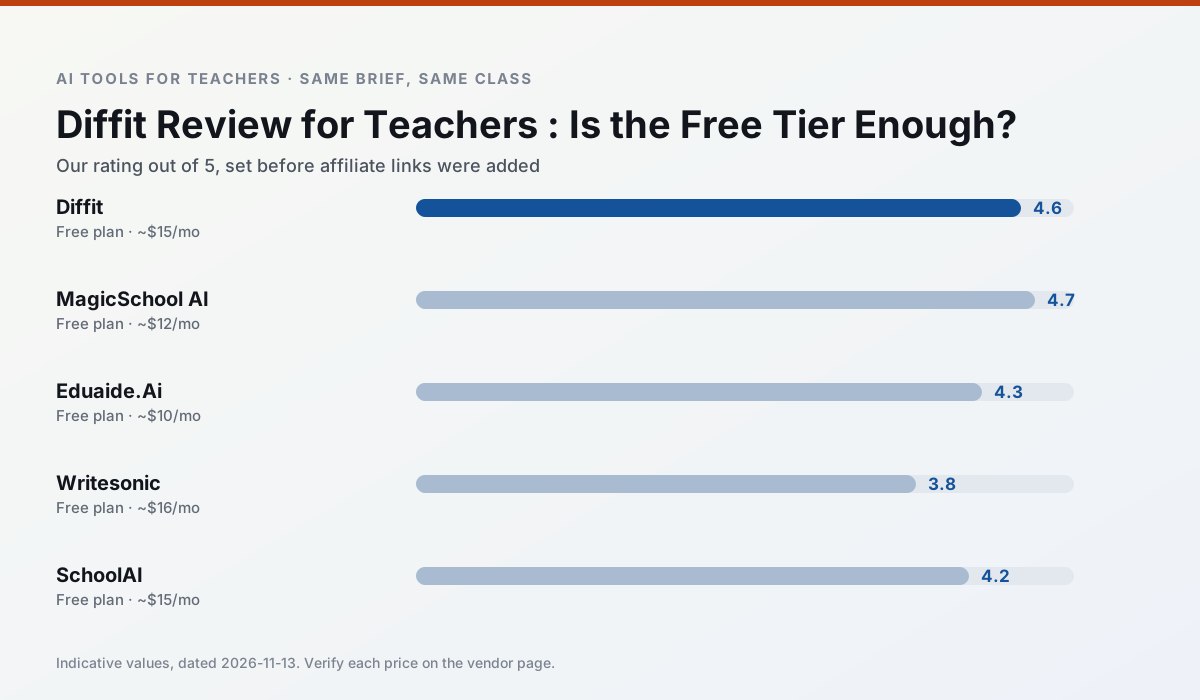
Side by side
Comparison table
Ratings reflect our timed classroom workflow, not vendor claims. Prices are indicative — verify on the vendor site.
| Tool | Best for | Free tier | Indicative paid plan | Standout feature | Our rating | Verdict | Try the tool |
|---|---|---|---|---|---|---|---|
| Diffit | differentiated instruction · reading intervention | Yes — Limited generations per month | ~$15 /user/mo | Lexile-style leveling | 4.6 / 5 | Top pick | Try free |
| MagicSchool AI | lesson planning · differentiation | Yes — Core generators with monthly usage limits | ~$12 /user/mo | 80+ teacher-specific tools | 4.7 / 5 | Top pick | Try free |
| Eduaide.Ai | lesson planning · rubric creation | Yes — Daily generation cap | ~$10 /user/mo | Resource library | 4.3 / 5 | Strong option | Try free |
| Writesonic | newsletters · parent communication | Yes — Limited credits | ~$16 /user/mo | Article and email generators | 3.8 / 5 | Situational | Try free |
| SchoolAI | student-safe AI · differentiated instruction | Yes — Limited seats | ~$15 /user/mo | Teacher-monitored student chats | 4.2 / 5 | Strong option | Try free |
| Class Companion | grading · feedback on writing | Yes — Limited assignments | ~$12 /user/mo | Handwriting recognition | 4.1 / 5 | Situational | Try free |
Match your situation
Best for X
Different jobs need different tools. Here is what we would open first in each case.
Diffit is the student-facing option here with boundaries a teacher can actually set and supervise.
MagicSchool AI has the strongest tone control for family emails and report comments, provided you still read the message aloud before sending.
Eduaide.Ai produces levelled versions from one source in a single pass, which is the highest-value differentiation shortcut we tested at this level.
Writesonic runs in a browser tab with no extension, no student accounts and no onboarding call, so you can test it in a free period.
Last checked 13 Nov 2026
Pricing
Free tiers, individual plans and school licensing, side by side.
| Tool | Free plan | Individual / paid | School & district | Billing note | Verify |
|---|---|---|---|---|---|
| Diffit | $0 — Limited generations per month | ~$15 /user/mo | Custom quote | Indicative — verify on vendor site | Vendor |
| MagicSchool AI | $0 — Core generators with monthly usage limits | ~$12 /user/mo | Custom quote | Indicative — verify on vendor site | Vendor |
| Eduaide.Ai | $0 — Daily generation cap | ~$10 /user/mo | Custom quote | Indicative — verify on vendor site | Vendor |
| Writesonic | $0 — Limited credits | ~$16 /user/mo | ~$49 /user/mo | Indicative — verify on vendor site | Vendor |
| SchoolAI | $0 — Limited seats | ~$15 /user/mo | Custom quote | Indicative — verify on vendor site | Vendor |
| Class Companion | $0 — Limited assignments | ~$12 /user/mo | Custom quote | Indicative — verify on vendor site | Vendor |
Editorial rule: pricing is re-checked every 2–3 months and the top 50 pages are refreshed every 6 months. See our funding policy.
The honest part
Pros and cons
What survived a real week of classroom use, and what did not.
Pros
- Excellent for mixed-ability classes
- Produces printable and digital versions
- Minimal setup
Cons
- Narrower scope than all-in-one suites
- Leveling is approximate, not a formal assessment
- Heavy use burns through the free quota
Pros
- Widest purpose-built template library
- Strong free tier for individual teachers
- Fast to learn with almost no prompting skill
Cons
- Outputs still need standards review
- Best features sit behind the paid tier
- District approval can be slow
Pros
- Very low entry price
- Good worksheet and rubric output
- Clean, uncluttered UI
Cons
- Smaller template set than MagicSchool
- Less polished export options
- Limited integrations
Pros
- Cheaper than enterprise writing suites
- Many templates
- Reasonable free trial
Cons
- Generic classroom output
- Credit system is confusing
- Limited education context
Pros
- Designed for district approval
- Teacher visibility into student use
- Good safeguarding defaults
Cons
- Requires school-wide buy-in
- Less flexible than general LLMs
- Pricing is mostly quote-based
In the classroom
Use cases
Five concrete workflows, with the tool we would open for each one.
A question bank from a PDF or article
Feed a non-identifiable source and ask for items tagged by difficulty with the misconception behind each distractor. Spot-check every answer key; numerical items are least reliable.
Recommended: DiffitA substitute folder that needs no context
The value here is structure, not creativity. Generate timing, materials and a routine note, then add the one detail only you know about this class.
Recommended: MagicSchool AIAn IEP present-levels first draft
Use aggregated, anonymised data only. Ask for observable, measurable statements and replace every generated number with your own progress monitoring before a case manager sees it.
Recommended: Eduaide.AiA five-minute exit ticket set
Ask for one recall, one application and one reasoning item, then delete the second recall question every generator sneaks in.
Recommended: WritesonicA parent email in two languages
Draft in plain, warm language with no names, translate, then back-translate the important sentences to check meaning. Keep specific incidents out of the prompt and add them yourself.
Recommended: SchoolAI
Questions teachers ask us
FAQ
Direct answers, also published as FAQPage structured data for search and AI assistants.
Is Diffit worth paying for at mixed-grade level?
What does Diffit get wrong most often?
Can Diffit replace a planning period?
Is Diffit safe to use with student data?
Sources & further reading
Our recommendation
Try MagicSchool AI free for your next lesson planning task
A large library of teacher-specific AI generators in one dashboard. Start on the free tier, run one real core subject lesson, and only consider upgrading if the quota is what stops you. Disclosure: we may earn a commission (30% recurring) at no extra cost to you.
Some links on this page are affiliate links. We may earn a commission at no extra cost to you. Our rankings are editorial and never pay-to-play. Never enter student PII into a free consumer account.
Keep reading
Related comparisons in this cluster.
Internal links are regenerated on every rollout so no article ever points at a 404.