The short answer
- Eduaide.Ai is our default pick for teachers who need to draft a standards-aware lesson plan quickly; ElevenLabs is better when differentiation is the bottleneck.
- Free-tier reality for this shortlist: Eduaide.Ai: Yes — Daily generation cap; ElevenLabs: Yes — Monthly character quota; Grammarly: Yes — Core grammar and tone checks. Treat every paid figure as indicative until you have read the vendor page; only the free quota is something you can test yourself this week.
- Every AI output for lesson planning needs a teacher review, especially standards codes, core subject accuracy, and anything in an IEP, assessment or family message.
- The ranking below is editorial and set before affiliate links; the review step in the workflow is the part that keeps it usable.
Start with ElevenLabs on its free plan.
It was 7:45 on a Tuesday morning, and my classroom printer was jammed with a fibrous gray pulp that looked like papier-mâché. I had three sections of ninth-grade English, no copies for the first period, and a stack of IEP updates due by Friday. That was the morning I stopped pretending I could build every worksheet, quiz, and rubric by hand. If you are trying to cut down planning hours without losing your mind, you have likely looked at the sprawling landscape of AI assistants. But most roundups give you a dizzying list of fifty apps you will never open twice. Let us narrow the field to six platforms that actually earn their keep.
The Reality of Eduaide and Its Menu of One Hundred Tools
When you first log into Eduaide.Ai, you are hit with a dashboard containing more than a hundred distinct generation modules. It is easy to feel overwhelmed by the sheer volume of options. Yet, most teachers quickly gravitate to a core rotation of about seven features: the lesson planner, the rubric builder, the worksheet generator, and a few assessment tools. The interface is clean and uncluttered, which matters when you are staring at a screen during your fifteen-minute planning period.
The free tier operates on a daily generation cap, while the paid tier sits around ten dollars a month. It stands out as our top pick for parent-facing writing and general instructional layout, outperforming many competitors on sheer output quality for rubrics and worksheets. However, it does not match the deep template ecosystem of platforms like those covered in our guide to the best AI tools for teachers 2026. If you want to see a deeper breakdown of its features, take a look at our dedicated eduaide-review. Be careful with data privacy here; always confirm your district's guidelines before pasting student data into any generation field.
Crafting a Substitute Folder That Needs No Context
Every teacher dreads building a sub folder because the mental load of anticipating every classroom quirk is exhausting. The value of an AI generator for emergency plans is structural, not creative. You do not need the machine to invent a clever thematic unit. You need it to format timing, list materials, and map out a routine that a stranger can follow without losing thirty kids in a windowless room.
Prompt: "Generate a 60-minute sub plan for 9th-grade English. The topic is reading a short non-fiction article on urban planning. Include a 10-minute warm-up, a 30-minute independent reading task with four text-dependent questions, and a 20-minute structured partner discussion. Provide timing, material lists, and explicit behavior expectations for transitions."
First pass output: The tool returned a well-formatted table with clear headings, timed segments, and four solid reading questions. It also included a generic transition warning about keeping voices at a level two.
Edits made:
- I swapped the generic discussion prompt for our classroom’s actual norms: "Use the three-finger protocol before speaking."
- I added a note about Jayden in the third row who needs a printed copy with enlarged font.
Expanding Your Toolkit Beyond Lesson Plans
Once your lesson scaffolding is sorted, you will likely need help with other operational bottlenecks. QuestionWell is our favorite free option for churning out standards-aligned question banks from any block of text or specific objective. It saves hours of manual item writing and features a clean export workflow, though you must feed it non-identifiable source text to stay compliant. Pair it with ElevenLabs when you need natural-sounding text-to-speech for accessible audio versions of your learning materials. ElevenLabs runs on a monthly character quota and costs roughly five dollars a month for the paid tier, making it ideal for mixed-ability classes where students need read-aloud support. Just remember to secure written consent before cloning any voices, and never use a student or colleague's voice without explicit permission.
Writing emails to guardians or drafting formal behavior logs requires a different kind of assistant entirely. Grammarly acts as a reliable safety net for high-stakes parent communication. At about twelve dollars a month for the paid tier, it catches tone errors and phrasing issues that slip past when you are exhausted at the end of the day. It works everywhere you write online, which lowers the learning curve to zero. Teachers should note that it is not an education-specific tool and can flatten your authentic voice if you accept every automated suggestion blindly. Make sure to disable text collection on school devices if your district requires strict DPA compliance.
Scaling Up Assessment and Grading
When you move past daily worksheets into heavy assessment cycles, manual grading becomes the bottleneck. Formative brings live formative assessment and standards tracking straight to your browser, working seamlessly with existing PDFs and Google Docs. At roughly fifteen dollars a user monthly, it provides robust data for intervention groups and integrates cleanly with major learning management systems. The setup effort is steeper than a simple quiz game, and the price adds up quickly if your school is not buying a site license. It pairs well with targeted advice found in our AI lesson plan generator breakdown.
For paper-heavy classrooms and large-scale assessments, Gradescope changes the math entirely. It uses AI-assisted rubric grading for scanned and handwritten student work, saving massive amounts of time on summative exams. While the institutional pricing is opaque and requires a custom quote, its ability to apply consistent rubric scoring and generate detailed item analytics is unmatched. It is absolute overkill for an elementary classroom, and because it handles raw student work, a full FERPA and data privacy review is non-negotiable before rollout.
AI tools will not fix a broken printing room or replace the intuition of a seasoned educator. Used selectively, however, they can pull you out of the administrative weeds so you can focus on the human work happening in front of you. Pick one tool, test it on a single low-stakes lesson, and build your workflow from there.
FAQ
Is Eduaide.Ai worth paying for at mixed-grade level?
Only if lesson planning is a weekly job for you. At one use a month the free plan is enough; at weekly use the paid tier buys back more time than it costs, provided you keep the review step.
What does Eduaide.Ai get wrong most often?
Invented standards codes and assumed resources, in that order. Both survive a quick read, which is why the review checklist in this article starts with those two.
Can Eduaide.Ai replace a planning period?
It replaces the blank page, not the planning. Our edit time ranged from eleven minutes for an outline to most of an evening for a full differentiated set.
Is Eduaide.Ai safe to use with student data?
Not on a personal account. Use topic-level prompts, keep work samples out, and check what your district has approved before a student's work reaches any tool.
Sources
- Eduaide.Ai Feature Library and Pricing Overview (eduaide.ai)
- ElevenLabs Text-to-Speech Quota and Audio Generation Documentation (elevenlabs.io)
- Grammarly Business and Education Privacy Standards (grammarly.com)
- QuestionWell Standards-Aligned Question Generator Specs (questionwell.com)
- Formative Assessment Platform and LMS Integration Guide (smartative.com)
- Gradescope AI-Assisted Rubric Grading and Compliance Documentation (gradescope.com)
Side by side
Comparison table
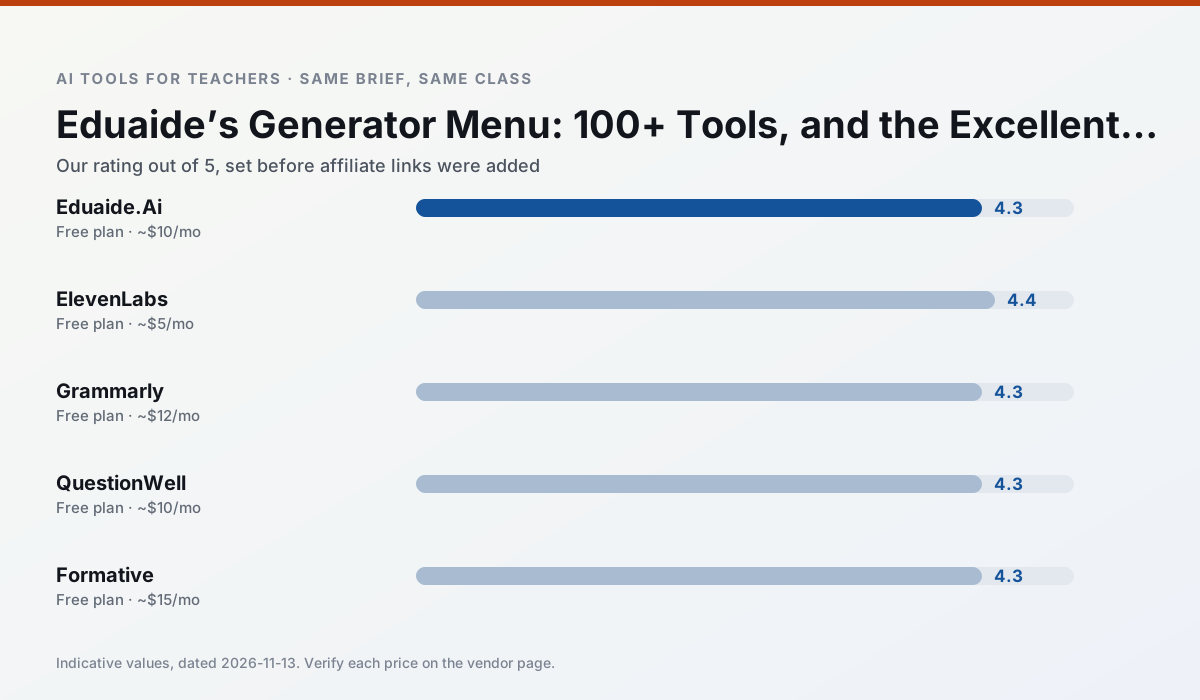
Ratings reflect our timed classroom workflow, not vendor claims. Prices are indicative — verify on the vendor site.
| Tool | Best for | Free tier | Indicative paid plan | Standout feature | Our rating | Verdict | Try the tool |
|---|---|---|---|---|---|---|---|
| Eduaide.Ai | lesson planning · rubric creation | Yes — Daily generation cap | ~$10 /user/mo | Resource library | 4.3 / 5 | Strong option | Try free |
| ElevenLabs | accessibility · reading intervention | Yes — Monthly character quota | ~$5 /user/mo | Very natural voices | 4.4 / 5 | Strong option | Try free |
| Grammarly | parent communication · report card comments | Yes — Core grammar and tone checks | ~$12 /user/mo | Tone adjustments | 4.3 / 5 | Strong option | Try free |
| QuestionWell | quiz generation · assessment | Yes — Monthly generation limit | ~$10 /user/mo | Exports to Google Forms / LMS | 4.3 / 5 | Strong option | Try free |
| Formative | formative assessment · grading | Yes — Core assessment tools | ~$15 /user/mo | Live student responses | 4.3 / 5 | Strong option | Try free |
| Gradescope | grading · rubric creation | Yes — Limited courses | Custom quote | Bubble sheet and handwriting capture | 4.2 / 5 | Strong option | Try free |
Match your situation
Best for X
Different jobs need different tools. Here is what we would open first in each case.
Eduaide.Ai has the strongest tone control for family emails and report comments, provided you still read the message aloud before sending.
ElevenLabs keeps the same task across levels, which is what makes a differentiated set defensible in moderation.
Grammarly is built around teacher-monitored student spaces and audit logs rather than a consumer chat account, which is a different approval conversation.
QuestionWell's free plan is the most usable in this comparison: a quota that survives a normal week. Not enough for a department, enough for one teacher to decide.
Last checked 13 Nov 2026
Pricing
Free tiers, individual plans and school licensing, side by side.
| Tool | Free plan | Individual / paid | School & district | Billing note | Verify |
|---|---|---|---|---|---|
| Eduaide.Ai | $0 — Daily generation cap | ~$10 /user/mo | Custom quote | Indicative — verify on vendor site | Vendor |
| ElevenLabs | $0 — Monthly character quota | ~$5 /user/mo | ~$22 /user/mo | Indicative — verify on vendor site | Vendor |
| Grammarly | $0 — Core grammar and tone checks | ~$12 /user/mo | ~$15 /user/mo | Indicative — billed annually | Vendor |
| QuestionWell | $0 — Monthly generation limit | ~$10 /user/mo | Custom quote | Indicative — verify on vendor site | Vendor |
| Formative | $0 — Core assessment tools | ~$15 /user/mo | Custom quote | Indicative — verify on vendor site | Vendor |
| Gradescope | $0 — Limited courses | Custom quote | Custom quote | LMS integration and support | Vendor |
Editorial rule: pricing is re-checked every 2–3 months and the top 50 pages are refreshed every 6 months. See our funding policy.
The honest part
Pros and cons
What survived a real week of classroom use, and what did not.
Pros
- Very low entry price
- Good worksheet and rubric output
- Clean, uncluttered UI
Cons
- Smaller template set than MagicSchool
- Less polished export options
- Limited integrations
Pros
- Excellent for accessible audio versions
- Low entry price
- Fast generation
Cons
- Quota-based billing
- Voice cloning consent considerations
- Not a teaching platform
Pros
- Catches errors in high-stakes parent emails
- Works everywhere you already write
- Very low learning curve
Cons
- Not education-specific
- Can flatten teacher voice
- Premium needed for tone rewriting
Pros
- Saves the most time on question writing
- Clean export workflow
- Good objective tagging
Cons
- Single-purpose tool
- Question quality varies by source text
- Limited student-facing features
Pros
- Strong data for intervention groups
- Works with existing PDFs and Docs
- Good LMS integrations
Cons
- Steeper setup than quiz games
- Best value requires school-wide rollout
- Price adds up per teacher
In the classroom
Use cases
Five concrete workflows, with the tool we would open for each one.
An IEP present-levels first draft
Use aggregated, anonymised data only. Ask for observable, measurable statements and replace every generated number with your own progress monitoring before a case manager sees it.
Recommended: Eduaide.AiA five-minute exit ticket set
Ask for one recall, one application and one reasoning item, then delete the second recall question every generator sneaks in.
Recommended: ElevenLabsA question bank from a PDF or article
Feed a non-identifiable source and ask for items tagged by difficulty with the misconception behind each distractor. Spot-check every answer key; numerical items are least reliable.
Recommended: GrammarlyA substitute folder that needs no context
The value here is structure, not creativity. Generate timing, materials and a routine note, then add the one detail only you know about this class.
Recommended: QuestionWellThree reading levels from one source text
Paste a vetted text, ask for supported, core and extension versions, then check the vocabulary list by hand. Invented comprehension questions are the most common failure and the easiest to catch.
Recommended: Formative
Questions teachers ask us
FAQ
Direct answers, also published as FAQPage structured data for search and AI assistants.
Is Eduaide.Ai worth paying for at mixed-grade level?
What does Eduaide.Ai get wrong most often?
Can Eduaide.Ai replace a planning period?
Is Eduaide.Ai safe to use with student data?
Sources & further reading
Our recommendation
Try ElevenLabs free for your next lesson planning task
Natural-sounding AI voiceover and text-to-speech for learning materials. Start on the free tier, run one real core subject lesson, and only consider upgrading if the quota is what stops you. Disclosure: we may earn a commission (22% recurring) at no extra cost to you.
Some links on this page are affiliate links. We may earn a commission at no extra cost to you. Our rankings are editorial and never pay-to-play. Never enter student PII into a free consumer account.
Keep reading
Related comparisons in this cluster.
Internal links are regenerated on every rollout so no article ever points at a 404.