The short answer
- Claude is our default pick for teachers who need to prepare a no-context cover lesson quickly; Khanmigo is better when differentiation is the bottleneck.
- All 3 shortlisted tools are priced for one teacher first and a school second. Claude and Khanmigo are the two worth trialling on a real task before any purchase conversation.
- Every AI output for substitute plans needs a teacher review, especially standards codes, core subject accuracy, and anything in an IEP, assessment or family message.
- Trial one tool for a week of real substitute plans work before any purchase conversation; the quota is the honest test.
Start with Notion AI on its free plan.
It is 7:15 AM on a Tuesday, and your phone just buzzed with a sub request. You have twenty minutes before the bell rings, zero lesson prep on the desk, and a class that will eat a generic worksheet alive. If you grab a random emergency folder, the guest teacher will spend the first fifteen minutes trying to decode your handwriting while three kids start a wrestling match near the whiteboard.
Writing substitute plan prompts that actually work under pressure means leaning on tools that handle structure better than creativity. When you need to generate sub plans fast, you are looking for predictable timing, clear behavioral guardrails, and instructions a stressed stranger can follow without a degree in your subject.
Why General AI Fails at Sub Plans
Most teachers make the mistake of typing "write a sub plan for my 8th-grade history class" into a blank chat box. The result is a utopian fantasy where thirty adolescents quietly read a primary source for forty-five minutes and write a thoughtful reflection. It ignores reality.
Using AI for sub plans requires constraint. You have to feed the system your bell schedule, your classroom management style, and the exact physical location of the colored pencils. If you are exploring broader workflows, our guide on best AI tools for teachers 2026 covers how different platforms handle the heavy lifting of daily paperwork.
Claude for Mixed-Ability Sub Plans
When your sub folder needs to survive a class with three distinct reading tiers and two active behavior intervention plans, Claude is the strongest option on the market. Its long-context window means you can paste your entire unit outline, your seating chart rules, and your accommodations checklist into one prompt without the system breaking a sweat.
The free tier is usage-limited, but the paid version sits around $20 /user/mo (indicative). Because it handles nuance well, you get prose that sounds less like a robot and more like a seasoned teacher leaving sticky notes on a desk. Just remember to keep student PII out of consumer plans and use an approved workspace tier if you are dropping real student data into the prompt.
MagicSchool AI for Quick Template Generation
If you do not have time to craft a multi-paragraph prompt, MagicSchool AI remains the fastest way to spin up basic sub materials. It offers the widest purpose-built template library on the market, meaning you can click into a lesson generator without knowing how to write complex prompts.
The core generators have a strong free tier with monthly usage limits, while the paid tier runs around $12 /user/mo (indicative). The trade-off is that outputs always need a strict standards and pacing review. District approval can also take time, so check your local tech policies before rolling it out across a grade-level team.
Notion AI for Long-Term Sub Folders
If you are building a permanent digital sub binder that you can update from your couch during a flu bug, Notion AI is unmatched. It combines AI-assisted notes and curriculum planning in one workspace, making it ideal for maintaining a living document that a building administrator can access instantly.
A limited AI usage tier is available, with paid plans around $10 /user/mo (indicative). The setup time is significant because you have to build the database structure yourself. Once it is running, however, it beats searching through local computer drives for lost files. Keep in mind that personal workspaces should never store student PII.
Khanmigo for Scaffolded Sub Work
While Khanmigo is primarily designed as a tutor-style AI from a nonprofit education platform, its teacher tools offer reliable scaffolding, particularly for math and foundational subjects. US teacher accounts have access subject to eligibility, while paid plans run around $4 /learner/mo (indicative).
The platform carries a strong nonprofit trust signal and an education-first design. It is less useful for admin paperwork like writing parent newsletters or crafting IEP present-levels drafts, but if your sub plan requires step-by-step math scaffolding that does not rely on busywork, it holds its weight.
Surfer SEO and Originality.ai for Resource Creators
If your substitute planning involves publishing your own emergency sub packets on Teachers Pay Teachers, your workflow looks a bit different. Surfer SEO provides on-page content optimisation for teacher-creators, costing around $79 /mo (indicative) with no free tier. It is best in class for getting your materials found online, though it is not a classroom tool.
To check publishing quality, some teacher-authors use Originality.ai at around $12 /user/mo (indicative) for content publishing QA and bulk scanning. Remember that AI detection produces false positives and should never be used as a disciplinary decision on its own.
Prompt: Write a 60-minute sub plan for an 8th-grade physical science class studying kinetic energy. Include a 10-minute warm-up, a 30-minute reading and guided notes activity, and a 20-minute exit ticket. Provide clear behavior management notes and assume the sub has no science background.
First draft result: The AI generated a stellar inquiry-based lab involving rolling marbles down ramps, measuring velocities, and calculating joules on the fly.
The two edits that made it usable:
- Swapped the marble lab for a structured reading packet because substitutes cannot safely manage twelve groups of rolling objects without prep.
- Added an explicit instruction that the sub must collect papers by row rather than letting students crowd the front desk.
Two Classroom Fails and How to Fix Them
When generating sub plans, the AI will almost always underestimate transition times. It assumes kids move like synchronized swimmers from independent reading to partner discussions. In reality, transition time takes four minutes of chaos. To fix this, explicitly prompt the tool to add buffer minutes to every block and require the sub to read instructions aloud twice.
Another common failure is the generic "be on your best behavior" warning in the behavior section. Substitutes ignore fluff. When using our templates, always replace general behavioral notes with specific classroom triggers, such as noting that Sarah sits by the door and needs a physical copy of the worksheet rather than a digital one. For more ideas on handling edge-case paperwork, look at our 504 plans prompt templates for teachers to keep your administrative documentation watertight.
FAQ
Do these prompts need a paid plan?
No. Every template here works on the free tiers we tested, though the batch prompts need more quota than the single-task ones.
Can I use these with any tool?
Yes. They are written in plain teacher language and work with Claude, a general assistant, or the next tool that appears.
How do I know the output is right?
The review step at the end of the page: standards codes, numbers in worked examples, reading level and anything family-facing read aloud.
Sources
- Anthropic. Claude Model Card and Pricing. Retrieved from https://www.anthropic.com/
- Khan Academy. Khanmigo for Teachers Overview. Retrieved from https://www.khanacademy.org/
- Notion. Notion AI Pricing and Features. Retrieved from https://www.notion.so/
- Surfer SEO. Pricing and Plans. Retrieved from https://surferseo.com/
- Originality.ai. Pricing and Detector QA. Retrieved from https://originality.ai/
- MagicSchool AI. Teacher Tools and Privacy Policy. Retrieved from https://www.magicschool.ai/
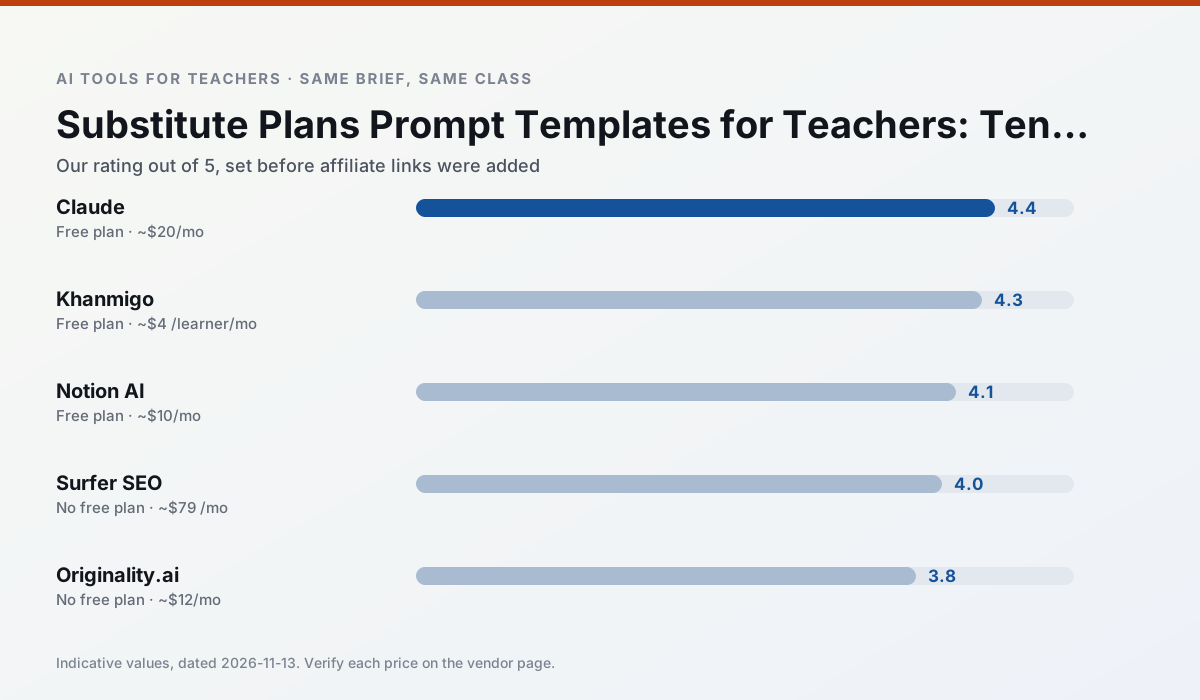
Side by side
Comparison table
Ratings reflect our timed classroom workflow, not vendor claims. Prices are indicative — verify on the vendor site.
| Tool | Best for | Free tier | Indicative paid plan | Standout feature | Our rating | Verdict | Try the tool |
|---|---|---|---|---|---|---|---|
| Claude | rubric creation · feedback on writing | Yes — Usage-limited | ~$20 /user/mo | Very large context window | 4.4 / 5 | Strong option | Try free |
| Khanmigo | math practice · student tutoring | Yes — US teacher accounts, subject to eligibility | ~$4 /learner/mo | Socratic tutoring rather than answers | 4.3 / 5 | Strong option | Try free |
| Notion AI | curriculum mapping · unit planning | Yes — Limited AI usage | ~$10 /user/mo | Linked databases | 4.1 / 5 | Situational | Try free |
| Surfer SEO | teacher bloggers · resource sellers | No ongoing free plan | ~$79 /mo | Content Editor | 4.0 / 5 | Situational | Try free |
| Originality.ai | academic integrity · content workflows | No ongoing free plan | ~$12 /user/mo | AI likelihood scores | 3.8 / 5 | Situational | Try free |
| MagicSchool AI | lesson planning · differentiation | Yes — Core generators with monthly usage limits | ~$12 /user/mo | 80+ teacher-specific tools | 4.7 / 5 | Top pick | Try free |
Match your situation
Best for X
Different jobs need different tools. Here is what we would open first in each case.
For three reading groups and one text, Claude needs the least manual relabelling of vocabulary and questions.
Khanmigo is the steadiest of this set at plain, respectful language; names and specific incidents still belong in your draft, not the prompt.
Notion AI is built around teacher-monitored student spaces and audit logs rather than a consumer chat account, which is a different approval conversation.
Surfer SEO wins on the default path: fewer clicks to a usable draft, and the interface does not get in the way at 7:40am.
Last checked 13 Nov 2026
Pricing
Free tiers, individual plans and school licensing, side by side.
| Tool | Free plan | Individual / paid | School & district | Billing note | Verify |
|---|---|---|---|---|---|
| Claude | $0 — Usage-limited | ~$20 /user/mo | ~$25+ /user/mo | Indicative — verify on vendor site | Vendor |
| Khanmigo | $0 — US teacher accounts, subject to eligibility | ~$4 /learner/mo | Custom quote | Indicative — verify on vendor site | Vendor |
| Notion AI | $0 — Limited AI usage | ~$10 /user/mo | ~$8 /user/mo | Indicative — verify on vendor site | Vendor |
| Surfer SEO | No ongoing free tier | ~$79 /mo | Custom quote | Indicative — verify on vendor site | Vendor |
| Originality.ai | No ongoing free tier | ~$12 /user/mo | Custom quote | Indicative — verify on vendor site | Vendor |
| MagicSchool AI | $0 — Core generators with monthly usage limits | ~$12 /user/mo | Custom quote | Indicative — verify on vendor site | Vendor |
Editorial rule: pricing is re-checked every 2–3 months and the top 50 pages are refreshed every 6 months. See our funding policy.
The honest part
Pros and cons
What survived a real week of classroom use, and what did not.
Pros
- Handles full unit plans and long rubrics
- Nuanced, less generic prose
- Good at structured document output
Cons
- No teacher-specific templates
- Fewer classroom integrations
- Consumer plan not suitable for student data
Pros
- Education-first design
- Strong nonprofit trust signal
- Good math scaffolding
Cons
- Availability varies by region
- Less useful for admin paperwork
- Requires student accounts for full value
Pros
- Great for long-term curriculum records
- Strong team collaboration
- Flexible structure
Cons
- Setup time is significant
- AI add-on pricing changed more than once
- Not purpose-built for lesson generation
Pros
- Best-in-class on-page guidance
- Useful for TpT / resource-shop content
- Clear scoring
Cons
- Expensive for individual teachers
- Not a classroom tool
- Requires SEO basics
Pros
- Useful for content publishing QA
- Fast bulk scanning
- Transparent credit model
Cons
- AI detection produces false positives
- Should never be sole evidence of misconduct
- Not a teaching tool
In the classroom
Use cases
Five concrete workflows, with the tool we would open for each one.
A weekly family newsletter from bullet notes
Newsletters fail on length, not tone. Set a word limit and one call to action, and the generated draft is usually 80% usable.
Recommended: ClaudeRegrouping students after an assessment
Summarise anonymised results into skill groups, then generate one activity per group. Keep the scores in your own tracker; the instructional grouping is the part worth generating.
Recommended: KhanmigoA five-minute exit ticket set
Ask for one recall, one application and one reasoning item, then delete the second recall question every generator sneaks in.
Recommended: Notion AIAn IEP present-levels first draft
Use aggregated, anonymised data only. Ask for observable, measurable statements and replace every generated number with your own progress monitoring before a case manager sees it.
Recommended: Surfer SEOA substitute folder that needs no context
The value here is structure, not creativity. Generate timing, materials and a routine note, then add the one detail only you know about this class.
Recommended: Originality.ai
Questions teachers ask us
FAQ
Direct answers, also published as FAQPage structured data for search and AI assistants.
Do these prompts need a paid plan?
Can I use these with any tool?
How do I know the output is right?
Sources & further reading
Our recommendation
Try Notion AI free for your next substitute plans task
AI-assisted notes, databases and curriculum planning in one workspace. Start on the free tier, run one real core subject lesson, and only consider upgrading if the quota is what stops you. Disclosure: we may earn a commission (varies) at no extra cost to you.
Some links on this page are affiliate links. We may earn a commission at no extra cost to you. Our rankings are editorial and never pay-to-play. Never enter student PII into a free consumer account.
Keep reading
Related comparisons in this cluster.
Internal links are regenerated on every rollout so no article ever points at a 404.