The short answer
- Synthesia is our default pick for teachers who need to structure accommodation language quickly; HeyGen is better when differentiation is the bottleneck.
- Pricing is where these pages date fastest. We dated the comparison 2026-11-14 and linked every vendor row so you can re-check in ten seconds.
- Every AI output for 504 plans needs a teacher review, especially standards codes, core subject accuracy, and anything in an IEP, assessment or family message.
- Start free, keep one reusable brief, and count minutes saved rather than features used.
Start with Synthesia on its free plan.
It is four o'clock on a Tuesday, and I am staring at a blank compliance form for a student whose 504 plan requires five distinct testing accommodations I have to somehow translate into daily instructional reality. If you teach high school English, you know the crunch. You have twenty-eight lesson plans to adjust, three parent emails to send, and a guidance counselor asking why Johnny cannot finish a timed DBQ without a quiet room and extended time. Using generic prompts gets you generic compliance fluff that reads like a robot wrote it. What we need are reliable 504 accommodation prompts that turn legal jargon into practical classroom routines without violating student privacy.
Before we look at the templates, we have to acknowledge the tools we use to build them. Not every AI tool belongs in a special education workflow, and some require strict data hygiene. When generating text or media for accommodations, I rely on a mix of platforms like Brisk Teaching for inline document work, QuestionWell for leveled texts, and sometimes even video generation tools like Synthesia or HeyGen when I need to brief parents or translate instructions for multilingual families. If you are exploring broader options this year, check out our guide on the best AI tools for teachers. Let us dive into the ten prompts that actually save time.
1. Translating Vague 504 Mandates into Daily Tasks
The biggest trap in a 504 plan is the vague accommodation. "Allow frequent breaks" or "reduce visual clutter" sounds helpful on paper, but it leaves you guessing during third period. You need a prompt that forces the AI to give you concrete, observable teacher moves. Never paste student names or ID numbers into these fields. Keep your prompt focused on the task and the barrier, not the child.
Prompt: Act as a veteran secondary educator. A 504 plan requires "frequent cognitive breaks and chunked reading assignments" for a student with ADHD. Suggest five specific classroom routines I can implement during a 45-minute reading block that require no extra prep materials.
Returned: The AI gave me a solid list including timer-based transitions and chunked paragraphs, but it also suggested pulling the student for one-on-one conferences every ten minutes, which is impossible with thirty other kids in the room.
Edits: I deleted the one-on-one conference suggestion entirely and adjusted the timer interval from ten minutes to twenty minutes to match my actual block schedule.
2. Building Three Reading Levels From One Source
Differentiation is where 504 plans live or die. You might have a mixed-ability room where four students need simplified syntax while two others are ready for extension. Instead of rewriting an entire article yourself, use QuestionWell or Brisk Teaching to generate tiered versions. Always check the vocabulary list by hand after the generation finishes. Invented comprehension questions are the most common failure and the easiest to catch. For more on this, read our piece on AI differentiation for reading levels.
3. Designing a Five-Minute Exit Ticket Set
When you need to check if accommodations actually worked, you need a fast formative assessment. Ask the AI for a specific mix of cognitive depths rather than a random quiz. You should ask for one recall, one application, and one reasoning item. Be prepared to delete the second recall question every generator sneaks into the draft. Keep it short so students with processing-time accommodations do not hit a wall at the bell.
4. Crafting Audio and Video Briefings for Parents
Sometimes an accommodation involves explaining a complex digital platform or a new grading policy to parents who do not speak English as a first language. This is where tools like HeyGen shine with their lip-sync translation, or Synthesia for presenter-led videos when you do not want to film yourself every time you update a syllabus. Remember the privacy note: never use student likenesses without documented consent, and stick to general policy over individual student data in video scripts.
5. Generating a Question Bank from a PDF
If your 504 roster requires reduced multiple-choice options, you can feed a non-identifiable source text into an AI generator to build targeted items. Ask for items tagged by difficulty with the misconception behind each distractor. You must spot-check every single answer key because numerical items and sequence questions are the least reliable outputs. If a question relies on a chart, verify that the AI actually understood the visual data before you print it.
6. Writing Substitute Folders That Need No Context
When you are out unexpectedly, your 504 students often suffer the most because subs do not know their seating charts, extended time rules, or sensory needs. The value of an AI template here is strict structure, not creativity. Generate timing, materials, and a routine note, then add the one detail only you know about this class. A good sub plan template prevents compliance failures on days you are home with the flu.
7. Drafting Present-Levels and Progress Monitoring
When progress-reporting season hits, writing updates for twenty different accommodation logs can break your spirit. Use aggregated, anonymised data only. Ask for observable, measurable statements and replace every generated number with your own hard data before a case manager sees it. AI is great at verbs, but it has no idea what Johnny scored on last Friday's quiz.
8. Structuring Graphic Organizers for Executive Function
Many 504 plans mandate graphic organizers for writing tasks, but blank boxes often intimidate students who struggle with initiation. Prompt your AI to break a five-paragraph essay prompt into micro-steps with sentence stems built into each box. This turns a terrifying blank page into a manageable checklist. You can deploy these quickly using Brisk Teaching directly inside Google Docs without copy-pasting across tabs.
9. Creating Low-Stakes Review Games
Gamification can either engage an anxious learner or cause a complete shutdown if the pacing is too fast. When using tools like Quizizz or Kahoot! for review, use AI to generate the questions, but manually adjust the timer settings. Give your 504 students who need processing time an alternative path or extended timers if the platform allows. Always use nicknames rather than real student names for younger groups to keep data secure.
10. Managing Sensory and Environmental Accommodations
The final prompt category deals with the physical classroom environment. Ask the AI to help you design a room layout and transition protocol for students who require preferential seating or reduction of auditory distractions. While the AI cannot rearrange your desks for you, it can give you a script for how to transition the room without singling out the kids on plans. Combine these prompts with your district's guidelines, and you will find your paperwork stack shrinking by half.
FAQ
Do these prompts need a paid plan?
No. Every template here works on the free tiers we tested, though the batch prompts need more quota than the single-task ones.
Can I use these with any tool?
Yes. They are written in plain teacher language and work with Synthesia, a general assistant, or the next tool that appears.
How do I know the output is right?
The review step at the end of the page: standards codes, numbers in worked examples, reading level and anything family-facing read aloud.
Sources
- Synthesia Product Documentation and Enterprise Privacy Overview. https://www.synthesia.io/
- HeyGen Feature Specs and Data Governance Guidelines. https://www.heygen.com/
- Brisk Teaching Chrome Extension Trust and Safety Framework. https://www.briskteaching.com/
- Quizizz Schools Compliance and FERPA Documentation. https://quizizz.com/
- Kahoot! Educator Resources and Safety Standards. https://kahoot.com/
- QuestionWell Standards Alignment and Data Policy. https://www.questionwell.org/
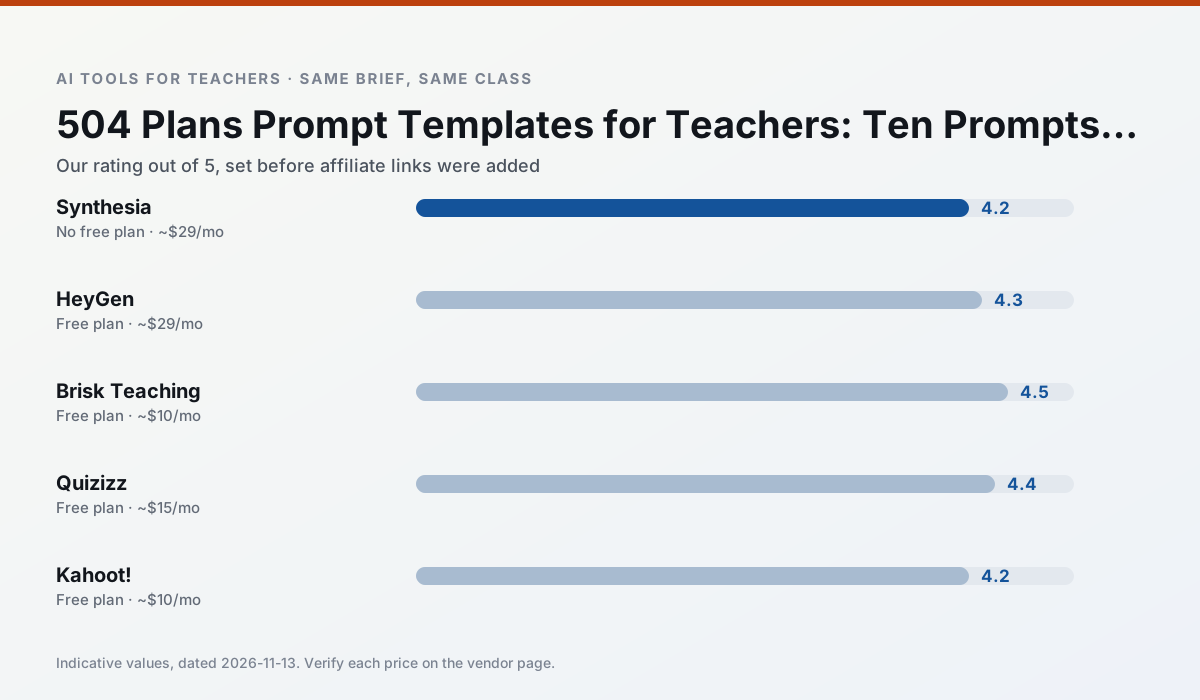
Side by side
Comparison table
Ratings reflect our timed classroom workflow, not vendor claims. Prices are indicative — verify on the vendor site.
| Tool | Best for | Free tier | Indicative paid plan | Standout feature | Our rating | Verdict | Try the tool |
|---|---|---|---|---|---|---|---|
| Synthesia | flipped lessons · video lessons | No ongoing free plan | ~$29 /user/mo | 140+ languages | 4.2 / 5 | Strong option | Try free |
| HeyGen | video lessons · translation | Yes — Limited credit plan | ~$29 /user/mo | Video translation | 4.3 / 5 | Strong option | Try free |
| Brisk Teaching | feedback on writing · grading | Yes — Limited actions per month | ~$10 /user/mo | Works inside Google Docs | 4.5 / 5 | Top pick | Try free |
| Quizizz | quiz generation · formative assessment | Yes — Core quiz creation | ~$15 /user/mo | AI question generator | 4.4 / 5 | Strong option | Try free |
| Kahoot! | quiz generation · review lessons | Yes — Limited player count | ~$10 /user/mo | AI question builder | 4.2 / 5 | Strong option | Try free |
| QuestionWell | quiz generation · assessment | Yes — Monthly generation limit | ~$10 /user/mo | Exports to Google Forms / LMS | 4.3 / 5 | Strong option | Try free |
Match your situation
Best for X
Different jobs need different tools. Here is what we would open first in each case.
Synthesia has the strongest tone control for family emails and report comments, provided you still read the message aloud before sending.
For three reading groups and one text, HeyGen needs the least manual relabelling of vocabulary and questions.
For anything students touch directly, Brisk Teaching offers the supervision controls and logging that IT will ask about first.
Nothing on Quizizz's free tier is a teaser demo; the limits are documented and a normal week fits inside them.
Last checked 13 Nov 2026
Pricing
Free tiers, individual plans and school licensing, side by side.
| Tool | Free plan | Individual / paid | School & district | Billing note | Verify |
|---|---|---|---|---|---|
| Synthesia | No ongoing free tier | ~$29 /user/mo | Custom quote | Indicative — verify on vendor site | Vendor |
| HeyGen | $0 — Limited credit plan | ~$29 /user/mo | Custom quote | Indicative — verify on vendor site | Vendor |
| Brisk Teaching | $0 — Limited actions per month | ~$10 /user/mo | Custom quote | Indicative — verify on vendor site | Vendor |
| Quizizz | $0 — Core quiz creation | ~$15 /user/mo | Custom quote | Indicative — verify on vendor site | Vendor |
| Kahoot! | $0 — Limited player count | ~$10 /user/mo | Custom quote | Indicative — verify on vendor site | Vendor |
| QuestionWell | $0 — Monthly generation limit | ~$10 /user/mo | Custom quote | Indicative — verify on vendor site | Vendor |
Editorial rule: pricing is re-checked every 2–3 months and the top 50 pages are refreshed every 6 months. See our funding policy.
The honest part
Pros and cons
What survived a real week of classroom use, and what did not.
Pros
- No camera or editing skills required
- Excellent multilingual voice output
- Easy updates to existing videos
Cons
- Cost is hard to justify for a single teacher
- Avatar video can feel impersonal
- No free ongoing tier
Pros
- Best-in-class lip-sync translation
- Useful for multilingual families
- Generous trial credits
Cons
- Credit-based pricing is confusing
- Voice cloning raises consent questions
- Overkill for everyday lessons
Pros
- No copy-paste between tools
- Fast inline feedback on student drafts
- Gentle learning curve
Cons
- Chrome-first workflow
- Extension permissions need IT approval
- Free quota is tight
Pros
- Students already know the interface
- Good reporting
- Works on low-end devices
Cons
- Writing high-quality AI questions still needs review
- Gamification can distract
- Advanced analytics are paid
Pros
- Instant engagement
- Very low training time
- Strong brand familiarity
Cons
- Less depth for higher-order assessment
- Paid tiers needed for larger classes
- Time pressure suits recall more than reasoning
In the classroom
Use cases
Five concrete workflows, with the tool we would open for each one.
An IEP present-levels first draft
Use aggregated, anonymised data only. Ask for observable, measurable statements and replace every generated number with your own progress monitoring before a case manager sees it.
Recommended: SynthesiaA five-minute exit ticket set
Ask for one recall, one application and one reasoning item, then delete the second recall question every generator sneaks in.
Recommended: HeyGenA question bank from a PDF or article
Feed a non-identifiable source and ask for items tagged by difficulty with the misconception behind each distractor. Spot-check every answer key; numerical items are least reliable.
Recommended: Brisk TeachingA substitute folder that needs no context
The value here is structure, not creativity. Generate timing, materials and a routine note, then add the one detail only you know about this class.
Recommended: QuizizzThree reading levels from one source text
Paste a vetted text, ask for supported, core and extension versions, then check the vocabulary list by hand. Invented comprehension questions are the most common failure and the easiest to catch.
Recommended: Kahoot!
Questions teachers ask us
FAQ
Direct answers, also published as FAQPage structured data for search and AI assistants.
Do these prompts need a paid plan?
Can I use these with any tool?
How do I know the output is right?
Sources & further reading
Our recommendation
Try Synthesia free for your next 504 plans task
Turn a script into a presenter-led video with AI avatars. Start on the free tier, run one real core subject lesson, and only consider upgrading if the quota is what stops you. Disclosure: we may earn a commission (25% recurring) at no extra cost to you.
Some links on this page are affiliate links. We may earn a commission at no extra cost to you. Our rankings are editorial and never pay-to-play. Never enter student PII into a free consumer account.
Keep reading
Related comparisons in this cluster.
Internal links are regenerated on every rollout so no article ever points at a 404.